Best workout spreadsheet app: we tested 19 apps (2026)
We checked if 19 workout apps can do what lifters use spreadsheets for: own rules, the whole block, sheet import, a laptop editor, export and graphs.
Tested: November 2026, on Android, using the Play Store builds of all the apps as they were on that day. Apps change over time, so a screenshot just reflects how the app worked on the day we tested it.
Disclosure: we're the ones making Liftosaur, and it's also in this comparison. So all the claims below are based on the same 6 checks in each app, with screenshots as a proof. And if some other app would be a better fit for you - we'll say so.
Short answer
A lot of lifters run their programs in Google Sheets or Excel. And it makes sense - in a spreadsheet you can lay out the block any way you want, and with something simple like =B2*0.85 all the weights get recalculated from the max. Often the program itself comes as a sheet - from a coach, or a program like Calgary Barbell 16. Workout apps are usually way better for logging during workouts, but way worse for planning - you edit each workout separately, and type in all the values manually.
So we went through 19 apps, and checked if they can do the 6 things lifters say they use a spreadsheet for:
use your own rules
see the whole block
get your sheet's program in
edit on a laptop
get your data out
make your own graphs
What we found:
Liftosaur is the only app that does all 6, and everything except the graphs is free. The program is just text with weeks, days, templates and formulas, so it's pretty much like a spreadsheet that also does the progression for you in the gym.
Volm, Hardy and KeyLifts let you plan a block and do part of the rest. Volm comes with a tiny scripting language for progression rules, Hardy updates all the percentage sets when you change the training max, and KeyLifts shows the whole week as a grid.
Boostcamp, Alpha Progression, MacroFactor Workouts, StrengthLog and RP Hypertrophy support multi-week programs, but you edit them week by week or exercise by exercise, and none of those apps have formulas.
On a laptop, the web editors of Volm, Hardy and Boostcamp show all the weeks on the same screen, and Boostcamp's looks the most like a sheet. But no app except Liftosaur lets you paste a program in, or use a formula for the weights.
Strong, Hevy, JEFIT, Lyfta, FitNotes and Caliber don't support weeks - a routine is just a single workout.
Fitbod, Gravl, MyoAdapt and GZCL Workout Logger don't let you plan a block yourself - either the app generates the workouts, or there's a fixed list of programs.
What a spreadsheet does, and what we checked
We didn't make up this checklist. We went through many Reddit threads where lifters explain why they plan or log in a spreadsheet instead of an app, from r/powerlifting, r/weightlifting, r/gzcl, r/BarbellMedicine and others. These are the top reasons that you can check in an app:
Your own rules. The most common reason by far - people want to lay out and change anything their own way. In a sheet that's =B2*0.85, =ROUND(...) or IF, and when you change the max in one cell, all the weeks follow. Can you set the weights as % of a max, write your own progression, and change many weeks with one edit?
See the block. People want many weeks on one screen, or at least last week next to this week. Can you see a multi-week program in one view?
Get your sheet's program in. Often the program comes as a spreadsheet - from a coach, or programs like Calgary Barbell 16 or Barbell Medicine's The Bridge. Can you get it into the app without tapping in every set?
Edit on a laptop. A lot of people plan at home on a computer and log on the phone. Is there a web or desktop editor?
Get your data out. People want to own their data, so they're not locked into an app. Can you export your sets into a file a spreadsheet opens?
Your own graphs. People build their own charts and pivot tables - e1RM over time, volume per muscle, whatever they care about. Can you choose what to plot, or only look at the charts the app gives you?
How we tested
All the apps were tested on Android in November 2026, freshly installed from the Play Store, with a test account.
First we used the free tier, then bought/trialed the paid tier, and checked again. Cancelled all the subscriptions immediately afterwards.
In each app, we created/opened a multi-week program (5/3/1, if the app had it), and did the 6 checks.
We tested the phone apps first, and then all the web editors we could find - Hardy, Boostcamp, Volm, Hevy, JEFIT, StrengthLog and RP Hypertrophy - in a browser on a laptop-sized screen, in November 2026.
All the prices on this page are US Google Play prices on the test day. Prices in other countries may be different.
Own rules: Yes - % of a max, templates that many weeks reuse, and progression scripts with variables and if
See the block: Yes, weeks side by side
Sheet in: Yes, as pasted text, a link or a JSON file. A sheet needs one rewrite into text, or the ChatGPT/Claude integration (Premium) converts it
Laptop: Yes, free web editor
Data out: CSV with a row per set, JSON backup, programs as text
Own graphs: Yes, dashboards where you choose what to plot, with your own formulas (Premium)
Copy a week: Yes
Price: Free
Premium: $4.99/month, $39.99/year or $99.99 lifetime
In Liftosaur, the program is just a Liftoscript text. It's kinda like a spreadsheet, but in plain text: weeks are # Week 1, days are ## Day 1, and each exercise is a separate line - Squat / 3x5 / 225lb. The editor in the app puts the weeks next to each other, so you can compare e.g. week 1 with week 3, and you can also copy a week from the week menu.
What makes it behave like a spreadsheet is templates. In our 5/3/1 Boring But Big example, there's a single main template per week - 1x5 58%, 1x5 67%, 1x5+ 76%, 5x10 50% in week 1, 1x3 63%, 1x3 72%, 1x3+ 81%, 5x10 50% in week 2, etc. Squat, bench, deadlift and overhead press all reuse it via ...main. So, if you want to change the BBB sets from 5x10 to 5x8 - you just change the template for each week, and all 4 exercises get updated, kinda like spreadsheet cells that reference the same source cell.
Formulas are where it gets more powerful than a spreadsheet. Progression is basically a tiny script attached to a specific exercise or template. E.g. in 5/3/1 BBB it's if (week % 3 == 0) { rm1 += state.increment }, i.e. each 3rd week it adds 5 pounds to the 1RM (10 pounds for squat and deadlift). The app executes it after each workout, and when you launch the app next time, the weights for the next cycle are just there. In a spreadsheet you'd have to update the max manually, and hope the formulas still point to the right cells.
To get a program into Liftosaur, you can either paste a link from the web editor, or just paste the program text. A spreadsheet won't work directly (since it's not Liftoscript), but usually it's a couple minutes of work to rewrite a block into text. Or, instead of starting from zero, you can clone one of the 60+ programs that come with the app (5/3/1 variants, nSuns, GZCL, Sheiko, Candito, etc.) and change it.
If you're on a computer, you can use a web editor - it has autocomplete for exercise names and program syntax, and next to the text there're various stats:
number of sets per week per muscle group
strength vs hypertrophy sets
how long each workout takes
Usually people calculate that stuff on a separate sheet in a spreadsheet.
Also, you can export all the workout data into a spreadsheet if needed - there's free CSV export, with a row per set, and planned and completed reps, weight and RPE next to each other. While you edit, there are undo and redo buttons. And if you're signed in, the app stores the last 100 versions of each program, so if you made a bad edit last week - you open "Show program versions", pick a date and restore it.
And you may not even need to export for charts. The Graphs tab (Premium) is a dashboard you build yourself, and you can have up to 20 of them. A dashboard can have:
graphs
single numbers, like your current e1RM
a muscle map
a training calendar
It's also stored as text, in a small language called Liftograph, so like in a sheet, you choose what to plot and can write your own formulas for it. If you don't want to write text, there are settings forms, or ChatGPT/Claude can build a dashboard from a description.
There's some learning curve though. Liftoscript is a text format, and if you haven't seen anything like / 3x5 / progress: lp(5lb) before, your first program will probably need some time.
Liftosaur also integrates with ChatGPT and Claude (Premium). So you can ask an LLM to:
convert a spreadsheet into a Liftosaur program
change the program (like "swap BBB to 5x8 for squat only")
enter the plates and equipment you have in the gym
build dashboards based on your goals
You can create, edit and run programs for free, web editor is free too. Premium features are:
Graphs
Plates Calculator
rest timer notifications with Live Activity on the lock screen
Week Insights
Apple Watch app
ChatGPT/Claude integration
API & MCP
In US it's currently $4.99 monthly, $39.99 yearly, $99.99 lifetime.
Hardy
Own rules: Partly - % of a training max that updates every set, and 3 progression presets with number fields; no formulas
See the block: On the web, all weeks on one scrolling page; one week tab at a time on the phone
Sheet in: No, only a hardy.app link or the community library
Laptop: Yes, web planner; saving to the app needs an account
Data out: No file export
Own graphs: No, fixed charts: total lifted, 1RM and max weight per exercise, and a muscle heat map
Copy a week: Workouts and sets can be copied, and a block can repeat
Price: Free, with a limit on how many routines you create
Hardy Pro: $5.99/month, $59.99/year or $94.99 lifetime
In Hardy, the routine editor shows the weeks in tabs (Week 1, Week 2, Week 3, Deload Week), and you only see one week on the screen at a time. You can repeat a block (there's a "Repeat xN" setting), and blocks go in order, so making a 5/3/1 program with a deload is pretty easy. You can copy workouts and sets, but we couldn't figure out how to copy a whole block.
Sets could be either % of 1RM or % of the training max. Each routine stores separate training maxes. When we failed a squat set, Hardy's Deload rule suggested lowering the 1RM from 225 to 202.5lb, and after we applied it, all the % sets moved together right away (190lb -> 170lb). There's also a single "Starting TM % from 1RM" setting for the routine, so you don't have to type 90% for each lift.
There're no formulas or variables there though. Weights are defined via fixed types (working weight, 1RM %, TM %, RPE), and progression is done via 3 presets:
Overload adds X pounds to the 1RM/TM/working weight after N successful workouts
Deload reduces the weight by X% after N failures
Double Progression uses a range of reps
You can tweak the values, but you can't define a custom condition, like "add more if the AMRAP went well". Hardy's own 5/3/1 for Beginners raises the training max by a fixed amount after each 3-week cycle, no matter how many reps you got on the AMRAP.
Hardy has a huge library of public routines - 1,800+, including ten 5/3/1 and nSuns versions made by Hardy, and they're all free. Each public routine also has a separate web page on hardy.app, with the weeks, % tables and progression rules. You can only add routines from a hardy.app link or from that library, and there's not a way to export to a file. So the workout history is kept in the app, although you can generate a share link for any workout.
Hardy has a web planner (hardy.app/workout-planner) you can use from a laptop browser, even without account. There are the same templates as in the app (Blank, 3x3, 5x5, Push Pull Legs, 5/3/1), and all the weeks are on the same scrolling page, below each other - so on a laptop you see way more than on the phone. When you open some exercise, there's a table of sets - % of TM, reps, AMRAP, rest - and the rules for that exercise below it. You could duplicate workouts or move them to another block, but there's still no way to copy a whole week.
The preview is where it becomes kinda spreadsheet-like - there's a "Your training maxes" box, and if you change a TM there, all the sets on the page update. E.g. we changed the overhead press TM from 135 to 100 pounds, and the 5/3/1 sets immediately went from 90/100/115 to 65/75/85 pounds, same as editing the max cell in a sheet. There's still no formula field and no import/export on the web though, and to save the routine to the app you need to have account.
Volm
Own rules: Partly - your own progression script per exercise, but set weights are plain numbers or % of 1RM
See the block: On the web, all weeks side by side (read-only); each day is edited on its own page
Sheet in: No, only a shared link
Laptop: Yes, volm.app (needs an account), edits one day at a time
Data out: CSV of workouts
Own graphs: Partly, you add dashboard widgets (training, exercise, muscle, measurement and more), but you can't use formulas; 1Y and All ranges need Volm+
Copy a week: Yes, press and hold a week
Price: Free to build and run programs
Volm+: $9.99/month or $59.99/year
Volm has the closest thing to Liftoscript among all other apps - Progression DSL. It has:
variables
math with units (kg, lb, %)
if/elif/else and loops
functions like round_weight, e1rm, min and max
A rule has two blocks:
progress - executed at the end of a workout, and prepares the next workout
update - executed after each set, and changes the remaining sets
So, progression rules could be as smart as a spreadsheet formula. If you don't want to write code - there're presets:
Linear (+5 lb after a success)
Linear on the 1RM
Top set, and some others
But the formulas are only in the rules. Weights in a template are either plain values or % of 1RM, so you can't write something like =B2*0.85 in a set.
So, the program is basically a list - weeks contain templates (days), and each template is opened on a separate page, i.e. you can't see e.g. week 1 and week 3 next to each other. Duplicating stuff is pretty easy though - you long press:
a week heading to get "Duplicate collection"
a template to copy a single day
a program to copy the whole thing
There's "Link exercise", which connects a lift across several days ("Change it once and every linked day follows"), and if you type the weight in set 1, it'd fill the sets below as well. But there's no way to edit across many weeks or many exercises simultaneously. There's also the Ask Volm chat (Volm+), which can apply a change you ask for to a program, and it shows the change as a diff card before saving.
Volm comes with 5/3/1 BBB, 5/3/1 for Beginners, Building the Monolith and 4 nSuns versions out of the box, and the only way to add programs there is via a shared link. The CSV upload is just for importing workout history from different apps. And you can export all the workouts into one CSV file.
Volm also has a web app - volm.app (you need a Volm account for it), and it fits way more stuff on one screen. On a program page there's a "Training plan", where all the weeks are columns side by side, and each day card lists its exercises with sets - like 1 x 58.5% 1RM x 5 reps. Above it there's a week picker, which displays the sets per muscle group for that week. If you right-click on a week, you get Rename, Duplicate and Delete. But you still have to change things day by day - each day lives on a separate page, with the same set table, and same Progression DSL field as on the phone. You can't modify multiple weeks at once, and you can't use formulas in set cells. Also, the web app can't import a program from a file or text, or download a program.
KeyLifts
Own rules: Partly - % of a training max, AMRAP-based training max rules, and schemes for a whole tier; no formulas
See the block: Partly, a read-only grid per week
Sheet in: No, only a link or community templates
Laptop: No web editor found
Data out: CSV of sets, and a CSV of training maxes
Own graphs: No, fixed charts, but a lot of them: e1RM, training max, volume, Wilks and a PR board
Copy a week: Yes
Price: 4 free workouts, then $29.99/year
KeyLifts is based on 5/3/1 and % of training max. Out of all the phone apps, the program page there is the closest to a spreadsheet. It shows all the days of a week next to each other, with T1, T2 and T3 exercises and their % of TM. You can't change anything in that grid though. For that, you need to go to "Edit Template", and there're 2 modes there - Quick and Detailed.
In the detailed editor there's Copy Week, Delete Week and Reorder Weeks (in Quick mode there's a copy icon for each day), and also controls for the whole template:
T1 and T2 schemes (e.g. FSL 65-75%) change all the main or supplemental exercises together
"Change all warmup sets" adds or deletes warmups everywhere
"Progressions" sets a single rule for all exercises
The rules work pretty much the same way as in 5/3/1 spreadsheets. Each exercise has a training max (TM), and you choose a rule for it:
Auto Regulation changes the TM based on how many AMRAP reps you did (from -5% to +3%)
Increase Next Cycle increases the weight by a fixed step (10lb by default)
Specific Week increases the weight on the weeks you choose
E.g. in our nSuns run, doing 13 reps on the 8+ AMRAP set bumped the bench TM from 135 to 139.1lb. For assistance exercises there're rep/weight progressions. Weights are % of TM - either from a preset, or from a custom percentage scheme, and you don't need any formulas beyond that.
KeyLifts supports a lot of verified 5/3/1 templates, and also nSuns:
PR Set
First Set Last
Boring But Big (5,506 users)
5/3/1 for Beginners
Boring But Strong
1000% Awesome, and more
The free CSV export contains a row for each set, and there's a second file with the training maxes.
Weeks, but one at a time
These apps have multi-week programs, but you edit one week or one exercise at a time, and none of them has formulas.
Boostcamp
Own rules: Partly - % of 1RM, "Last Week + X lbs" on the web, and Auto Progression with 3 behaviors (PRO); no formulas
See the block: On the web, weeks side by side as columns; one week tab at a time on the phone
Sheet in: No, only a link
Laptop: Yes, web builder; saving needs an account
Data out: No data export in the Android app
Own graphs: No, fixed charts; most of them (e1RM, volume, muscle tracker) need PRO
Copy a week: Yes, to several weeks at once
Price: Free to build and run programs
PRO: $14.99/month or $59.99/year with a 7-day trial (boostcamp.app/pro). In our test, the Android paywall offered $39.99/year
So, Boostcamp's periodized builder shows each week in a separate tab, and "View Full Plan" is the same, a single week per tab. The best part is duplicating - with Duplicate Week you choose a From Week and multiple To Weeks, there's a preview, and we checked that week 2 got the same exercises with 3x10. "Repeating Weeks" lets you edit a single week, and then uses it for all of them. You could also duplicate a day too. And when you replace some exercise during a workout, it asks "This and Future Workouts" or "Just This Workout".
What spreadsheet users would miss is a way to change a value across the whole program, like adding 5 lb to all squats. Set targets are fixed types (Reps, Rep Range, AMRAP, Time, RPE, % of 1RM), and the reps field has a digits-only keypad, so you can't use formulas there. The 5/3/1 for Beginners program asks for a training max per lift (90% of 1RM), but AMRAP sets don't change it. PRO Auto Progression has 3 behaviors (Linear, Double progression, Missed reps) with increment setting, but there's not a rule editor.
There's a big catalog of programs, and 5/3/1 for Beginners, nSuns and Building the Monolith are free there. The Android app doesn't support export though - you can only share stuff as images.
On a laptop Boostcamp is way better. They have a web builder - boostcamp.app/custom-program - which targets spreadsheet users directly ("Ditch the spreadsheet"), and you can use it even if you're not logged in. Weeks are columns next to each other, each with a table of sets, reps and intensity - of all the apps we tried, that's the closest thing to a spreadsheet. Intensity has more options than on the phone:
% of 1RM
% of 1RM of another exercise
"Last Week + X lbs" or "Last Session + X lbs" - probably the closest thing to =B2+5 you can get there
Duplicate Week copies a week to all other weeks, with a Select All button and a preview. But still:
you can't enter formulas
you can't change a value across all weeks in a single go
you have to sign in to save
Alpha Progression
Own rules: No - cells are plain numbers, and the app suggests weights and reps (PRO)
See the block: Partly, a 4-week grid for one exercise at a time (PRO)
Sheet in: No, only an Alpha Progression link or QR code
Laptop: No web editor found
Data out: Partly - CSV (plans, workouts, custom exercises, measurements), but one report per workout, not a row per set
Own graphs: Partly, you add chart cards and pick the exercise, value and calculation (PRO)
Copy a week: A day or a whole plan, not a week
Price: $14.99/month or $89.99/year
Alpha Progression's PRO periodization grid is basically a mini spreadsheet for a single exercise - 4-week block + deload, with sets, reps and RIR in each cell. But you can't see the whole program week over week - days are tabs (Upper, Lower, ...), and you choose the week on the home card. The sets, reps and RIR selectors have "All exercises" and "All days" toggles, so a single change there could update either a specific exercise across all days, or the whole day at once.
Cells are just plain numeric values. There's no training max and there're no named programs either (like 5/3/1 or nSuns), so you either build a plan yourself, or let the PRO generator do it for you. Then the PRO engine suggests the weights based on the estimated rep max and logged RIR. E.g. after a 10-rep AMRAP with 255lb on deadlift, it suggested 285x5 for the following workout. The free CSV export has 4 files, but the workouts file is a report per workout, not a row per set.
MacroFactor Workouts
Own rules: No - Smart Progression picks the weights. A set scheme can apply to a day or the whole program
See the block: Partly, cycle cards per exercise
Sheet in: Partly, .xlsx, but only its own exports
Laptop: No web editor found
Data out: Spreadsheet export
Own graphs: No, fixed charts, but detailed: 1-RM, 3-RM, 10-RM, volume, reps and sets per exercise
Copy a week: One exercise to all cycles
Price: Everything is paid. $11.99/month, $47.99 per 6 months or $71.99/year, 7-day trial
Out of the apps that calculate weights for you, MacroFactor Workouts is the closest thing to a spreadsheet. If you enable Periodization, each exercise in a day has a horizontal row of cards (Cycle 1 to 7), with sets, rep targets and RIR. There's "Save To All Cycles" that copies one of them to all the others. And there are also Saving Options, where you can apply a set scheme to:
just one exercise
all exercises in the day
all exercises in the program
It's the only app here that imports a spreadsheet file, but just the .xlsx files that it exported itself. Data export has Quick and Granular options, and you can open both in a spreadsheet. No way to set the weights though - a program set just has a range of reps, RIR and set type, and Smart Progression picks the weight automatically. Also no named programs - you either build from scratch, or let Smart Generation do it.
StrengthLog
Own rules: Partly - % of 1RM (Premium) and progression presets: Copy last, Linear (free), Double and Triple (Premium); no formulas
See the block: Partly, one workout at a time, with a read-only overview of all weeks
Own graphs: No, fixed charts; most of them need Premium
Copy a week: Yes, "Duplicate" for the selected week
Premium: $16.99/month, $37.99 per 3 months or $109/year
StrengthLog's program editor has week chips with "Add week" and "Duplicate", and below them you edit workouts individually. Then the program page lists all the weeks read-only, with summaries like "Squat 15 reps in 5 sets, Linear progression". There's no way to apply changes to all weeks, so you duplicate a week and then edit each copy manually. There's a "smart block" (Linear, Double, Triple progression) where you set the sets, reps and weight step a single time for all future workouts of the exercise, which kinda helps a bit.
Set weight could be a number, the last logged weight, or % of 1RM (with My 1RMs, Premium). No formulas though, and there's no 5/3/1 or nSuns in the library. You can get programs from other users just via their share link (Premium, it's valid for 30 days). Free CSV export has a row per set. Webapp (app.strengthlog.com) has the same program editor as on the phone - week chips, it displays just the selected week, and you can reorder it, duplicate it and delete it.
RP Hypertrophy
Own rules: No - the RP engine sets sets, reps and weights
See the block: Partly, a planning board of exercises, without sets or weights
Sheet in: No import at all
Laptop: Partly, the same app in a browser, one day at a time
Data out: Partly, a zipped JSON file
Own graphs: No charts, only two summary tables per mesocycle
Copy a week: A whole mesocycle only
Price: $34.99/month or $299.99/year
Planning in RP Hypertrophy is based on muscle groups - on the planning board there're days, and for each day - muscle groups and exercises for those. Any changes you make there apply to all weeks. There're no sets, reps or weights on the board - RP engine calculates those based on the feedback you provide, and RIR decreases week over week, with a deload in the end. You only choose the muscle priority (Emphasize, Grow, Maintain).
You can copy a whole mesocycle, or save as a template, and there's also "Replace with Repeat" that replaces the exercise for all following weeks. No way to bring anything in though, and export is a zipped JSON file - fine if you're gonna script something, but not really for a spreadsheet. The browser version on training.rpstrength.com is basically the same app, only in a browser - day by day, no separate planning view or anything.
Workout loggers: no weeks
Strong, Hevy, JEFIT, Lyfta, FitNotes and Caliber are nice loggers, but a routine there is just one workout:
there's no notion of weeks, and no way to copy weeks
sets are just static values
there're no formulas or bulk editing
You can duplicate a routine (in JEFIT - even a whole plan), and add it from a share link (except FitNotes). So if you run a multi-week program in any of those - you usually still keep the spreadsheet open, next to the app.
Strong
Copy: a routine (Duplicate)
Sheet in: No, only a Strong link
Progression: None, "Update Template" copies logged numbers back
Data out: CSV of workouts and measurements
Own graphs: Partly, dashboard widgets you pick; exercise charts need PRO
PRO: $4.99/month, $29.99/year or $99.99 lifetime
When you type a value, it gets filled into all the empty sets after it. E.g. if you did a 12-rep AMRAP with 175 pounds, the following workout still stayed 175x5, both on free and PRO.
Hevy
Copy: a routine (Duplicate Routine)
Sheet in: No, only a Hevy link
Progression: Double progression in Trainer (PRO)
Laptop: Partly, hevy.com edits one routine at a time
Data out: CSV of workouts and measurements
Own graphs: No, fixed charts, most of them free
PRO: $2.99/month, $23.99/year or $74.99 lifetime
In free tier you can only have 4 routines. If you did 8 reps on AMRAP, the routine would just copy those 8 reps as a target for the next workout. And on the website (hevy.com) you also can only edit routines one by one, with just simple pounds/reps.
JEFIT
Copy: a whole plan
Sheet in: No, only a JEFIT link or QR code
Progression: A 4-week periodization wave (Elite)
Laptop: Partly, a web routine builder with days only
Data out: No export in the Android app
Own graphs: No, fixed charts
Elite: $12.99/month or $69.99/year
A plan can have max 5 days (31 on Elite), and there're no weeks. The routine builder on the website (you don't even have to have an account) is the same thing - just a bunch of days, with weight, reps and timer for each set, and a "Copy this day" button.
Lyfta
Copy: a routine
Sheet in: No, only a Lyfta link or Explore
Progression: One-tap suggestions during a workout
Data out: CSV
Own graphs: No, fixed charts; longer ranges need Premium
Premium: $59.99/year
Programs are folders of routines. There are community 5/3/1 programs, but no training max or % fields.
FitNotes
Copy: a routine
Sheet in: No import at all
Progression: None, copy previous sets or fixed sets
Data out: CSV ("Spreadsheet Export")
Own graphs: No, but a lot of free fixed charts and breakdowns by week, month and year
Price: Free, with an optional $6.99 one-time Supporter app
The Set Calculator gives a % of a typed max, but stores nothing.
Caliber
Copy: a plan (Duplicate)
Sheet in: No, only a Caliber share link
Progression: None, the plan explains double progression in text only
Data out: CSV (free)
Own graphs: Partly, you add a chart per exercise, free
Plus: $12/month or $72/year
You can build your own plans for free, and set sets, rep range and rest for each exercise. But a plan is just a list of workouts, with no weeks. The 120+ coach-designed plans need Plus.
Apps that plan for you
Fitbod, Gravl and MyoAdapt generate the workouts automatically, so there isn't even a block to plan - you don't deal with weeks, duplicating stuff or formulas at all.
GZCL Workout Logger supports 7 built-in programs really well, but there's no way to edit programs there.
These are all good apps for their use cases - just not a replacement for a spreadsheet.
When to keep your spreadsheet
You want a proper grid. None of the apps here has cells you can select and type a formula into. Liftosaur's grid mode is the closest - weeks are columns, and you can drag exercises, days and weeks around - but the formulas live in the program text, not in cells.
You do ad-hoc math. For stuff like "what if I ran 3 more weeks with 87.5%", a spreadsheet is the best tool.
You get a sheet from the coach each block. Rewriting it into some app every 4 weeks gets tedious pretty quickly. Though in Liftosaur the AI assistant can do that part.
And if you like logging in Strong or Hevy - you can keep the sheet for planning and the app for the gym. Plenty of people do that.
FAQ
Can I import my Google Sheet or Excel program into a workout app?
Not directly into any app we tested. MacroFactor Workouts can load .xlsx files, but only the ones that MacroFactor exported itself. In Liftosaur the program is entered as plain text, so you'd need to rewrite the sheet one time (you can also ask ChatGPT/Claude to do it for you via the Liftosaur integration, it's Premium). Other apps usually only accept share links generated by the same app.
Is there a free workout app with formulas?
Liftosaur - the whole program can use variables and formulas, and it's free. Volm has a free scripting language for progression rules, but not for the weights in a workout.
Which app is the closest to a lifting spreadsheet?
Liftosaur - it's the only app that passed all 6 checks. You can:
use % of a max, templates and formulas for your own rules
see multiple weeks next to each other
get a program in by just pasting the program text
edit it in a web editor on a laptop
export every set to CSV
build your own graphs with formulas (Premium)
Can a workout app calculate 5/3/1 percentages from a training max?
Yes, Liftosaur, Hardy and KeyLifts can calculate the weight based on the max, and Volm and Boostcamp also support % of 1RM. Liftosaur, Hardy, Volm and KeyLifts would also increase the max on their own once you finish each cycle. In KeyLifts, the increase can also depend on your AMRAP reps.
Do Strong or Hevy support multi-week programs?
Nope, in both of these a routine is just one workout, and they don't have weeks. You could create a separate routine for every day of every week, but then you'd have to edit each one manually.
{"entry":{"id":"workout-spreadsheet-apps","title":"Best workout spreadsheet app: we tested 19 apps (2026)","shortDescription":"We checked if 19 workout apps can do what lifters use spreadsheets for: own rules, the whole block, sheet import, a laptop editor, export and graphs.","order":20,"category":"Apps","datePublished":"2026-11-27","dateModified":"2026-11-27","cover":"liftosaur-weeks-side-by-side"},"content":"**Tested:** November 2026, on Android, using the Play Store builds of all the apps as they were on that day. Apps change over time, so a screenshot just reflects how the app worked on the day we tested it.\n\n**Disclosure:** we're the ones making Liftosaur, and it's also in this comparison. So all the claims below are based on the same 6 checks in each app, with screenshots as a proof. And if some other app would be a better fit for you - we'll say so.\n\n## Short answer\n\nA lot of lifters run their programs in Google Sheets or Excel. And it makes sense - in a spreadsheet you can lay out the block any way you want, and with something simple like `=B2*0.85` all the weights get recalculated from the max. Often the program itself comes as a sheet - from a coach, or a program like [Calgary Barbell 16](/programs/calgary-barbell-16-week). Workout apps are usually way better for logging during workouts, but way worse for planning - you edit each workout separately, and type in all the values manually.\n\nSo we went through 19 apps, and checked if they can do the 6 things lifters say they use a spreadsheet for:\n\n- use your own rules\n- see the whole block\n- get your sheet's program in\n- edit on a laptop\n- get your data out\n- make your own graphs\n\nWhat we found:\n\n- **Liftosaur** is the only app that does all 6, and everything except the graphs is free. The program is just text with weeks, days, templates and formulas, so it's pretty much like a spreadsheet that also does the progression for you in the gym.\n- **Volm, Hardy and KeyLifts** let you plan a block and do part of the rest. Volm comes with a tiny scripting language for progression rules, Hardy updates all the percentage sets when you change the training max, and KeyLifts shows the whole week as a grid.\n- **Boostcamp, Alpha Progression, MacroFactor Workouts, StrengthLog and RP Hypertrophy** support multi-week programs, but you edit them week by week or exercise by exercise, and none of those apps have formulas.\n- **On a laptop**, the web editors of Volm, Hardy and Boostcamp show all the weeks on the same screen, and Boostcamp's looks the most like a sheet. But no app except Liftosaur lets you paste a program in, or use a formula for the weights.\n- **Strong, Hevy, JEFIT, Lyfta, FitNotes and Caliber** don't support weeks - a routine is just a single workout.\n- **Fitbod, Gravl, MyoAdapt and GZCL Workout Logger** don't let you plan a block yourself - either the app generates the workouts, or there's a fixed list of programs.\n\n## What a spreadsheet does, and what we checked\n\nWe didn't make up this checklist. We went through many Reddit threads where lifters explain why they plan or log in a spreadsheet instead of an app, from r/powerlifting, r/weightlifting, r/gzcl, r/BarbellMedicine and others. These are the top reasons that you can check in an app:\n\n1. **Your own rules.** The most common reason by far - people want to lay out and change anything their own way. In a sheet that's `=B2*0.85`, `=ROUND(...)` or `IF`, and when you change the max in one cell, all the weeks follow. Can you set the weights as % of a max, write your own progression, and change many weeks with one edit?\n2. **See the block.** People want many weeks on one screen, or at least last week next to this week. Can you see a multi-week program in one view?\n3. **Get your sheet's program in.** Often the program comes as a spreadsheet - from a coach, or programs like [Calgary Barbell 16](/programs/calgary-barbell-16-week) or Barbell Medicine's [The Bridge](/programs/barbell-medicine-the-bridge). Can you get it into the app without tapping in every set?\n4. **Edit on a laptop.** A lot of people plan at home on a computer and log on the phone. Is there a web or desktop editor?\n5. **Get your data out.** People want to own their data, so they're not locked into an app. Can you export your sets into a file a spreadsheet opens?\n6. **Your own graphs.** People build their own charts and pivot tables - e1RM over time, volume per muscle, whatever they care about. Can you choose what to plot, or only look at the charts the app gives you?\n\n## How we tested\n\n- All the apps were tested on Android in November 2026, freshly installed from the Play Store, with a test account.\n- First we used the free tier, then bought/trialed the paid tier, and checked again. Cancelled all the subscriptions immediately afterwards.\n- In each app, we created/opened a multi-week program (5/3/1, if the app had it), and did the 6 checks.\n- We tested the phone apps first, and then all the web editors we could find - Hardy, Boostcamp, Volm, Hevy, JEFIT, StrengthLog and RP Hypertrophy - in a browser on a laptop-sized screen, in November 2026.\n- All the prices on this page are US Google Play prices on the test day. Prices in other countries may be different.\n\n## Results\n\n| App | Own rules | See the block | Sheet in | Laptop | Data out | Own graphs |\n|---|---|---|---|---|---|---|\n| [Liftosaur](#liftosaur) | Yes | Yes | Yes (as text) | Yes | Yes | Yes |\n| [Volm](#volm) | Partly | Web only | No | Yes | Yes | Partly |\n| [Hardy](#hardy) | Partly | Web only | No | Yes | No | No |\n| [KeyLifts](#keylifts) | Partly | Partly | No | No | Yes | No |\n| [Boostcamp](#boostcamp) | Partly | Web only | No | Yes | No | No |\n| [StrengthLog](#strengthlog) | Partly | Partly | No | Yes | Yes | No |\n| [MacroFactor Workouts](#macrofactor-workouts) | No | Partly | Partly | No | Yes | No |\n| [Alpha Progression](#alpha-progression) | No | Partly | No | No | Partly | Partly |\n| [RP Hypertrophy](#rp-hypertrophy) | No | Partly | No | Partly | Partly | No |\n| [Strong](#strong) | No | No | No | No | Yes | Partly |\n| [Hevy](#hevy) | No | No | No | Partly | Yes | No |\n| [Lyfta](#lyfta) | No | No | No | No | Yes | No |\n| [FitNotes](#fitnotes) | No | No | No | No | Yes | No |\n| [JEFIT](#jefit) | No | No | No | Partly | No | No |\n| [Caliber](#caliber) | No | No | No | No | Yes | Partly |\n\n[Fitbod, Gravl, MyoAdapt and GZCL Workout Logger](#apps-that-plan-for-you) aren't in the grid - the app plans the workouts for you, or there's a fixed list of programs, so there's no block of your own to check.\n\n## Apps you can plan a block in\n\n### Liftosaur\n\n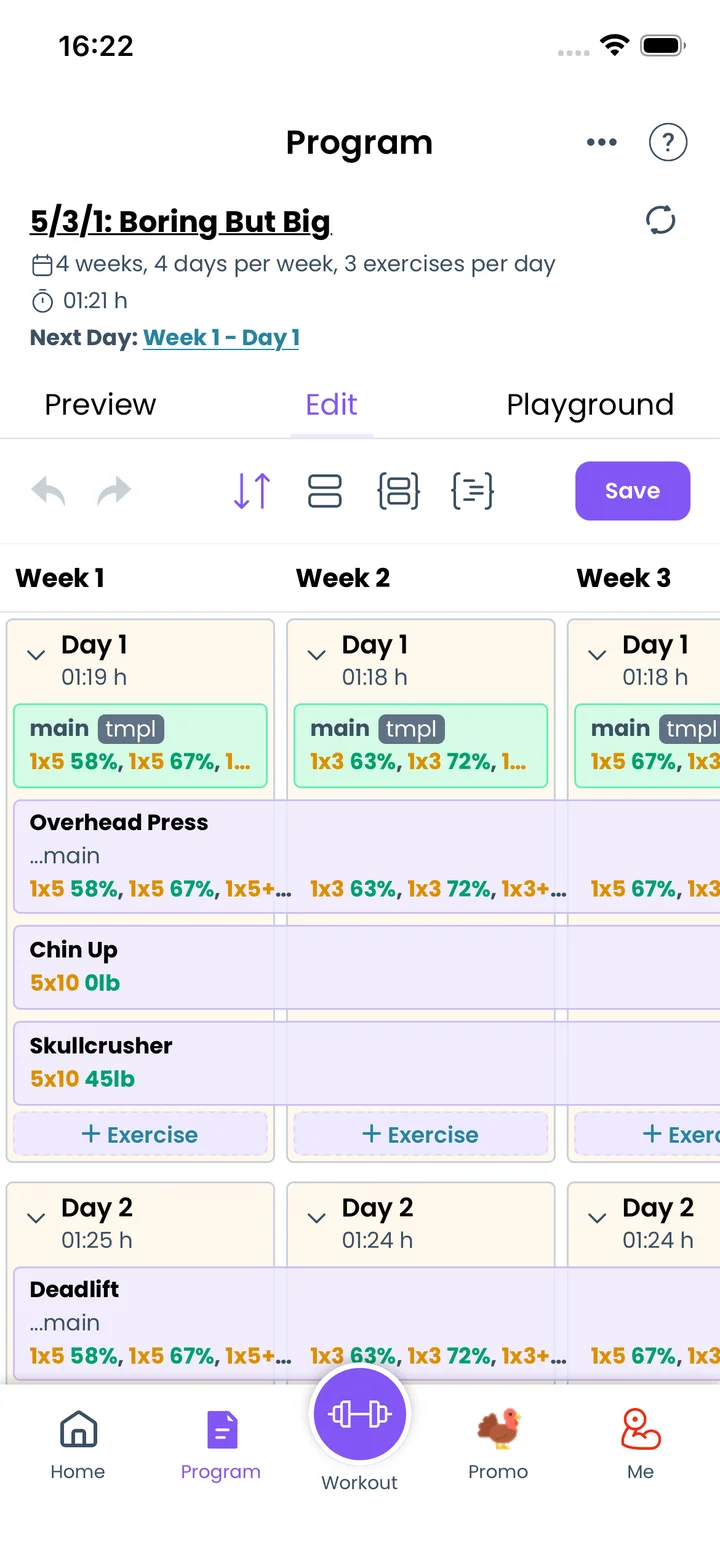\n\n- **Own rules:** Yes - % of a max, templates that many weeks reuse, and progression scripts with variables and `if`\n- **See the block:** Yes, weeks side by side\n- **Sheet in:** Yes, as pasted text, a link or a JSON file. A sheet needs one rewrite into text, or the ChatGPT/Claude integration (Premium) converts it\n- **Laptop:** Yes, free web editor\n- **Data out:** CSV with a row per set, JSON backup, programs as text\n- **Own graphs:** Yes, dashboards where you choose what to plot, with your own formulas (Premium)\n- **Copy a week:** Yes\n- **Price:** Free\n- **Premium:** $4.99/month, $39.99/year or $99.99 lifetime\n\nIn Liftosaur, the program is just a Liftoscript text. It's kinda like a spreadsheet, but in plain text: weeks are `# Week 1`, days are `## Day 1`, and each exercise is a separate line - `Squat / 3x5 / 225lb`. The editor in the app puts the weeks next to each other, so you can compare e.g. week 1 with week 3, and you can also copy a week from the week menu.\n\nWhat makes it behave like a spreadsheet is templates. In our 5/3/1 Boring But Big example, there's a single `main` template per week - `1x5 58%, 1x5 67%, 1x5+ 76%, 5x10 50%` in week 1, `1x3 63%, 1x3 72%, 1x3+ 81%, 5x10 50%` in week 2, etc. Squat, bench, deadlift and overhead press all reuse it via `...main`. So, if you want to change the BBB sets from 5x10 to 5x8 - you just change the template for each week, and all 4 exercises get updated, kinda like spreadsheet cells that reference the same source cell.\n\n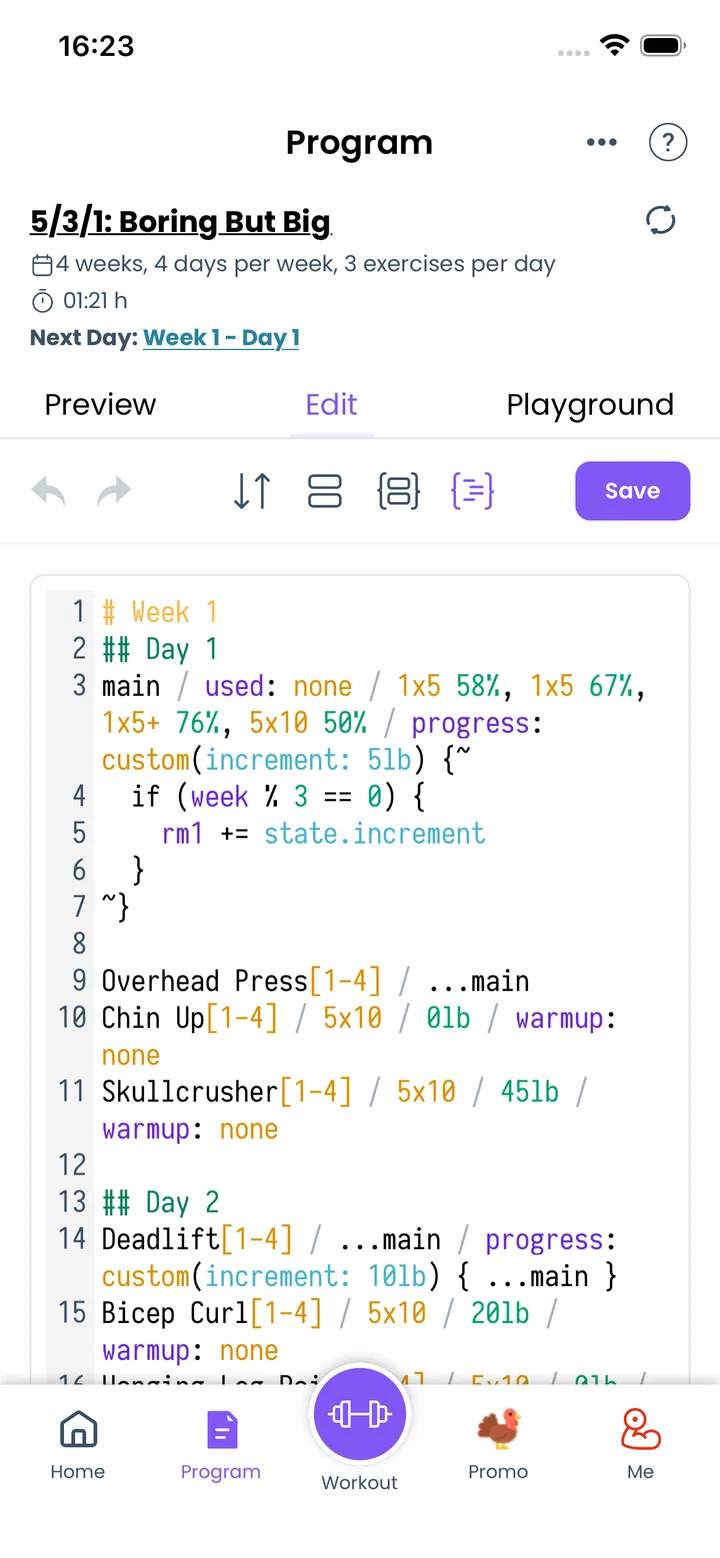\n\nFormulas are where it gets more powerful than a spreadsheet. Progression is basically a tiny script attached to a specific exercise or template. E.g. in 5/3/1 BBB it's `if (week % 3 == 0) { rm1 += state.increment }`, i.e. each 3rd week it adds 5 pounds to the 1RM (10 pounds for squat and deadlift). The app executes it after each workout, and when you launch the app next time, the weights for the next cycle are just there. In a spreadsheet you'd have to update the max manually, and hope the formulas still point to the right cells.\n\nTo get a program into Liftosaur, you can either paste a link from the web editor, or just paste the program text. A spreadsheet won't work directly (since it's not Liftoscript), but usually it's a couple minutes of work to rewrite a block into text. Or, instead of starting from zero, you can clone one of the 60+ programs that come with the app (5/3/1 variants, nSuns, GZCL, Sheiko, Candito, etc.) and change it.\n\nIf you're on a computer, you can use a [web editor](/planner) - it has autocomplete for exercise names and program syntax, and next to the text there're various stats:\n\n- number of sets per week per muscle group\n- strength vs hypertrophy sets\n- how long each workout takes\n\nUsually people calculate that stuff on a separate sheet in a spreadsheet.\n\n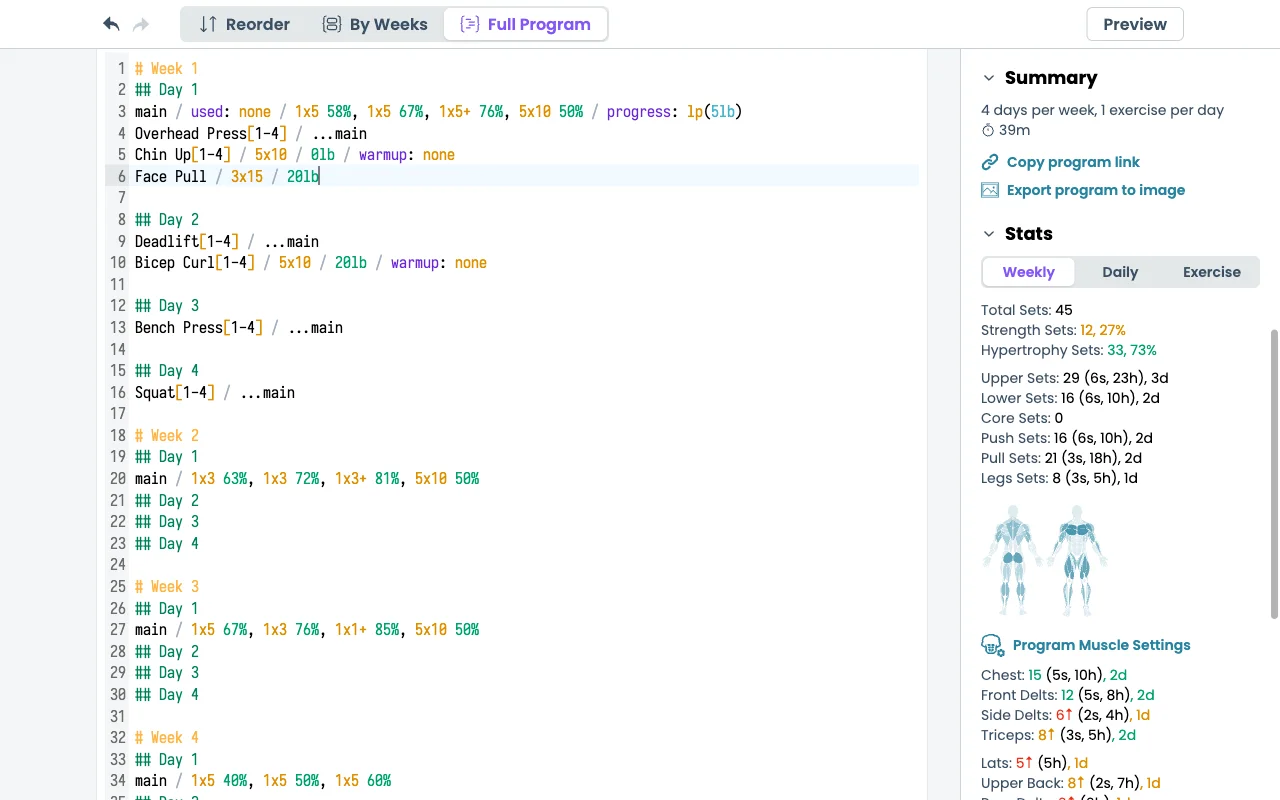\n\nAlso, you can export all the workout data into a spreadsheet if needed - there's free CSV export, with a row per set, and planned and completed reps, weight and RPE next to each other. While you edit, there are undo and redo buttons. And if you're signed in, the app stores the last 100 versions of each program, so if you made a bad edit last week - you open \"Show program versions\", pick a date and restore it.\n\nAnd you may not even need to export for charts. The Graphs tab (Premium) is a dashboard you build yourself, and you can have up to 20 of them. A dashboard can have:\n\n- graphs\n- single numbers, like your current e1RM\n- a muscle map\n- a training calendar\n\nIt's also stored as text, in a small language called [Liftograph](/doc/liftograph), so like in a sheet, you choose what to plot and can write your own formulas for it. If you don't want to write text, there are settings forms, or ChatGPT/Claude can build a dashboard from a description.\n\n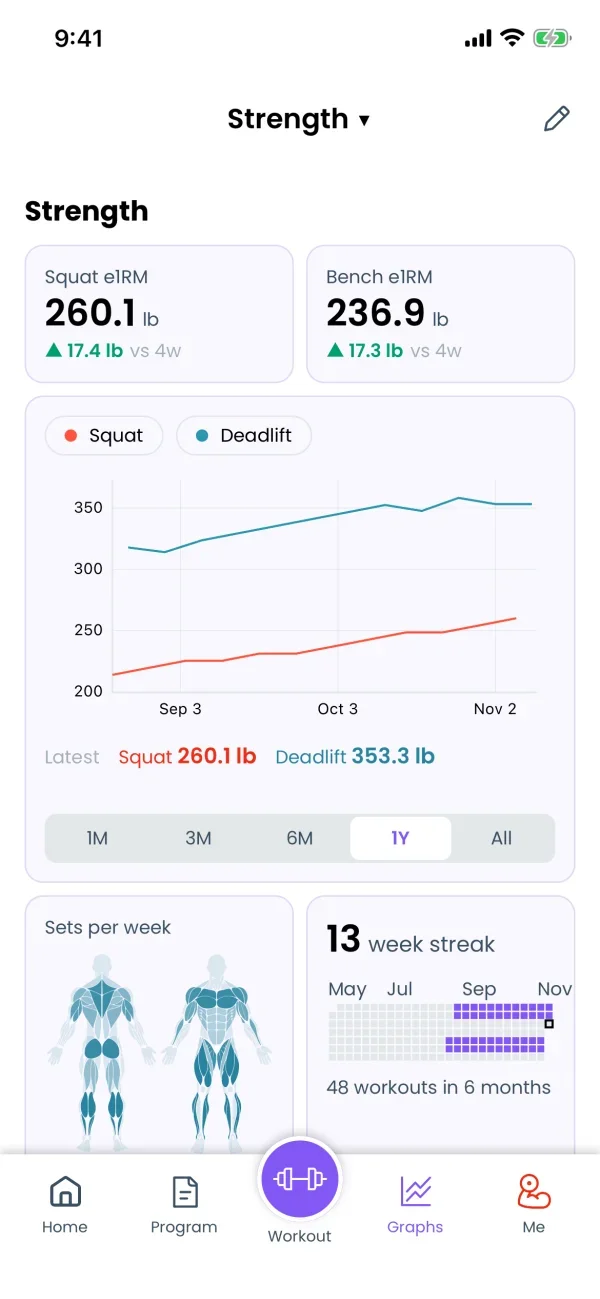 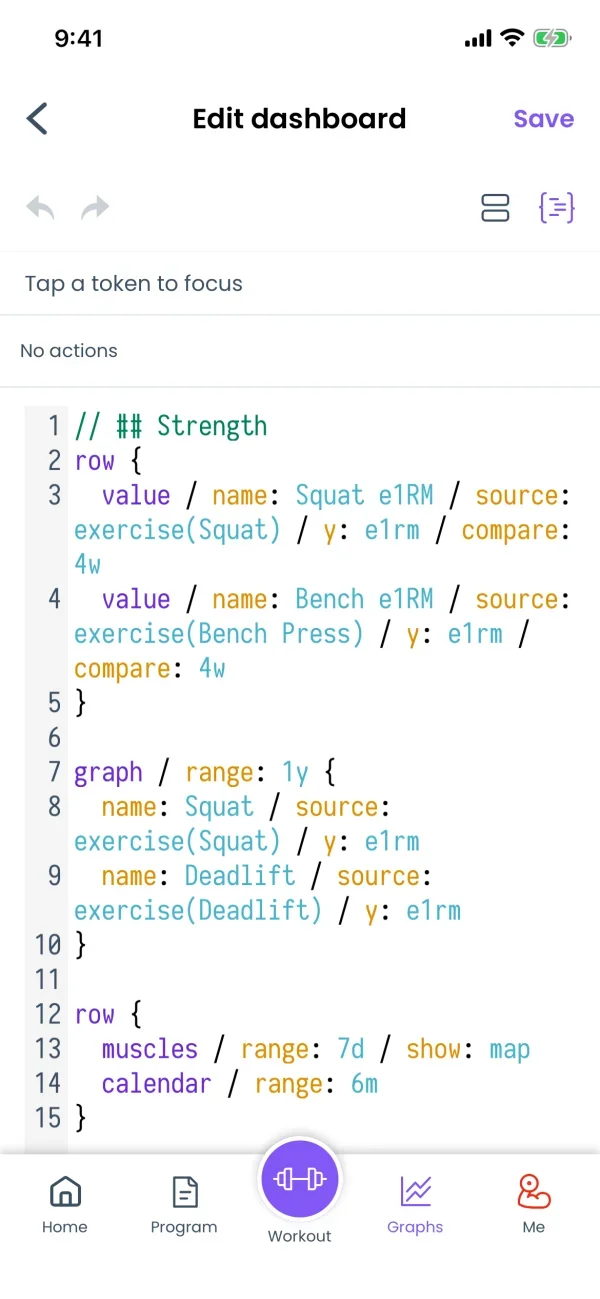\n\nThere's some learning curve though. Liftoscript is a text format, and if you haven't seen anything like `/ 3x5 / progress: lp(5lb)` before, your first program will probably need some time.\n\nLiftosaur also integrates with ChatGPT and Claude (Premium). So you can ask an LLM to:\n\n- convert a spreadsheet into a Liftosaur program\n- change the program (like \"swap BBB to 5x8 for squat only\")\n- enter the plates and equipment you have in the gym\n- build dashboards based on your goals\n\nYou can create, edit and run programs for free, web editor is free too. Premium features are:\n\n- Graphs\n- Plates Calculator\n- rest timer notifications with Live Activity on the lock screen\n- Week Insights\n- Apple Watch app\n- ChatGPT/Claude integration\n- API & MCP\n\nIn US it's currently $4.99 monthly, $39.99 yearly, $99.99 lifetime.\n\n### Hardy\n\n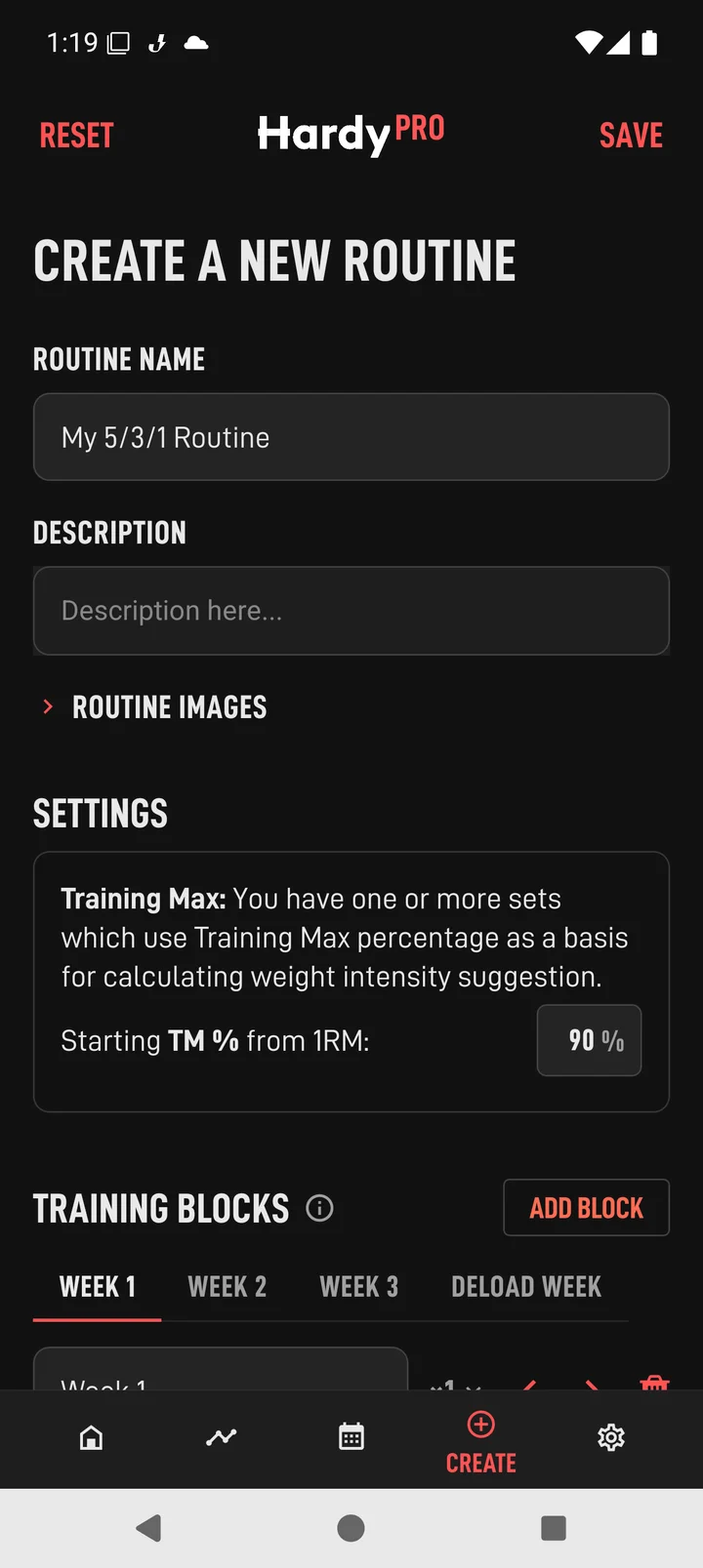\n\n- **Own rules:** Partly - % of a training max that updates every set, and 3 progression presets with number fields; no formulas\n- **See the block:** On the web, all weeks on one scrolling page; one week tab at a time on the phone\n- **Sheet in:** No, only a hardy.app link or the community library\n- **Laptop:** Yes, web planner; saving to the app needs an account\n- **Data out:** No file export\n- **Own graphs:** No, fixed charts: total lifted, 1RM and max weight per exercise, and a muscle heat map\n- **Copy a week:** Workouts and sets can be copied, and a block can repeat\n- **Price:** Free, with a limit on how many routines you create\n- **Hardy Pro:** $5.99/month, $59.99/year or $94.99 lifetime\n\nIn Hardy, the routine editor shows the weeks in tabs (Week 1, Week 2, Week 3, Deload Week), and you only see one week on the screen at a time. You can repeat a block (there's a \"Repeat xN\" setting), and blocks go in order, so making a 5/3/1 program with a deload is pretty easy. You can copy workouts and sets, but we couldn't figure out how to copy a whole block.\n\nSets could be either % of 1RM or % of the training max. Each routine stores separate training maxes. When we failed a squat set, Hardy's Deload rule suggested lowering the 1RM from 225 to 202.5lb, and after we applied it, all the % sets moved together right away (190lb -> 170lb). There's also a single \"Starting TM % from 1RM\" setting for the routine, so you don't have to type 90% for each lift.\n\nThere're no formulas or variables there though. Weights are defined via fixed types (working weight, 1RM %, TM %, RPE), and progression is done via 3 presets:\n\n- **Overload** adds X pounds to the 1RM/TM/working weight after N successful workouts\n- **Deload** reduces the weight by X% after N failures\n- **Double Progression** uses a range of reps\n\nYou can tweak the values, but you can't define a custom condition, like \"add more if the AMRAP went well\". Hardy's own 5/3/1 for Beginners raises the training max by a fixed amount after each 3-week cycle, no matter how many reps you got on the AMRAP.\n\n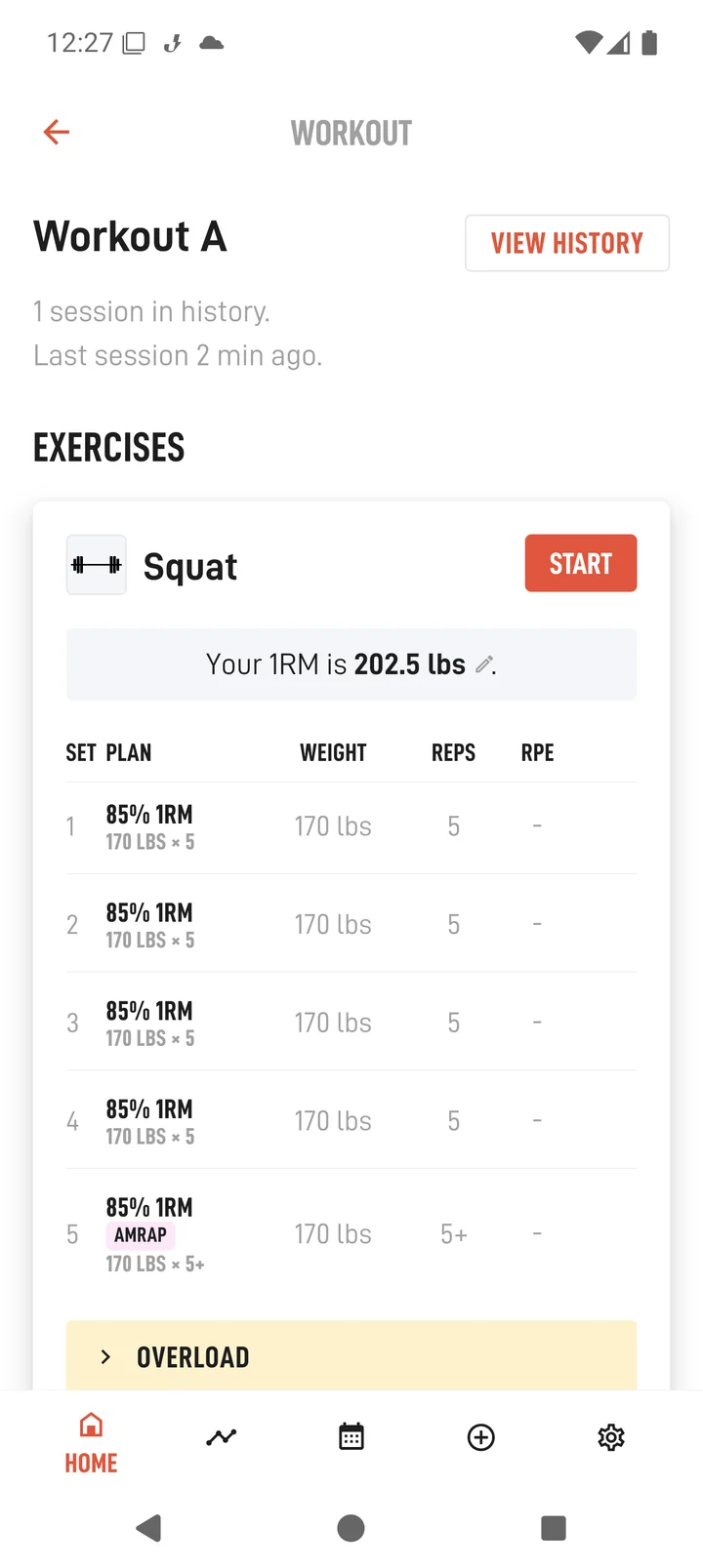 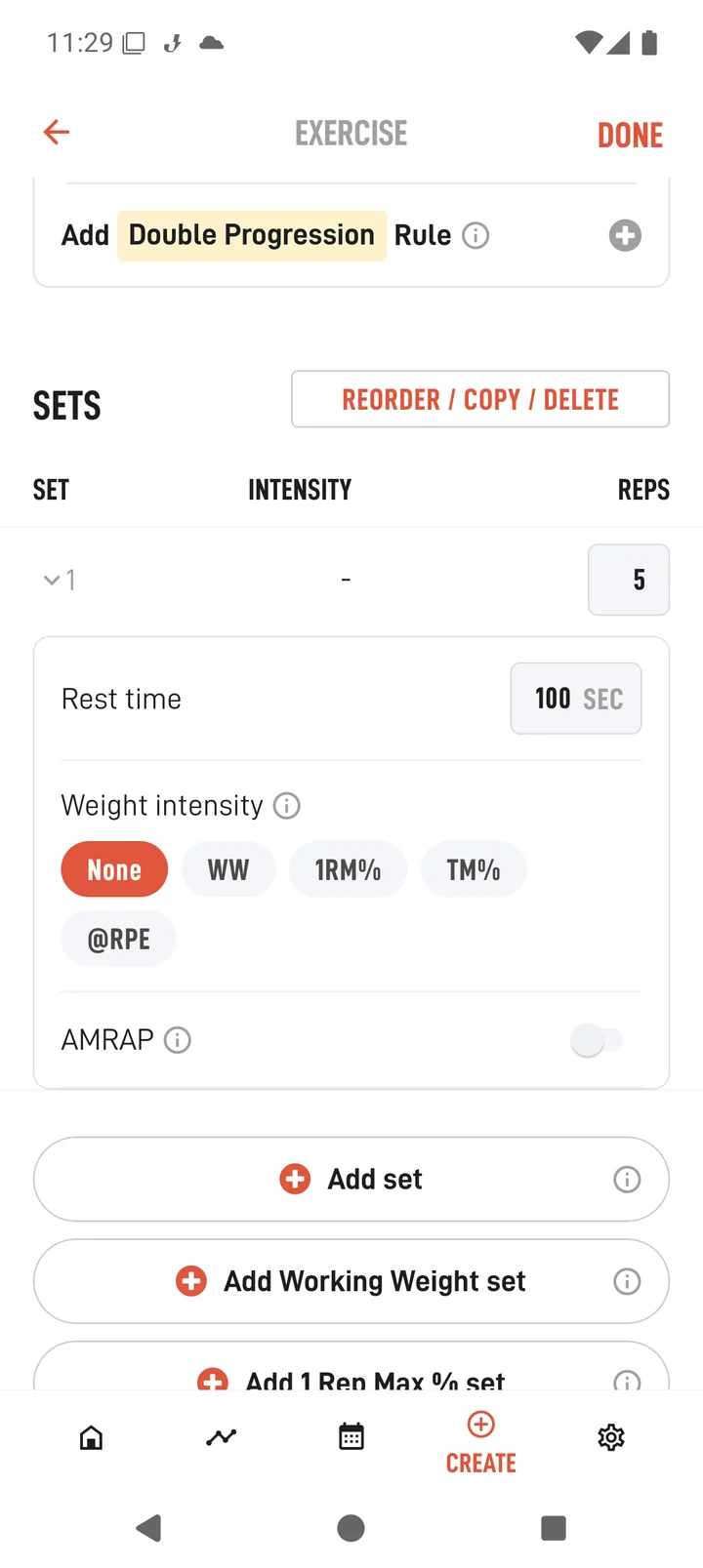 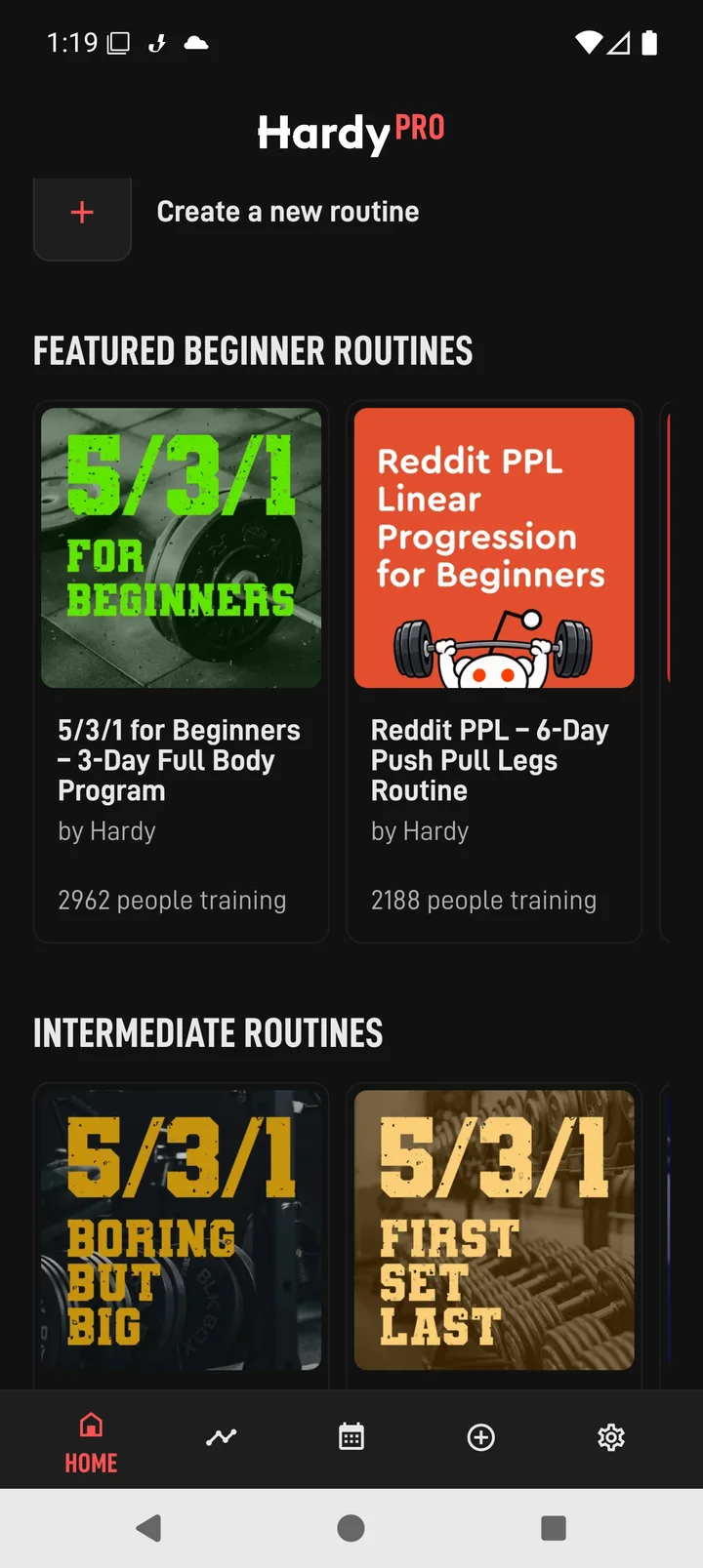\n\nHardy has a huge library of public routines - 1,800+, including ten 5/3/1 and nSuns versions made by Hardy, and they're all free. Each public routine also has a separate web page on hardy.app, with the weeks, % tables and progression rules. You can only add routines from a hardy.app link or from that library, and there's not a way to export to a file. So the workout history is kept in the app, although you can generate a share link for any workout.\n\n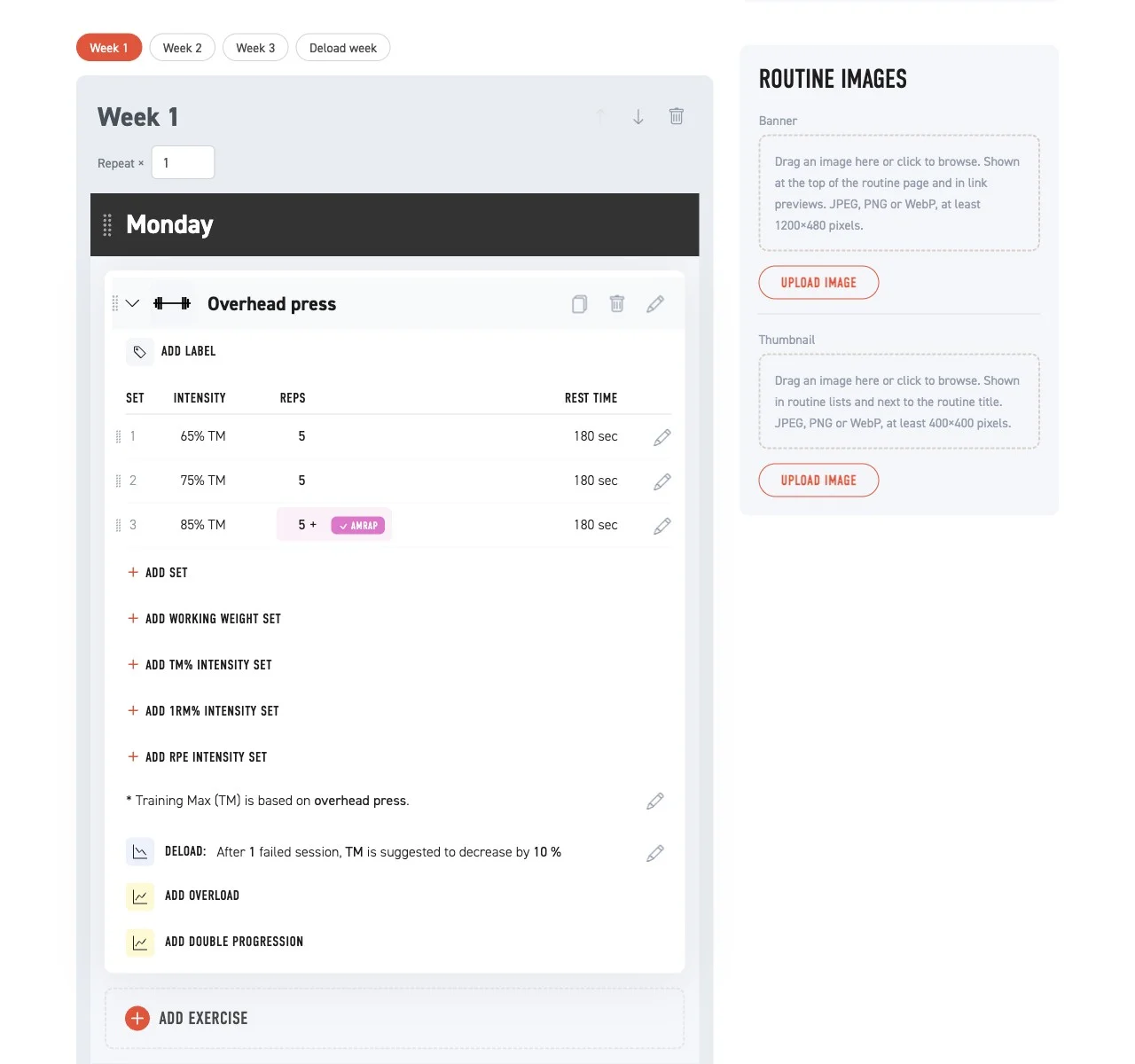\n\nHardy has a web planner (hardy.app/workout-planner) you can use from a laptop browser, even without account. There are the same templates as in the app (Blank, 3x3, 5x5, Push Pull Legs, 5/3/1), and all the weeks are on the same scrolling page, below each other - so on a laptop you see way more than on the phone. When you open some exercise, there's a table of sets - % of TM, reps, AMRAP, rest - and the rules for that exercise below it. You could duplicate workouts or move them to another block, but there's still no way to copy a whole week.\n\nThe preview is where it becomes kinda spreadsheet-like - there's a \"Your training maxes\" box, and if you change a TM there, all the sets on the page update. E.g. we changed the overhead press TM from 135 to 100 pounds, and the 5/3/1 sets immediately went from 90/100/115 to 65/75/85 pounds, same as editing the max cell in a sheet. There's still no formula field and no import/export on the web though, and to save the routine to the app you need to have account.\n\n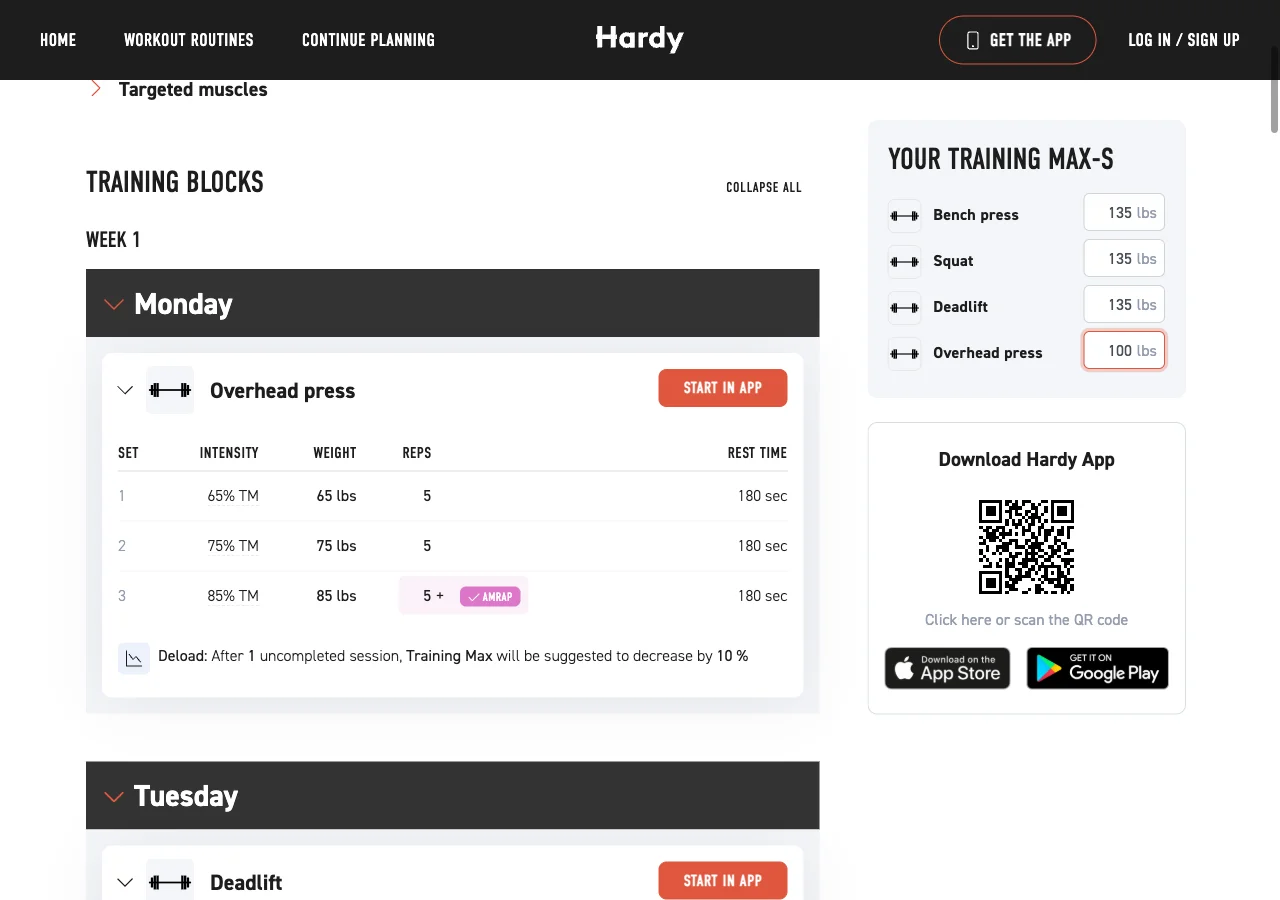\n\n### Volm\n\n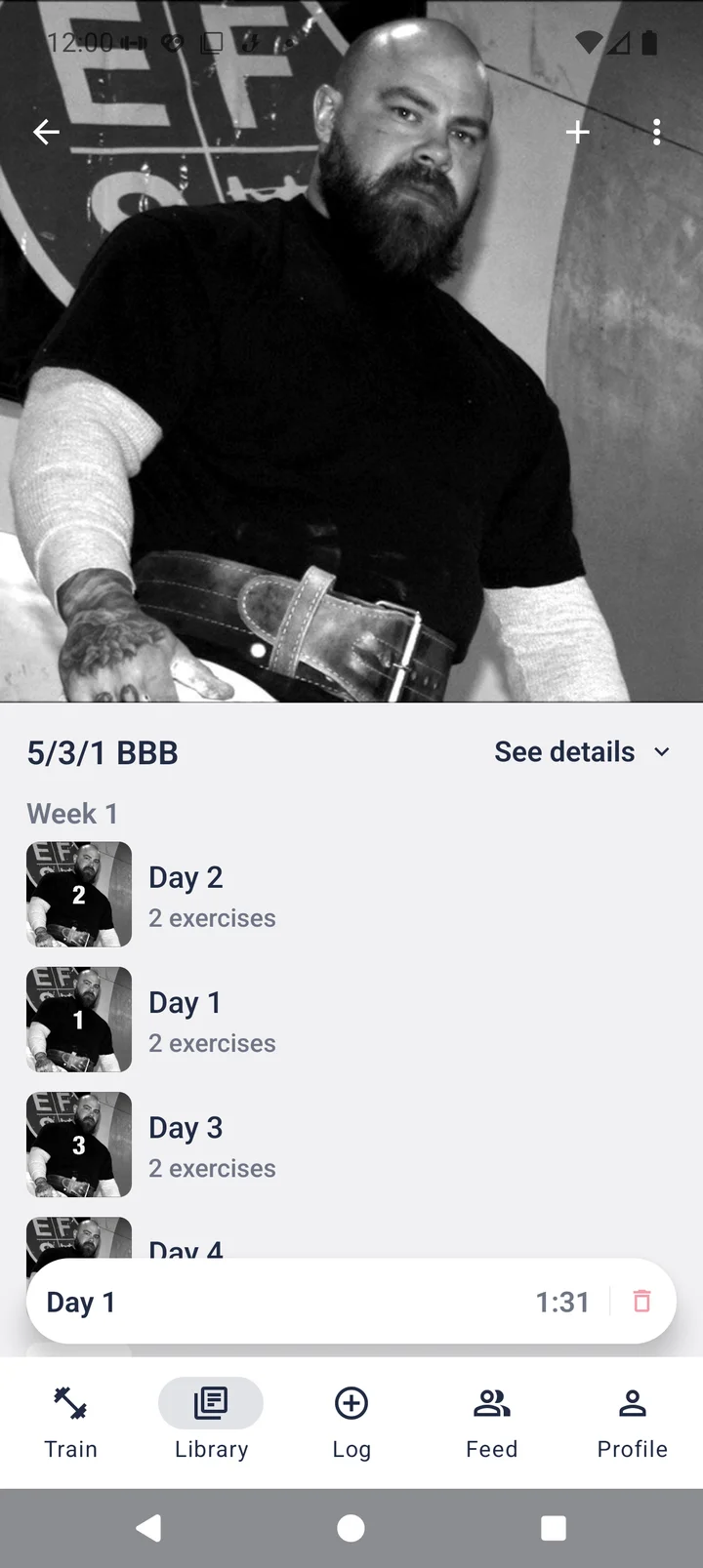\n\n- **Own rules:** Partly - your own progression script per exercise, but set weights are plain numbers or % of 1RM\n- **See the block:** On the web, all weeks side by side (read-only); each day is edited on its own page\n- **Sheet in:** No, only a shared link\n- **Laptop:** Yes, volm.app (needs an account), edits one day at a time\n- **Data out:** CSV of workouts\n- **Own graphs:** Partly, you add dashboard widgets (training, exercise, muscle, measurement and more), but you can't use formulas; 1Y and All ranges need Volm+\n- **Copy a week:** Yes, press and hold a week\n- **Price:** Free to build and run programs\n- **Volm+:** $9.99/month or $59.99/year\n\nVolm has the closest thing to Liftoscript among all other apps - Progression DSL. It has:\n\n- variables\n- math with units (kg, lb, %)\n- `if/elif/else` and loops\n- functions like `round_weight`, `e1rm`, `min` and `max`\n\nA rule has two blocks:\n\n- `progress` - executed at the end of a workout, and prepares the next workout\n- `update` - executed after each set, and changes the remaining sets\n\nSo, progression rules could be as smart as a spreadsheet formula. If you don't want to write code - there're presets:\n\n- Linear (+5 lb after a success)\n- Linear on the 1RM\n- Top set, and some others\n\nBut the formulas are only in the rules. Weights in a template are either plain values or % of 1RM, so you can't write something like `=B2*0.85` in a set.\n\nSo, the program is basically a list - weeks contain templates (days), and each template is opened on a separate page, i.e. you can't see e.g. week 1 and week 3 next to each other. Duplicating stuff is pretty easy though - you long press:\n\n- a week heading to get \"Duplicate collection\"\n- a template to copy a single day\n- a program to copy the whole thing\n\nThere's \"Link exercise\", which connects a lift across several days (\"Change it once and every linked day follows\"), and if you type the weight in set 1, it'd fill the sets below as well. But there's no way to edit across many weeks or many exercises simultaneously. There's also the Ask Volm chat (Volm+), which can apply a change you ask for to a program, and it shows the change as a diff card before saving.\n\n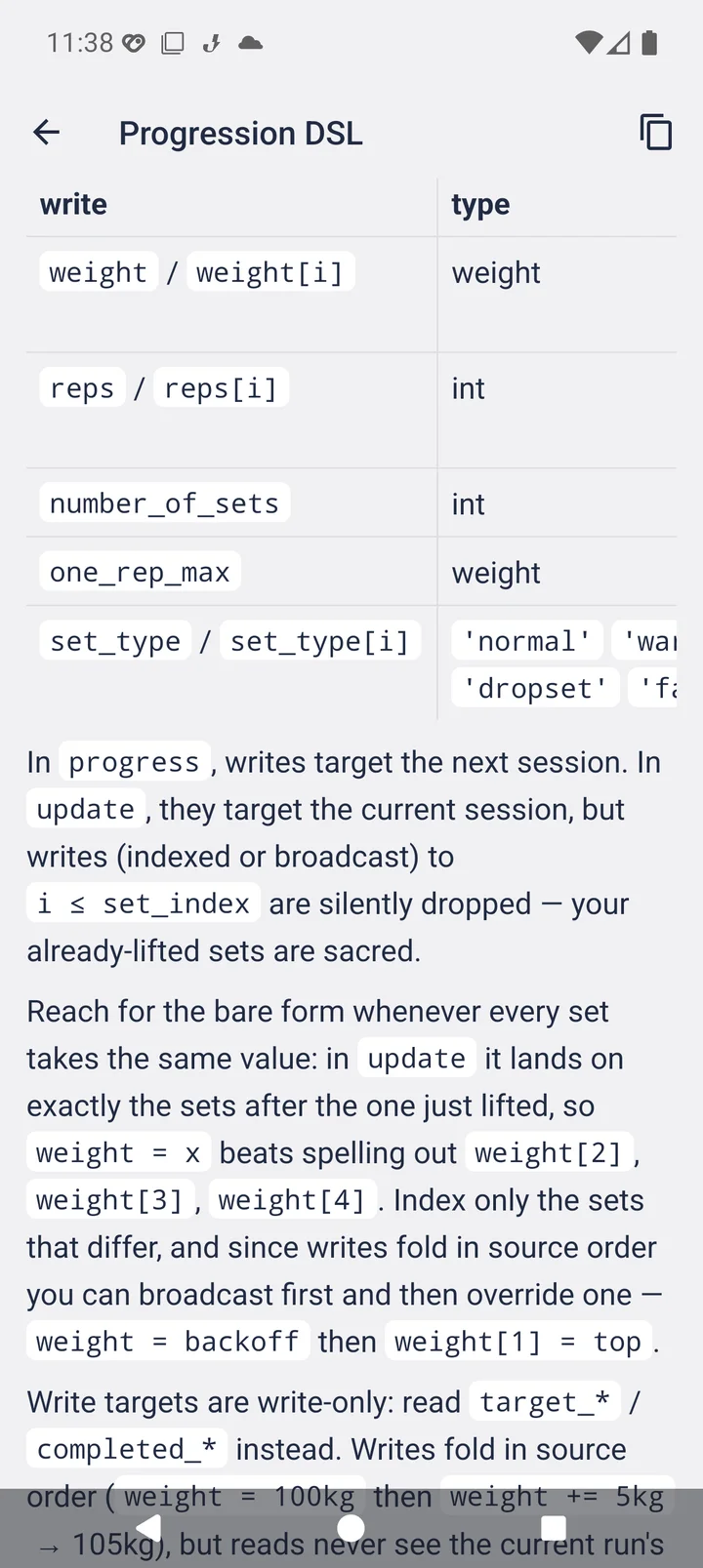 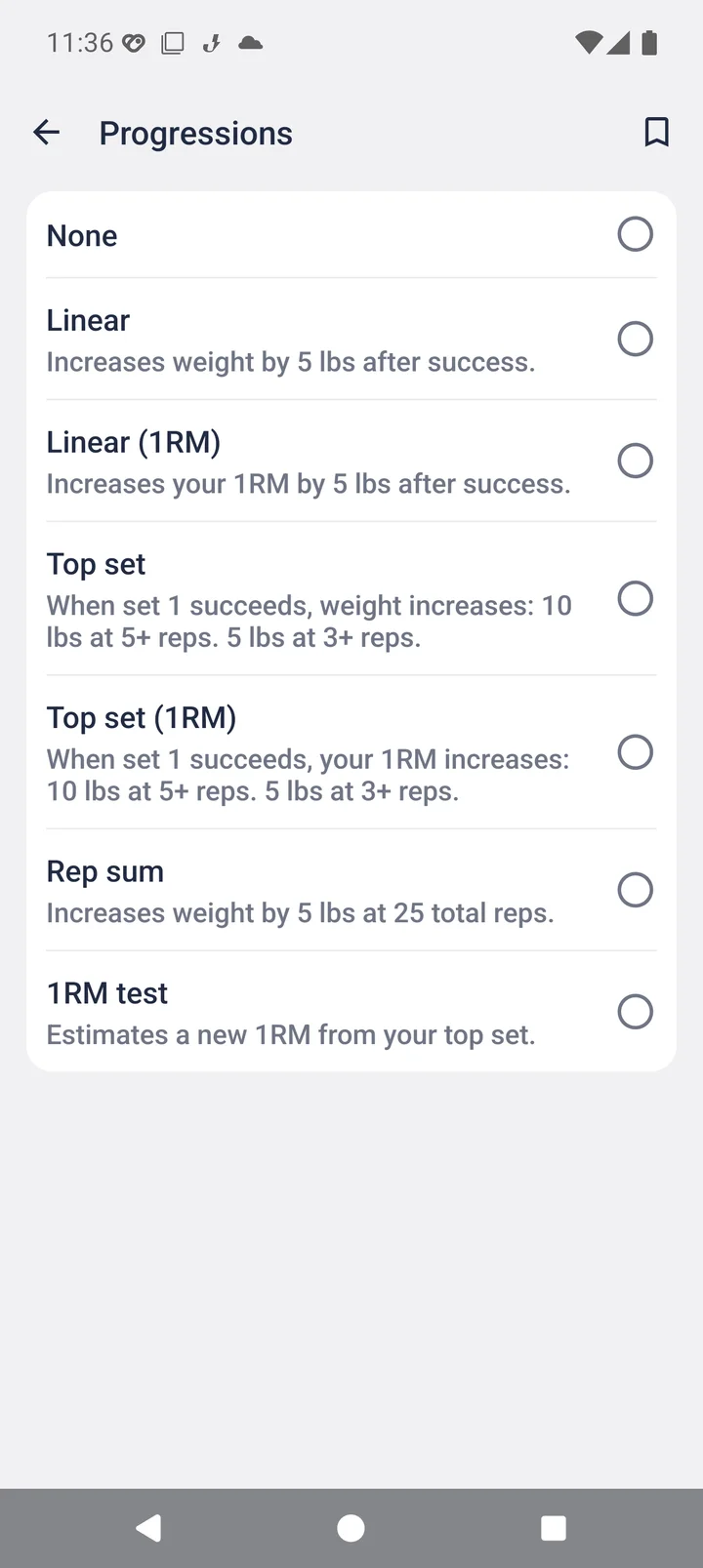 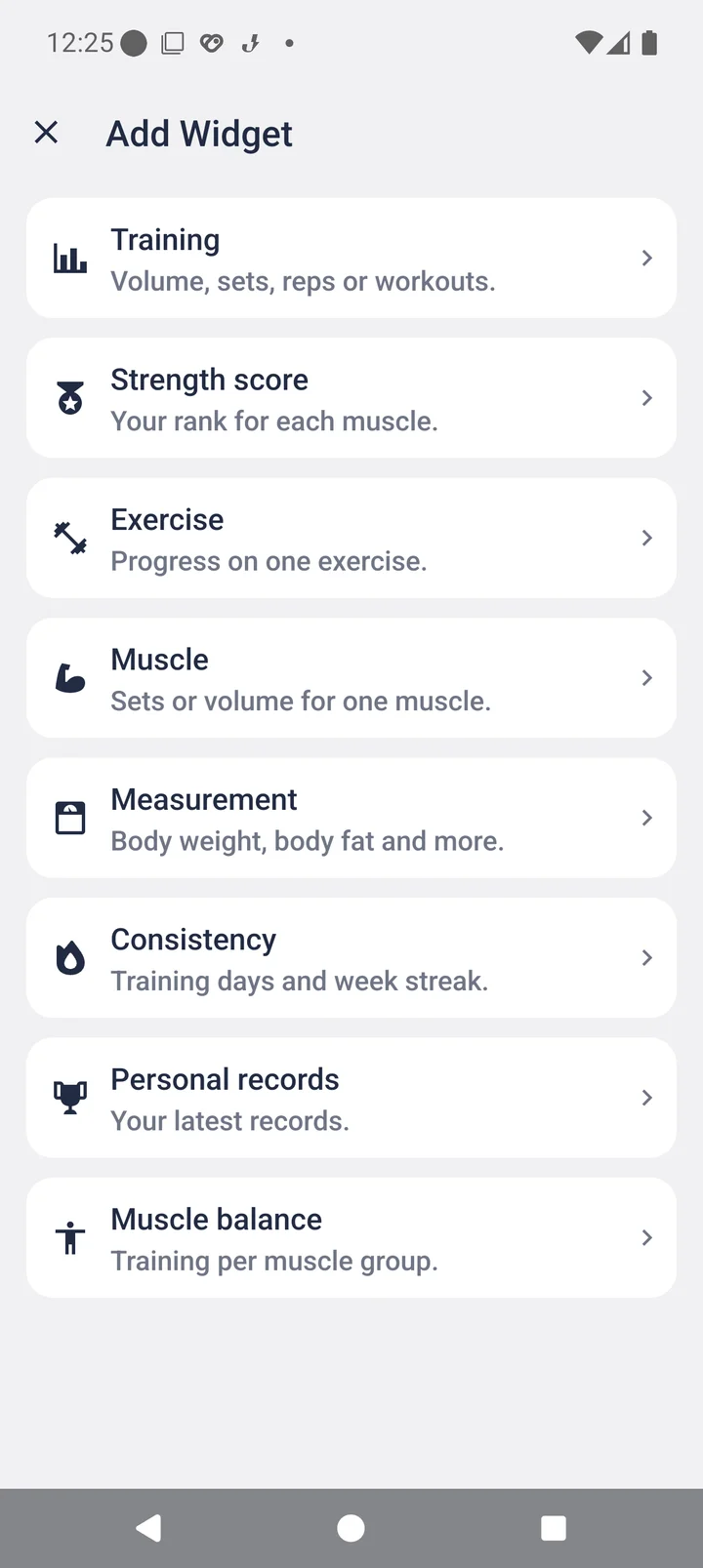\n\nVolm comes with 5/3/1 BBB, 5/3/1 for Beginners, Building the Monolith and 4 nSuns versions out of the box, and the only way to add programs there is via a shared link. The CSV upload is just for importing workout history from different apps. And you can export all the workouts into one CSV file.\n\nVolm also has a web app - volm.app (you need a Volm account for it), and it fits way more stuff on one screen. On a program page there's a \"Training plan\", where all the weeks are columns side by side, and each day card lists its exercises with sets - like `1 x 58.5% 1RM x 5 reps`. Above it there's a week picker, which displays the sets per muscle group for that week. If you right-click on a week, you get Rename, Duplicate and Delete. But you still have to change things day by day - each day lives on a separate page, with the same set table, and same Progression DSL field as on the phone. You can't modify multiple weeks at once, and you can't use formulas in set cells. Also, the web app can't import a program from a file or text, or download a program.\n\n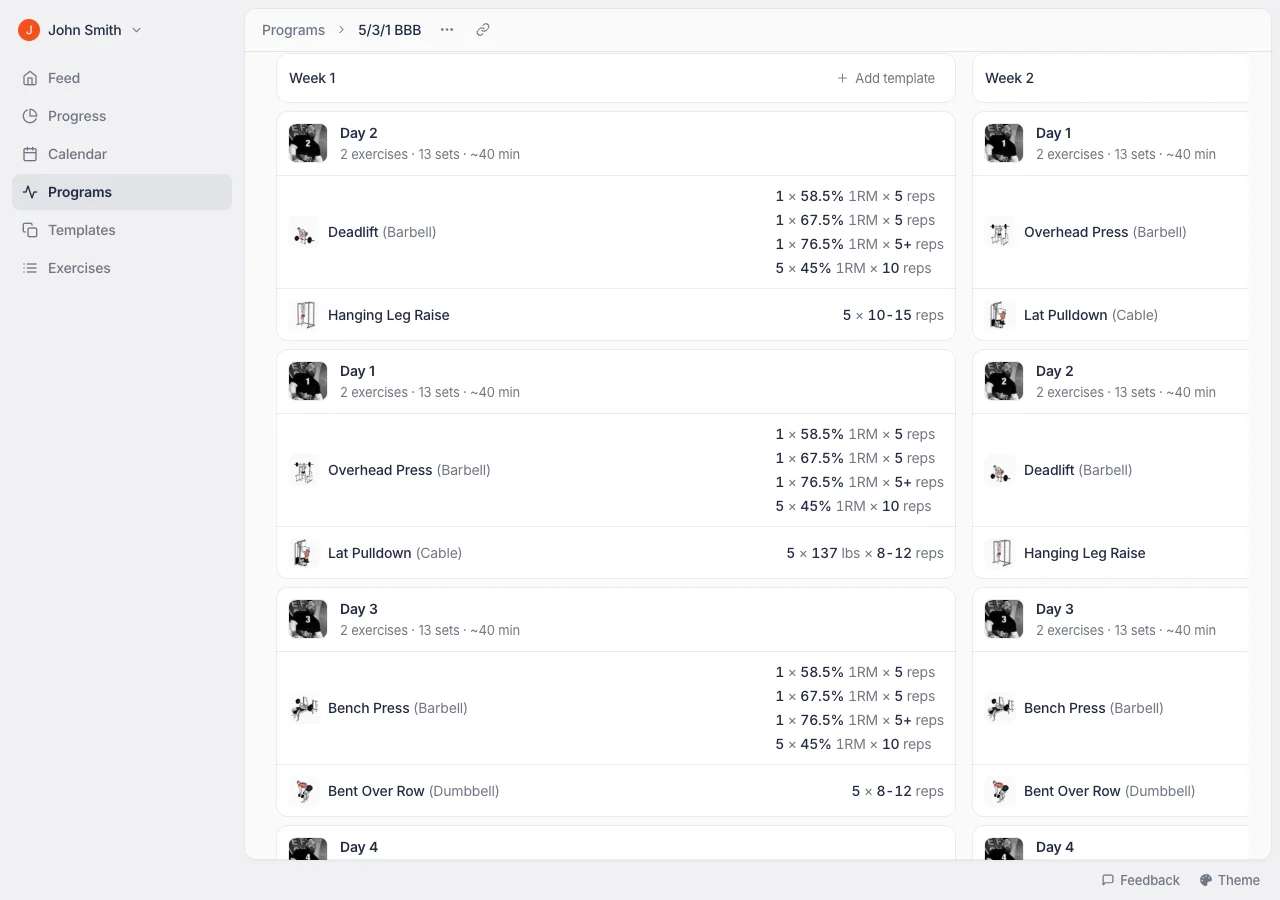\n\n### KeyLifts\n\n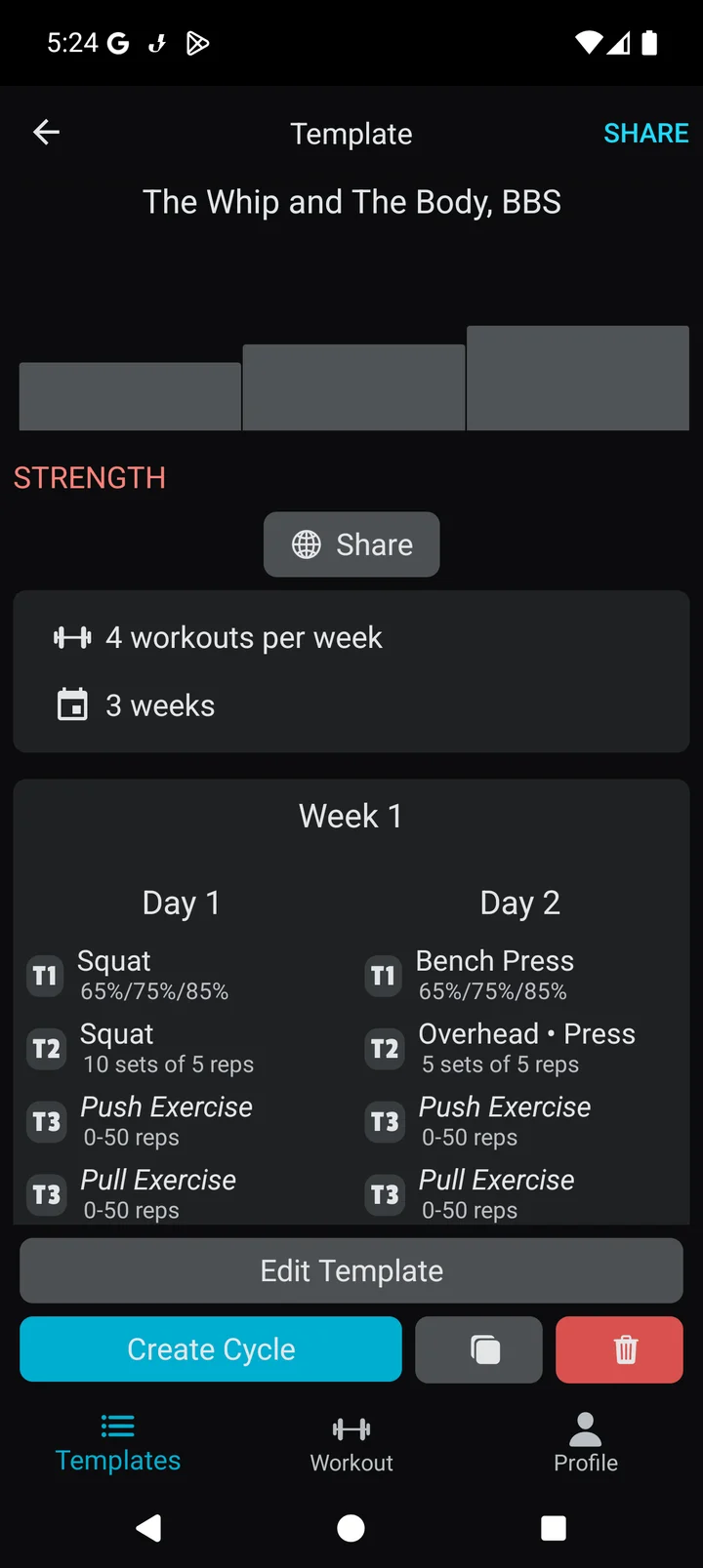\n\n- **Own rules:** Partly - % of a training max, AMRAP-based training max rules, and schemes for a whole tier; no formulas\n- **See the block:** Partly, a read-only grid per week\n- **Sheet in:** No, only a link or community templates\n- **Laptop:** No web editor found\n- **Data out:** CSV of sets, and a CSV of training maxes\n- **Own graphs:** No, fixed charts, but a lot of them: e1RM, training max, volume, Wilks and a PR board\n- **Copy a week:** Yes\n- **Price:** 4 free workouts, then $29.99/year\n\nKeyLifts is based on 5/3/1 and % of training max. Out of all the phone apps, the program page there is the closest to a spreadsheet. It shows all the days of a week next to each other, with T1, T2 and T3 exercises and their % of TM. You can't change anything in that grid though. For that, you need to go to \"Edit Template\", and there're 2 modes there - Quick and Detailed.\n\nIn the detailed editor there's Copy Week, Delete Week and Reorder Weeks (in Quick mode there's a copy icon for each day), and also controls for the whole template:\n\n- T1 and T2 schemes (e.g. FSL 65-75%) change all the main or supplemental exercises together\n- \"Change all warmup sets\" adds or deletes warmups everywhere\n- \"Progressions\" sets a single rule for all exercises\n\n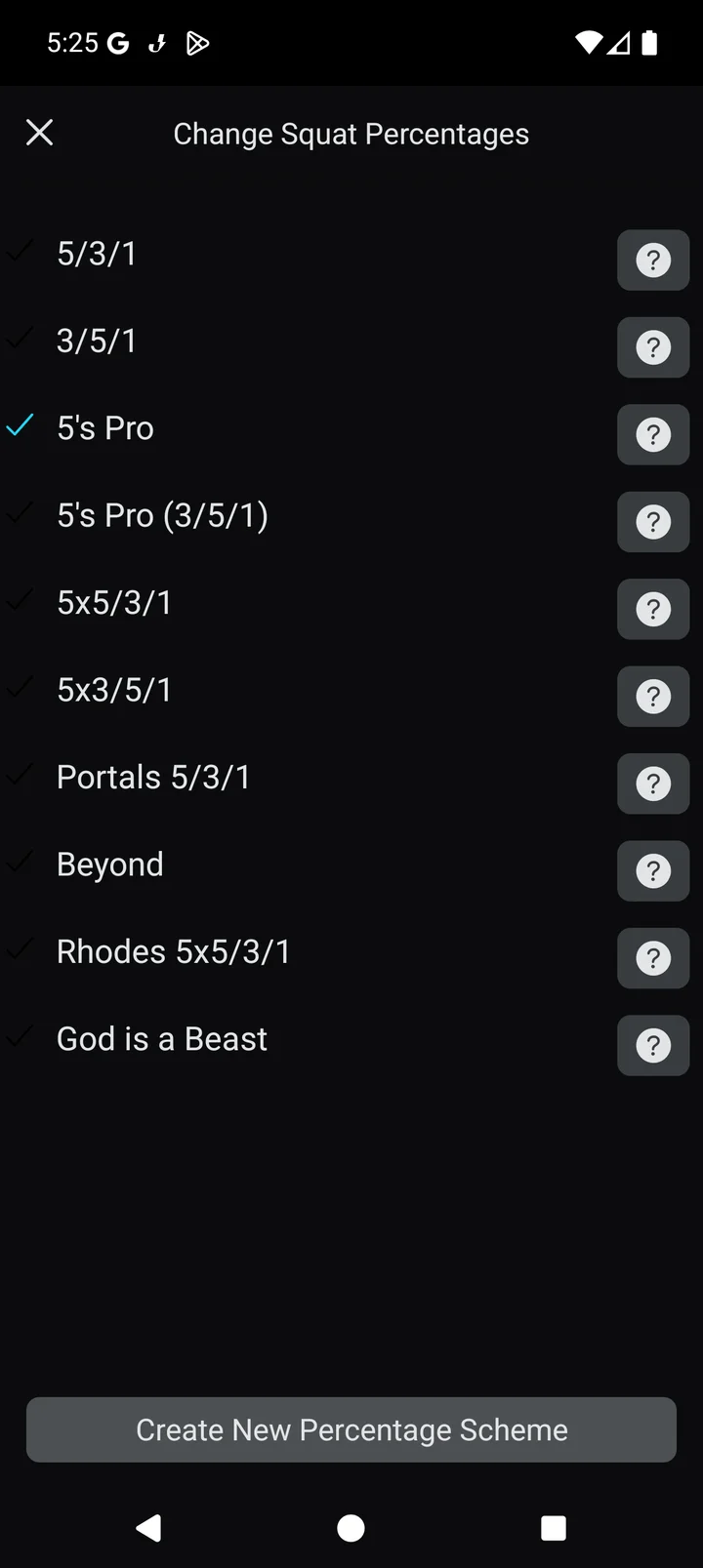 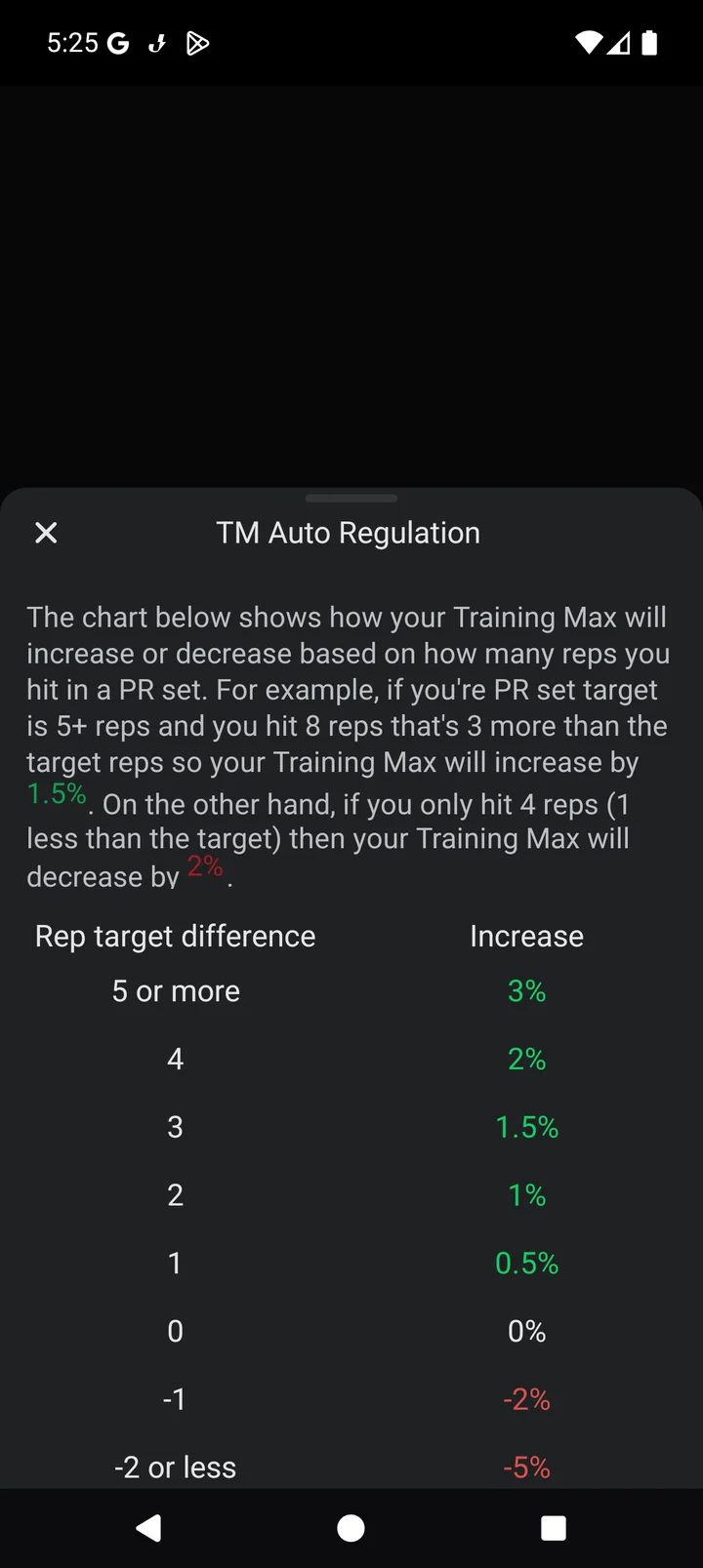 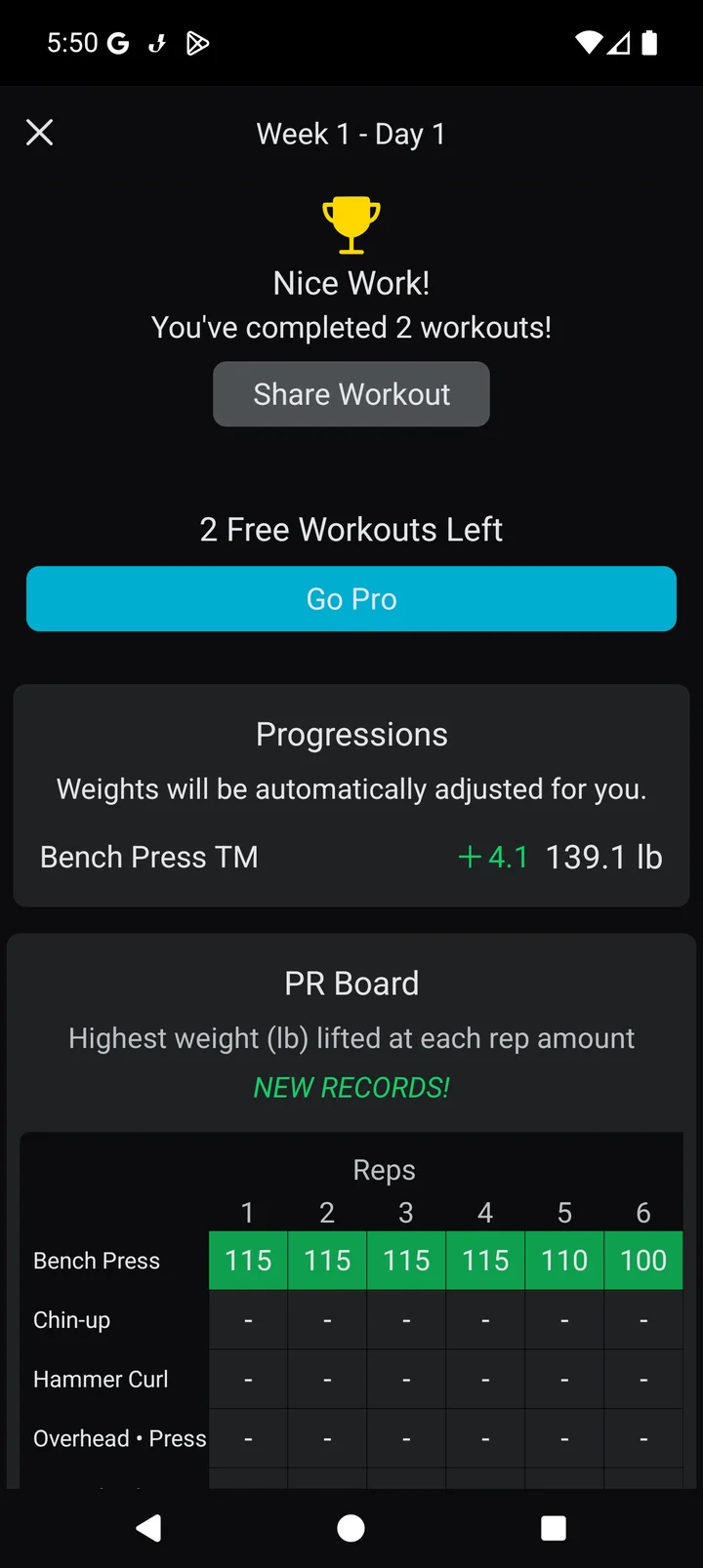\n\nThe rules work pretty much the same way as in 5/3/1 spreadsheets. Each exercise has a training max (TM), and you choose a rule for it:\n\n- **Auto Regulation** changes the TM based on how many AMRAP reps you did (from -5% to +3%)\n- **Increase Next Cycle** increases the weight by a fixed step (10lb by default)\n- **Specific Week** increases the weight on the weeks you choose\n\nE.g. in our nSuns run, doing 13 reps on the 8+ AMRAP set bumped the bench TM from 135 to 139.1lb. For assistance exercises there're rep/weight progressions. Weights are % of TM - either from a preset, or from a custom percentage scheme, and you don't need any formulas beyond that.\n\nKeyLifts supports a lot of verified 5/3/1 templates, and also nSuns:\n\n- PR Set\n- First Set Last\n- Boring But Big (5,506 users)\n- 5/3/1 for Beginners\n- Boring But Strong\n- 1000% Awesome, and more\n\nThe free CSV export contains a row for each set, and there's a second file with the training maxes.\n\n## Weeks, but one at a time\n\nThese apps have multi-week programs, but you edit one week or one exercise at a time, and none of them has formulas.\n\n### Boostcamp\n\n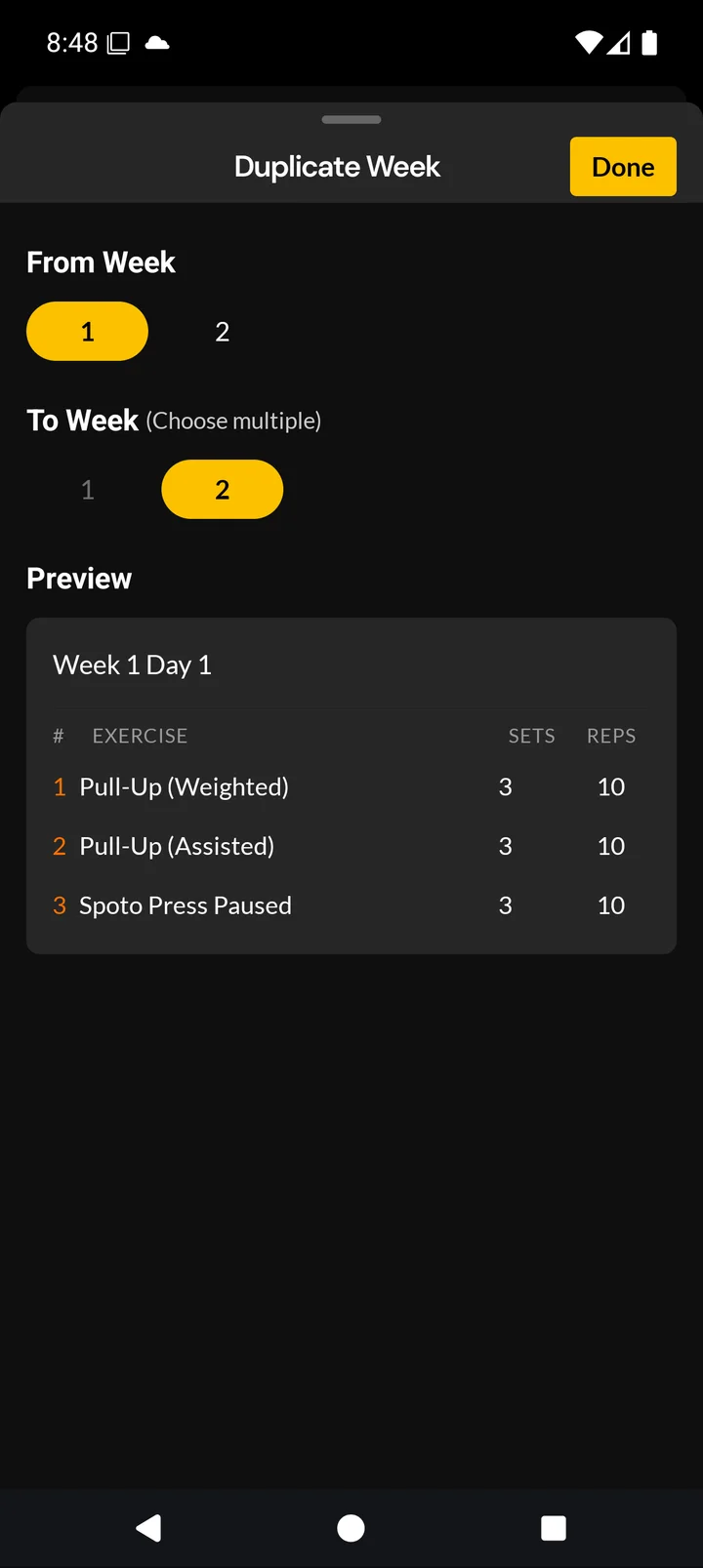\n\n- **Own rules:** Partly - % of 1RM, \"Last Week + X lbs\" on the web, and Auto Progression with 3 behaviors (PRO); no formulas\n- **See the block:** On the web, weeks side by side as columns; one week tab at a time on the phone\n- **Sheet in:** No, only a link\n- **Laptop:** Yes, web builder; saving needs an account\n- **Data out:** No data export in the Android app\n- **Own graphs:** No, fixed charts; most of them (e1RM, volume, muscle tracker) need PRO\n- **Copy a week:** Yes, to several weeks at once\n- **Price:** Free to build and run programs\n- **PRO:** $14.99/month or $59.99/year with a 7-day trial (boostcamp.app/pro). In our test, the Android paywall offered $39.99/year\n\nSo, Boostcamp's periodized builder shows each week in a separate tab, and \"View Full Plan\" is the same, a single week per tab. The best part is duplicating - with Duplicate Week you choose a From Week and multiple To Weeks, there's a preview, and we checked that week 2 got the same exercises with 3x10. \"Repeating Weeks\" lets you edit a single week, and then uses it for all of them. You could also duplicate a day too. And when you replace some exercise during a workout, it asks \"This and Future Workouts\" or \"Just This Workout\".\n\n 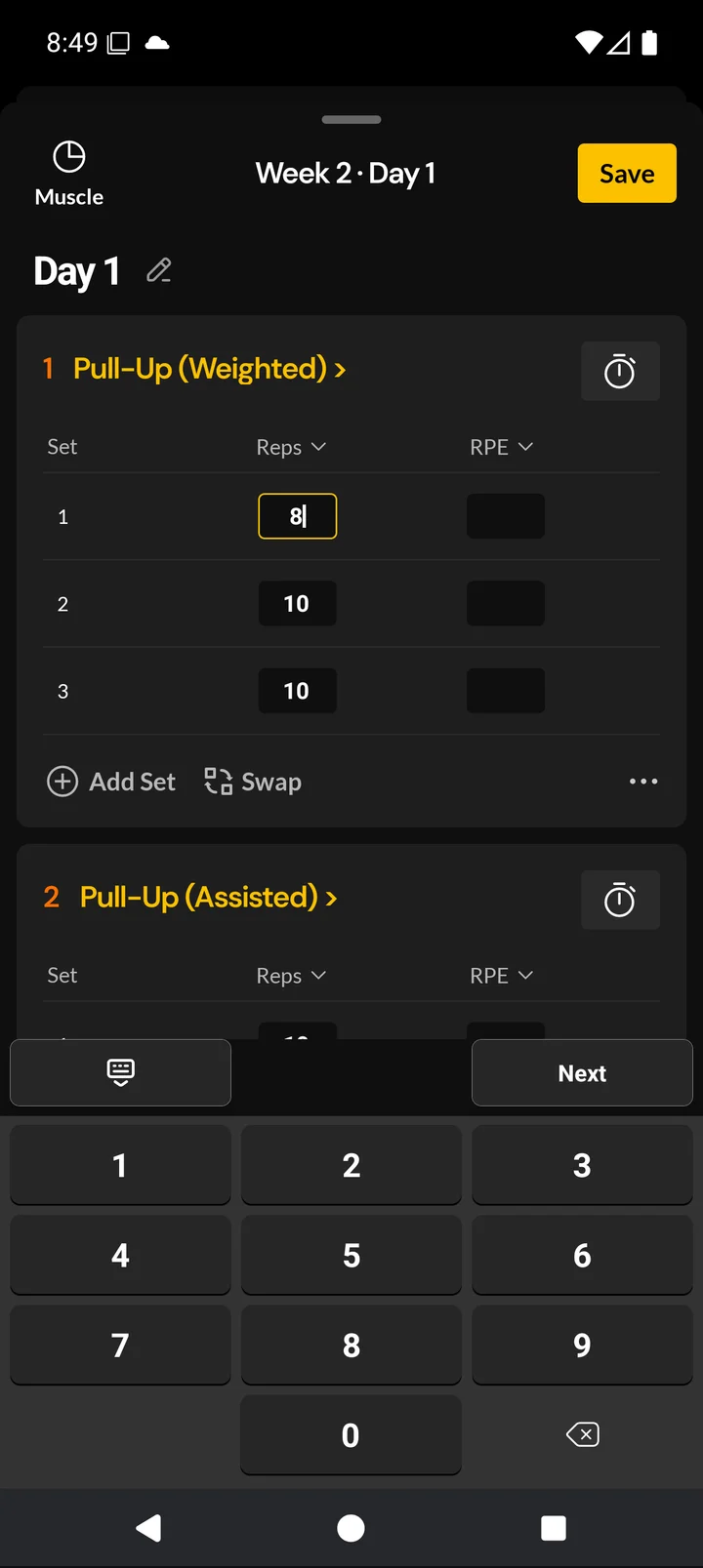\n\nWhat spreadsheet users would miss is a way to change a value across the whole program, like adding 5 lb to all squats. Set targets are fixed types (Reps, Rep Range, AMRAP, Time, RPE, % of 1RM), and the reps field has a digits-only keypad, so you can't use formulas there. The 5/3/1 for Beginners program asks for a training max per lift (90% of 1RM), but AMRAP sets don't change it. PRO Auto Progression has 3 behaviors (Linear, Double progression, Missed reps) with increment setting, but there's not a rule editor.\n\nThere's a big catalog of programs, and 5/3/1 for Beginners, nSuns and Building the Monolith are free there. The Android app doesn't support export though - you can only share stuff as images.\n\nOn a laptop Boostcamp is way better. They have a web builder - boostcamp.app/custom-program - which targets spreadsheet users directly (\"Ditch the spreadsheet\"), and you can use it even if you're not logged in. Weeks are columns next to each other, each with a table of sets, reps and intensity - of all the apps we tried, that's the closest thing to a spreadsheet. Intensity has more options than on the phone:\n\n- % of 1RM\n- % of 1RM of another exercise\n- \"Last Week + X lbs\" or \"Last Session + X lbs\" - probably the closest thing to `=B2+5` you can get there\n\nDuplicate Week copies a week to all other weeks, with a Select All button and a preview. But still:\n\n- you can't enter formulas\n- you can't change a value across all weeks in a single go\n- you have to sign in to save\n\n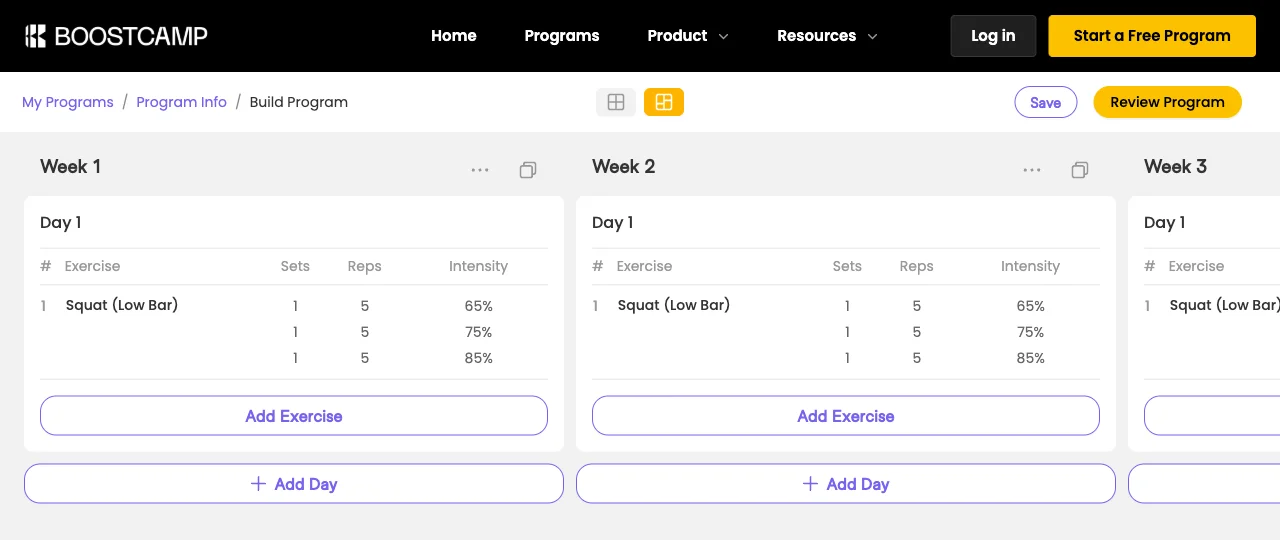\n\n### Alpha Progression\n\n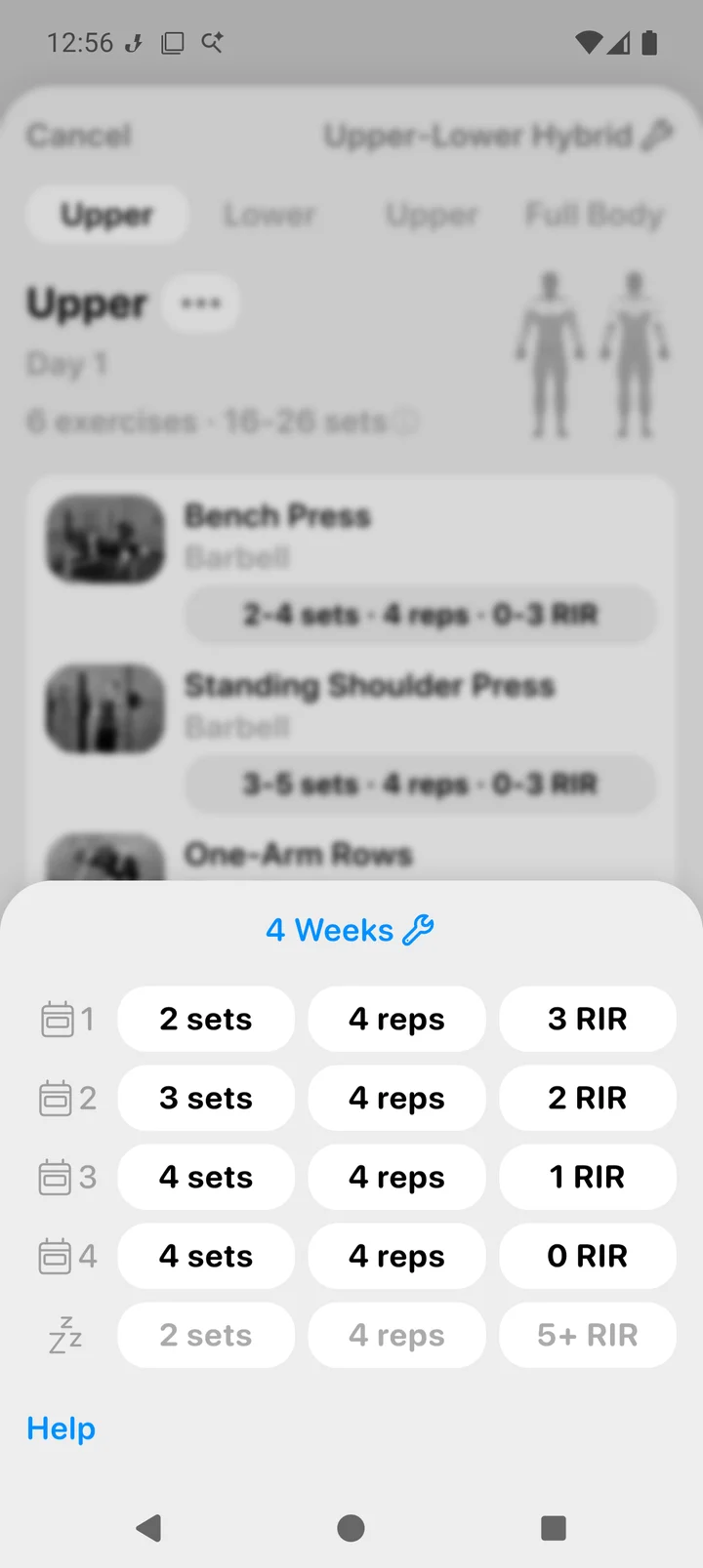\n\n- **Own rules:** No - cells are plain numbers, and the app suggests weights and reps (PRO)\n- **See the block:** Partly, a 4-week grid for one exercise at a time (PRO)\n- **Sheet in:** No, only an Alpha Progression link or QR code\n- **Laptop:** No web editor found\n- **Data out:** Partly - CSV (plans, workouts, custom exercises, measurements), but one report per workout, not a row per set\n- **Own graphs:** Partly, you add chart cards and pick the exercise, value and calculation (PRO)\n- **Copy a week:** A day or a whole plan, not a week\n- **Price:** $14.99/month or $89.99/year\n\nAlpha Progression's PRO periodization grid is basically a mini spreadsheet for a single exercise - 4-week block + deload, with sets, reps and RIR in each cell. But you can't see the whole program week over week - days are tabs (Upper, Lower, ...), and you choose the week on the home card. The sets, reps and RIR selectors have \"All exercises\" and \"All days\" toggles, so a single change there could update either a specific exercise across all days, or the whole day at once.\n\n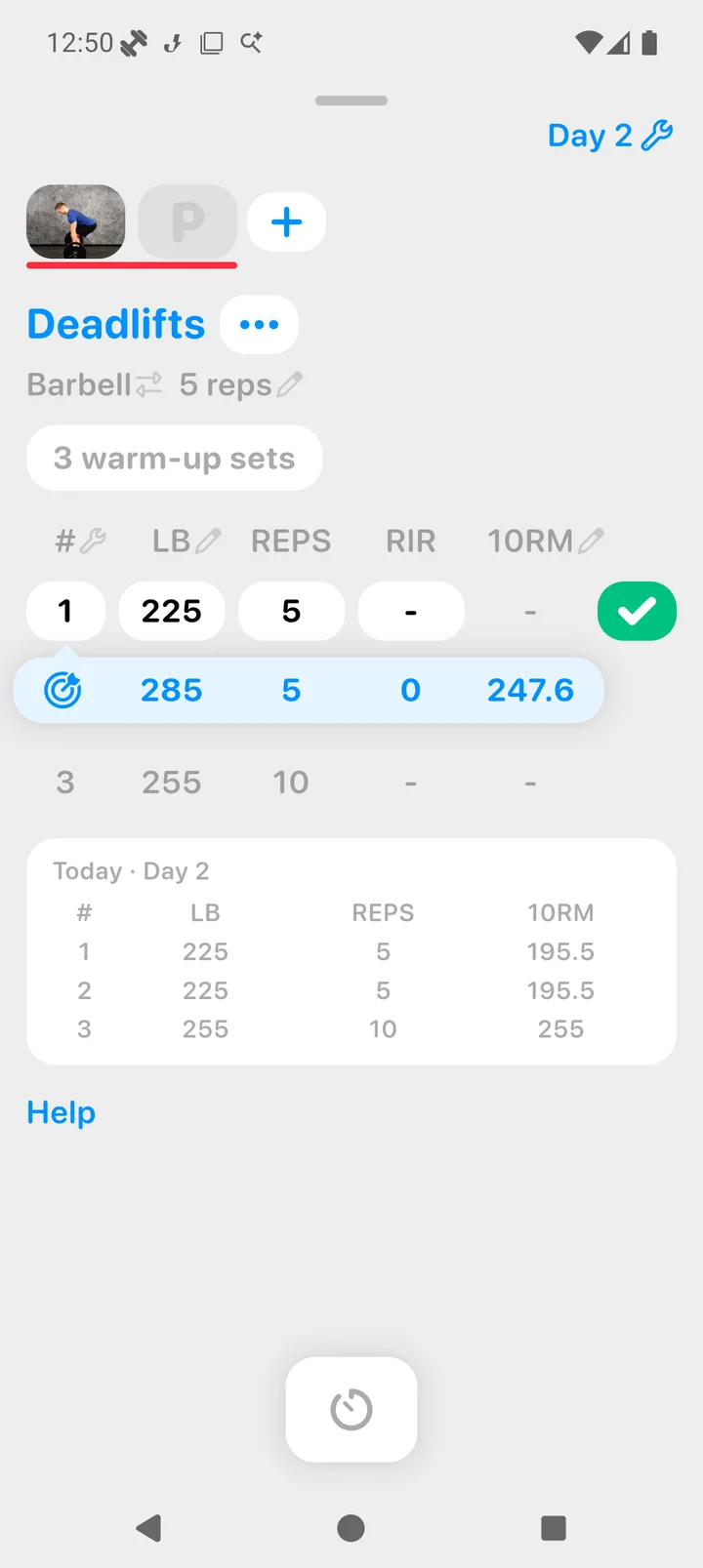 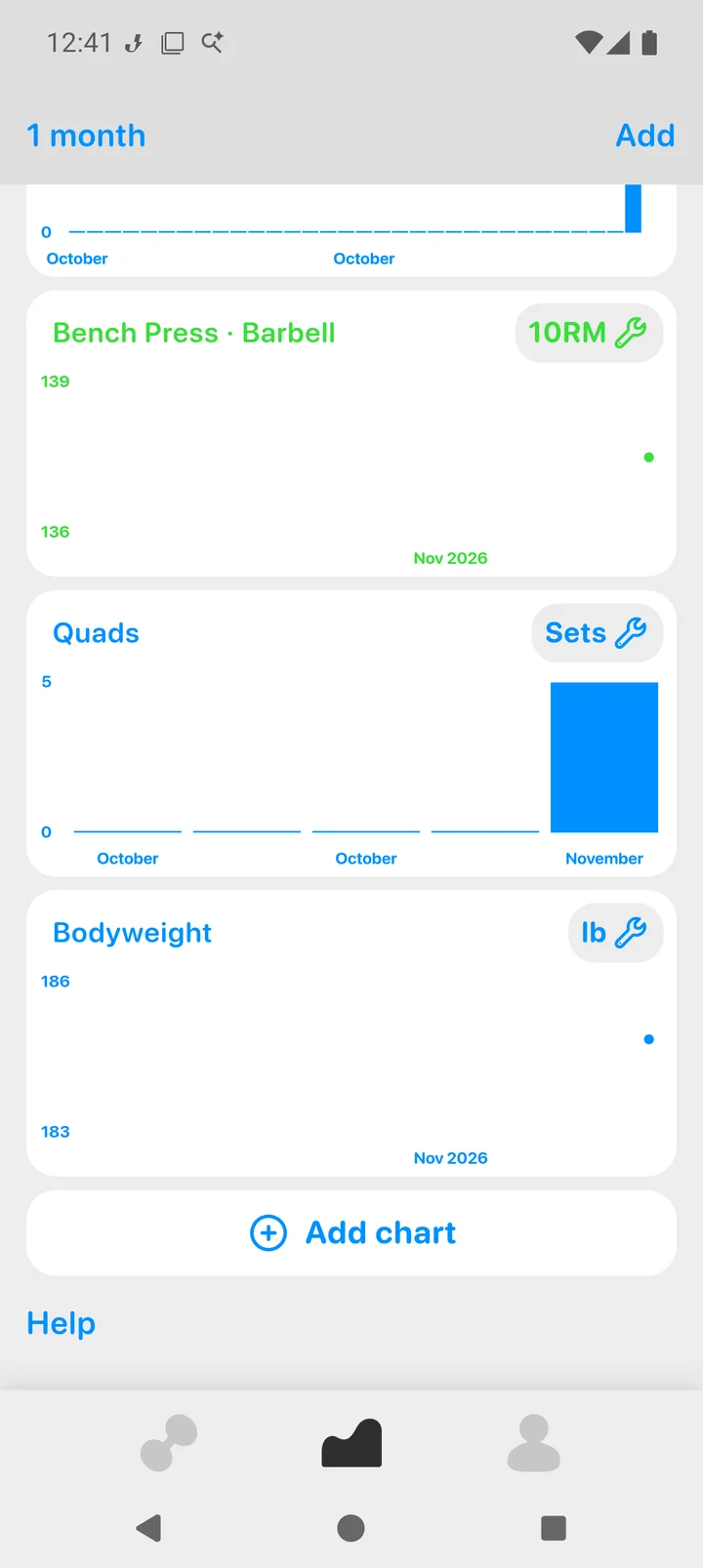\n\nCells are just plain numeric values. There's no training max and there're no named programs either (like 5/3/1 or nSuns), so you either build a plan yourself, or let the PRO generator do it for you. Then the PRO engine suggests the weights based on the estimated rep max and logged RIR. E.g. after a 10-rep AMRAP with 255lb on deadlift, it suggested 285x5 for the following workout. The free CSV export has 4 files, but the workouts file is a report per workout, not a row per set.\n\n### MacroFactor Workouts\n\n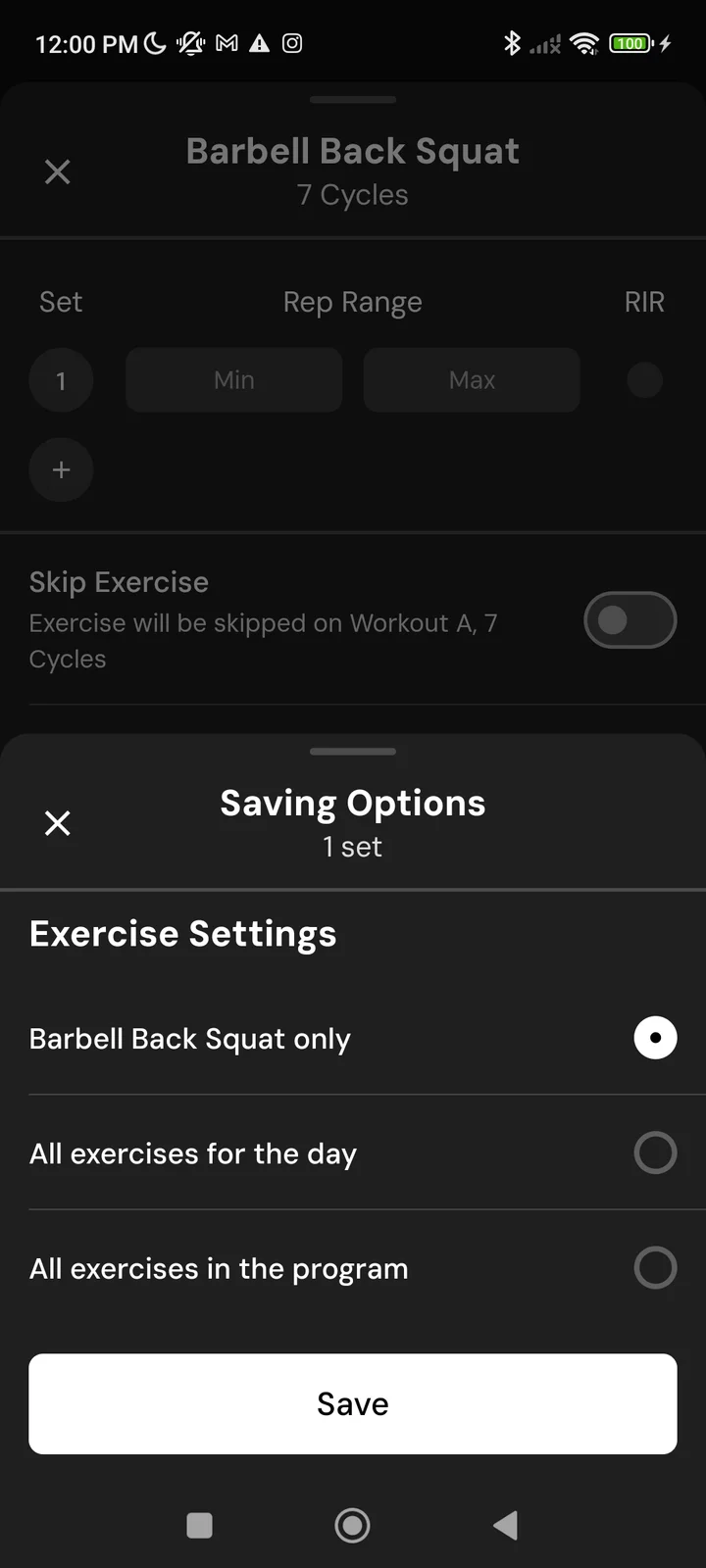 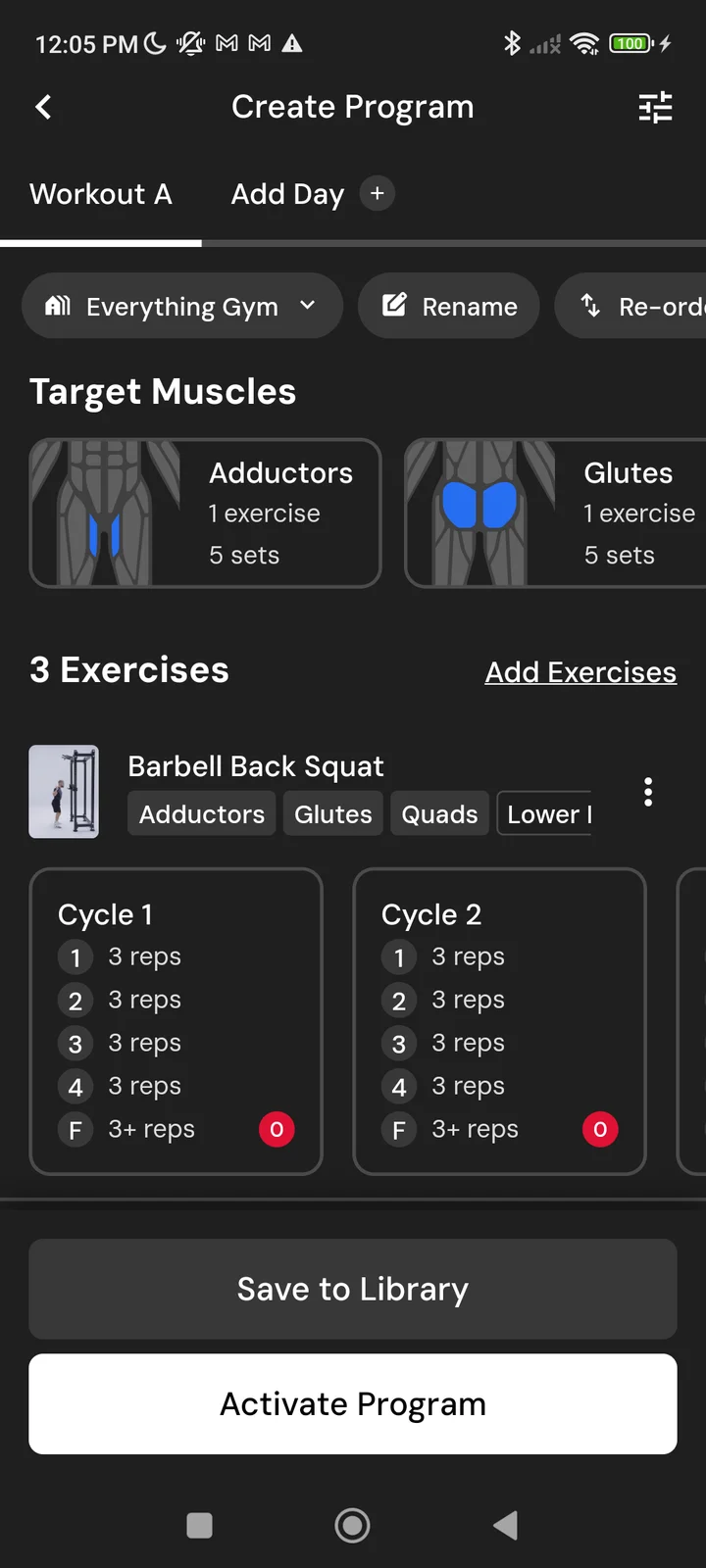\n\n- **Own rules:** No - Smart Progression picks the weights. A set scheme can apply to a day or the whole program\n- **See the block:** Partly, cycle cards per exercise\n- **Sheet in:** Partly, .xlsx, but only its own exports\n- **Laptop:** No web editor found\n- **Data out:** Spreadsheet export\n- **Own graphs:** No, fixed charts, but detailed: 1-RM, 3-RM, 10-RM, volume, reps and sets per exercise\n- **Copy a week:** One exercise to all cycles\n- **Price:** Everything is paid. $11.99/month, $47.99 per 6 months or $71.99/year, 7-day trial\n\nOut of the apps that calculate weights for you, MacroFactor Workouts is the closest thing to a spreadsheet. If you enable Periodization, each exercise in a day has a horizontal row of cards (Cycle 1 to 7), with sets, rep targets and RIR. There's \"Save To All Cycles\" that copies one of them to all the others. And there are also Saving Options, where you can apply a set scheme to:\n\n- just one exercise\n- all exercises in the day\n- all exercises in the program\n\nIt's the only app here that imports a spreadsheet file, but just the .xlsx files that it exported itself. Data export has Quick and Granular options, and you can open both in a spreadsheet. No way to set the weights though - a program set just has a range of reps, RIR and set type, and Smart Progression picks the weight automatically. Also no named programs - you either build from scratch, or let Smart Generation do it.\n\n### StrengthLog\n\n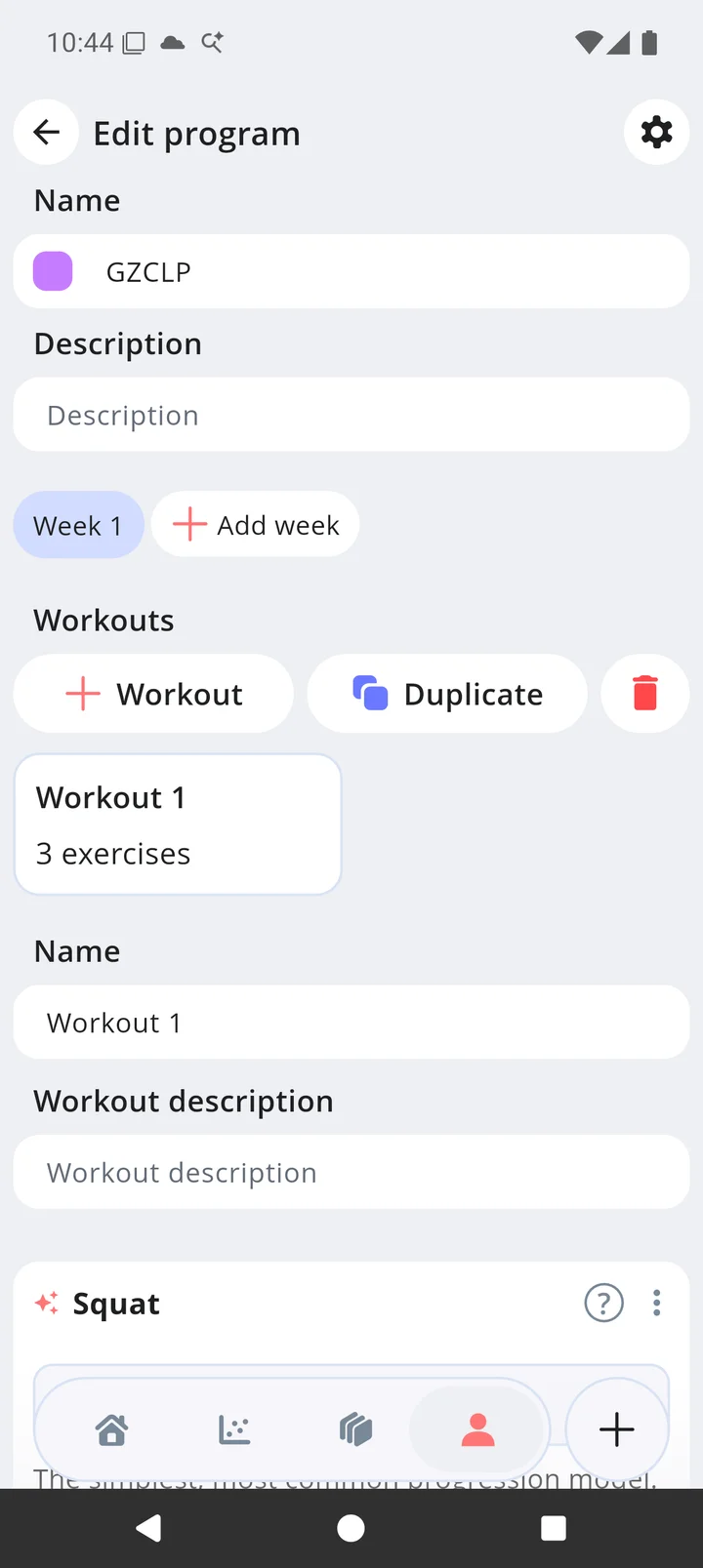\n\n- **Own rules:** Partly - % of 1RM (Premium) and progression presets: Copy last, Linear (free), Double and Triple (Premium); no formulas\n- **See the block:** Partly, one workout at a time, with a read-only overview of all weeks\n- **Sheet in:** No, only a shared link (Premium)\n- **Laptop:** Yes, app.strengthlog.com, the same editor as the phone\n- **Data out:** CSV, one row per set\n- **Own graphs:** No, fixed charts; most of them need Premium\n- **Copy a week:** Yes, \"Duplicate\" for the selected week\n- **Premium:** $16.99/month, $37.99 per 3 months or $109/year\n\nStrengthLog's program editor has week chips with \"Add week\" and \"Duplicate\", and below them you edit workouts individually. Then the program page lists all the weeks read-only, with summaries like \"Squat 15 reps in 5 sets, Linear progression\". There's no way to apply changes to all weeks, so you duplicate a week and then edit each copy manually. There's a \"smart block\" (Linear, Double, Triple progression) where you set the sets, reps and weight step a single time for all future workouts of the exercise, which kinda helps a bit.\n\n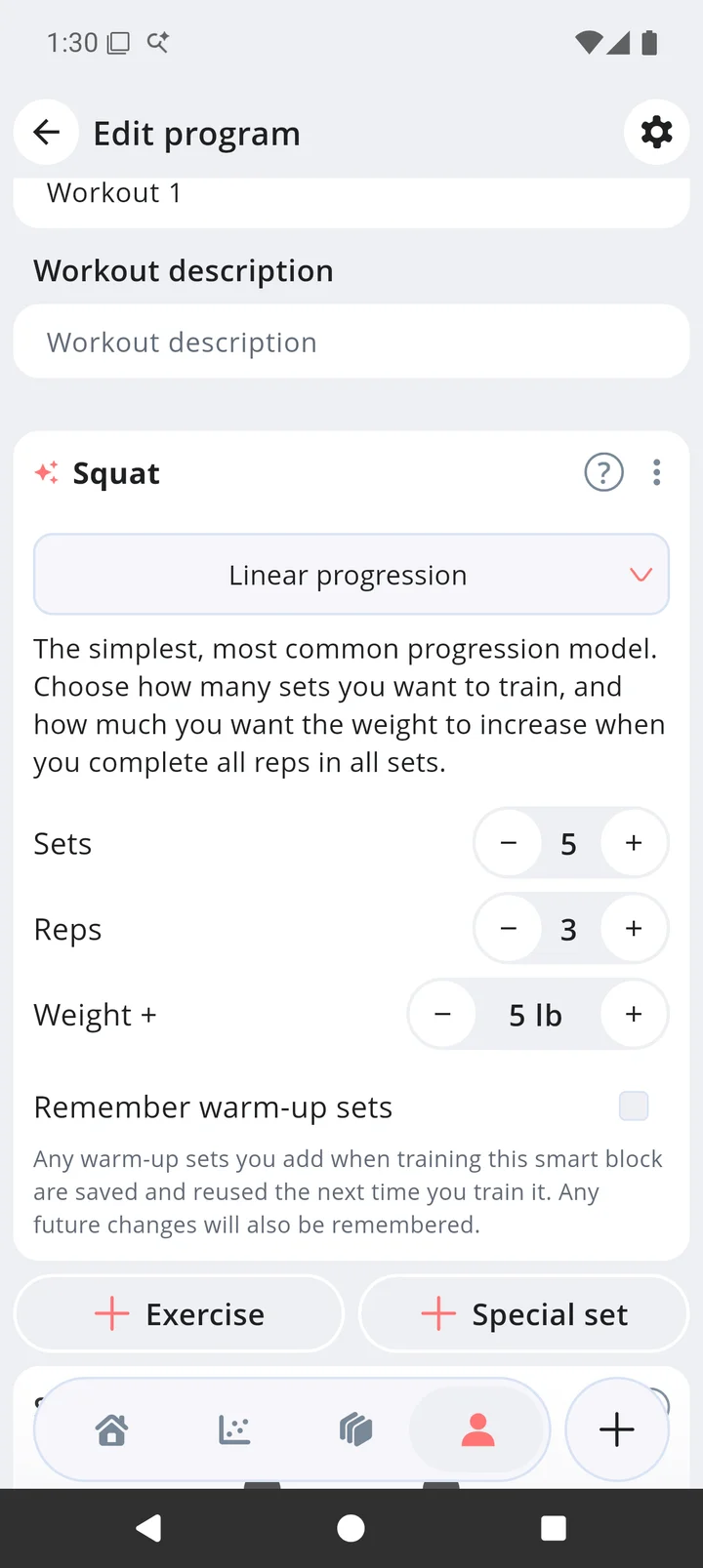 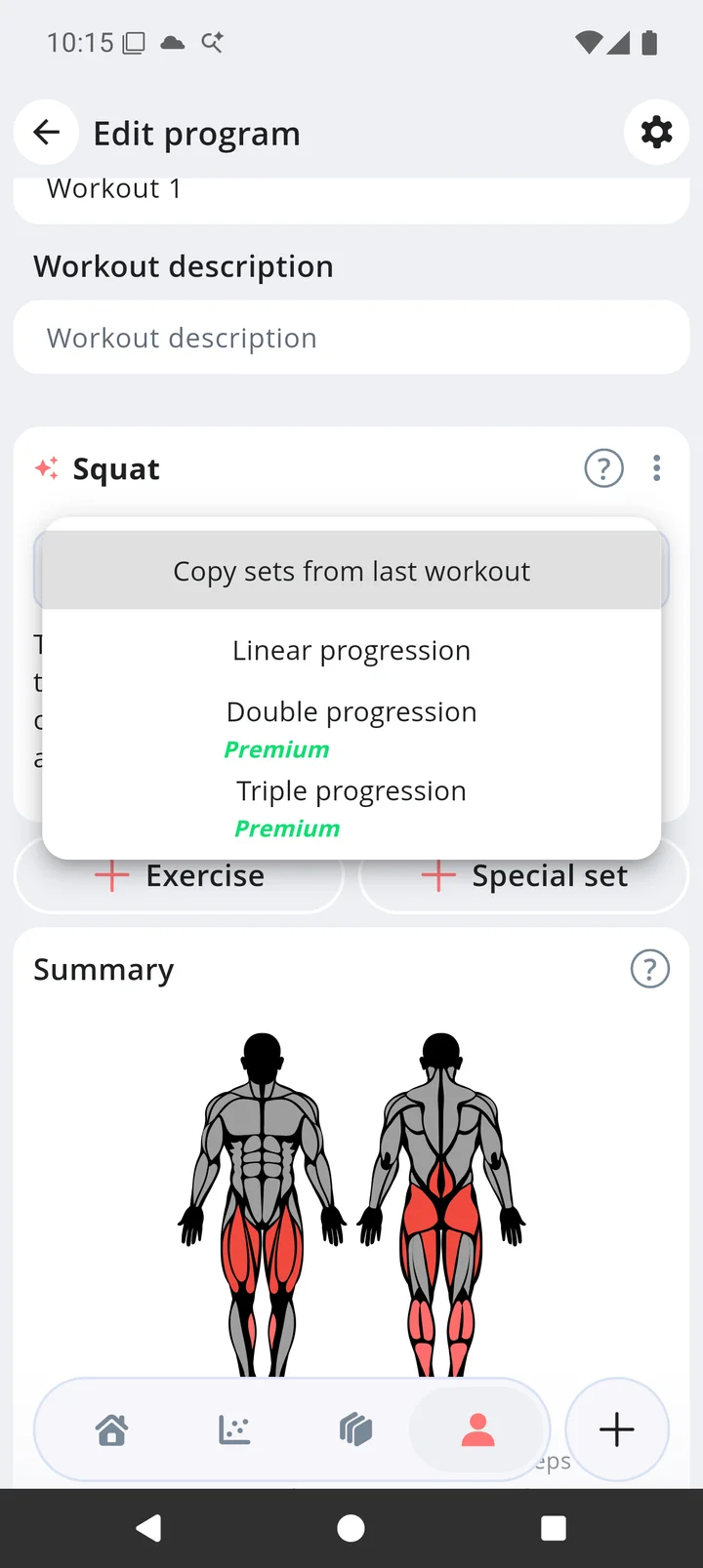\n\nSet weight could be a number, the last logged weight, or % of 1RM (with My 1RMs, Premium). No formulas though, and there's no 5/3/1 or nSuns in the library. You can get programs from other users just via their share link (Premium, it's valid for 30 days). Free CSV export has a row per set. Webapp (app.strengthlog.com) has the same program editor as on the phone - week chips, it displays just the selected week, and you can reorder it, duplicate it and delete it.\n\n### RP Hypertrophy\n\n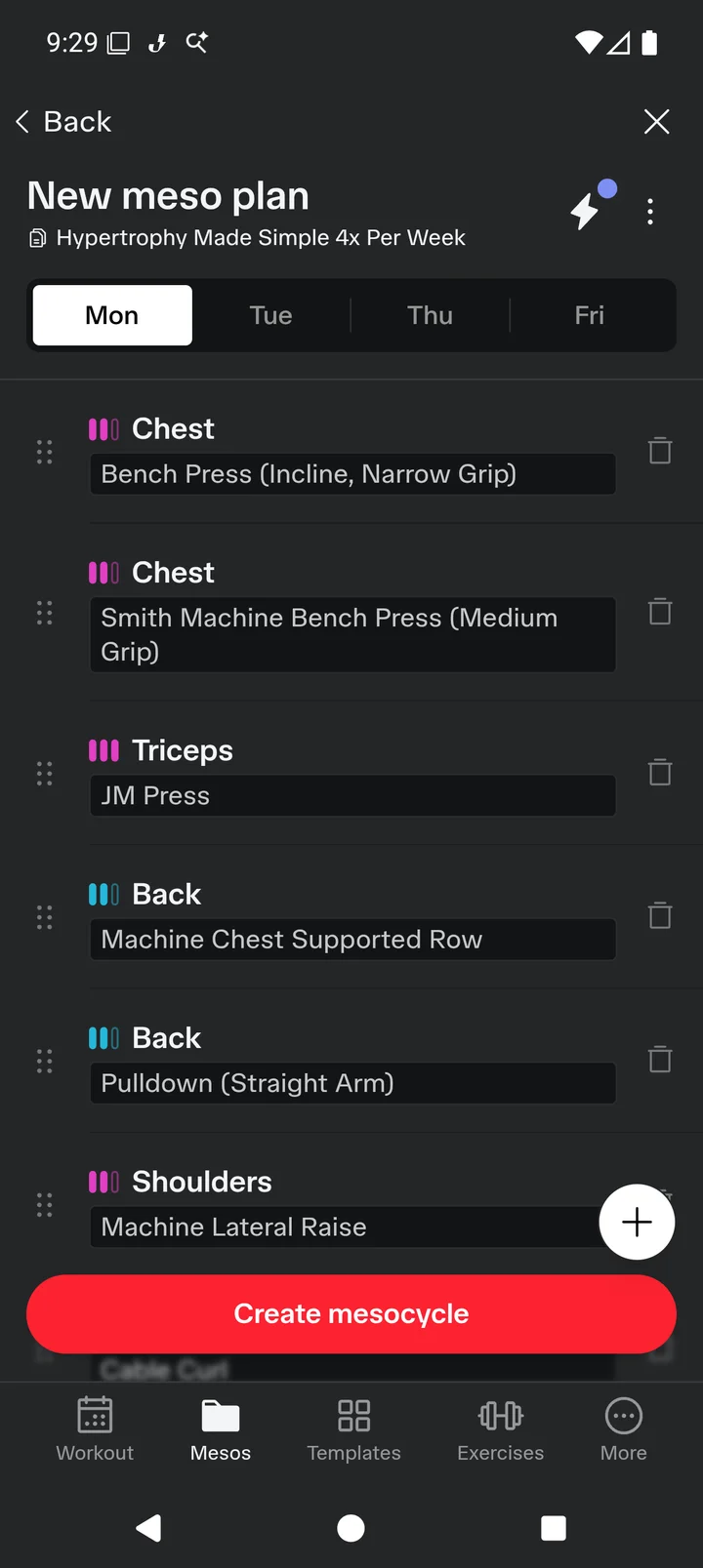\n\n- **Own rules:** No - the RP engine sets sets, reps and weights\n- **See the block:** Partly, a planning board of exercises, without sets or weights\n- **Sheet in:** No import at all\n- **Laptop:** Partly, the same app in a browser, one day at a time\n- **Data out:** Partly, a zipped JSON file\n- **Own graphs:** No charts, only two summary tables per mesocycle\n- **Copy a week:** A whole mesocycle only\n- **Price:** $34.99/month or $299.99/year\n\nPlanning in RP Hypertrophy is based on muscle groups - on the planning board there're days, and for each day - muscle groups and exercises for those. Any changes you make there apply to all weeks. There're no sets, reps or weights on the board - RP engine calculates those based on the feedback you provide, and RIR decreases week over week, with a deload in the end. You only choose the muscle priority (Emphasize, Grow, Maintain).\n\n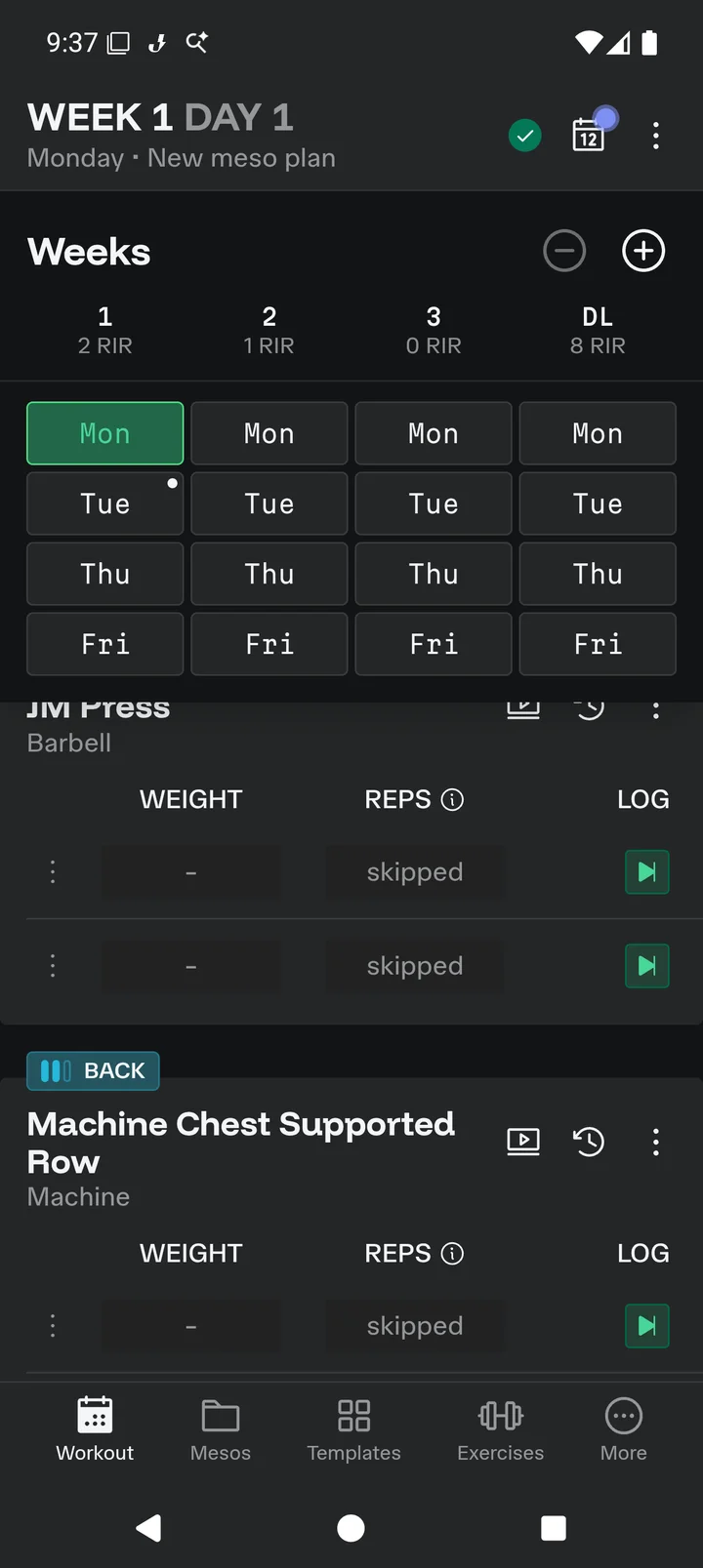 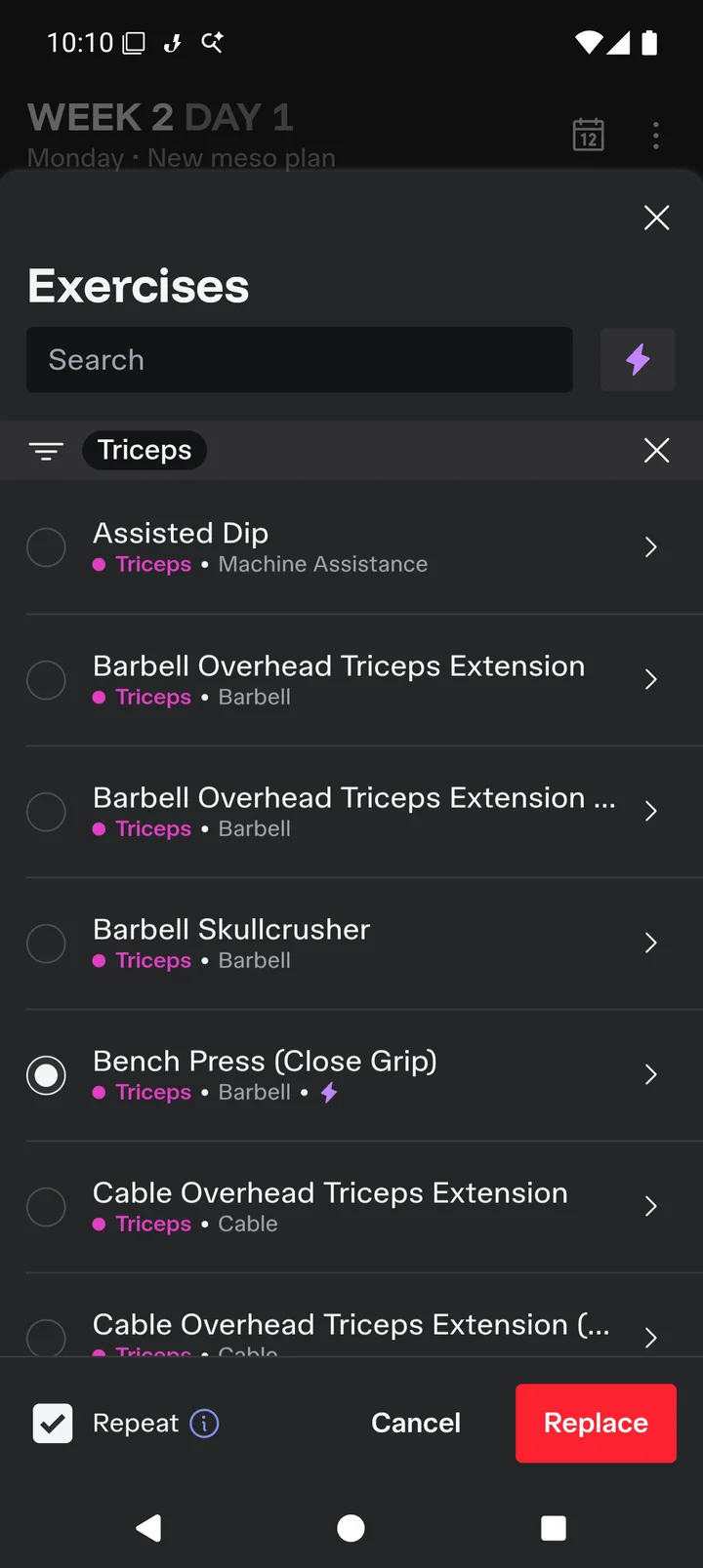\n\nYou can copy a whole mesocycle, or save as a template, and there's also \"Replace with Repeat\" that replaces the exercise for all following weeks. No way to bring anything in though, and export is a zipped JSON file - fine if you're gonna script something, but not really for a spreadsheet. The browser version on training.rpstrength.com is basically the same app, only in a browser - day by day, no separate planning view or anything.\n\n## Workout loggers: no weeks\n\nStrong, Hevy, JEFIT, Lyfta, FitNotes and Caliber are nice loggers, but a routine there is just one workout:\n\n- there's no notion of weeks, and no way to copy weeks\n- sets are just static values\n- there're no formulas or bulk editing\n\nYou can duplicate a routine (in JEFIT - even a whole plan), and add it from a share link (except FitNotes). So if you run a multi-week program in any of those - you usually still keep the spreadsheet open, next to the app.\n\n### Strong\n\n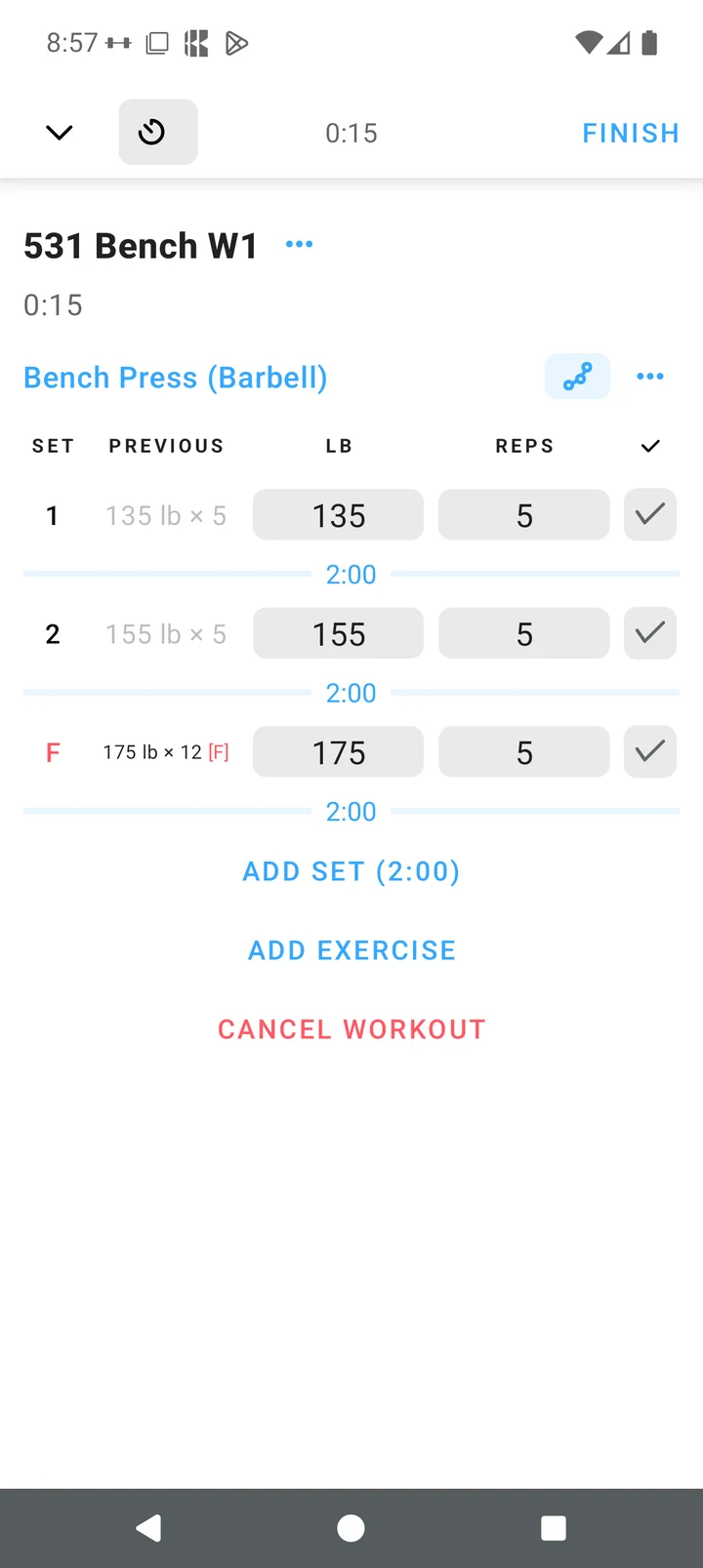\n\n- **Copy:** a routine (Duplicate)\n- **Sheet in:** No, only a Strong link\n- **Progression:** None, \"Update Template\" copies logged numbers back\n- **Data out:** CSV of workouts and measurements\n- **Own graphs:** Partly, dashboard widgets you pick; exercise charts need PRO\n- **PRO:** $4.99/month, $29.99/year or $99.99 lifetime\n\nWhen you type a value, it gets filled into all the empty sets after it. E.g. if you did a 12-rep AMRAP with 175 pounds, the following workout still stayed 175x5, both on free and PRO.\n\n### Hevy\n\n- **Copy:** a routine (Duplicate Routine)\n- **Sheet in:** No, only a Hevy link\n- **Progression:** Double progression in Trainer (PRO)\n- **Laptop:** Partly, hevy.com edits one routine at a time\n- **Data out:** CSV of workouts and measurements\n- **Own graphs:** No, fixed charts, most of them free\n- **PRO:** $2.99/month, $23.99/year or $74.99 lifetime\n\n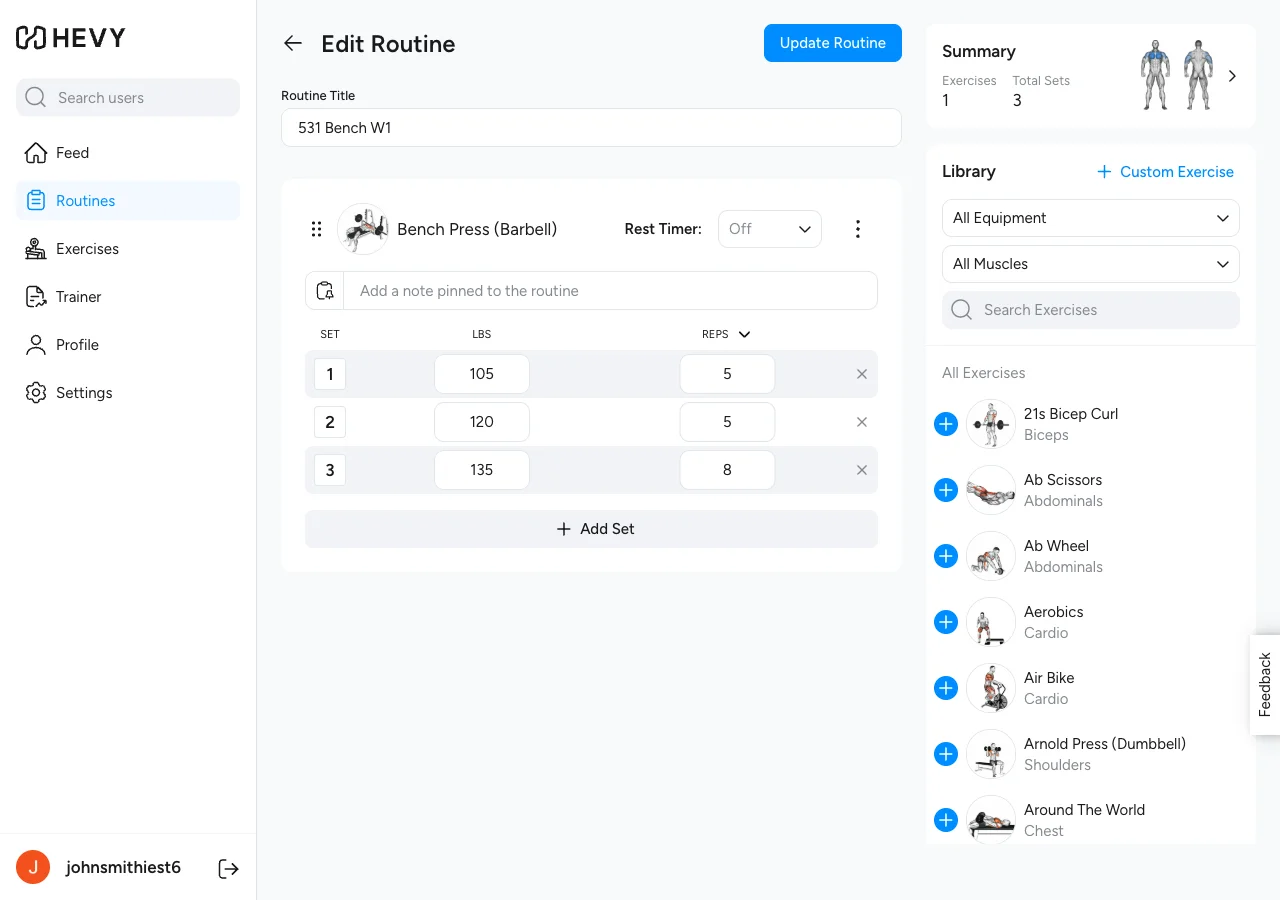\n\nIn free tier you can only have 4 routines. If you did 8 reps on AMRAP, the routine would just copy those 8 reps as a target for the next workout. And on the website (hevy.com) you also can only edit routines one by one, with just simple pounds/reps.\n\n### JEFIT\n\n- **Copy:** a whole plan\n- **Sheet in:** No, only a JEFIT link or QR code\n- **Progression:** A 4-week periodization wave (Elite)\n- **Laptop:** Partly, a web routine builder with days only\n- **Data out:** No export in the Android app\n- **Own graphs:** No, fixed charts\n- **Elite:** $12.99/month or $69.99/year\n\n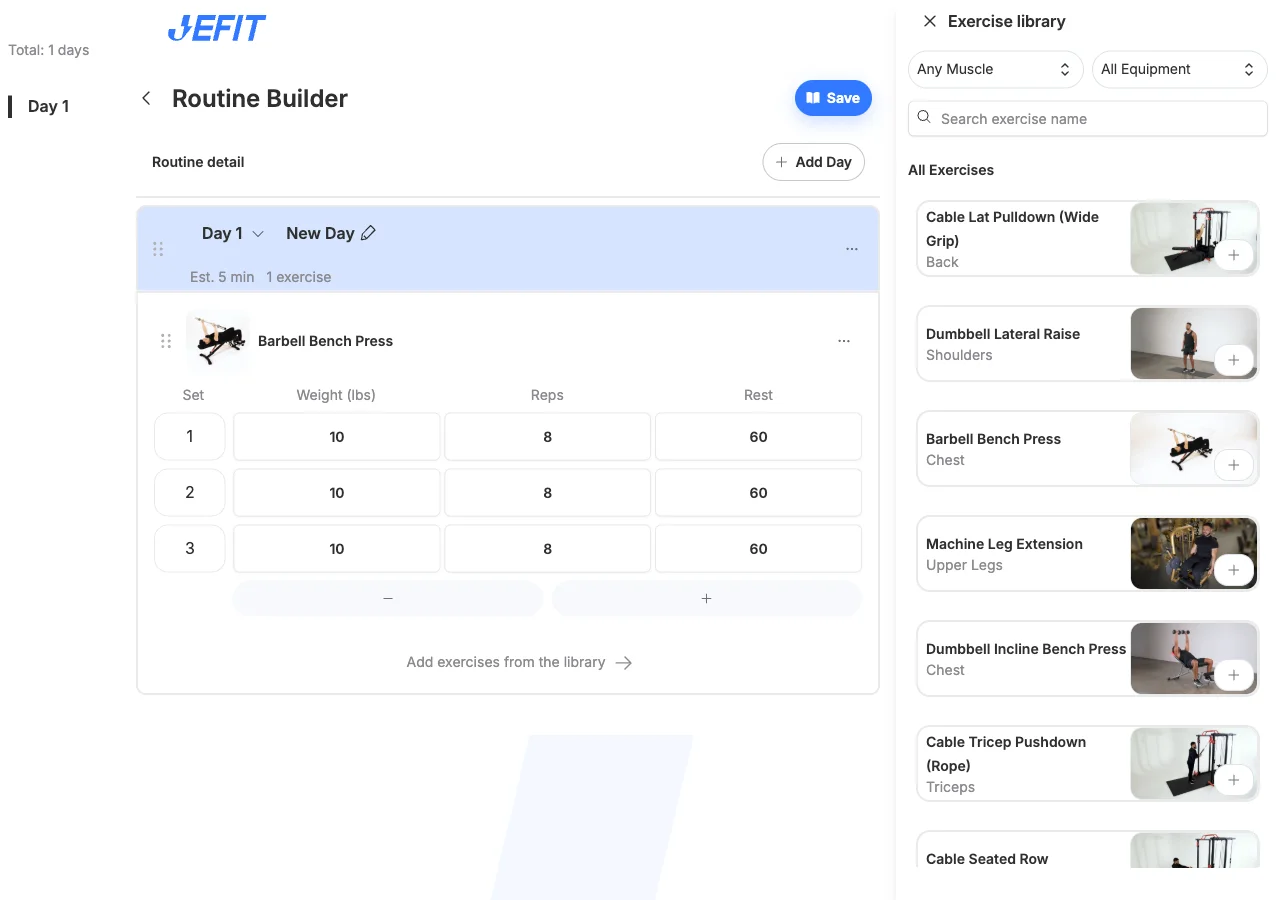\n\nA plan can have max 5 days (31 on Elite), and there're no weeks. The routine builder on the website (you don't even have to have an account) is the same thing - just a bunch of days, with weight, reps and timer for each set, and a \"Copy this day\" button.\n\n### Lyfta\n\n- **Copy:** a routine\n- **Sheet in:** No, only a Lyfta link or Explore\n- **Progression:** One-tap suggestions during a workout\n- **Data out:** CSV\n- **Own graphs:** No, fixed charts; longer ranges need Premium\n- **Premium:** $59.99/year\n\nPrograms are folders of routines. There are community 5/3/1 programs, but no training max or % fields.\n\n### FitNotes\n\n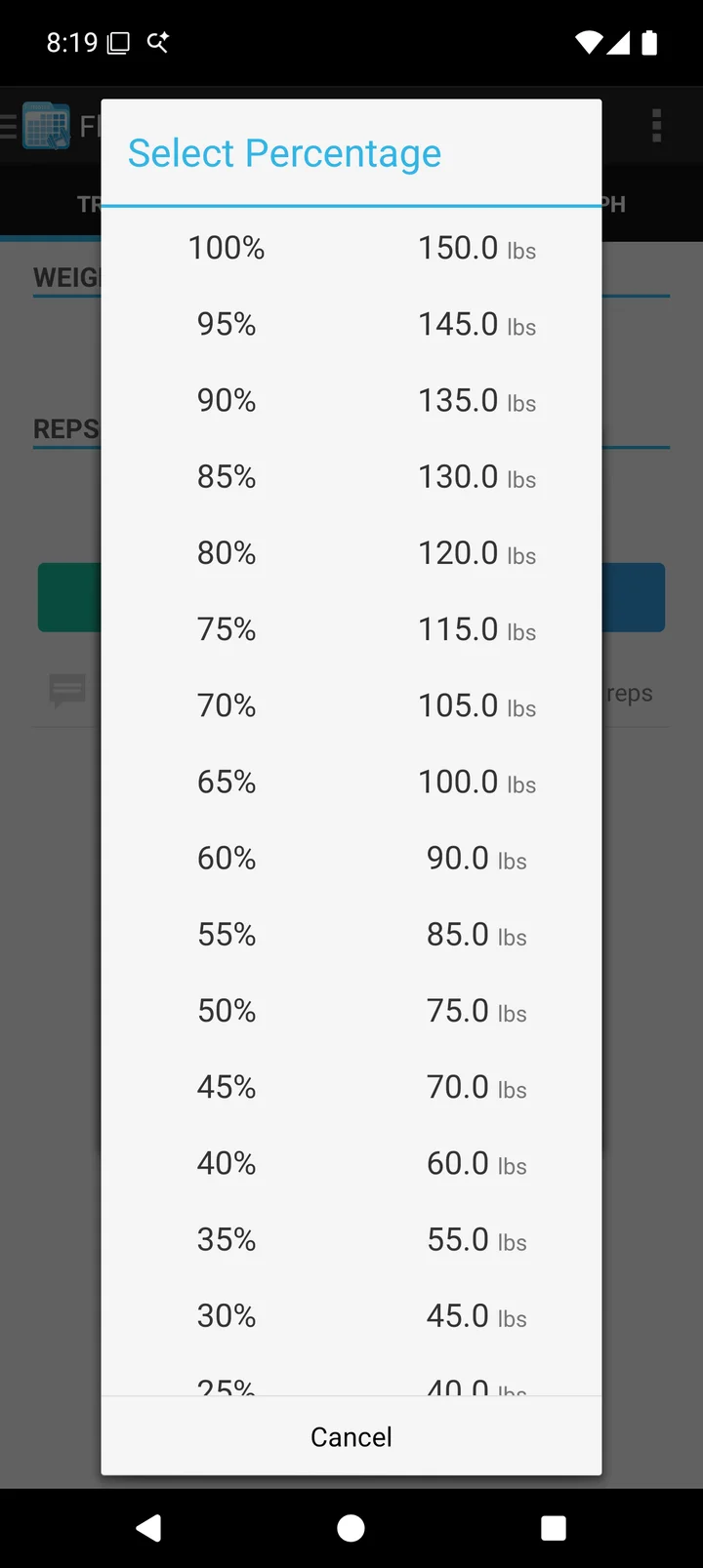\n\n- **Copy:** a routine\n- **Sheet in:** No import at all\n- **Progression:** None, copy previous sets or fixed sets\n- **Data out:** CSV (\"Spreadsheet Export\")\n- **Own graphs:** No, but a lot of free fixed charts and breakdowns by week, month and year\n- **Price:** Free, with an optional $6.99 one-time Supporter app\n\nThe Set Calculator gives a % of a typed max, but stores nothing.\n\n### Caliber\n\n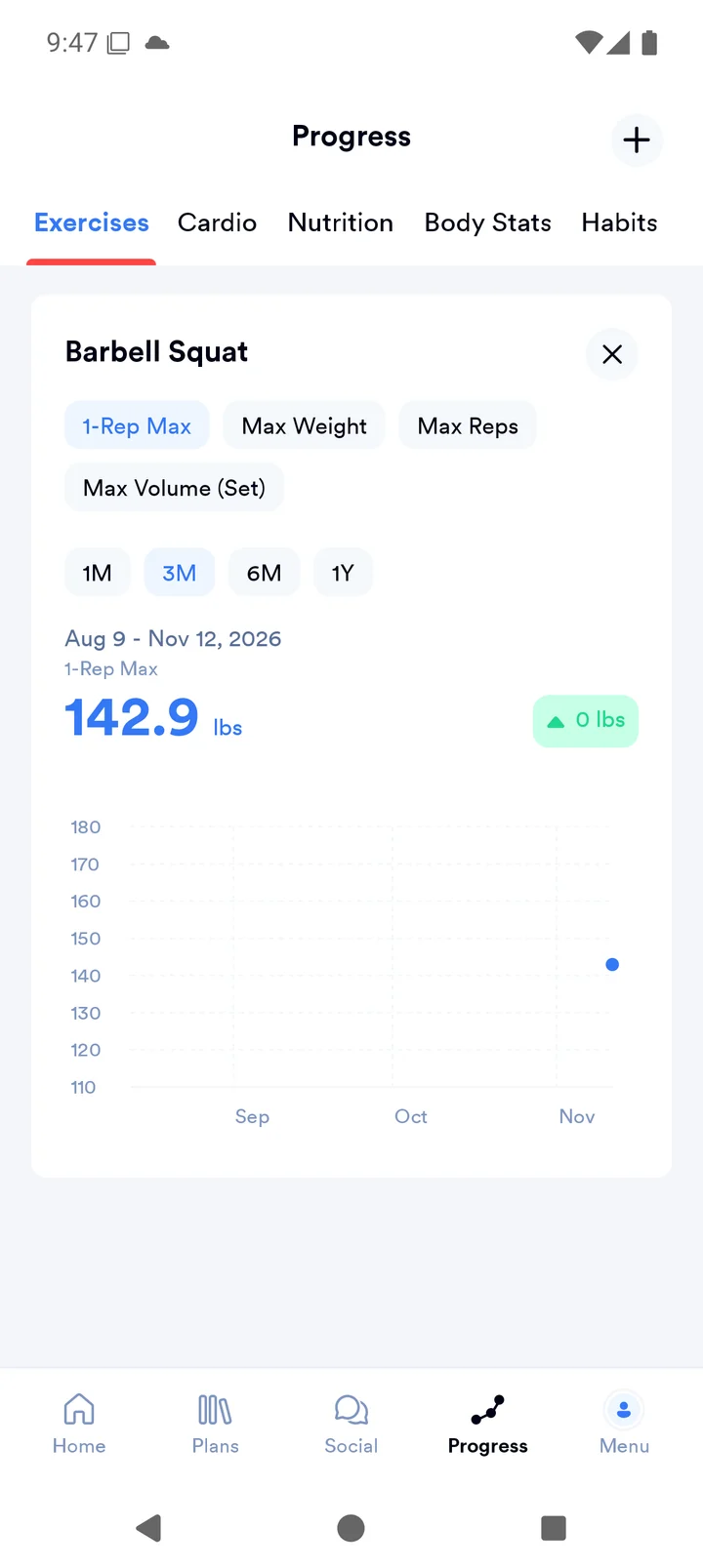\n\n- **Copy:** a plan (Duplicate)\n- **Sheet in:** No, only a Caliber share link\n- **Progression:** None, the plan explains double progression in text only\n- **Data out:** CSV (free)\n- **Own graphs:** Partly, you add a chart per exercise, free\n- **Plus:** $12/month or $72/year\n\nYou can build your own plans for free, and set sets, rep range and rest for each exercise. But a plan is just a list of workouts, with no weeks. The 120+ coach-designed plans need Plus.\n\n## Apps that plan for you\n\n- **Fitbod, Gravl and MyoAdapt** generate the workouts automatically, so there isn't even a block to plan - you don't deal with weeks, duplicating stuff or formulas at all.\n- **GZCL Workout Logger** supports 7 built-in programs really well, but there's no way to edit programs there.\n\nThese are all good apps for their use cases - just not a replacement for a spreadsheet.\n\n## When to keep your spreadsheet\n\n- **You want a proper grid.** None of the apps here has cells you can select and type a formula into. Liftosaur's grid mode is the closest - weeks are columns, and you can drag exercises, days and weeks around - but the formulas live in the program text, not in cells.\n- **You do ad-hoc math.** For stuff like \"what if I ran 3 more weeks with 87.5%\", a spreadsheet is the best tool.\n- **You get a sheet from the coach each block.** Rewriting it into some app every 4 weeks gets tedious pretty quickly. Though in Liftosaur the AI assistant can do that part.\n\nAnd if you like logging in Strong or Hevy - you can keep the sheet for planning and the app for the gym. Plenty of people do that.\n\n## FAQ\n\n### Can I import my Google Sheet or Excel program into a workout app?\n\nNot directly into any app we tested. MacroFactor Workouts can load .xlsx files, but only the ones that MacroFactor exported itself. In Liftosaur the program is entered as plain text, so you'd need to rewrite the sheet one time (you can also ask ChatGPT/Claude to do it for you via the Liftosaur integration, it's Premium). Other apps usually only accept share links generated by the same app.\n\n### Is there a free workout app with formulas?\n\nLiftosaur - the whole program can use variables and formulas, and it's free. Volm has a free scripting language for progression rules, but not for the weights in a workout.\n\n### Which app is the closest to a lifting spreadsheet?\n\nLiftosaur - it's the only app that passed all 6 checks. You can:\n\n- use % of a max, templates and formulas for your own rules\n- see multiple weeks next to each other\n- get a program in by just pasting the program text\n- edit it in a web editor on a laptop\n- export every set to CSV\n- build your own graphs with formulas (Premium)\n\n### Can a workout app calculate 5/3/1 percentages from a training max?\n\nYes, Liftosaur, Hardy and KeyLifts can calculate the weight based on the max, and Volm and Boostcamp also support % of 1RM. Liftosaur, Hardy, Volm and KeyLifts would also increase the max on their own once you finish each cycle. In KeyLifts, the increase can also depend on your AMRAP reps.\n\n### Do Strong or Hevy support multi-week programs?\n\nNope, in both of these a routine is just one workout, and they don't have weeks. You could create a separate routine for every day of every week, but then you'd have to edit each one manually.","sizes":{"workout-spreadsheet-apps/liftosaur-weeks-side-by-side":{"width":720,"height":1558},"workout-spreadsheet-apps/liftosaur-program-text":{"width":720,"height":1558},"workout-spreadsheet-apps/liftosaur-web-editor-desktop":{"width":1280,"height":800},"workout-spreadsheet-apps/liftosaur-graphs-dashboard":{"width":600,"height":1299},"workout-spreadsheet-apps/liftosaur-graphs-text":{"width":600,"height":1299},"workout-spreadsheet-apps/hardy-week-tabs":{"width":720,"height":1607},"workout-spreadsheet-apps/hardy-1rm-sets":{"width":720,"height":1607},"workout-spreadsheet-apps/hardy-set-intensity":{"width":720,"height":1607},"workout-spreadsheet-apps/hardy-library":{"width":720,"height":1607},"workout-spreadsheet-apps/hardy-web-sets-rules-desktop":{"width":1280,"height":1200},"workout-spreadsheet-apps/hardy-web-tm-desktop":{"width":1280,"height":900},"workout-spreadsheet-apps/volm-program-days":{"width":720,"height":1607},"workout-spreadsheet-apps/volm-progression-dsl":{"width":720,"height":1607},"workout-spreadsheet-apps/volm-progression-presets":{"width":720,"height":1607},"workout-spreadsheet-apps/volm-add-widget":{"width":720,"height":1607},"workout-spreadsheet-apps/volm-web-plan-desktop":{"width":1280,"height":900},"workout-spreadsheet-apps/keylifts-week-grid":{"width":720,"height":1607},"workout-spreadsheet-apps/keylifts-percentage-schemes":{"width":720,"height":1607},"workout-spreadsheet-apps/keylifts-tm-auto-regulation":{"width":720,"height":1607},"workout-spreadsheet-apps/keylifts-amrap-tm-bump":{"width":720,"height":1607},"workout-spreadsheet-apps/boostcamp-duplicate-week":{"width":720,"height":1607},"workout-spreadsheet-apps/boostcamp-week-tabs":{"width":720,"height":1607},"workout-spreadsheet-apps/boostcamp-digits-keypad":{"width":720,"height":1607},"workout-spreadsheet-apps/boostcamp-web-weeks-desktop":{"width":1280,"height":540},"workout-spreadsheet-apps/alpha-week-grid":{"width":720,"height":1607},"workout-spreadsheet-apps/alpha-pro-suggestion":{"width":720,"height":1607},"workout-spreadsheet-apps/alpha-chart-cards":{"width":720,"height":1607},"workout-spreadsheet-apps/macrofactor-saving-options":{"width":720,"height":1600},"workout-spreadsheet-apps/macrofactor-cycle-cards":{"width":720,"height":1600},"workout-spreadsheet-apps/strengthlog-program-weeks":{"width":720,"height":1607},"workout-spreadsheet-apps/strengthlog-smart-block":{"width":720,"height":1607},"workout-spreadsheet-apps/strengthlog-progression-models":{"width":720,"height":1607},"workout-spreadsheet-apps/rp-planning-board":{"width":720,"height":1607},"workout-spreadsheet-apps/rp-rir-weeks":{"width":720,"height":1607},"workout-spreadsheet-apps/rp-replace-repeat":{"width":720,"height":1607},"workout-spreadsheet-apps/strong-amrap-no-change":{"width":720,"height":1607},"workout-spreadsheet-apps/hevy-web-routine-desktop":{"width":1280,"height":900},"workout-spreadsheet-apps/jefit-web-builder-desktop":{"width":1280,"height":900},"workout-spreadsheet-apps/fitnotes-percent-table":{"width":720,"height":1607},"workout-spreadsheet-apps/caliber-exercise-chart":{"width":720,"height":1607}}}







































