Add exercises missing from the built-in list, with muscles, types, notes and an image. Let AI fill the muscles, and split or hide muscle groups.
Where to create one
Two places open the same form. In a workout, tap the + button after the last exercise. The exercise picker opens. Find the Custom Exercises header and tap Create next to it. Or go to Me → Exercises and tap Create custom exercise. The exercise picker in the program editor has the same header.
Fill in the form
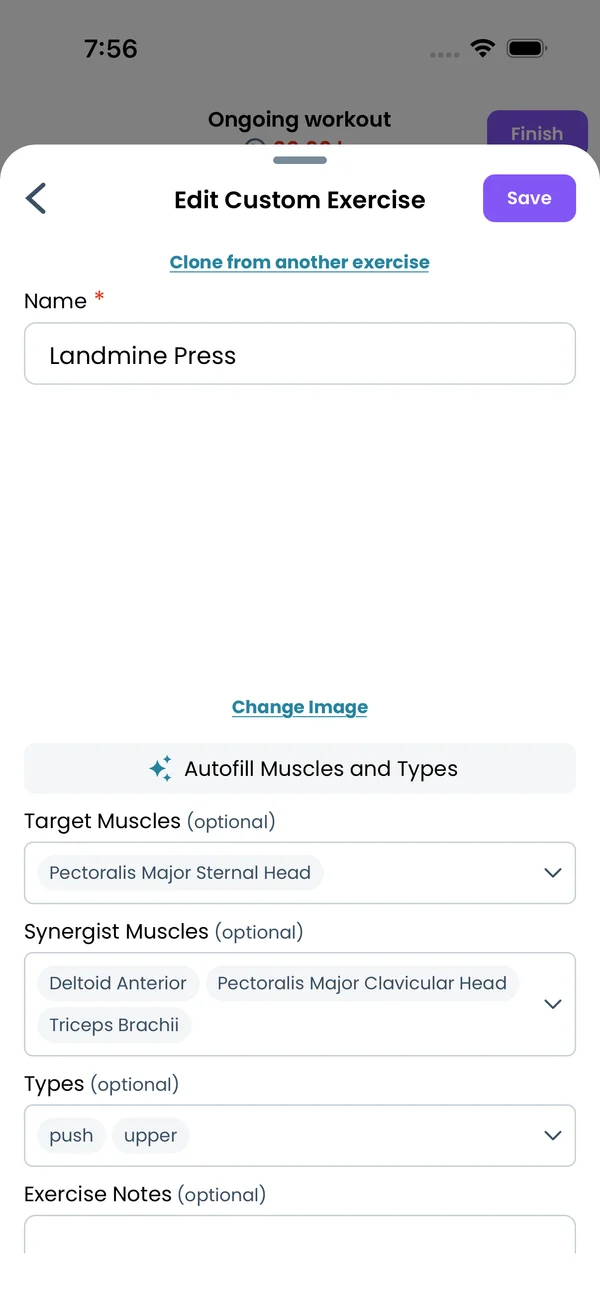
The form has a Name, an image, an Autofill Muscles and Types button, Target Muscles, Synergist Muscles, Types and Exercise Notes. Only the name is required. It cannot contain / { } ( ) # [ ] | ! :. Save in the top right stays disabled until the name is valid. Notes take Markdown.
Let AI fill the muscles and types
Type the name, then tap Autofill Muscles and Types. The app sends the name to the Liftosaur server, and an AI model picks the target muscles, the synergist muscles and the types. If the name is not a known exercise, the app says "Couldn't autofill the muscles for this exercise. Try a different name!". You can change any field by hand after that.
Clone another exercise
Tap Clone from another exercise above the name. A sheet lists every built-in exercise, per equipment, and your other custom exercises. Search by name and tap one. The app copies its image, target muscles, synergist muscles and types into your form. The name stays the one you typed. Use this for a variation, like a "Paused Bench Press" cloned from Bench Press.
Pick muscles and types by hand
Tap the Target Muscles or Synergist Muscles field. The sheet shows every muscle with a small image, grouped by muscle group, including your custom groups. Tap a muscle to select or unselect it, then tap Done. The Types field opens a list of Core, Pull, Push, Legs, Upper and Lower. The muscles count towards sets and volume per muscle group in the week stats and the graphs. The exercise picker filters use both the muscles and the types.
Add an image
Tap Add image. The sheet asks for a 2:3 aspect ratio and gives three sources:
From Image Library opens the images of all built-in exercises, plus every image you uploaded before. Search by name and tap one.
From Camera takes a photo with the phone camera.
From Photo Library picks a photo from your phone.
Uploads need a signed-in account. Otherwise the app says "You need to be logged in to upload custom exercise images". On the web the second option is Upload Image, which picks a file from your computer. Once an image is set, tap Change Image to replace it. The image shows in the workout screen, in program previews and on the exercise stats screen.
Use the exercise
Tap Save. The exercise appears under Custom Exercises in the picker. Select it and tap Add to this workout. In a program, write it by name like any built-in exercise:
Landmine Press / 3x10 / 60s
To edit it later, open the picker and tap the pencil icon next to the exercise. Renaming it updates your current program text too. The Delete Exercise button at the bottom of the form asks for a confirmation first. See Liftoscript for the program syntax.
Custom muscle groups
Go to Me → Muscle Groups. The built-in groups are Shoulders, Triceps, Back, Abs, Glutes, Hamstrings, Quadriceps, Chest, Biceps, Calves and Forearms. Each row shows the group image, the name and its muscles. Tap Add custom muscle group, type a name, and tap Add. The new group starts with no muscles. Use this to split a built-in group, like Front, Side and Rear Delts instead of one Shoulders group. Custom groups get their own weekly volume graph and their own row in the week stats. The same editor opens from Edit Muscle Groups under Weekly Sets Per Muscle Group in the program editor's muscle settings, in the app and on the web.
Choose the muscles in a group
Tap the pencil icon next to a group. The Choose Muscles sheet lists every muscle. Tap one to add or remove it, then tap Done. This works for built-in groups too, and a muscle can be in more than one group.
Hide and restore built-in groups
Tap the crossed eye icon on a built-in group to hide it. Tap the trash icon on a custom group to delete it. Hidden built-in groups are listed under Unhide muscle groups: at the bottom of the screen. Tap a name there to bring the group back.
{"feature":{"id":"custom-exercises","title":"Custom Exercises and Muscle Groups","shortDescription":"Add exercises missing from the built-in list, with muscles, types, notes and an image. Let AI fill the muscles, and split or hide muscle groups.","order":20,"category":"Exercises and equipment","datePublished":"2026-09-27","dateModified":"2026-09-28","screenshots":["custom-exercises-cloned","custom-exercises-muscle-groups"]},"content":"## Where to create one\n\n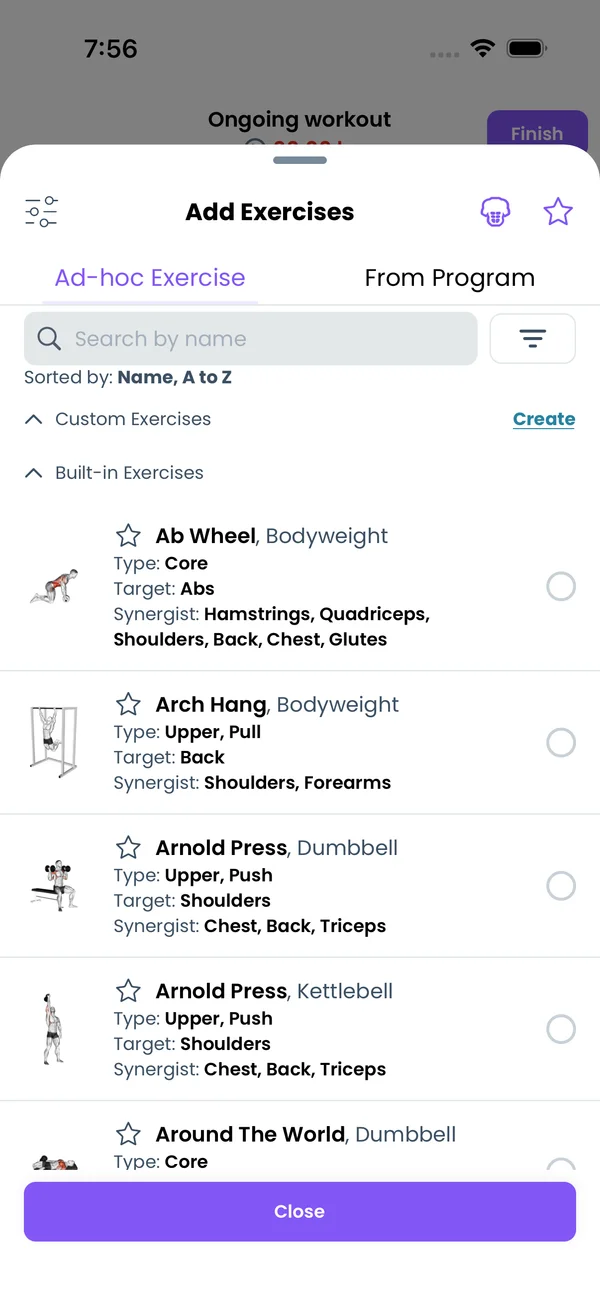\n\nTwo places open the same form. In a workout, tap the **+** button after the last exercise. The exercise picker opens. Find the **Custom Exercises** header and tap **Create** next to it. Or go to **Me → Exercises** and tap **Create custom exercise**. The exercise picker in the program editor has the same header.\n\n## Fill in the form\n\n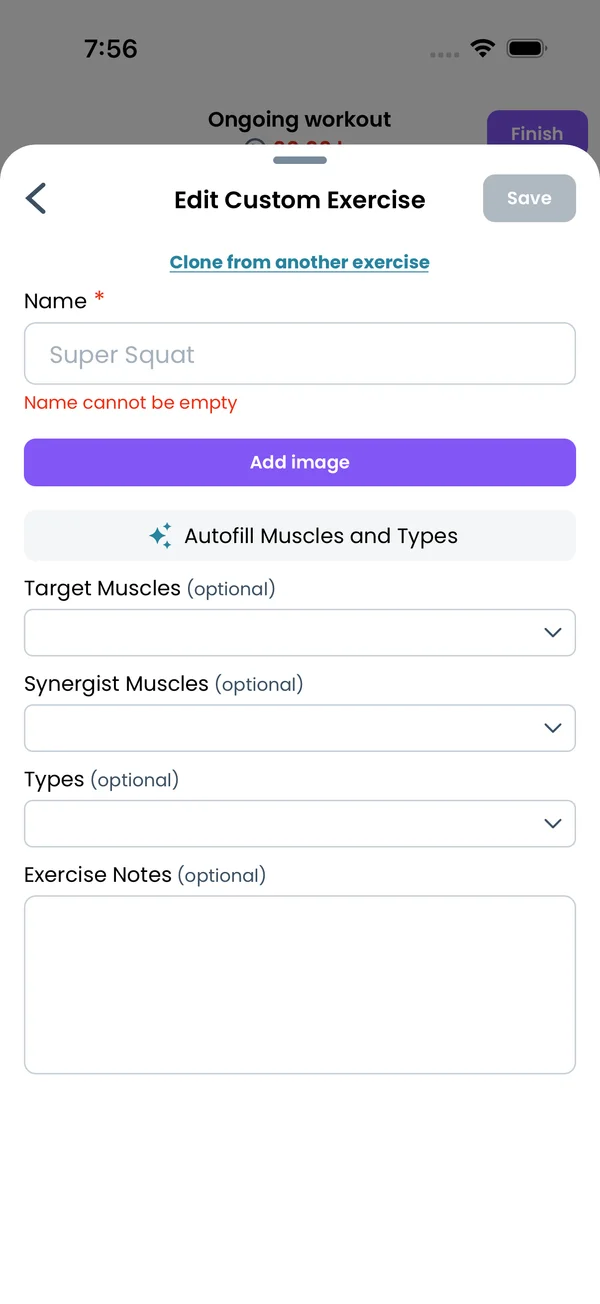\n\nThe form has a **Name**, an image, an **Autofill Muscles and Types** button, **Target Muscles**, **Synergist Muscles**, **Types** and **Exercise Notes**. Only the name is required. It cannot contain `/ { } ( ) # [ ] | ! :`. **Save** in the top right stays disabled until the name is valid. Notes take Markdown.\n\n## Let AI fill the muscles and types\n\n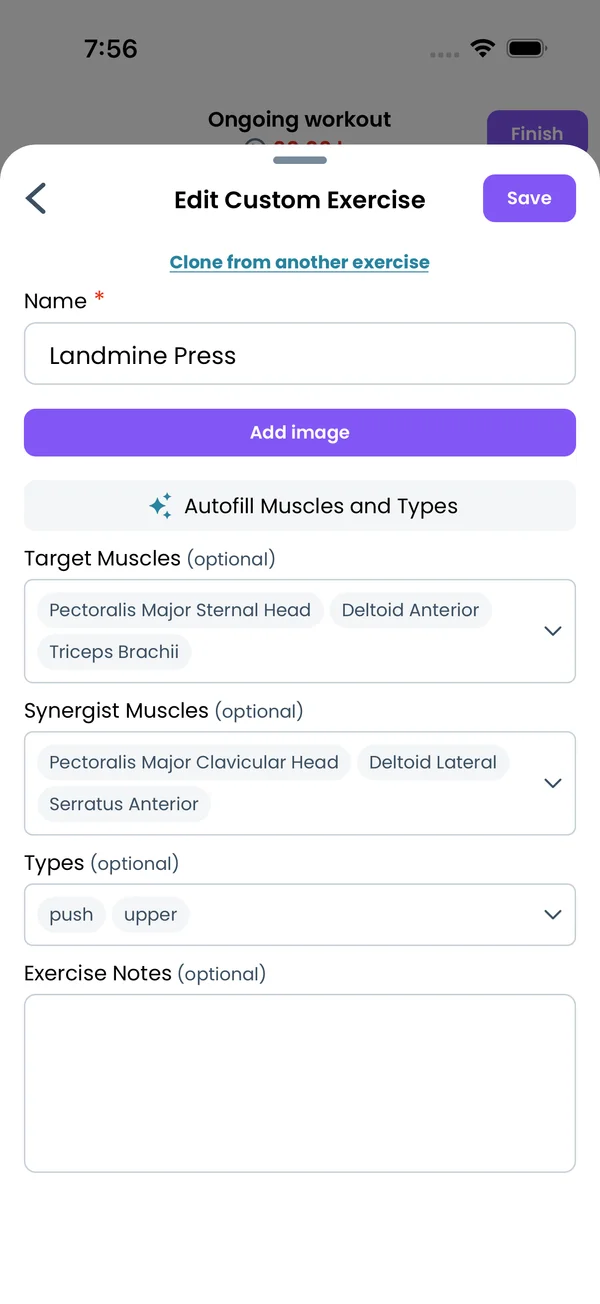\n\nType the name, then tap **Autofill Muscles and Types**. The app sends the name to the Liftosaur server, and an AI model picks the target muscles, the synergist muscles and the types. If the name is not a known exercise, the app says \"Couldn't autofill the muscles for this exercise. Try a different name!\". You can change any field by hand after that.\n\n## Clone another exercise\n\n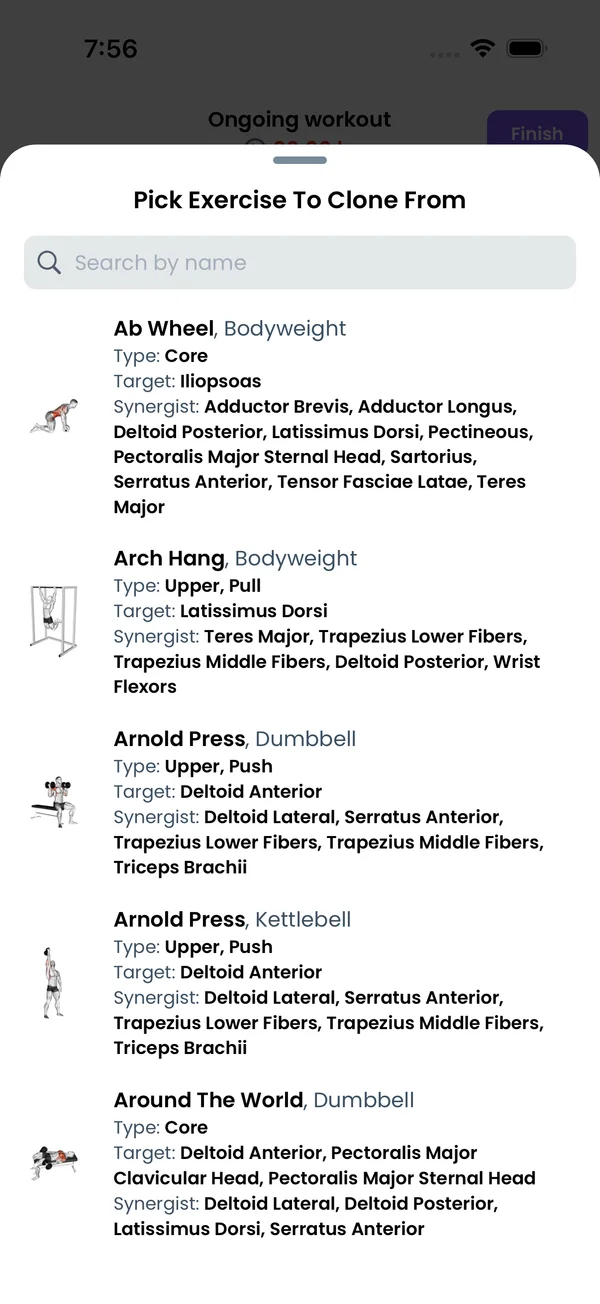\n\nTap **Clone from another exercise** above the name. A sheet lists every built-in exercise, per equipment, and your other custom exercises. Search by name and tap one. The app copies its image, target muscles, synergist muscles and types into your form. The name stays the one you typed. Use this for a variation, like a \"Paused Bench Press\" cloned from **Bench Press**.\n\n## Pick muscles and types by hand\n\n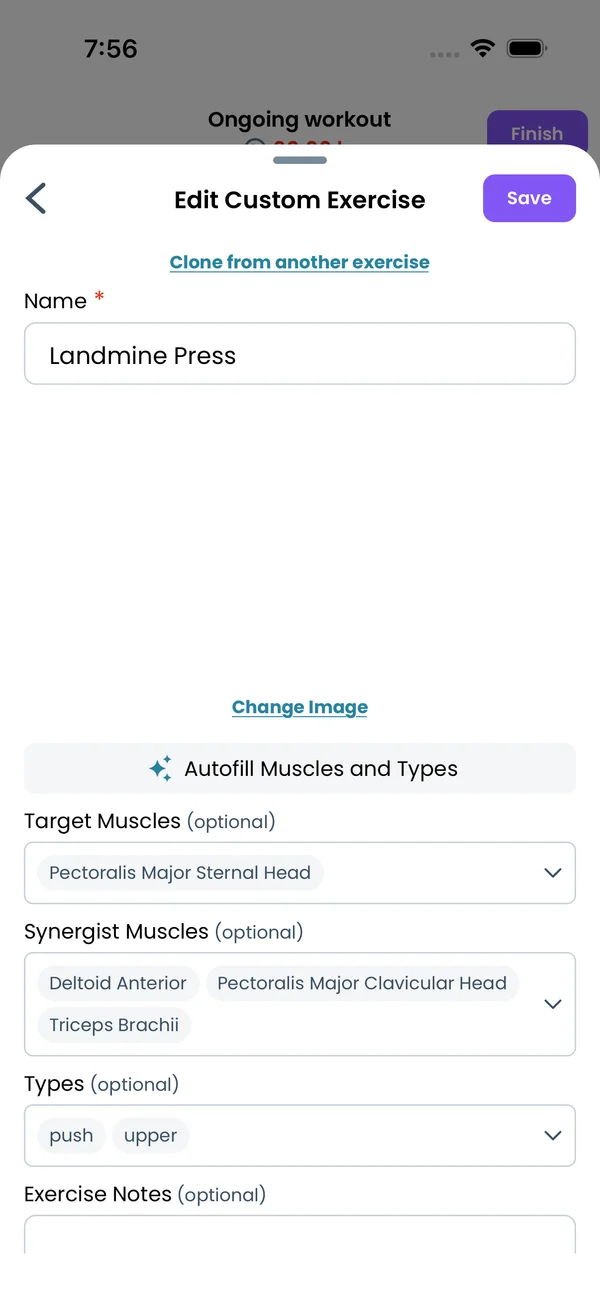\n\nTap the **Target Muscles** or **Synergist Muscles** field. The sheet shows every muscle with a small image, grouped by muscle group, including your custom groups. Tap a muscle to select or unselect it, then tap **Done**. The **Types** field opens a list of **Core**, **Pull**, **Push**, **Legs**, **Upper** and **Lower**. The muscles count towards sets and volume per muscle group in the week stats and the graphs. The exercise picker filters use both the muscles and the types.\n\n## Add an image\n\n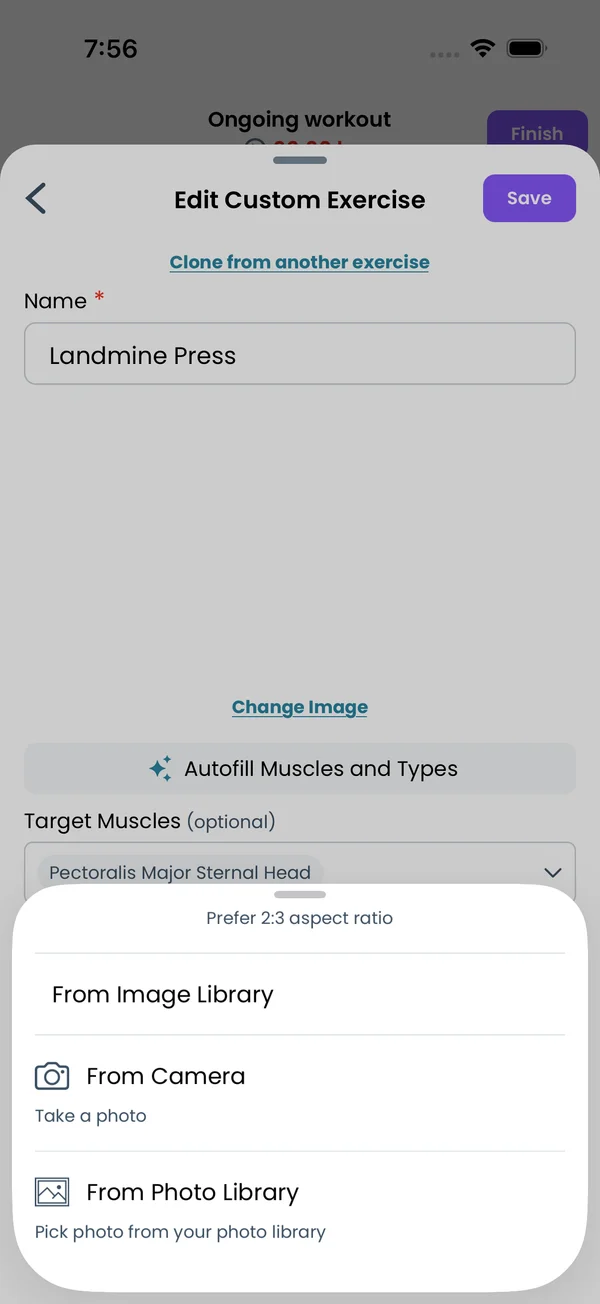 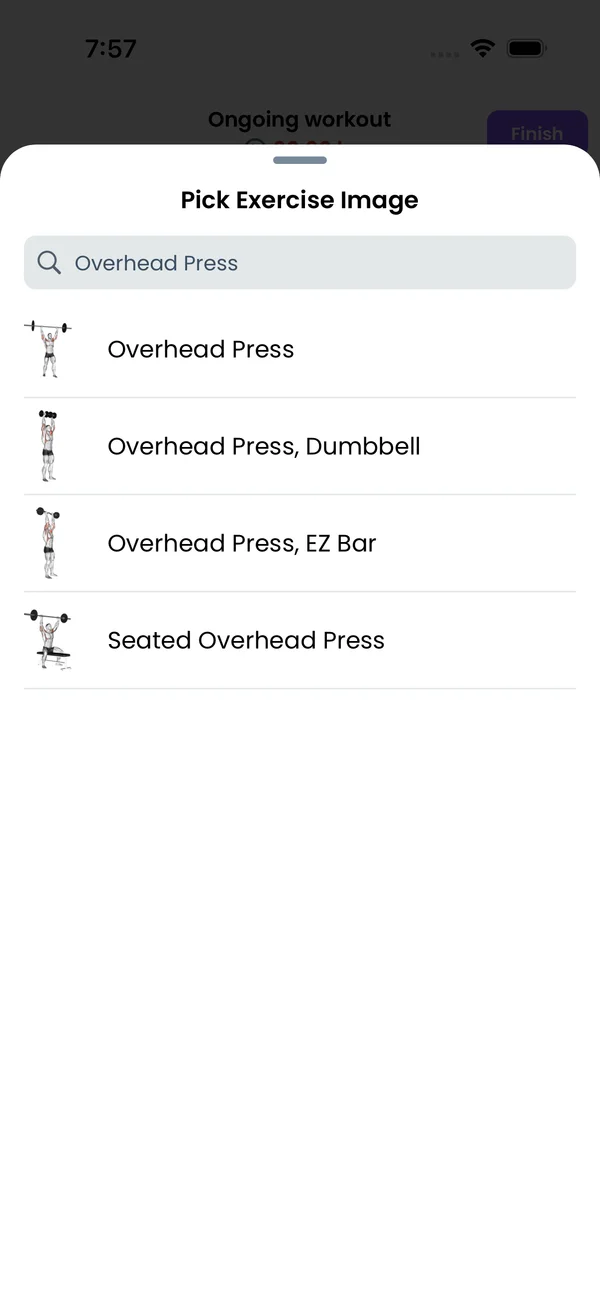\n\nTap **Add image**. The sheet asks for a 2:3 aspect ratio and gives three sources:\n\n- **From Image Library** opens the images of all built-in exercises, plus every image you uploaded before. Search by name and tap one.\n- **From Camera** takes a photo with the phone camera.\n- **From Photo Library** picks a photo from your phone.\n\nUploads need a signed-in account. Otherwise the app says \"You need to be logged in to upload custom exercise images\". On the web the second option is **Upload Image**, which picks a file from your computer. Once an image is set, tap **Change Image** to replace it. The image shows in the workout screen, in program previews and on the exercise stats screen.\n\n## Use the exercise\n\n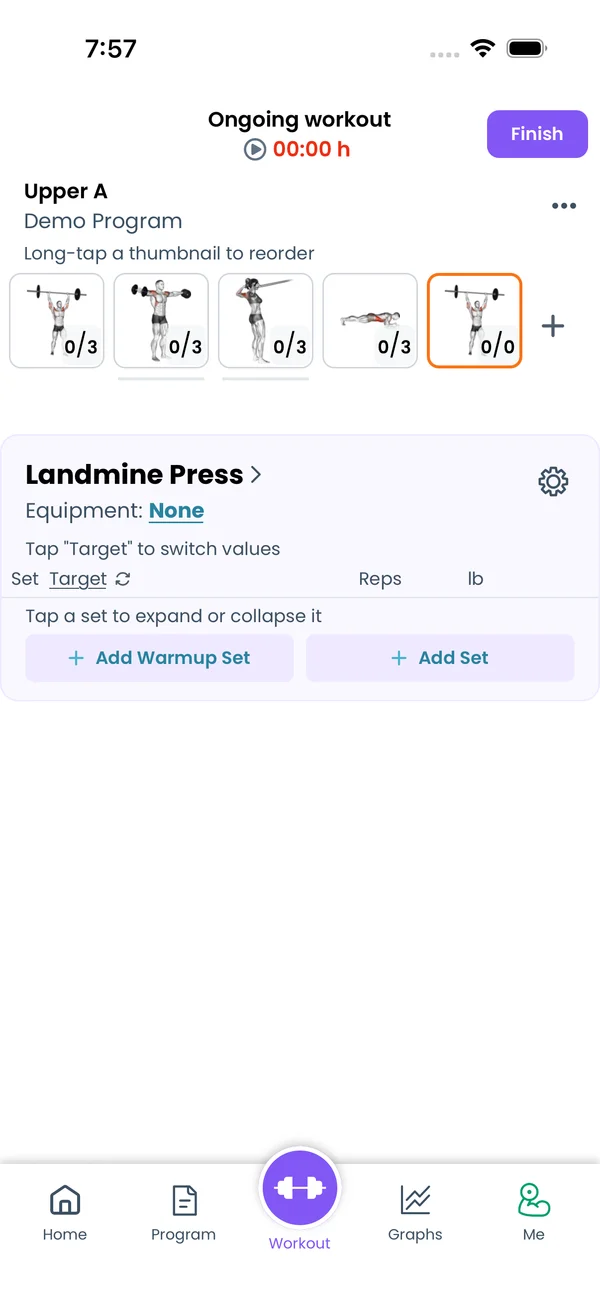\n\nTap **Save**. The exercise appears under **Custom Exercises** in the picker. Select it and tap **Add to this workout**. In a program, write it by name like any built-in exercise:\n\n```liftoscript\nLandmine Press / 3x10 / 60s\n```\n\nTo edit it later, open the picker and tap the pencil icon next to the exercise. Renaming it updates your current program text too. The **Delete Exercise** button at the bottom of the form asks for a confirmation first. See [Liftoscript](/doc/liftoscript) for the program syntax.\n\n## Custom muscle groups\n\n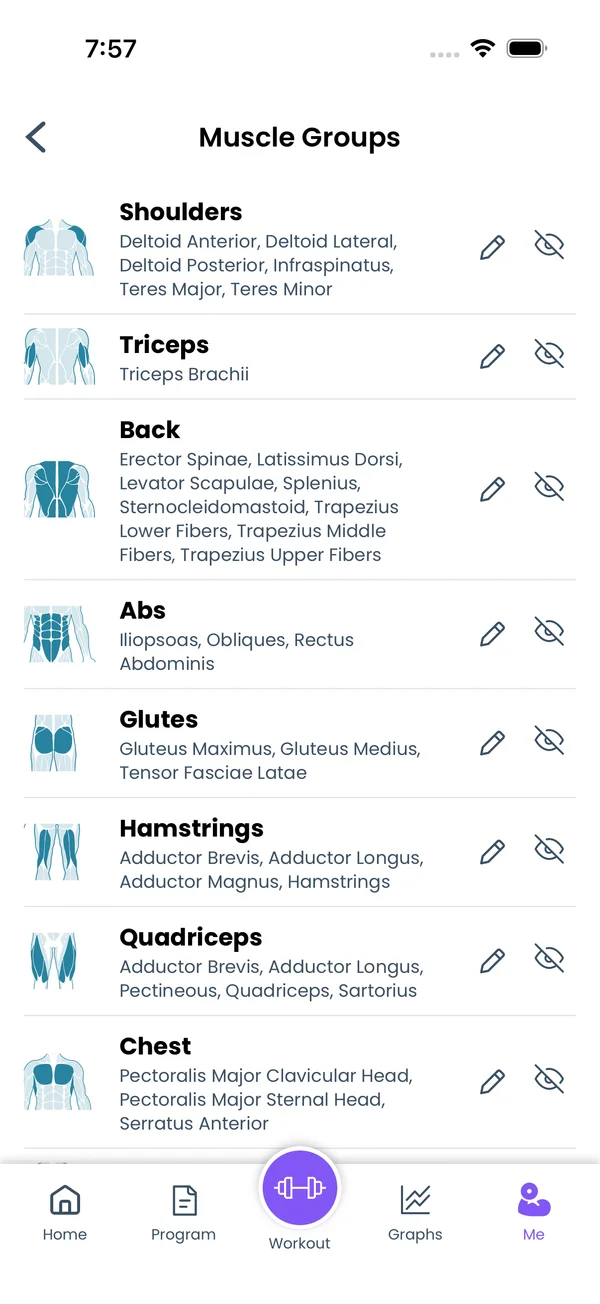\n\nGo to **Me → Muscle Groups**. The built-in groups are Shoulders, Triceps, Back, Abs, Glutes, Hamstrings, Quadriceps, Chest, Biceps, Calves and Forearms. Each row shows the group image, the name and its muscles. Tap **Add custom muscle group**, type a name, and tap **Add**. The new group starts with no muscles. Use this to split a built-in group, like Front, Side and Rear Delts instead of one Shoulders group. Custom groups get their own weekly volume graph and their own row in the week stats. The same editor opens from **Edit Muscle Groups** under **Weekly Sets Per Muscle Group** in the program editor's muscle settings, in the app and on the web.\n\n## Choose the muscles in a group\n\nTap the pencil icon next to a group. The **Choose Muscles** sheet lists every muscle. Tap one to add or remove it, then tap **Done**. This works for built-in groups too, and a muscle can be in more than one group.\n\n## Hide and restore built-in groups\n\n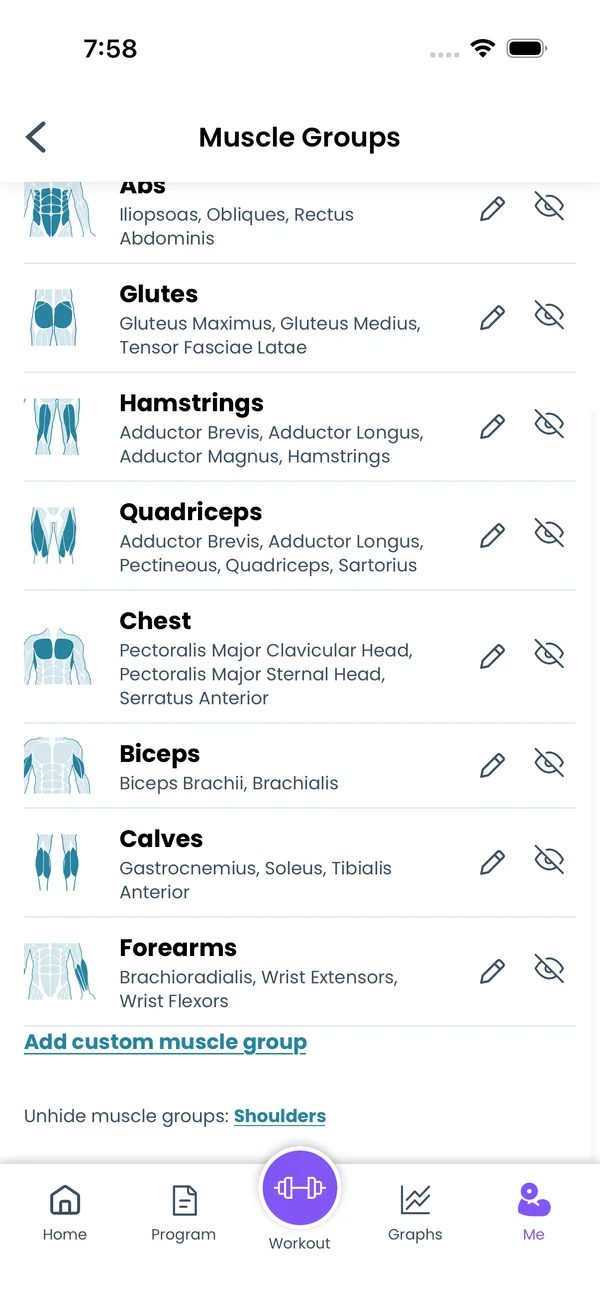\n\nTap the crossed eye icon on a built-in group to hide it. Tap the trash icon on a custom group to delete it. Hidden built-in groups are listed under **Unhide muscle groups:** at the bottom of the screen. Tap a name there to bring the group back.","sizes":{"account/account-email-form":{"width":600,"height":1304},"account/account-forgot-password":{"width":600,"height":1304},"account/account-screen":{"width":600,"height":1304},"account/account-sign-in":{"width":600,"height":1304},"chatgpt-claude-and-ai/chatgpt-claude-and-ai-autofill":{"width":600,"height":1304},"api/api-key-created":{"width":600,"height":1304},"api/api-keys-empty":{"width":600,"height":1304},"api/api-me-row":{"width":600,"height":1304},"apple-watch/apple-watch-health-settings":{"width":600,"height":1304},"apple-watch/watch-apple-watch-amrap":{"width":416,"height":496},"apple-watch/watch-apple-watch-crown":{"width":416,"height":496},"apple-watch/watch-apple-watch-exercise":{"width":416,"height":496},"apple-watch/watch-apple-watch-get-ready":{"width":416,"height":496},"apple-watch/watch-apple-watch-home":{"width":416,"height":496},"apple-watch/watch-apple-watch-set-clock":{"width":416,"height":496},"apple-watch/watch-apple-watch-workout":{"width":416,"height":496},"built-in-programs/built-in-programs-import":{"width":600,"height":1304},"built-in-programs/built-in-programs-info":{"width":600,"height":1304},"built-in-programs/built-in-programs-library":{"width":600,"height":1304},"built-in-programs/built-in-programs-preview":{"width":600,"height":1304},"built-in-programs/built-in-programs-started":{"width":600,"height":1304},"changing-a-workout/changing-a-workout-adhoc":{"width":600,"height":1304},"changing-a-workout/changing-a-workout-adhoc-picker":{"width":600,"height":1304},"changing-a-workout/changing-a-workout-create-program-day":{"width":600,"height":1304},"changing-a-workout/changing-a-workout-edit-day":{"width":600,"height":1304},"changing-a-workout/changing-a-workout-edit-exercise":{"width":600,"height":1304},"changing-a-workout/changing-a-workout-next-workout":{"width":600,"height":1304},"changing-a-workout/changing-a-workout-pick-day":{"width":600,"height":1304},"changing-a-workout/changing-a-workout-program-day":{"width":600,"height":1304},"changing-a-workout/changing-a-workout-swap-adhoc":{"width":600,"height":1304},"changing-a-workout/changing-a-workout-swap-from-program":{"width":600,"height":1304},"changing-a-workout/changing-a-workout-swap-recent":{"width":600,"height":1304},"custom-exercises/custom-exercises-autofill":{"width":600,"height":1304},"custom-exercises/custom-exercises-clone-library":{"width":600,"height":1304},"custom-exercises/custom-exercises-cloned":{"width":600,"height":1304},"custom-exercises/custom-exercises-form":{"width":600,"height":1304},"custom-exercises/custom-exercises-hidden-group":{"width":600,"height":1304},"custom-exercises/custom-exercises-image-library":{"width":600,"height":1304},"custom-exercises/custom-exercises-image-source":{"width":600,"height":1304},"custom-exercises/custom-exercises-in-workout":{"width":600,"height":1304},"custom-exercises/custom-exercises-muscle-groups":{"width":600,"height":1304},"custom-exercises/custom-exercises-picker":{"width":600,"height":1304},"custom-exercises/custom-exercises-target-muscles":{"width":600,"height":1304},"equipment-and-gyms/equipment-and-gyms-barbell":{"width":600,"height":1304},"equipment-and-gyms/equipment-and-gyms-custom":{"width":600,"height":1304},"equipment-and-gyms/equipment-and-gyms-exercise":{"width":600,"height":1304},"equipment-and-gyms/equipment-and-gyms-fixed":{"width":600,"height":1304},"equipment-and-gyms/equipment-and-gyms-gyms":{"width":600,"height":1304},"equipment-and-gyms/equipment-and-gyms-hidden":{"width":600,"height":1304},"equipment-and-gyms/equipment-and-gyms-list":{"width":600,"height":1304},"exercise-library/exercise-library-calculator":{"width":600,"height":1304},"exercise-library/exercise-library-from-program":{"width":600,"height":1304},"exercise-library/exercise-library-list":{"width":600,"height":1304},"exercise-library/exercise-library-multi-add":{"width":600,"height":1304},"exercise-library/exercise-library-override-muscles":{"width":600,"height":1304},"exercise-library/exercise-library-picker":{"width":600,"height":1304},"exercise-library/exercise-library-prs":{"width":600,"height":1304},"exercise-library/exercise-library-search":{"width":600,"height":1304},"exercise-library/exercise-library-stats":{"width":600,"height":1304},"exercise-library/exercise-library-swap":{"width":600,"height":1304},"graphs/graphs-bodyweight":{"width":600,"height":1304},"graphs/graphs-choose":{"width":600,"height":1304},"graphs/graphs-exercise":{"width":600,"height":1304},"graphs/graphs-legend":{"width":600,"height":1304},"graphs/graphs-muscle-group":{"width":600,"height":1304},"graphs/graphs-personal-records":{"width":600,"height":1304},"graphs/graphs-settings":{"width":600,"height":1304},"health-sync/android-health-sync-measurements":{"width":600,"height":1339},"health-sync/android-health-sync-settings":{"width":600,"height":1339},"health-sync/android-health-sync-share":{"width":600,"height":1339},"health-sync/android-health-sync-sleep-nutrition":{"width":600,"height":1339},"health-sync/health-sync-measurements":{"width":600,"height":1304},"health-sync/health-sync-settings":{"width":600,"height":1304},"health-sync/health-sync-share":{"width":600,"height":1304},"health-sync/health-sync-sleep-nutrition":{"width":600,"height":1304},"import-export/import-export-export":{"width":600,"height":1304},"import-export/import-export-hevy":{"width":600,"height":1304},"import-export/import-export-import":{"width":600,"height":1304},"liftoscript/liftoscript-exercise-sheet":{"width":600,"height":1304},"liftoscript/liftoscript-full-program":{"width":600,"height":1304},"liftoscript/liftoscript-per-day":{"width":600,"height":1304},"liftoscript/liftoscript-playground":{"width":600,"height":1304},"lock-screen-and-notifications/android-lock-screen-and-notifications-live-update":{"width":600,"height":1339},"lock-screen-and-notifications/android-lock-screen-and-notifications-reminder":{"width":600,"height":1339},"lock-screen-and-notifications/android-lock-screen-and-notifications-sound":{"width":600,"height":1339},"lock-screen-and-notifications/lock-screen-and-notifications-dynamic-island":{"width":600,"height":1304},"lock-screen-and-notifications/lock-screen-and-notifications-live-activity":{"width":600,"height":1304},"lock-screen-and-notifications/lock-screen-and-notifications-reminder":{"width":600,"height":1304},"lock-screen-and-notifications/lock-screen-and-notifications-sound":{"width":600,"height":1304},"measurements/measurements-add":{"width":600,"height":1304},"measurements/measurements-bodyweight":{"width":600,"height":1304},"measurements/measurements-moving-average":{"width":600,"height":1304},"measurements/measurements-sleep-nutrition":{"width":600,"height":1304},"measurements/measurements-types":{"width":600,"height":1304},"first-run-and-settings/first-run-and-settings-appearance":{"width":600,"height":1304},"first-run-and-settings/first-run-and-settings-dark-mode":{"width":600,"height":1304},"first-run-and-settings/first-run-and-settings-equipment":{"width":600,"height":1304},"first-run-and-settings/first-run-and-settings-me":{"width":600,"height":1304},"first-run-and-settings/first-run-and-settings-units":{"width":600,"height":1304},"first-run-and-settings/first-run-and-settings-welcome":{"width":600,"height":1304},"playground/playground-completed":{"width":600,"height":1304},"playground/playground-day":{"width":600,"height":1304},"playground/playground-finished":{"width":600,"height":1304},"playground/playground-variables":{"width":600,"height":1304},"premium/premium-account":{"width":600,"height":1304},"premium/premium-feature-info":{"width":600,"height":1304},"premium/premium-plans":{"width":600,"height":1304},"program-editor/program-editor-create":{"width":600,"height":1304},"program-editor/program-editor-day-details":{"width":600,"height":1304},"program-editor/program-editor-exercise-sheet":{"width":600,"height":1304},"program-editor/program-editor-full-text":{"width":600,"height":1304},"program-editor/program-editor-grid":{"width":600,"height":1304},"program-editor/program-editor-perday-text":{"width":600,"height":1304},"program-editor/program-editor-ui-mode":{"width":600,"height":1304},"program-editor/program-editor-week-stats":{"width":600,"height":1304},"progressions/progressions-linear-settings":{"width":600,"height":1304},"progressions/progressions-preview":{"width":600,"height":1304},"progressions/progressions-state-variables":{"width":600,"height":1304},"progressions/progressions-suppressed":{"width":600,"height":1304},"rest-timer/rest-timer-collapsed":{"width":600,"height":1304},"rest-timer/rest-timer-dynamic-island":{"width":600,"height":1304},"rest-timer/rest-timer-expanded":{"width":600,"height":1304},"rest-timer/rest-timer-get-ready":{"width":600,"height":1304},"rest-timer/rest-timer-lock-screen":{"width":600,"height":1304},"rest-timer/rest-timer-settings":{"width":600,"height":1304},"rest-timer/rest-timer-sound":{"width":600,"height":1304},"rest-timer/watch-rest-timer":{"width":416,"height":496},"rest-timer/watch-rest-timer-exercise":{"width":416,"height":496},"set-types/set-types-amrap-popup":{"width":600,"height":1304},"set-types/set-types-per-side":{"width":600,"height":1304},"set-types/set-types-rpe-logged":{"width":600,"height":1304},"set-types/set-types-rpe-popup":{"width":600,"height":1304},"sharing-programs/sharing-programs-export-text":{"width":600,"height":1304},"sharing-programs/sharing-programs-image-preview":{"width":600,"height":1304},"sharing-programs/sharing-programs-image-settings":{"width":600,"height":1304},"sharing-programs/sharing-programs-import":{"width":600,"height":1304},"sharing-programs/sharing-programs-menu":{"width":600,"height":1304},"sharing-programs/sharing-programs-private-link":{"width":600,"height":1304},"sharing-programs/sharing-programs-public-link":{"width":600,"height":1304},"sharing-workouts/sharing-workouts-copied-text":{"width":600,"height":1304},"sharing-workouts/sharing-workouts-finish-screen":{"width":600,"height":1304},"sharing-workouts/sharing-workouts-profile-settings":{"width":600,"height":1304},"sharing-workouts/sharing-workouts-share-sheet":{"width":600,"height":1304},"sharing-workouts/sharing-workouts-story-preview":{"width":600,"height":1304},"supersets/supersets-liftoscript":{"width":600,"height":1304},"supersets/supersets-next-exercise":{"width":600,"height":1304},"supersets/supersets-picker":{"width":600,"height":1304},"supersets/supersets-program-editor":{"width":600,"height":1304},"supersets/supersets-timer":{"width":600,"height":1304},"supersets/supersets-workout":{"width":600,"height":1304},"sync-and-offline/sync-and-offline-account":{"width":600,"height":1304},"sync-and-offline/sync-and-offline-me-account":{"width":600,"height":1304},"sync-and-offline/sync-and-offline-sign-in":{"width":600,"height":1304},"timed-sets/timed-sets-count-up":{"width":600,"height":1304},"timed-sets/timed-sets-edit-time":{"width":600,"height":1304},"timed-sets/timed-sets-get-ready":{"width":600,"height":1304},"timed-sets/timed-sets-recorded":{"width":600,"height":1304},"timed-sets/timed-sets-running":{"width":600,"height":1304},"timed-sets/timed-sets-set-row":{"width":600,"height":1304},"timed-sets/timed-sets-timers":{"width":600,"height":1304},"week-insights/week-insights-details":{"width":600,"height":1304},"week-insights/week-insights-edit-muscle-groups":{"width":600,"height":1304},"week-insights/week-insights-exercises":{"width":600,"height":1304},"week-insights/week-insights-home":{"width":600,"height":1304},"week-insights/week-insights-muscle-groups":{"width":600,"height":1304},"week-insights/week-insights-settings":{"width":600,"height":1304},"workout-history/workout-history-change-date":{"width":600,"height":1304},"workout-history/workout-history-delete":{"width":600,"height":1304},"workout-history/workout-history-feed":{"width":600,"height":1304},"workout-history/workout-history-menu":{"width":600,"height":1304},"workout-history/workout-history-month-calendar":{"width":600,"height":1304},"workout-history/workout-history-note-on-card":{"width":600,"height":1304},"workout-history/workout-history-notes":{"width":600,"height":1304},"workout-history/workout-history-past-card":{"width":600,"height":1304},"workout-history/workout-history-past-workout":{"width":600,"height":1304},"workout-history/workout-history-week-insights":{"width":600,"height":1304},"workout-screen/workout-screen-e1rm":{"width":600,"height":1304},"workout-screen/workout-screen-edit-target":{"width":600,"height":1304},"workout-screen/workout-screen-exercise-menu":{"width":600,"height":1304},"workout-screen/workout-screen-exercise-notes":{"width":600,"height":1304},"workout-screen/workout-screen-history":{"width":600,"height":1304},"workout-screen/workout-screen-keypad":{"width":600,"height":1304},"workout-screen/workout-screen-next-set":{"width":600,"height":1304},"workout-screen/workout-screen-overview":{"width":600,"height":1304},"workout-screen/workout-screen-rounding":{"width":600,"height":1304},"workout-screen/workout-screen-summary":{"width":600,"height":1304}}}