Best simple workout log app: we tested 12 apps (2026)
We tested 12 workout log apps on what lifters call simple: a free tier that is enough, last time on screen, few taps, your data and a watch.
Tested: November 2026, on Android, with the Play Store versions of all the apps at that moment. Watch support is taken from the App Store and Play Store listings. Apps change over time, so a screenshot only shows what an app looked like when we tested it.
Disclosure: Liftosaur is made by us, and it's also part of the comparison. But it doesn't win - if you just want to log workouts, Liftosaur is overkill. All the claims in the article are based on the same checks done in each app, and there're screenshots as a proof.
Short answer
Sometimes you don't want a program, a coach or a feed. You want a notebook: what did I lift last time, what do I lift today, done. A lot of apps start like that and then grow into something else.
Our pick: FitNotes on Android - it's the closest to a paper notebook, free, with no account. On iPhone, Strong - the fastest to log, with last time next to every set, if you're fine with an account and 3 routines on the free tier.
FitNotes is the simplest. You don't need account, it asks just a single question when you first open it, there're zero ads, zero limits, and it's free. But it's Android only, and looks a bit dated.
Strong is the fastest to log a workout from scratch (7 taps), and shows last time right by each set. But it requires account, and free tier limits you to 3 routines.
Hevy is like Strong with a social feed on top. Free tier is generous, but it's capped by 4 routines, and new workouts are public by default.
Boostcamp, StrengthLog, Alpha Progression and Hardy are program apps, but each of them has empty workout that works as a plain log. Boostcamp and Alpha show last time well, Hardy is as quick as Strong, and StrengthLog copies last session into new sets.
RepCount has zero limits on free tier, but all charts, exercise history and export are paid, and you have to type each number, even if you repeat last time.
Lyfta, Caliber and JEFIT log fine, but they ask 10-20 questions before you can begin, and push upgrades all the time.
Liftosaur logs fast too, without account or limits, but it's built around programs. If you only want a log - it's more than you need.
What simple means, and what we checked
So, we've read a bunch of Reddit threads on r/workout, r/beginnerfitness, r/weightlifting, r/strongapp and others, where lifters ask for a simple workout tracker, complain that the app they use got bloated, etc. Here's what people asked for over and over:
The free tier is enough. That's the most common complaint by far. People are okay paying, but they hate when basic stuff is limited (like 4 routines max), or when the app keeps nagging them to upgrade on every screen. So, is the free version enough to track workouts, with no ads?
Last time on screen. "All I do is look what I did last time." When you log a set - can you see the numbers from the previous workout right there, without going to some separate screen?
Not many taps. People who track on paper complain apps slow them down. How many taps does it take to log a set? We counted it for a new set in an empty workout (Bench Press, 135 lb x 5, starting from opening the app), and for a set that's planned in the program.
Data ownership. People want to export their history, and bring the old history over when they switch apps. Is there a way to export it to a file, and load it from other apps?
A watch app. Can you track sets from the wrist?
How we tested
All the apps were tested on Android in November 2026, freshly installed from the Play Store, with a test account.
First we used the free tier, then bought or trialed the paid tier, and checked again. Cancelled all the subscriptions afterwards.
We tried to import the same 12 weeks of history into each app, so last time and charts had real data.
Tap counts follow one rule for every app: each tap is one, and typing a number counts as one.
Watch support is from the App Store and Play Store listings - we didn't test the watch apps.
All the prices on this page are US prices on the test day.
Free is enough: Yes - no account, no limits, no ads. The only paid thing is a $6.99 one-time Supporter app that unlocks 8 extra exercise types (like time and distance)
Last time: Partly - the fields come prefilled with your last set, and the full last session is one tap away
Taps: 10 to a new set in an empty workout. Repeating your last set is just SAVE
Data: CSV export and a full backup, free. No import from other apps
Watch: No
Phones: Android only
FitNotes is probably as close to a paper notebook as it gets. On first launch it asks just one question, kg or lb, that's it. It doesn't make you sign up, doesn't throw a questionnaire at you, doesn't show a paywall. You choose some exercise, and TRACK screen shows weight/reps of a last set you did, so if you're doing same weight/reps again - just tap SAVE, fields would stay prefilled for a next set too.
There isn't a "previous" column though - it just shows the last set, not the whole last workout. To see that, you'd need to go to the HISTORY tab. You fully own everything you log: there's CSV export (one row per set) and backups to the phone or Google Drive, all for free. But you can't bring in a log from another app, and the same developer doesn't make an iPhone version. The "FitNotes" apps you see on the App Store are made by other people.
Strong
Free is enough: Partly - an account is required, free is limited to 3 routines (per the App Store listing - we saved 2 without hitting it), and exercise charts are PRO. No ads
Last time: Yes - a PREVIOUS column on every set row, with last session set by set
Taps: 7 to a new set in an empty workout, the fastest here. 1 tap for a planned set
Data: CSV export, free. No import - "Exported files cannot be imported back into Strong"
Watch: Apple Watch, which per the App Store listing logs with or without the iPhone, and Wear OS (Play marks it "Enhanced by the developer for Wear OS")
PRO: $4.99/month, $29.99/year or $99.99 lifetime
When people say "a simple log", they usually mean Strong. You create a blank workout, add Bench Press, and it adds the same amount of sets you did last time, with last time's values shown in grey like hints. If you do the same - you just tap on the check. And there's PREVIOUS column by each set, which shows what you did last workout, including failed sets.
Biggest downside - the free tier. You can't use it at all without creating an account, the routine limit kicks in if you go over a 3-day split, and charts, plates calculator and warm-up calculator are PRO only. CSV export is free, but it only works one way - there's no way to get any data into Strong, not even the CSV it exported.
Hevy
Free is enough: Partly - account required, about 15 onboarding screens, 4 routines, charts limited to 3 months. No ads
Last time: Yes - a PREVIOUS column on every set row
Taps: 11 to a new set in an empty workout (the keyboard covers the Add button, so one tap goes to closing it). 1 tap for a planned set
Data: CSV export, free. Import from a Strong CSV, once per account
Watch: Apple Watch and Wear OS
PRO: $2.99/month, $23.99/year or $74.99 lifetime
Tracking sets in Hevy is pretty much identical to Strong - there's that PREVIOUS thing, grey hints, a single tap to complete a set, and if you add an exercise - it copies the number of sets from your previous workout. The difference is in all the other stuff surrounding it.
Hevy is also a social app - there's a feed with other people's workouts, and by default new workouts are visible to "Everyone". You can switch that to "Only me", but the feed is still there. Free tier gives you 4 routines and 3 months of charts. The good thing is it can import a Strong CSV, so moving from Strong is pretty straightforward.
Boostcamp
Free is enough: Partly - no ads, and the program library is mostly free, but custom exercises, the plate calculator and warm-up sets have a few free uses, and charts are PRO
Last time: Yes - a Previous column on every set row, and an added exercise copies last session's sets
Taps: 10 to a new set in an empty workout, one of them to close a PRO paywall that pops up after "Empty workout" on the free tier. 1 tap for a planned set
Data: No export or import in the Android app - sharing makes images only
Watch: No
PRO: $14.99/month or $59.99/year with a 7-day trial
Boostcamp is first of all a program app - people come there for the free library of programs. But you can also use "Empty workout" as a plain log, and it looks a lot like Strong - there's a Previous column, grey hints, and tapping the check fills in the hint. So if you repeat the reps from last time, you don't need to type anything. The downside is data - the Android app doesn't have any export whatsoever.
StrengthLog
Free is enough: Partly - an account is required (but no questions after it), no ads, and logging has no limit. But you can save only 5 programs and workouts, and most stats, % of 1RM and RPE logging are Premium
Last time: Partly - "Copy sets from last workout" is on by default, so new sets start with last time's numbers. But there's no column or hint, so once you type over a set, last time is gone from the row
Taps: 9 to a new set in an empty workout. 1 tap for a planned set
Data: CSV export with a row per set. No import
Watch: Partly - Wear OS Tiles show goals, streaks and weekly stats, but the listing doesn't say you can log sets from the watch. The App Store lists Apple Watch as supported, but doesn't say what it does
Premium: $16.99/month, $37.99 per 3 months or $109/year, with a 2-week trial
StrengthLog is super easy to start with - you just sign in, and it doesn't ask anything else. Logging is fast as well. The only issue is how it shows the previous workout - it copies the sets from last time into the current workout. That's nice if you repeat them, but if you change a set, the previous numbers are gone, and there's no way to see them anymore.
Alpha Progression
Free is enough: Partly - no account needed and 3 questions at the start, no ads. But progression suggestions, all charts and the plate calculator are PRO
Last time: Yes - a grey card under the sets with your last session, and the rows are prefilled with it
Taps: 11 to a new set in an empty workout. 1 tap for a planned set
Data: CSV export, free, but the workouts file is a report per workout, not a row per set. No import
Watch: No
PRO: $14.99/month or $89.99/year with a 14-day trial
Alpha Progression is mostly for planning hypertrophy programs, but if you just want to track a simple workout, there's also "Create - Workout - Empty workout". It shows what you did last time in a little table below the sets, which is pretty clear. Entering reps and weights is a bit slower than in other apps though, because you have to choose the reps from a wheel.
Hardy
Free is enough: Partly - an account is required (email, username, password), no ads. Charts show 30 days, custom exercises, offline mode and dark mode are Pro
Last time: No - in an unplanned workout there's no last time on the screen at all. In a routine workout, it's one tap away under the History button (that's the screenshot above)
Taps: 7 to a new set in an empty workout, tied with Strong. 1 tap for a planned set
Data: No file export and no import. A workout can be shared as a link
Watch: Apple Watch
Hardy Pro: $5.99/month, $59.99/year or $94.99 lifetime
"Log unplanned workout" is right there on the Home screen, and the set is prefilled, so logging from scratch is pretty much on par with Strong. But unplanned workouts don't show last time at all, and all the data is stuck in the app - no export. Offline mode is Pro, which is kinda weird to pay for in a gym.
RepCount
Free is enough: Partly - no limits on workouts, routines or exercises, and the account is optional. But every chart, the exercise history, PRs and the export are Premium
Last time: Partly - grey hints inside the empty fields, which you have to retype
Taps: 8 to a new set in an empty workout. 4 for a planned set, because there's no "done" button - you type both numbers every time
Data: Export only with Premium, no import
Watch: No
Premium: $4.99/month or $29.99/year
RepCount is a keyboard-first log. There isn't even a checkmark button - the set is logged when both fields are filled in. The "Next" key on the keyboard takes you from weight to reps, and then to the following set. It's fast if you lift something new, but the values from last time are only shown as grey hints, so if you want to repeat the last workout, you'd still need to type all of them manually.
The free tier isn't capped, works without account (the data just lives on the phone in that case), and doesn't show any third-party ads. But once you want to check past progress - charts, history of a specific exercise, PRs - that's Premium. Same with the only export option - Export to Excel.
Lyfta
Free is enough: Partly - 12 onboarding questions and an account before you start, workouts public by default, and the paywall lists almost everything as Premium
Last time: Yes - a Previous column on every set row
Taps: 12 to a new set in an empty workout. 1 tap for a planned set
Data: CSV export, and the widest import here - Strong, Hevy, FitNotes, JEFIT, Fitbod, StrengthLog and more
Watch: Apple Watch and Wear OS
Premium: $59.99/year with a 14-day trial
The logging screen is nice - there's a "Previous" thing showing what you did last time, and you just tap each set from the program to log it. And importing is the best out of the 12 apps - it took our Strong CSV with 36 workouts in like 20 seconds.
But to get there it takes a while: 12 questions, then you need to create a Google/email account, then there are paywalls, and an exit offer on top. Each workout is posted to a feed, and it's public by default. You can track workouts for free, but if you want to see charts for bigger time ranges, and the majority of extras - you need Premium.
Caliber
Free is enough: Partly - 10 onboarding questions and an email account. No count limits, but custom exercises, supersets, the plate calculator and the automatic rest timer are Plus
Last time: Yes - "Last: 95 lbs" / "Last: 10 reps" hints under every field, and a "Last" key on the number pad
Taps: 13 to a new set in an empty workout. About 4 for a planned set, because the fields never prefill
Data: CSV of the whole history, sent by email within 24 hours. No import
Watch: No
Plus: $12/month or $72/year
Caliber displays the last time pretty nicely, but you have to type in all the values manually (you can also tap "Last" on the number pad, but you'd need to do it field by field). There isn't a done button - once the fields are filled in, it's considered logged.
Caliber is mostly about coaching, and you can feel it in the app - there's Upgrade pill on each exercise screen, Plus banner on Plans, and "$100 off coaching" card on Home.
JEFIT
Free is enough: No - 20 question screens and 3 paywalls before you start, 3 custom exercises, 10 plans, 5 days per plan, and achievements posted to a feed automatically
Last time: No - the set rows show targets, and last session is one tap away in History
Taps: 10 to a new set (there's no empty workout - you start from an exercise). 1 tap for a planned set
Data: No export or import in the Android app
Watch: Apple Watch and Wear OS, unlimited watch workouts are Elite
Elite: $12.99/month or $69.99/year
JEFIT has a huge exercise library, but it's the opposite of simple.
You need to answer 20 questions on separate screens and get past 3 paywalls before you even get to the first set. On the free tier you can only create 3 custom exercises. It also automatically posts your achievements to a community feed, without asking you. And there's no way to export anything from the Android app.
Liftosaur
Free is enough: Yes - no account, no limits, no ads. Premium is graphs, rest timer notifications, the Apple Watch app and a few more
Last time: Yes - a "Last:" line with the date under the current set, and the set is prefilled with the same numbers
Taps: 12 to a new set in an empty workout, 8 if you repeat last time. 1 tap for a planned set
Data: CSV and JSON export, free. Import from a Hevy CSV, a generic CSV or a Liftosaur JSON
Watch: Apple Watch (Premium), which works with the phone in the locker. No Wear OS app
Phones: iPhone, Android and web
Premium: $4.99/month, $39.99/year or $99.99 lifetime
To be honest - Liftosaur is not a simple logger. It's built around programs - a program is a text in Liftoscript, and Liftosaur does all the progression for you. So if you only want to log your workouts, most of that would just get in your way.
But if you just want to track workouts, you can do that as well. You don't have to register, just tap "Ad-Hoc Workout" and it'll start with empty workout. When you add some exercise, it'll prefill a set from the last time you did it, and there're "Last" and "Best" lines under it, so to repeat what you did last time you just need one tap. Everything is free except the extras, and you can export all your history to CSV or JSON.
We also checked these apps - each is good in its own way, but none of those allows you to just quickly log a workout for free:
MacroFactor Workouts and RP Hypertrophy don't have a blank workout or a free tier, so you need to pay before logging anything (MacroFactor has a 7-day trial). The app builds the program itself and picks the weights.
MyoAdapt generates all the workouts from a 30-question profile. On the free tier, tapping Start Workout just opens the paywall.
Fitbod and Gravl let you create a workout from scratch, but they're really designed to generate the workouts themselves, and you need a subscription to keep training (Gravl has 3 free workouts).
KeyLifts is a 5/3/1 app. To do a single ad-hoc workout, you need to create a template first, and the free tier ends after 4 workouts.
GZCL Workout Logger only supports the 7 built-in GZCL programs, there's not even a blank workout.
FAQ
What is the simplest workout log app?
If you're on Android - FitNotes. It works without any account, asks you one question on the first launch, and there are no ads and no limits. For iPhone, Strong is probably the closest one - logging is fast, and it displays your previous numbers next to each set. But you have to create an account, and also the free tier only allows 3 routines.
Is there a free workout log app with no limits?
FitNotes, RepCount and Liftosaur don't limit your workouts and routines if you're on a free plan. But in RepCount, graphs, exercise history, and export are paid.
Which workout apps show what I lifted last time?
Strong, Hevy, Boostcamp and Lyfta have a "previous" column for each set. Caliber and Liftosaur have a "Last" line under the set, and Alpha Progression has a little table with the last workout. StrengthLog copies the last workout into the new sets. FitNotes prefills the last set, and RepCount displays the last time as grey hints. In JEFIT, the last time is in History, just a tap away. Hardy has the same History button in a routine workout, but in unplanned workouts there's no last time at all.
Which workout log apps work without an account?
FitNotes, RepCount, Alpha Progression and Liftosaur. JEFIT creates an anonymous account for you in the background. Strong, Hevy, StrengthLog, Hardy, Lyfta and Caliber - you have to sign up first, and only then you could start tracking workouts.
Can I move my workout log from one app to another?
Kinda. Lyfta supports the most formats (Strong, Hevy, FitNotes, JEFIT, etc). Hevy can import a Strong CSV, but only once. Liftosaur imports a Hevy CSV, and also a generic CSV. Strong, FitNotes, Boostcamp, StrengthLog, Alpha Progression, Hardy, RepCount, Caliber and JEFIT - you just can't import your history from other apps there at all.
{"entry":{"id":"simple-workout-log-apps","title":"Best simple workout log app: we tested 12 apps (2026)","shortDescription":"We tested 12 workout log apps on what lifters call simple: a free tier that is enough, last time on screen, few taps, your data and a watch.","order":30,"category":"Apps","datePublished":"2026-11-29","dateModified":"2026-11-29","cover":"fitnotes-track-prefilled"},"content":"**Tested:** November 2026, on Android, with the Play Store versions of all the apps at that moment. Watch support is taken from the App Store and Play Store listings. Apps change over time, so a screenshot only shows what an app looked like when we tested it.\n\n**Disclosure:** Liftosaur is made by us, and it's also part of the comparison. But it doesn't win - if you just want to log workouts, Liftosaur is overkill. All the claims in the article are based on the same checks done in each app, and there're screenshots as a proof.\n\n## Short answer\n\nSometimes you don't want a program, a coach or a feed. You want a notebook: what did I lift last time, what do I lift today, done. A lot of apps start like that and then grow into something else.\n\n**Our pick:** FitNotes on Android - it's the closest to a paper notebook, free, with no account. On iPhone, Strong - the fastest to log, with last time next to every set, if you're fine with an account and 3 routines on the free tier.\n\n- **FitNotes** is the simplest. You don't need account, it asks just a single question when you first open it, there're zero ads, zero limits, and it's free. But it's Android only, and looks a bit dated.\n- **Strong** is the fastest to log a workout from scratch (7 taps), and shows last time right by each set. But it requires account, and free tier limits you to 3 routines.\n- **Hevy** is like Strong with a social feed on top. Free tier is generous, but it's capped by 4 routines, and new workouts are public by default.\n- **Boostcamp, StrengthLog, Alpha Progression and Hardy** are program apps, but each of them has empty workout that works as a plain log. Boostcamp and Alpha show last time well, Hardy is as quick as Strong, and StrengthLog copies last session into new sets.\n- **RepCount** has zero limits on free tier, but all charts, exercise history and export are paid, and you have to type each number, even if you repeat last time.\n- **Lyfta, Caliber and JEFIT** log fine, but they ask 10-20 questions before you can begin, and push upgrades all the time.\n- **Liftosaur** logs fast too, without account or limits, but it's built around programs. If you only want a log - it's more than you need.\n\n## What simple means, and what we checked\n\nSo, we've read a bunch of Reddit threads on r/workout, r/beginnerfitness, r/weightlifting, r/strongapp and others, where lifters ask for a simple workout tracker, complain that the app they use got bloated, etc. Here's what people asked for over and over:\n\n1. **The free tier is enough.** That's the most common complaint by far. People are okay paying, but they hate when basic stuff is limited (like 4 routines max), or when the app keeps nagging them to upgrade on every screen. So, is the free version enough to track workouts, with no ads?\n2. **Last time on screen.** \"All I do is look what I did last time.\" When you log a set - can you see the numbers from the previous workout right there, without going to some separate screen?\n3. **Not many taps.** People who track on paper complain apps slow them down. How many taps does it take to log a set? We counted it for a new set in an empty workout (Bench Press, 135 lb x 5, starting from opening the app), and for a set that's planned in the program.\n4. **Data ownership.** People want to export their history, and bring the old history over when they switch apps. Is there a way to export it to a file, and load it from other apps?\n5. **A watch app.** Can you track sets from the wrist?\n\n## How we tested\n\n- All the apps were tested on Android in November 2026, freshly installed from the Play Store, with a test account.\n- First we used the free tier, then bought or trialed the paid tier, and checked again. Cancelled all the subscriptions afterwards.\n- We tried to import the same 12 weeks of history into each app, so last time and charts had real data.\n- Tap counts follow one rule for every app: each tap is one, and typing a number counts as one.\n- Watch support is from the App Store and Play Store listings - we didn't test the watch apps.\n- All the prices on this page are US prices on the test day.\n\n## Results\n\n| App | Free is enough | Last time | Taps, empty workout | Data | Watch |\n|---|---|---|---|---|---|\n| [FitNotes](#fitnotes) | Yes | Partly | 10 | Export | No |\n| [Strong](#strong) | Partly | Yes | 7 | Export | Both |\n| [Hevy](#hevy) | Partly | Yes | 11 | Export, import | Both |\n| [Boostcamp](#boostcamp) | Partly | Yes | 10 | No | No |\n| [StrengthLog](#strengthlog) | Partly | Partly | 9 | Export | Partly |\n| [Alpha Progression](#alpha-progression) | Partly | Yes | 11 | Export | No |\n| [Hardy](#hardy) | Partly | No | 7 | No | Apple Watch |\n| [RepCount](#repcount) | Partly | Partly | 8 | Paid export | No |\n| [Lyfta](#lyfta) | Partly | Yes | 12 | Export, import | Both |\n| [Caliber](#caliber) | Partly | Yes | 13 | Export by email | No |\n| [JEFIT](#jefit) | No | No | 10 | No | Both |\n| [Liftosaur](#liftosaur) | Yes | Yes | 12 | Export, import | Apple Watch |\n\n\"Both\" means Apple Watch and Wear OS.\n\n## FitNotes\n\n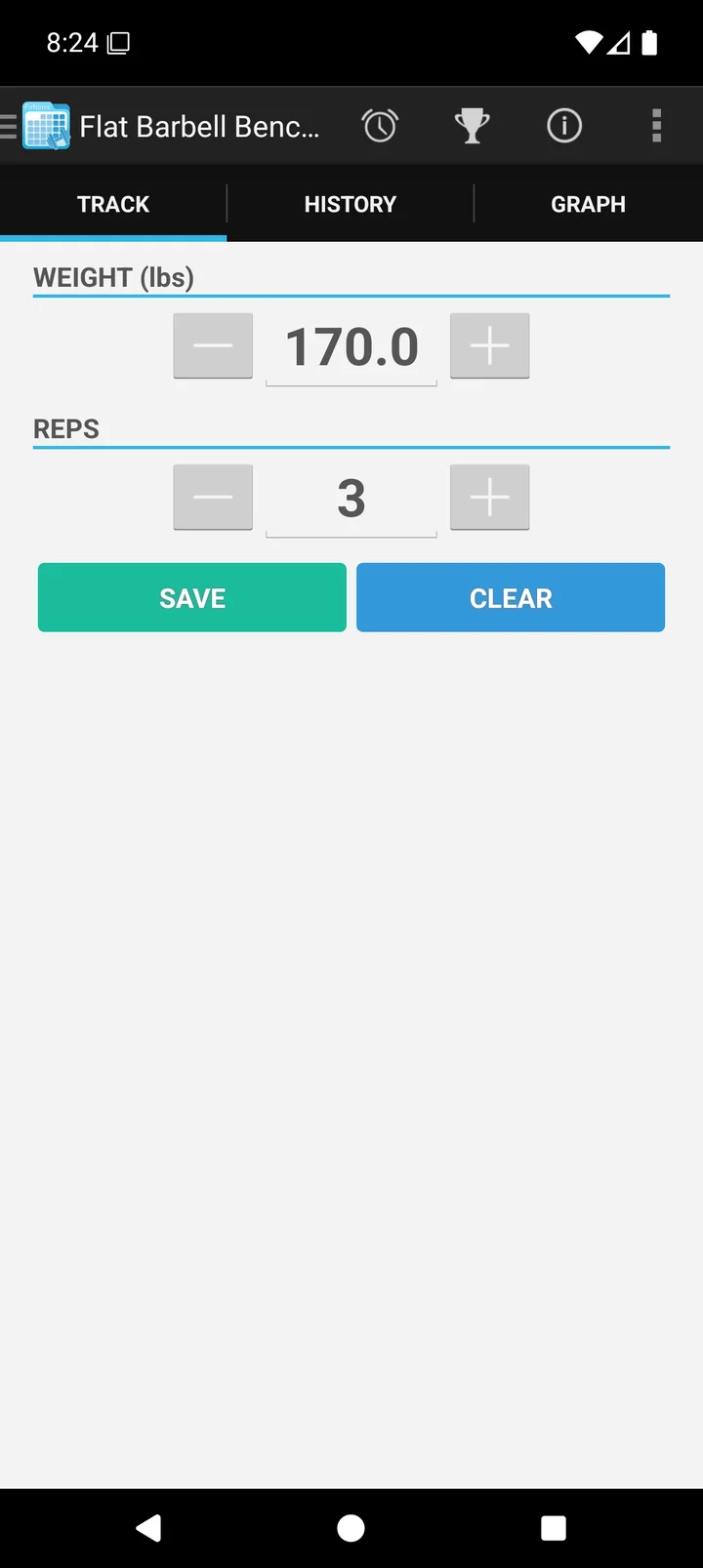\n\n- **Free is enough:** Yes - no account, no limits, no ads. The only paid thing is a $6.99 one-time Supporter app that unlocks 8 extra exercise types (like time and distance)\n- **Last time:** Partly - the fields come prefilled with your last set, and the full last session is one tap away\n- **Taps:** 10 to a new set in an empty workout. Repeating your last set is just SAVE\n- **Data:** CSV export and a full backup, free. No import from other apps\n- **Watch:** No\n- **Phones:** Android only\n\nFitNotes is probably as close to a paper notebook as it gets. On first launch it asks just one question, kg or lb, that's it. It doesn't make you sign up, doesn't throw a questionnaire at you, doesn't show a paywall. You choose some exercise, and TRACK screen shows weight/reps of a last set you did, so if you're doing same weight/reps again - just tap SAVE, fields would stay prefilled for a next set too.\n\n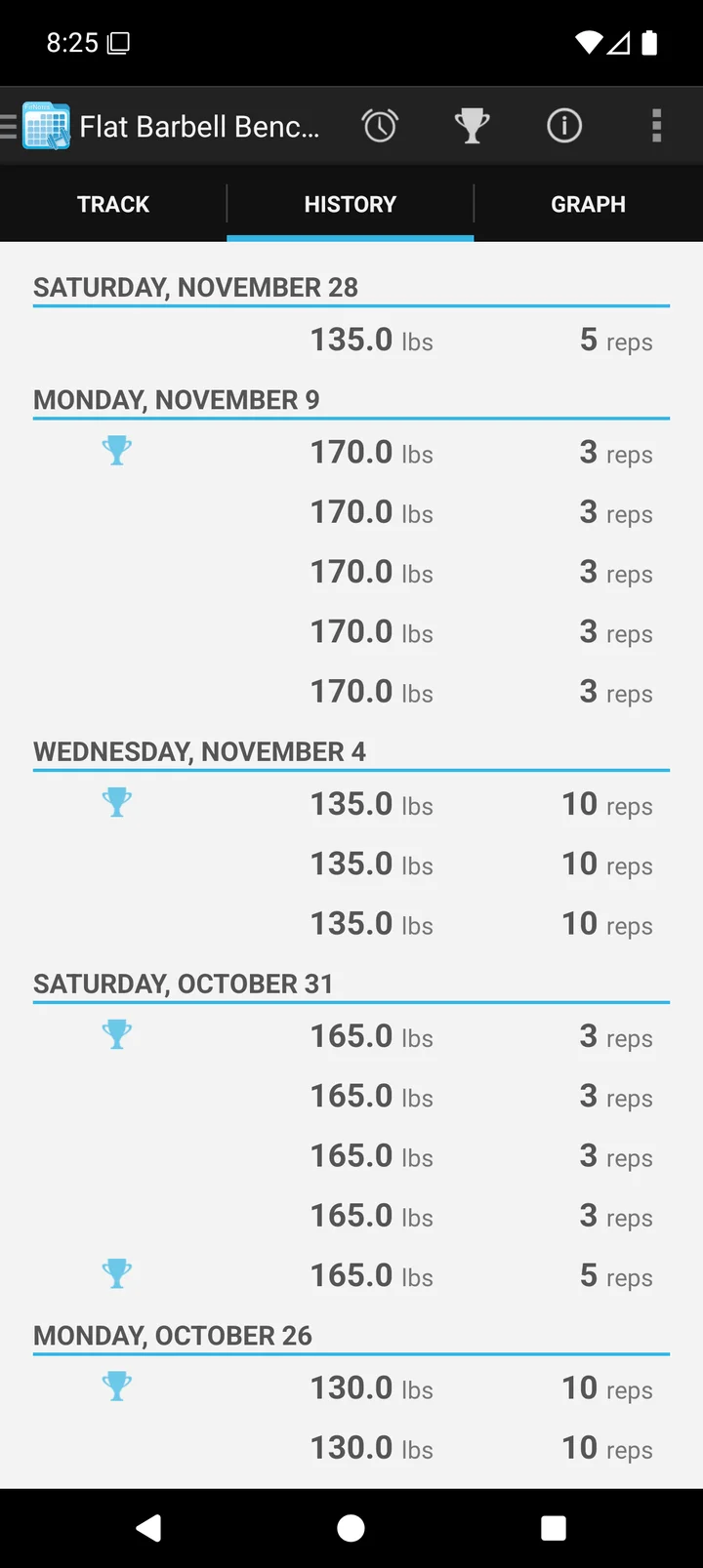 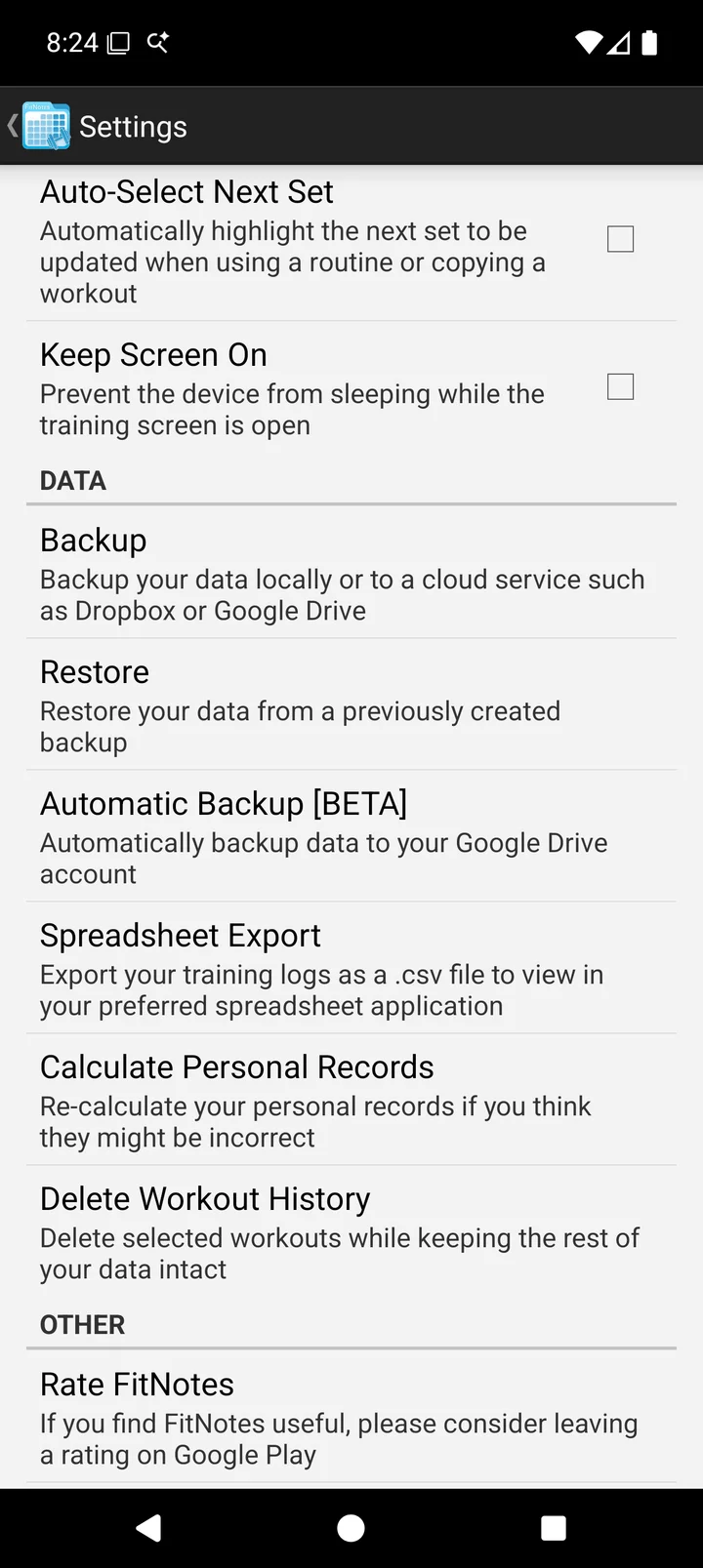\n\nThere isn't a \"previous\" column though - it just shows the last set, not the whole last workout. To see that, you'd need to go to the HISTORY tab. You fully own everything you log: there's CSV export (one row per set) and backups to the phone or Google Drive, all for free. But you can't bring in a log from another app, and the same developer doesn't make an iPhone version. The \"FitNotes\" apps you see on the App Store are made by other people.\n\n## Strong\n\n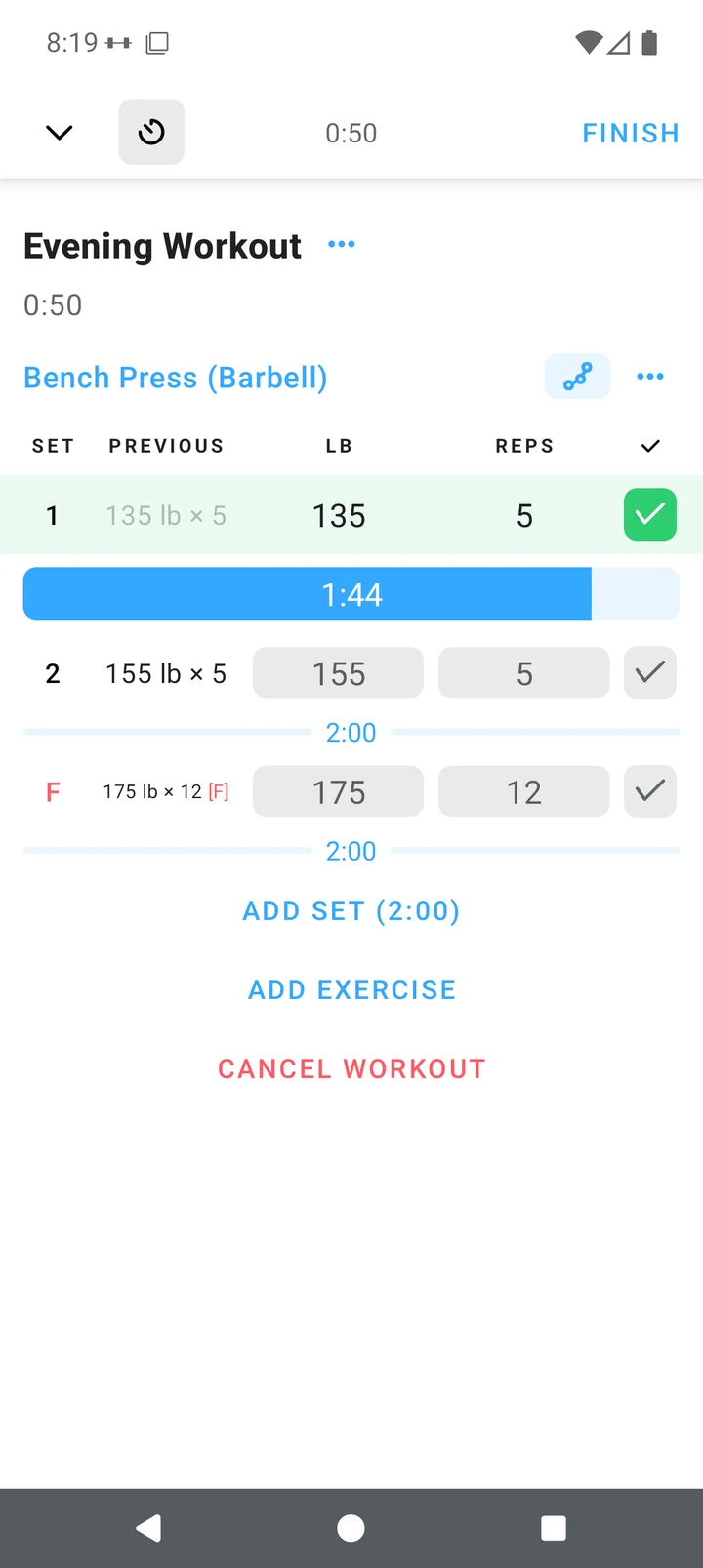\n\n- **Free is enough:** Partly - an account is required, free is limited to 3 routines (per the App Store listing - we saved 2 without hitting it), and exercise charts are PRO. No ads\n- **Last time:** Yes - a PREVIOUS column on every set row, with last session set by set\n- **Taps:** 7 to a new set in an empty workout, the fastest here. 1 tap for a planned set\n- **Data:** CSV export, free. No import - \"Exported files cannot be imported back into Strong\"\n- **Watch:** Apple Watch, which per the App Store listing logs with or without the iPhone, and Wear OS (Play marks it \"Enhanced by the developer for Wear OS\")\n- **PRO:** $4.99/month, $29.99/year or $99.99 lifetime\n\nWhen people say \"a simple log\", they usually mean Strong. You create a blank workout, add Bench Press, and it adds the same amount of sets you did last time, with last time's values shown in grey like hints. If you do the same - you just tap on the check. And there's PREVIOUS column by each set, which shows what you did last workout, including failed sets.\n\n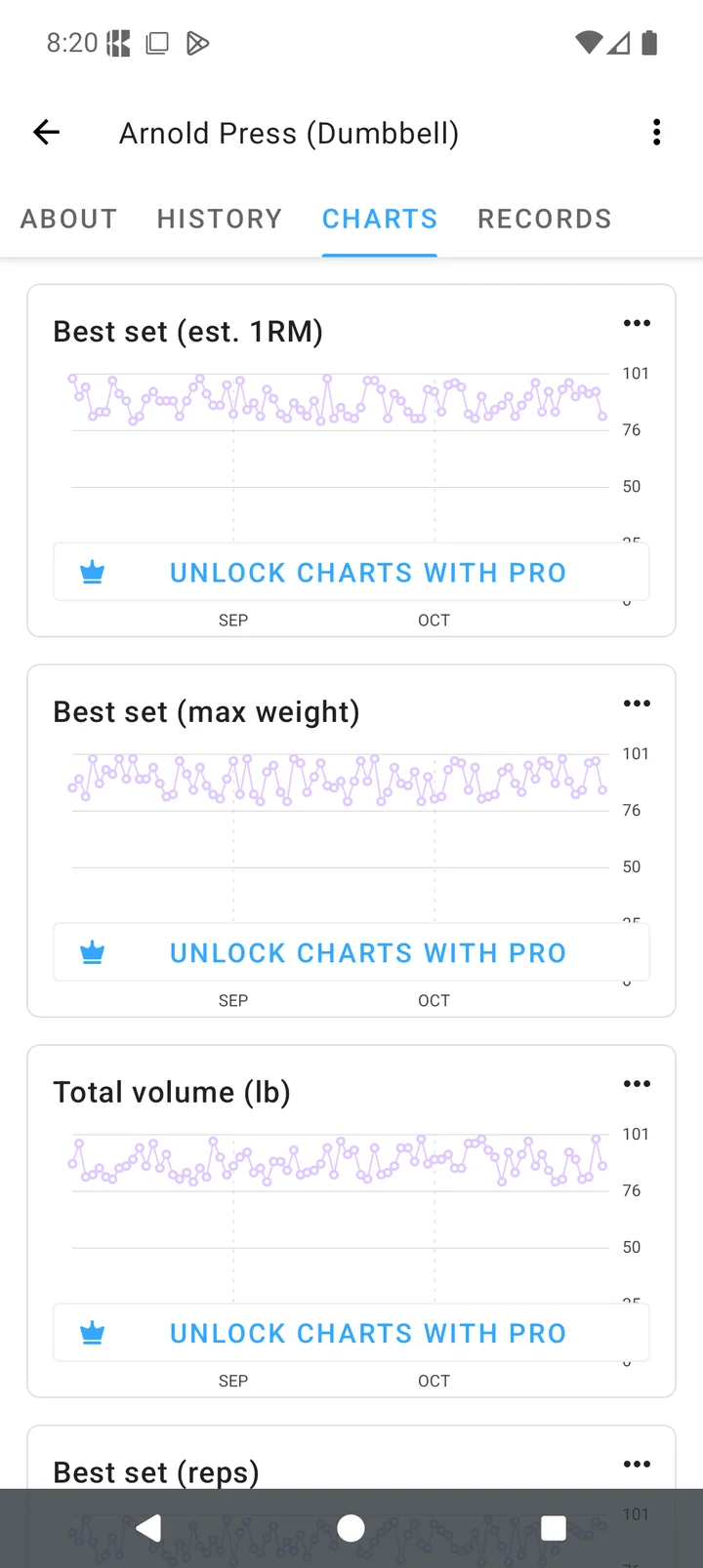 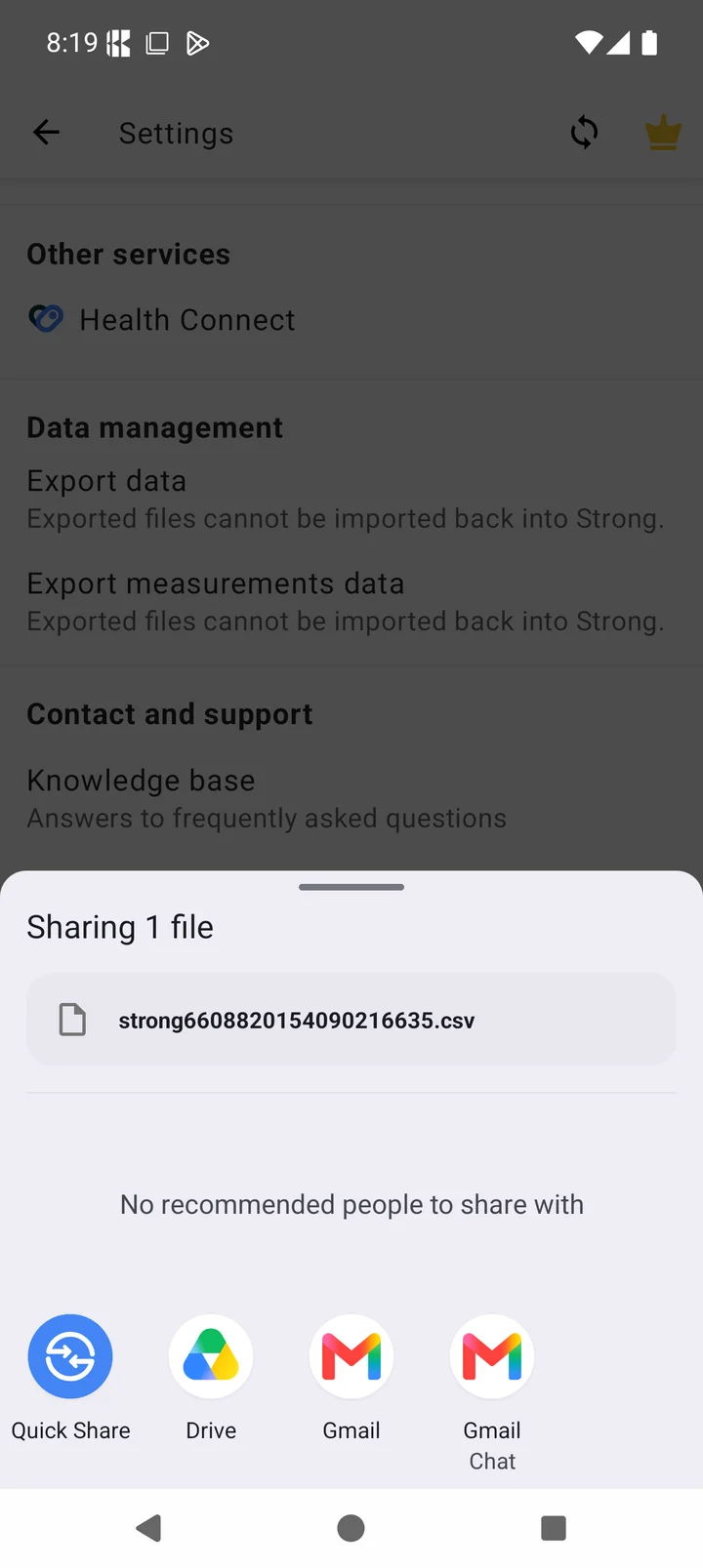\n\nBiggest downside - the free tier. You can't use it at all without creating an account, the routine limit kicks in if you go over a 3-day split, and charts, plates calculator and warm-up calculator are PRO only. CSV export is free, but it only works one way - there's no way to get any data into Strong, not even the CSV it exported.\n\n## Hevy\n\n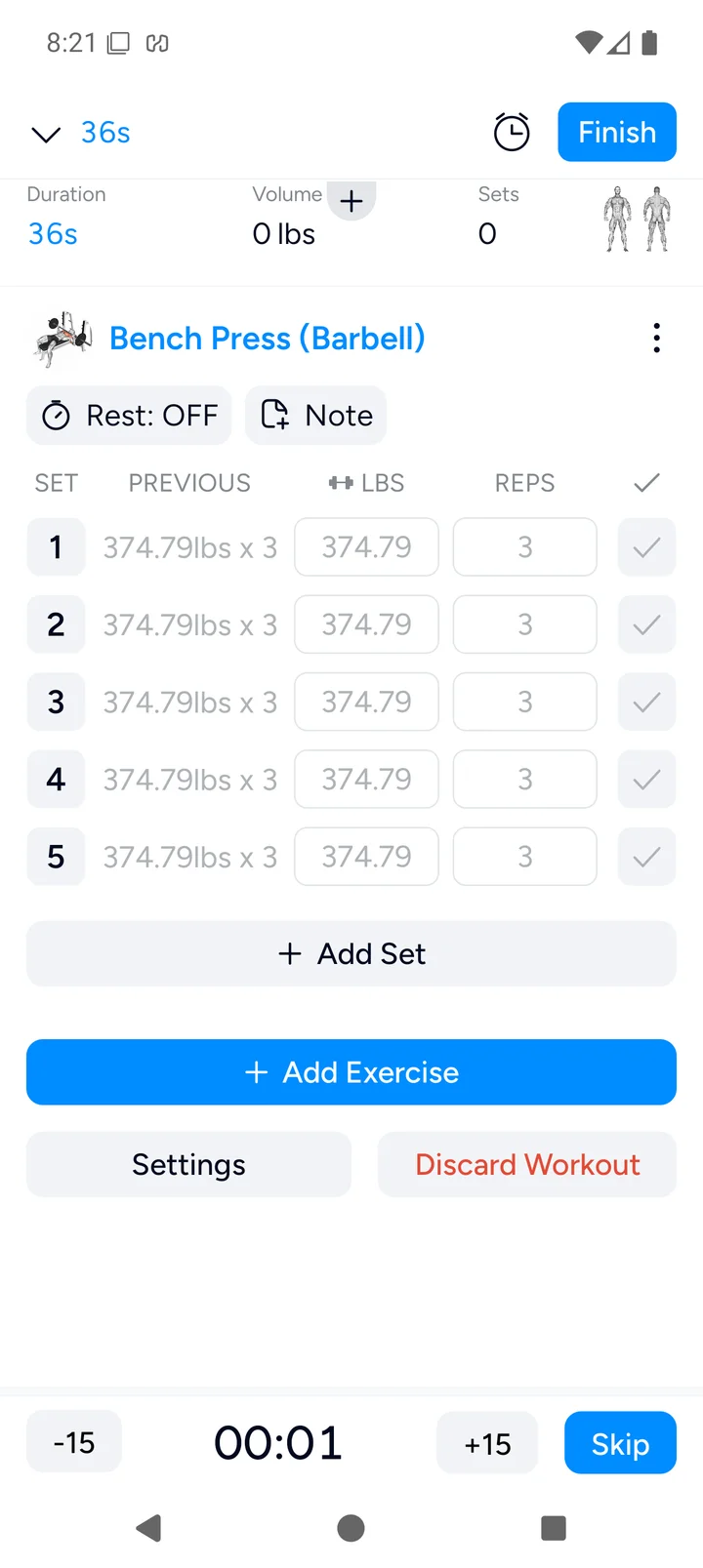\n\n- **Free is enough:** Partly - account required, about 15 onboarding screens, 4 routines, charts limited to 3 months. No ads\n- **Last time:** Yes - a PREVIOUS column on every set row\n- **Taps:** 11 to a new set in an empty workout (the keyboard covers the Add button, so one tap goes to closing it). 1 tap for a planned set\n- **Data:** CSV export, free. Import from a Strong CSV, once per account\n- **Watch:** Apple Watch and Wear OS\n- **PRO:** $2.99/month, $23.99/year or $74.99 lifetime\n\nTracking sets in Hevy is pretty much identical to Strong - there's that PREVIOUS thing, grey hints, a single tap to complete a set, and if you add an exercise - it copies the number of sets from your previous workout. The difference is in all the other stuff surrounding it.\n\n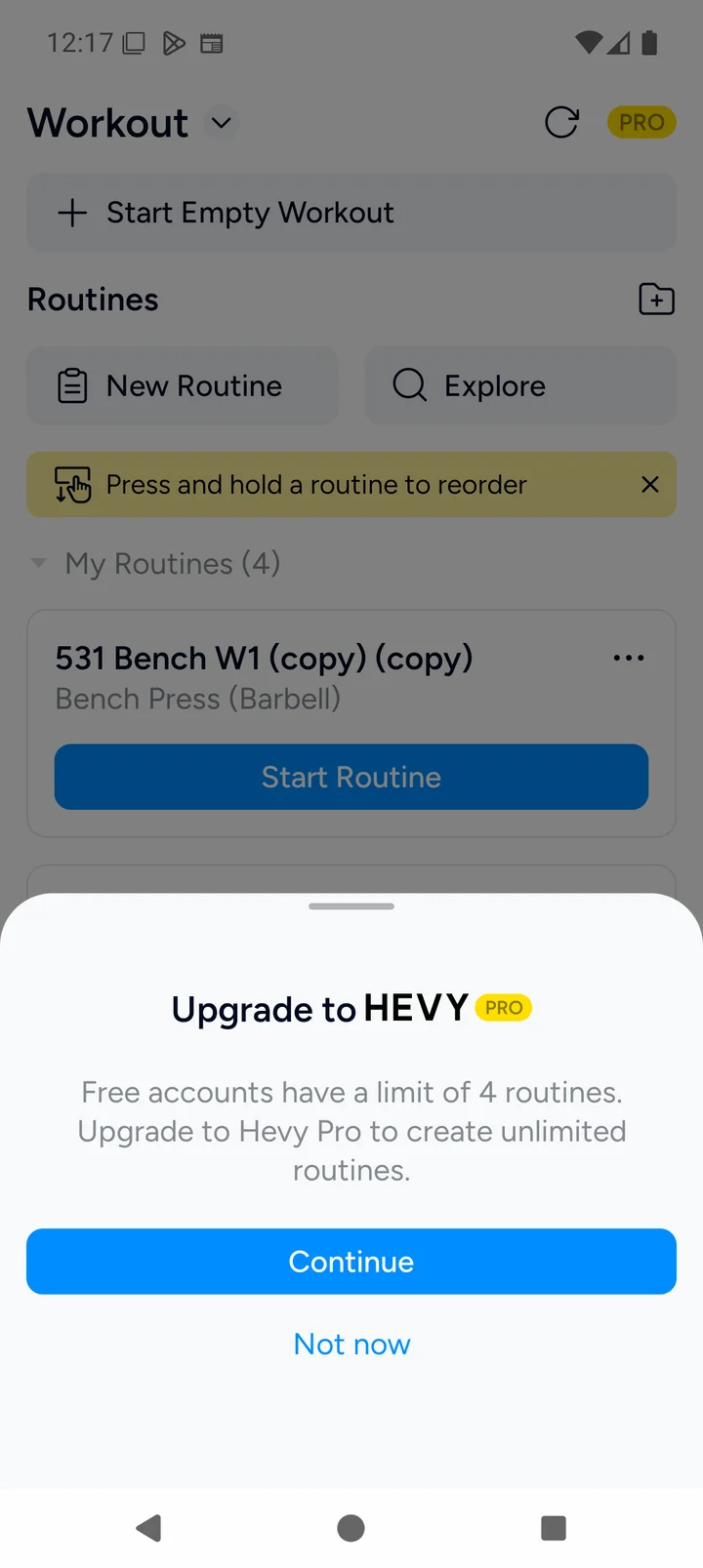 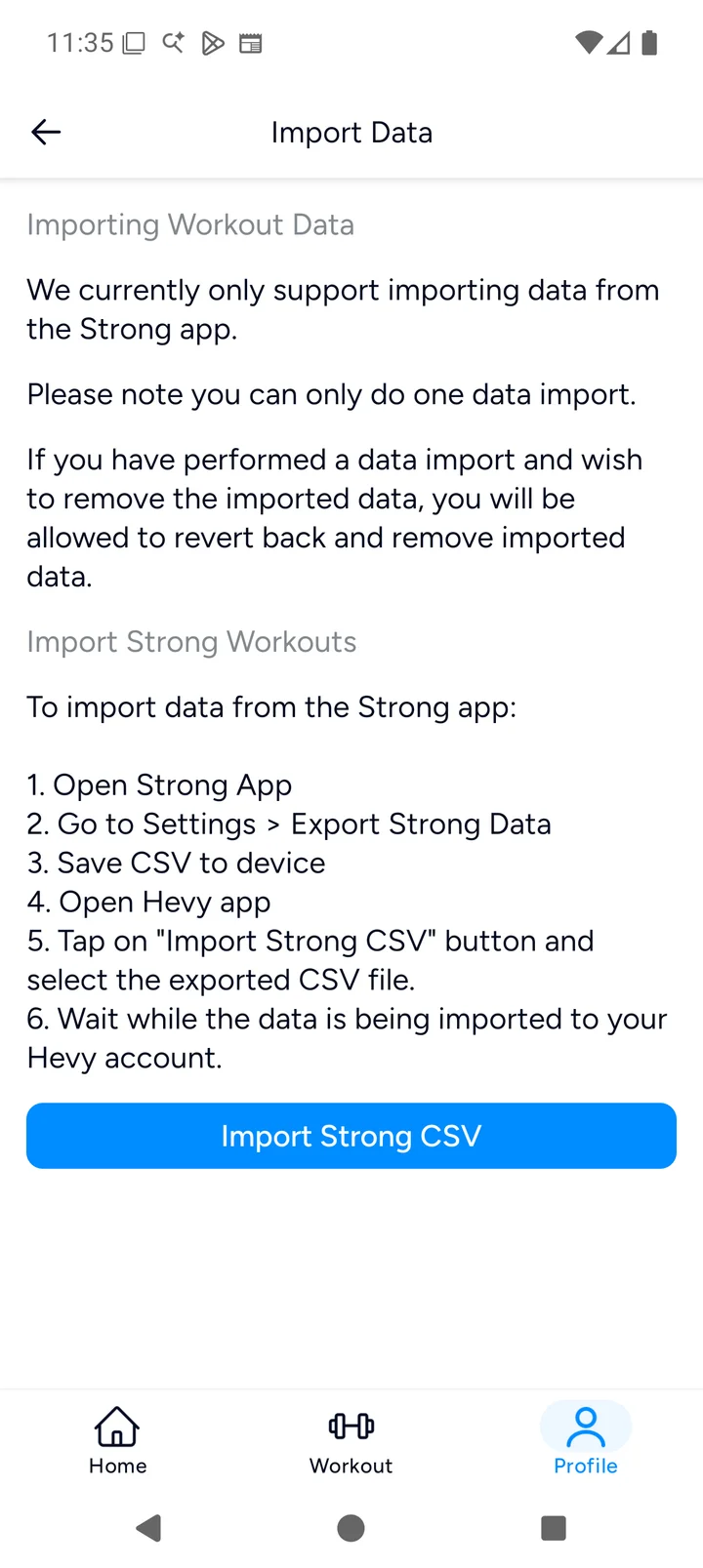\n\nHevy is also a social app - there's a feed with other people's workouts, and by default new workouts are visible to \"Everyone\". You can switch that to \"Only me\", but the feed is still there. Free tier gives you 4 routines and 3 months of charts. The good thing is it can import a Strong CSV, so moving from Strong is pretty straightforward.\n\n## Boostcamp\n\n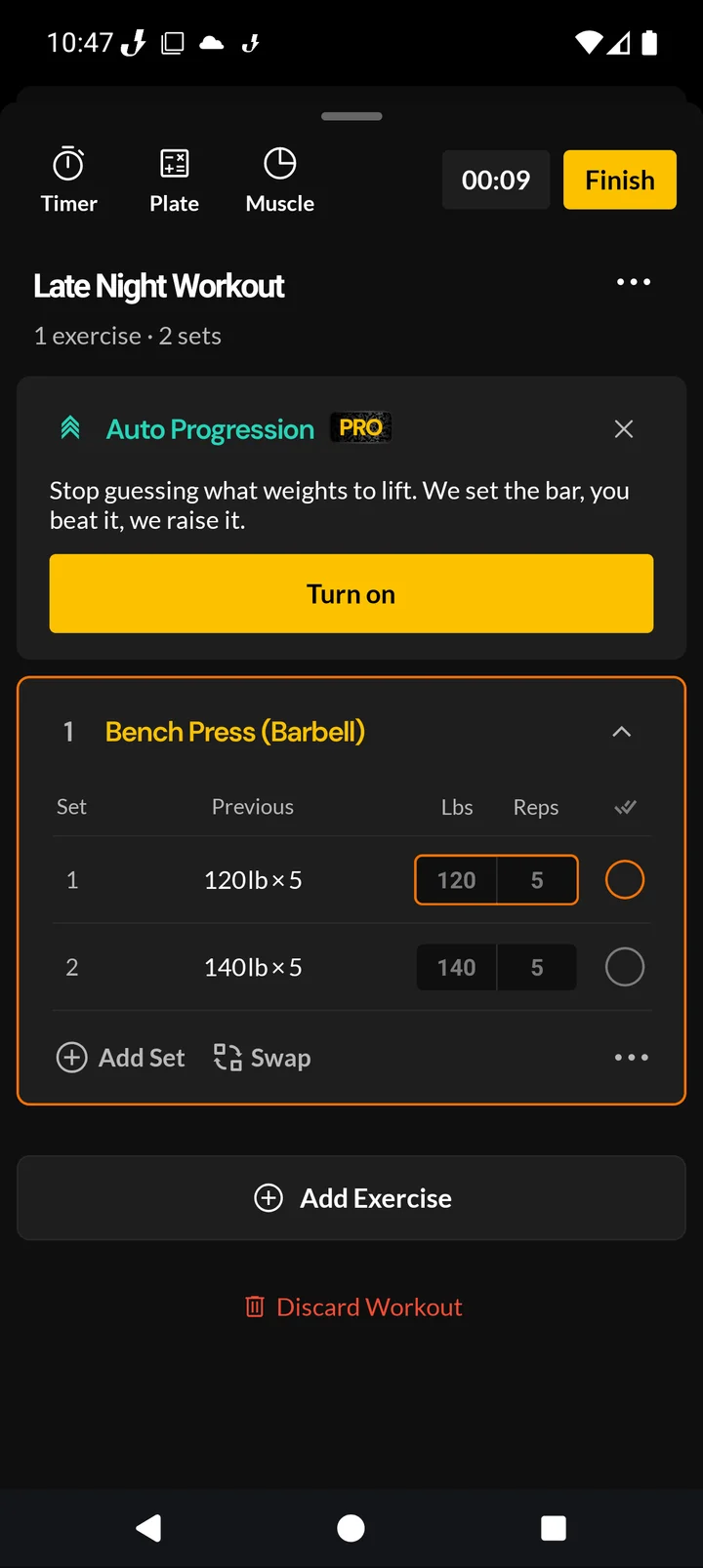\n\n- **Free is enough:** Partly - no ads, and the program library is mostly free, but custom exercises, the plate calculator and warm-up sets have a few free uses, and charts are PRO\n- **Last time:** Yes - a Previous column on every set row, and an added exercise copies last session's sets\n- **Taps:** 10 to a new set in an empty workout, one of them to close a PRO paywall that pops up after \"Empty workout\" on the free tier. 1 tap for a planned set\n- **Data:** No export or import in the Android app - sharing makes images only\n- **Watch:** No\n- **PRO:** $14.99/month or $59.99/year with a 7-day trial\n\nBoostcamp is first of all a program app - people come there for the free library of programs. But you can also use \"Empty workout\" as a plain log, and it looks a lot like Strong - there's a Previous column, grey hints, and tapping the check fills in the hint. So if you repeat the reps from last time, you don't need to type anything. The downside is data - the Android app doesn't have any export whatsoever.\n\n## StrengthLog\n\n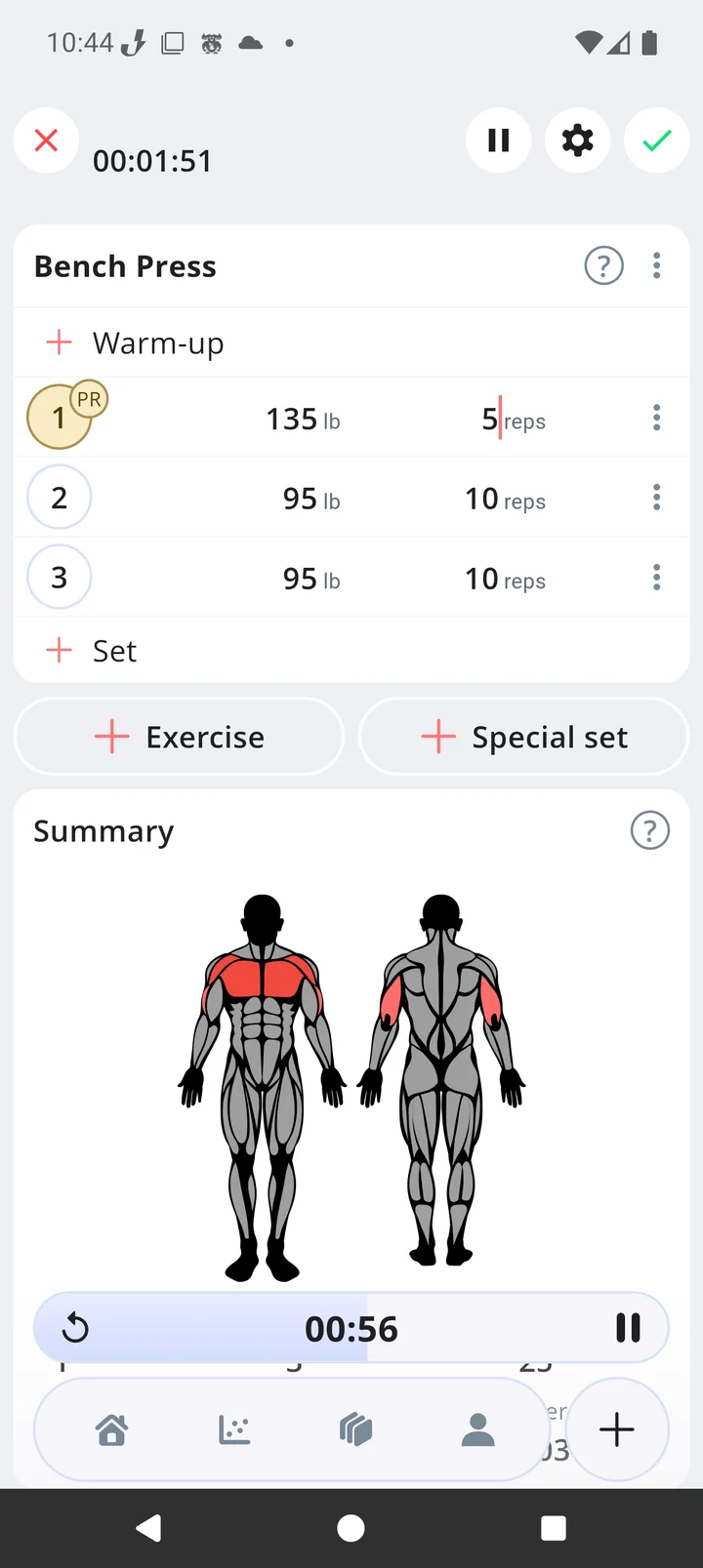\n\n- **Free is enough:** Partly - an account is required (but no questions after it), no ads, and logging has no limit. But you can save only 5 programs and workouts, and most stats, % of 1RM and RPE logging are Premium\n- **Last time:** Partly - \"Copy sets from last workout\" is on by default, so new sets start with last time's numbers. But there's no column or hint, so once you type over a set, last time is gone from the row\n- **Taps:** 9 to a new set in an empty workout. 1 tap for a planned set\n- **Data:** CSV export with a row per set. No import\n- **Watch:** Partly - Wear OS Tiles show goals, streaks and weekly stats, but the listing doesn't say you can log sets from the watch. The App Store lists Apple Watch as supported, but doesn't say what it does\n- **Premium:** $16.99/month, $37.99 per 3 months or $109/year, with a 2-week trial\n\nStrengthLog is super easy to start with - you just sign in, and it doesn't ask anything else. Logging is fast as well. The only issue is how it shows the previous workout - it copies the sets from last time into the current workout. That's nice if you repeat them, but if you change a set, the previous numbers are gone, and there's no way to see them anymore.\n\n## Alpha Progression\n\n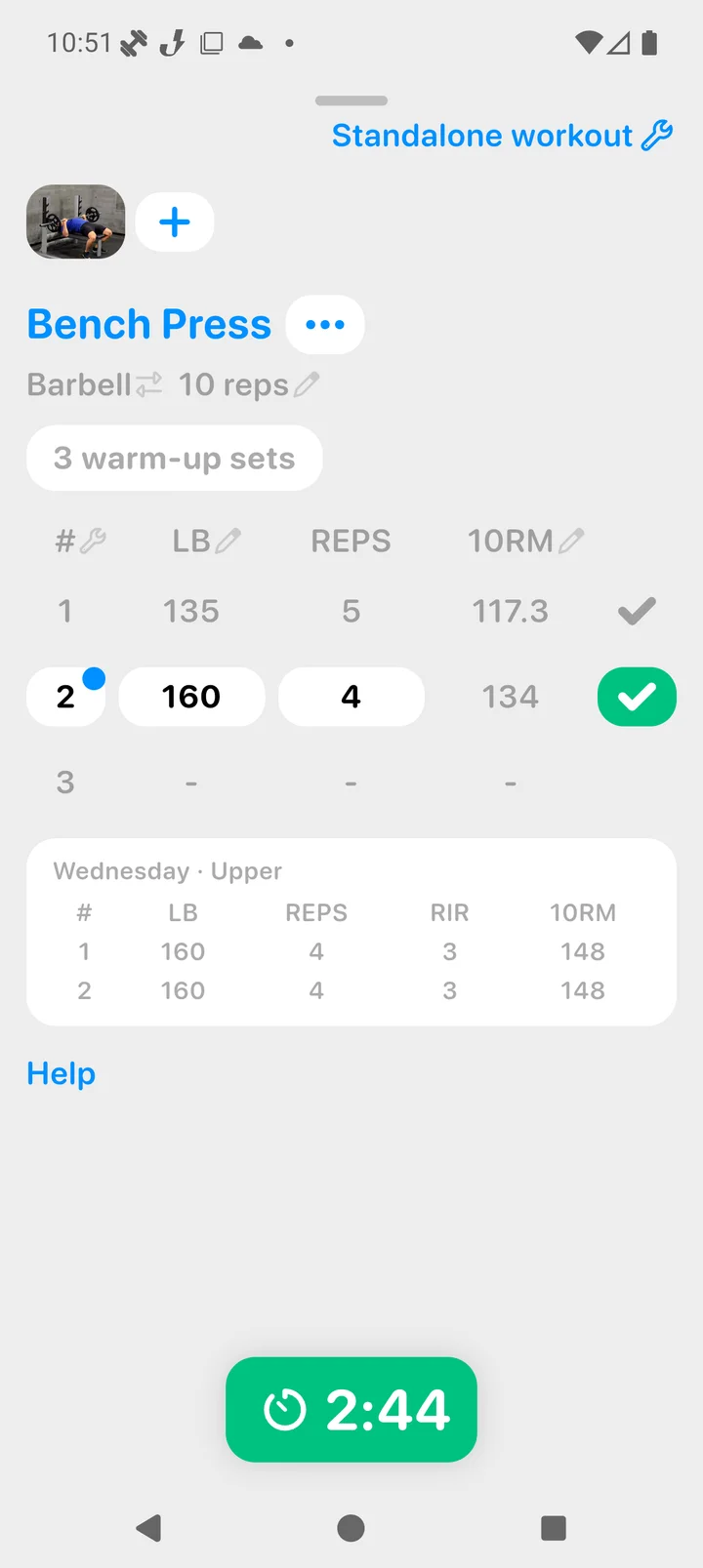\n\n- **Free is enough:** Partly - no account needed and 3 questions at the start, no ads. But progression suggestions, all charts and the plate calculator are PRO\n- **Last time:** Yes - a grey card under the sets with your last session, and the rows are prefilled with it\n- **Taps:** 11 to a new set in an empty workout. 1 tap for a planned set\n- **Data:** CSV export, free, but the workouts file is a report per workout, not a row per set. No import\n- **Watch:** No\n- **PRO:** $14.99/month or $89.99/year with a 14-day trial\n\nAlpha Progression is mostly for planning hypertrophy programs, but if you just want to track a simple workout, there's also \"Create - Workout - Empty workout\". It shows what you did last time in a little table below the sets, which is pretty clear. Entering reps and weights is a bit slower than in other apps though, because you have to choose the reps from a wheel.\n\n## Hardy\n\n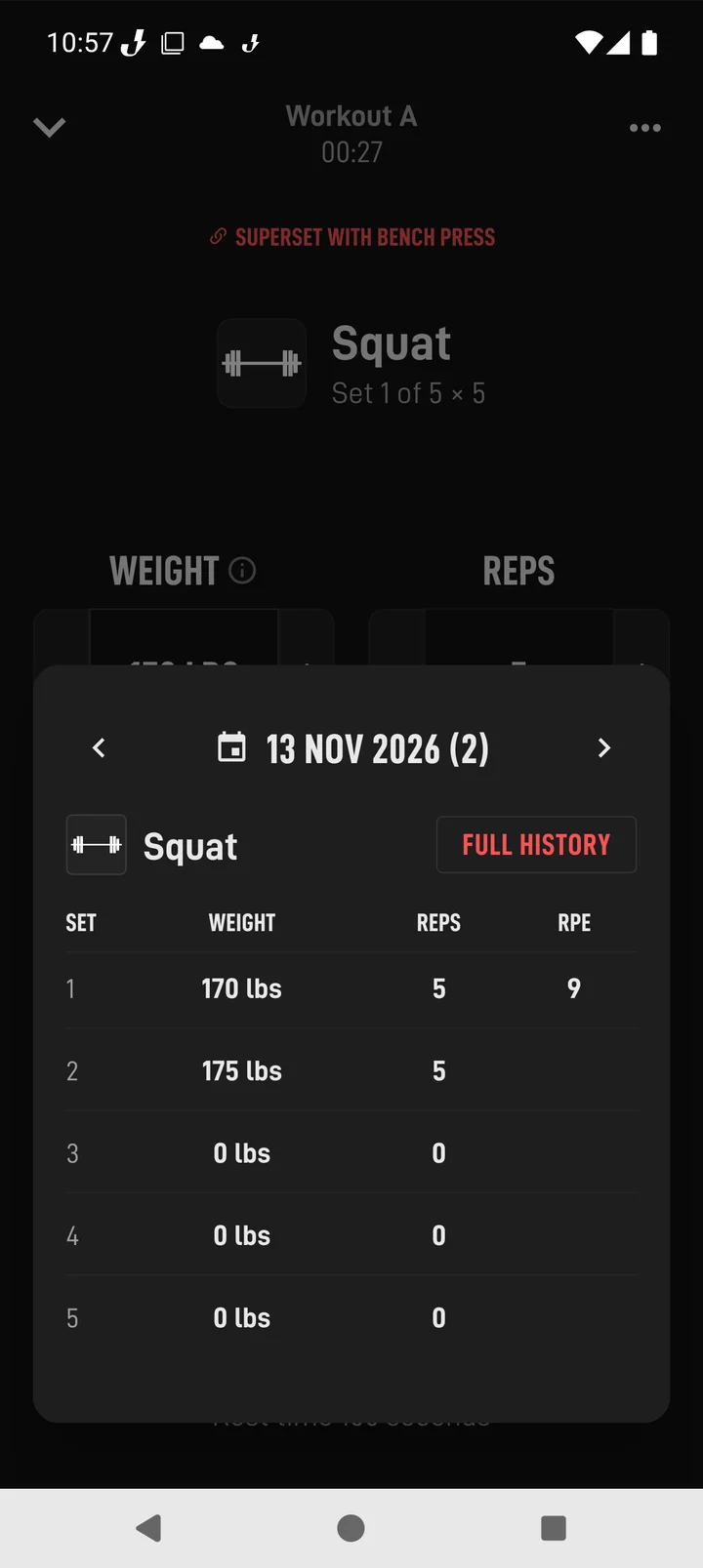\n\n- **Free is enough:** Partly - an account is required (email, username, password), no ads. Charts show 30 days, custom exercises, offline mode and dark mode are Pro\n- **Last time:** No - in an unplanned workout there's no last time on the screen at all. In a routine workout, it's one tap away under the History button (that's the screenshot above)\n- **Taps:** 7 to a new set in an empty workout, tied with Strong. 1 tap for a planned set\n- **Data:** No file export and no import. A workout can be shared as a link\n- **Watch:** Apple Watch\n- **Hardy Pro:** $5.99/month, $59.99/year or $94.99 lifetime\n\n\"Log unplanned workout\" is right there on the Home screen, and the set is prefilled, so logging from scratch is pretty much on par with Strong. But unplanned workouts don't show last time at all, and all the data is stuck in the app - no export. Offline mode is Pro, which is kinda weird to pay for in a gym.\n\n## RepCount\n\n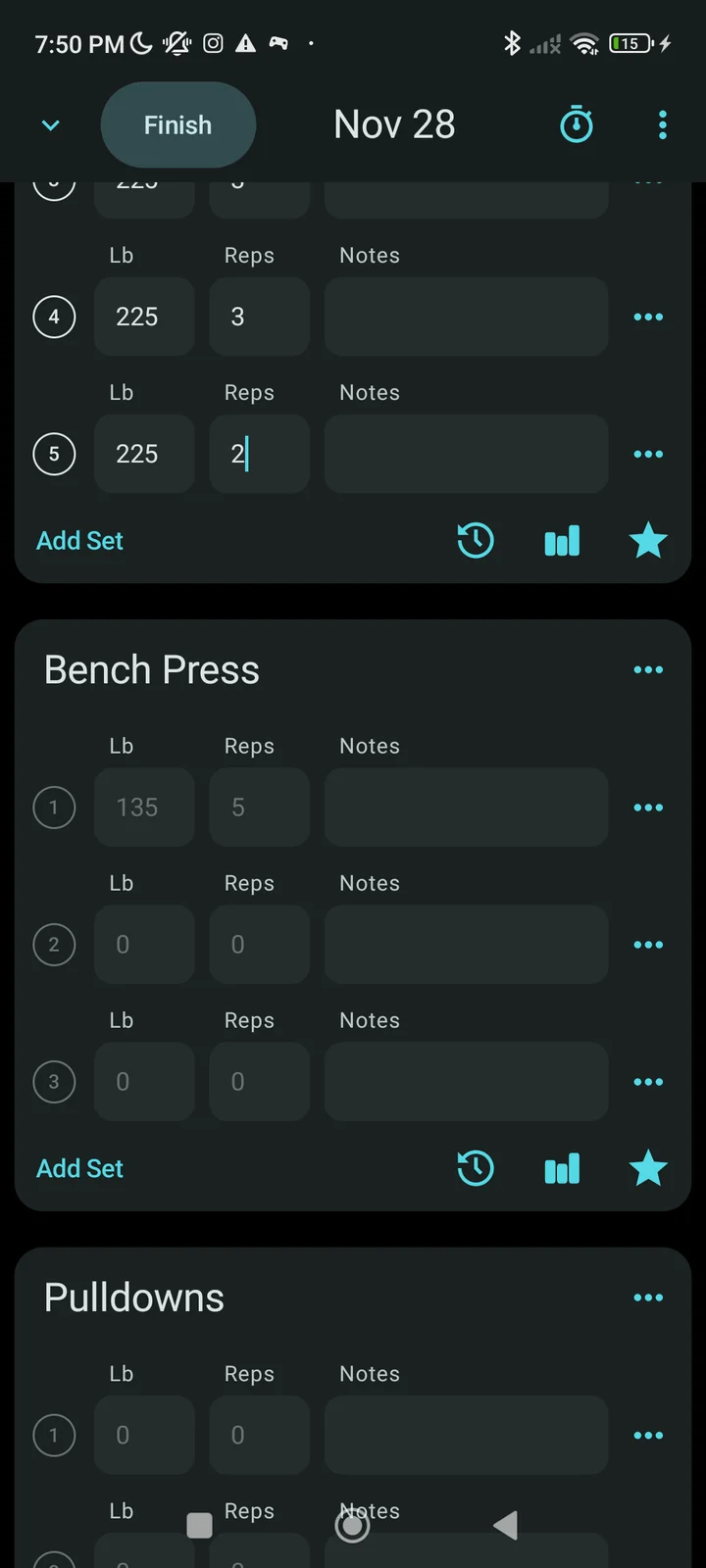\n\n- **Free is enough:** Partly - no limits on workouts, routines or exercises, and the account is optional. But every chart, the exercise history, PRs and the export are Premium\n- **Last time:** Partly - grey hints inside the empty fields, which you have to retype\n- **Taps:** 8 to a new set in an empty workout. 4 for a planned set, because there's no \"done\" button - you type both numbers every time\n- **Data:** Export only with Premium, no import\n- **Watch:** No\n- **Premium:** $4.99/month or $29.99/year\n\nRepCount is a keyboard-first log. There isn't even a checkmark button - the set is logged when both fields are filled in. The \"Next\" key on the keyboard takes you from weight to reps, and then to the following set. It's fast if you lift something new, but the values from last time are only shown as grey hints, so if you want to repeat the last workout, you'd still need to type all of them manually.\n\n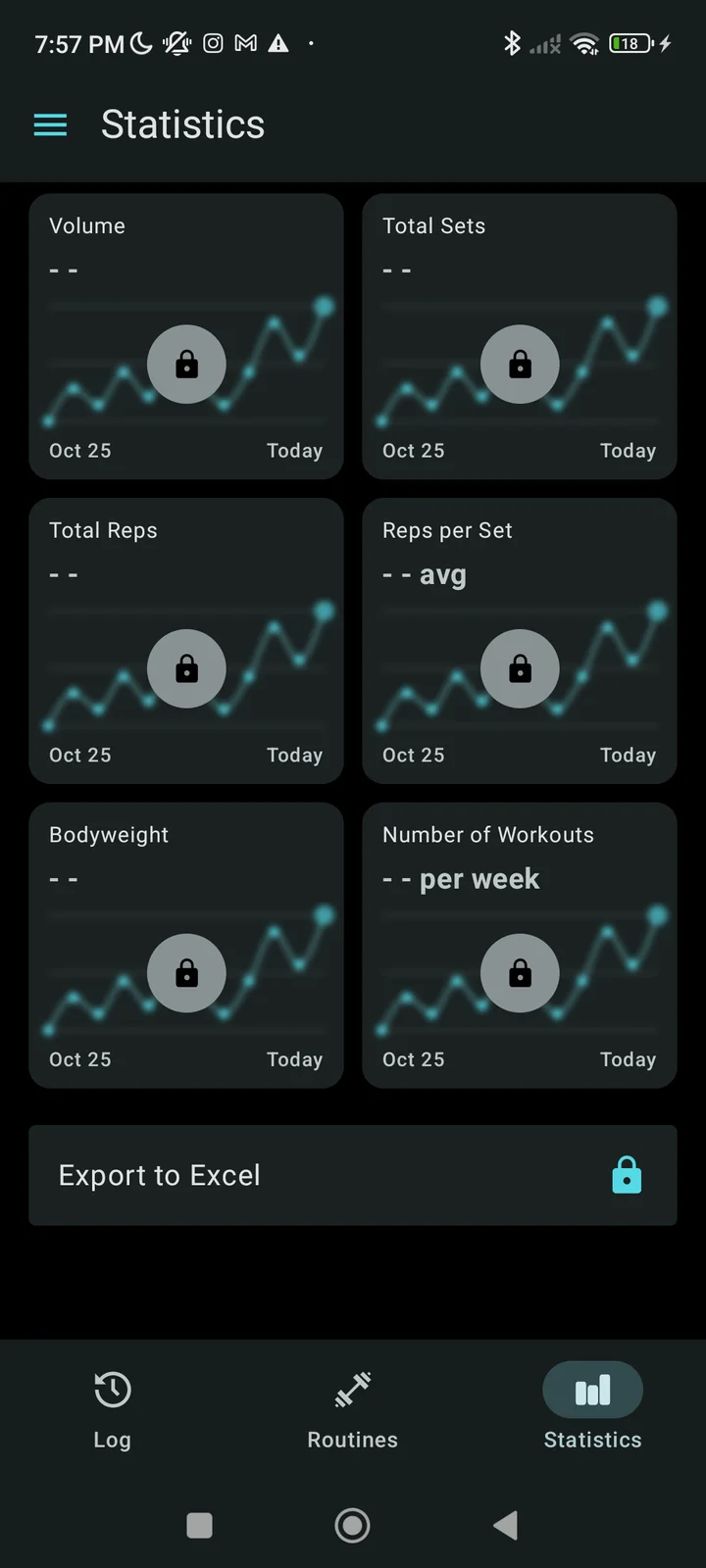\n\nThe free tier isn't capped, works without account (the data just lives on the phone in that case), and doesn't show any third-party ads. But once you want to check past progress - charts, history of a specific exercise, PRs - that's Premium. Same with the only export option - Export to Excel.\n\n## Lyfta\n\n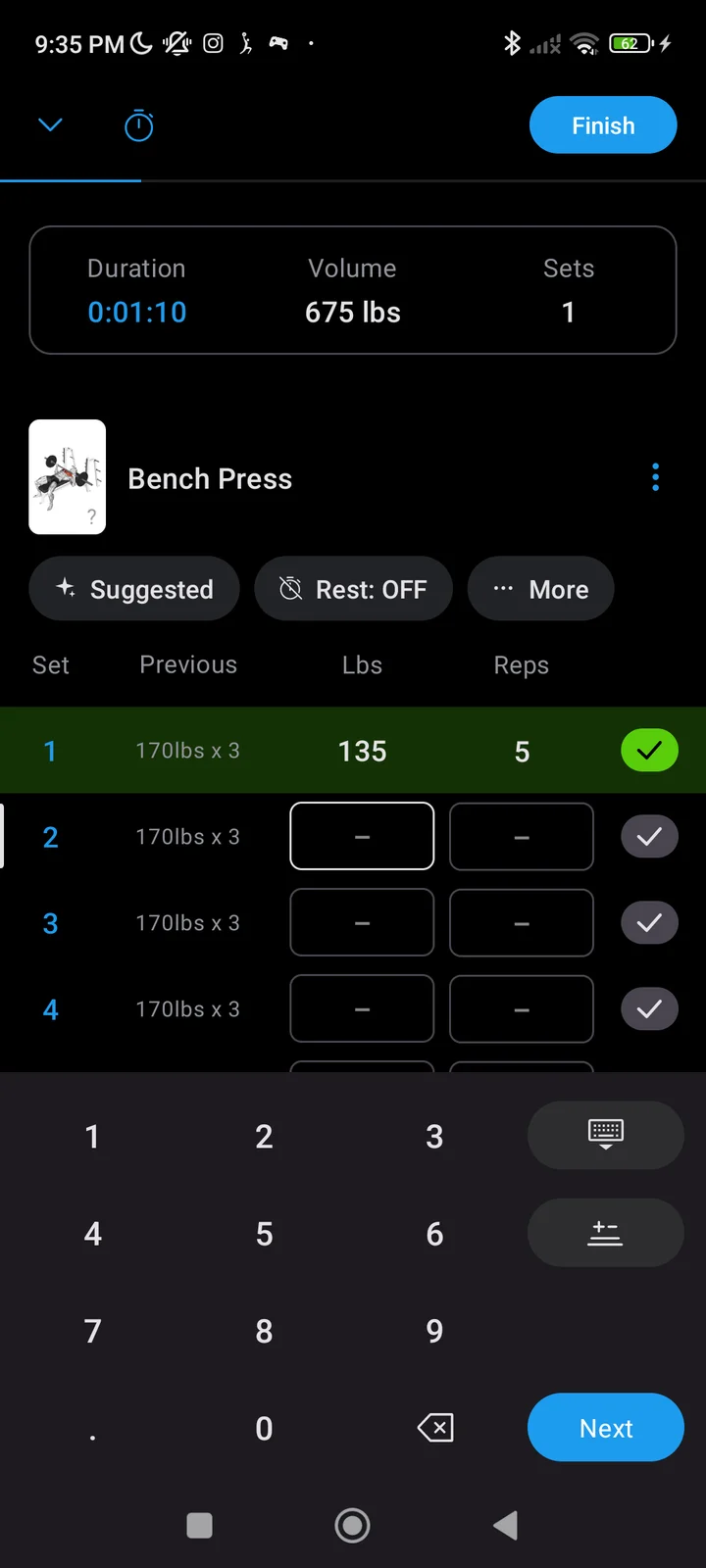\n\n- **Free is enough:** Partly - 12 onboarding questions and an account before you start, workouts public by default, and the paywall lists almost everything as Premium\n- **Last time:** Yes - a Previous column on every set row\n- **Taps:** 12 to a new set in an empty workout. 1 tap for a planned set\n- **Data:** CSV export, and the widest import here - Strong, Hevy, FitNotes, JEFIT, Fitbod, StrengthLog and more\n- **Watch:** Apple Watch and Wear OS\n- **Premium:** $59.99/year with a 14-day trial\n\nThe logging screen is nice - there's a \"Previous\" thing showing what you did last time, and you just tap each set from the program to log it. And importing is the best out of the 12 apps - it took our Strong CSV with 36 workouts in like 20 seconds.\n\n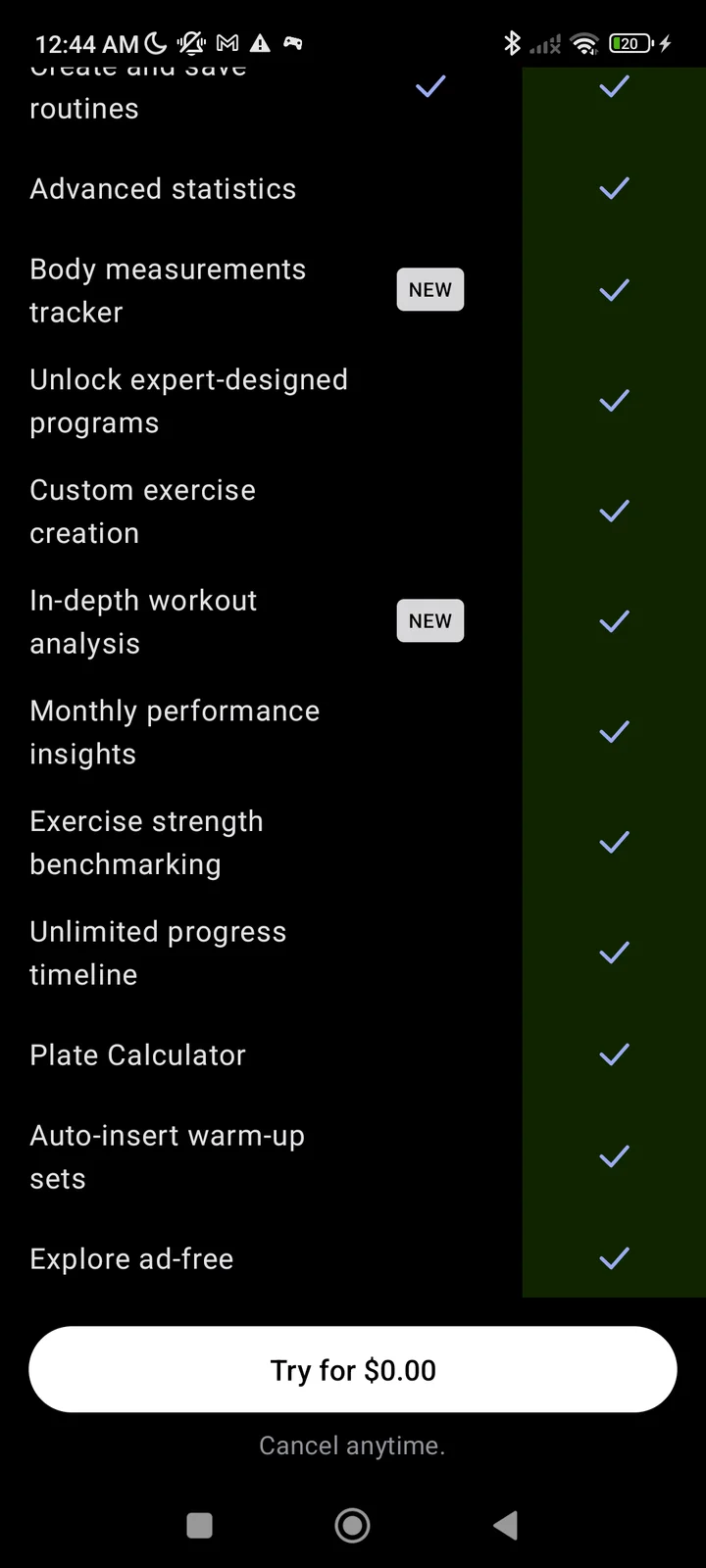 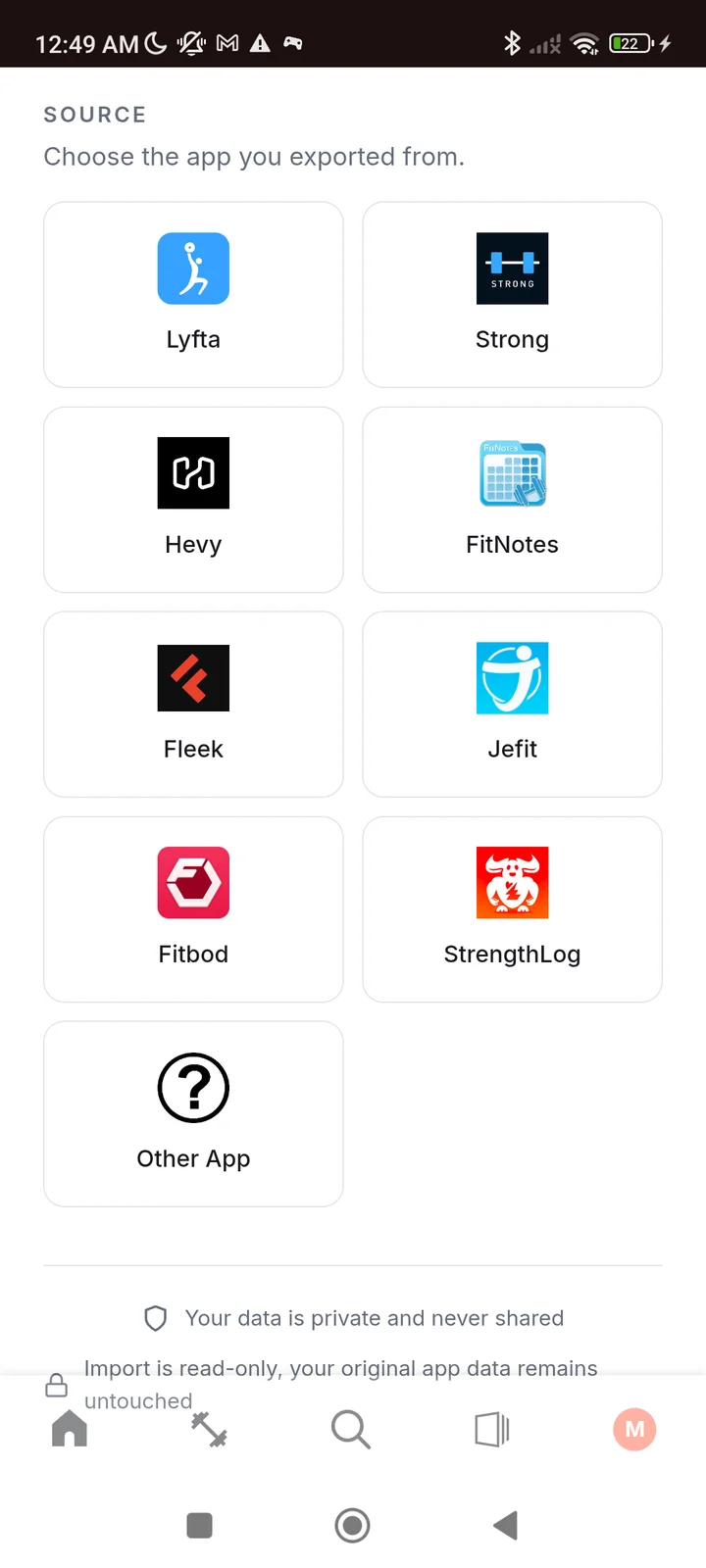\n\nBut to get there it takes a while: 12 questions, then you need to create a Google/email account, then there are paywalls, and an exit offer on top. Each workout is posted to a feed, and it's public by default. You can track workouts for free, but if you want to see charts for bigger time ranges, and the majority of extras - you need Premium.\n\n## Caliber\n\n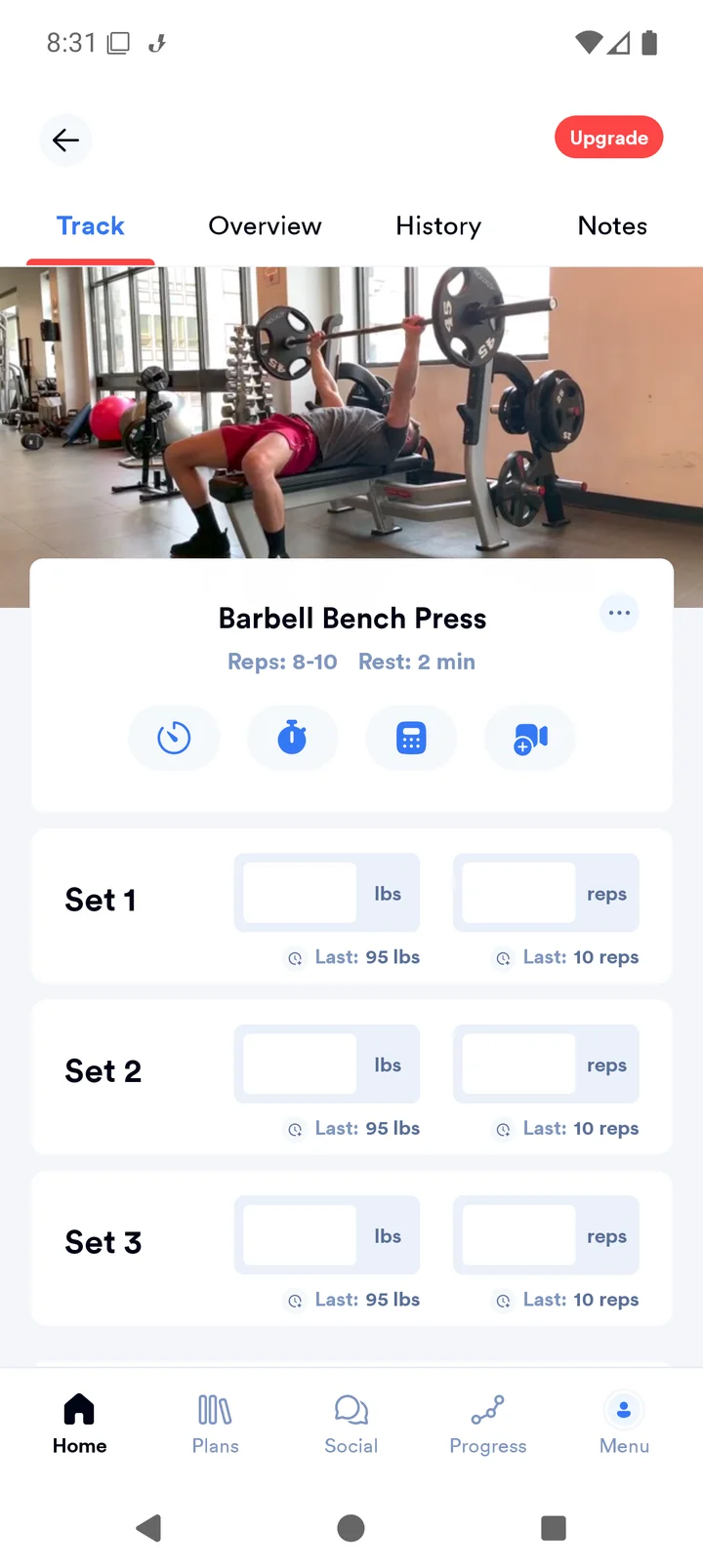\n\n- **Free is enough:** Partly - 10 onboarding questions and an email account. No count limits, but custom exercises, supersets, the plate calculator and the automatic rest timer are Plus\n- **Last time:** Yes - \"Last: 95 lbs\" / \"Last: 10 reps\" hints under every field, and a \"Last\" key on the number pad\n- **Taps:** 13 to a new set in an empty workout. About 4 for a planned set, because the fields never prefill\n- **Data:** CSV of the whole history, sent by email within 24 hours. No import\n- **Watch:** No\n- **Plus:** $12/month or $72/year\n\nCaliber displays the last time pretty nicely, but you have to type in all the values manually (you can also tap \"Last\" on the number pad, but you'd need to do it field by field). There isn't a done button - once the fields are filled in, it's considered logged.\n\n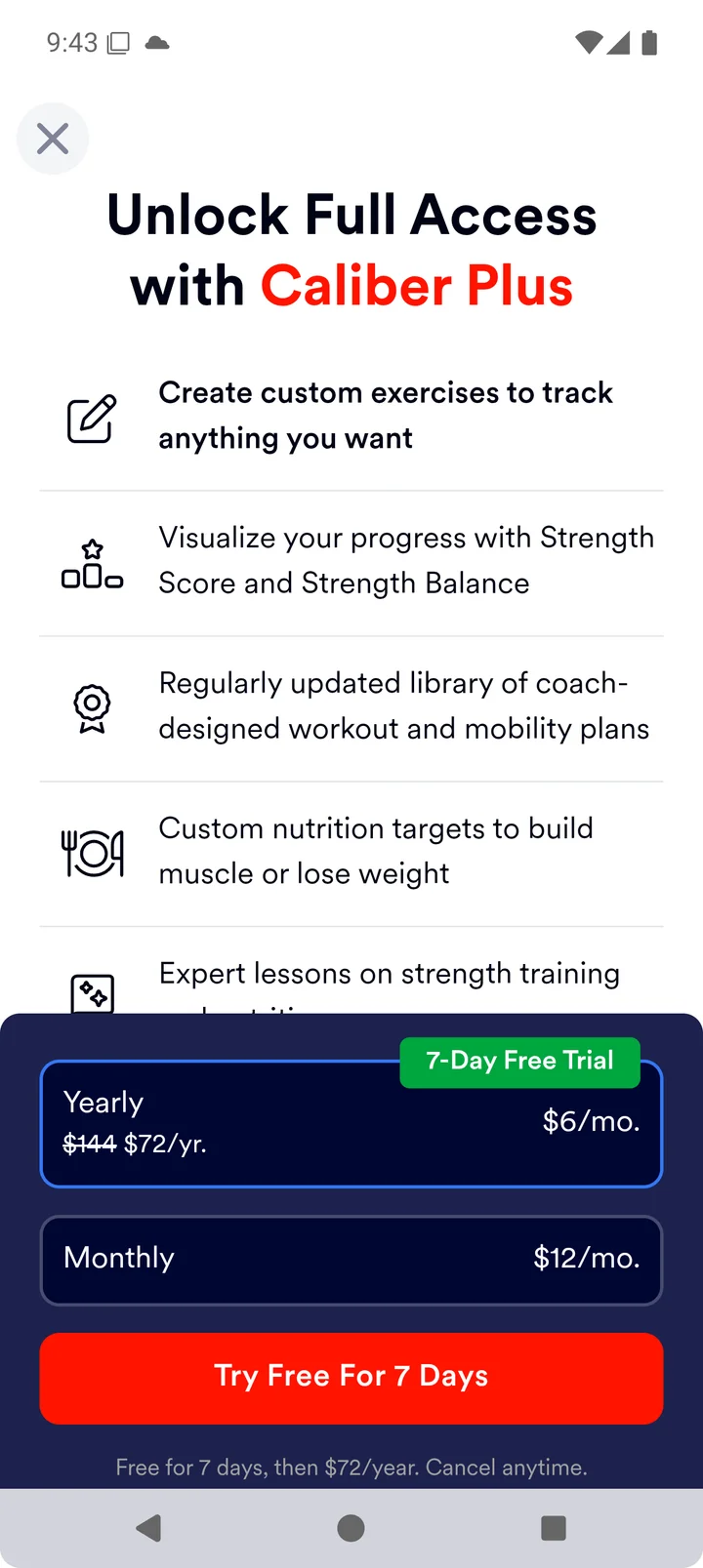 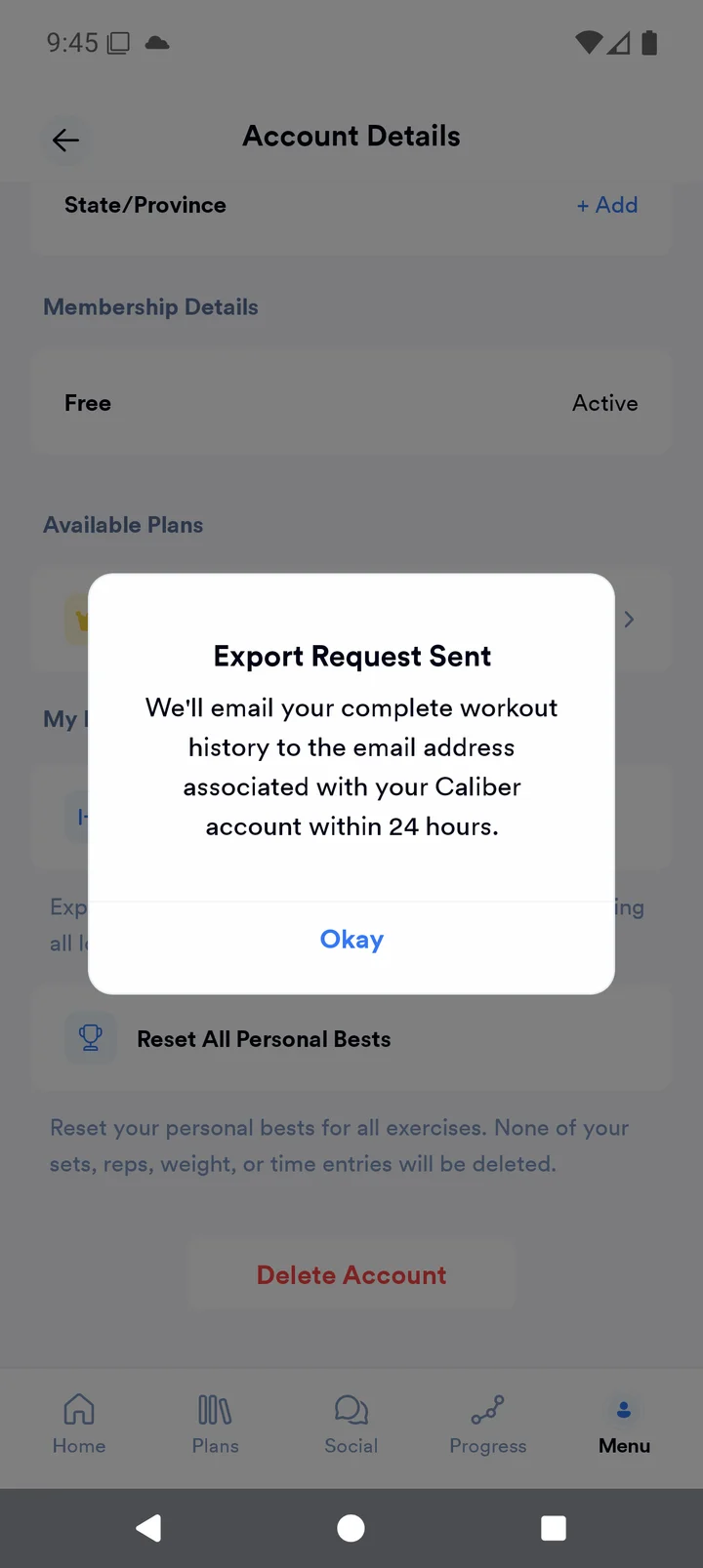\n\nCaliber is mostly about coaching, and you can feel it in the app - there's Upgrade pill on each exercise screen, Plus banner on Plans, and \"$100 off coaching\" card on Home.\n\n## JEFIT\n\n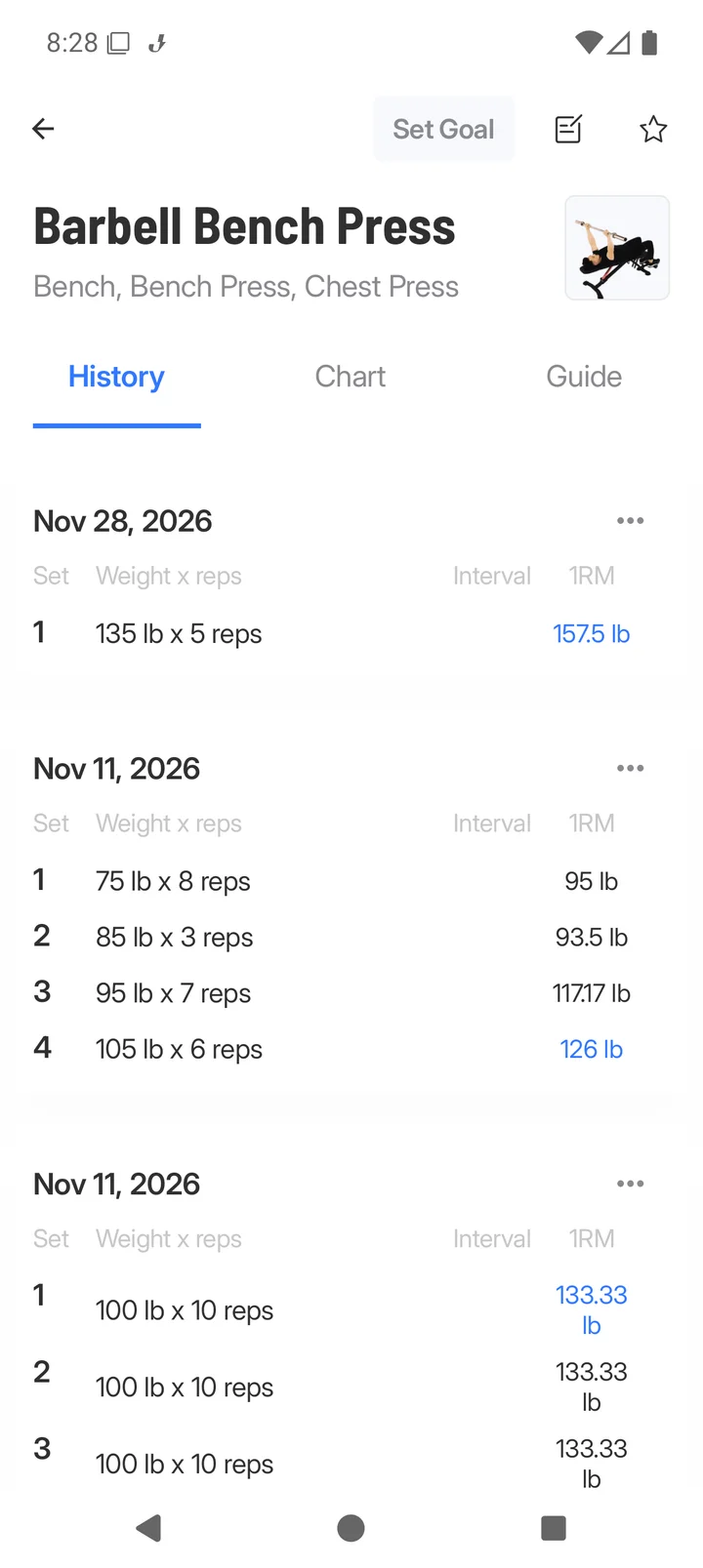\n\n- **Free is enough:** No - 20 question screens and 3 paywalls before you start, 3 custom exercises, 10 plans, 5 days per plan, and achievements posted to a feed automatically\n- **Last time:** No - the set rows show targets, and last session is one tap away in History\n- **Taps:** 10 to a new set (there's no empty workout - you start from an exercise). 1 tap for a planned set\n- **Data:** No export or import in the Android app\n- **Watch:** Apple Watch and Wear OS, unlimited watch workouts are Elite\n- **Elite:** $12.99/month or $69.99/year\n\nJEFIT has a huge exercise library, but it's the opposite of simple.\n\n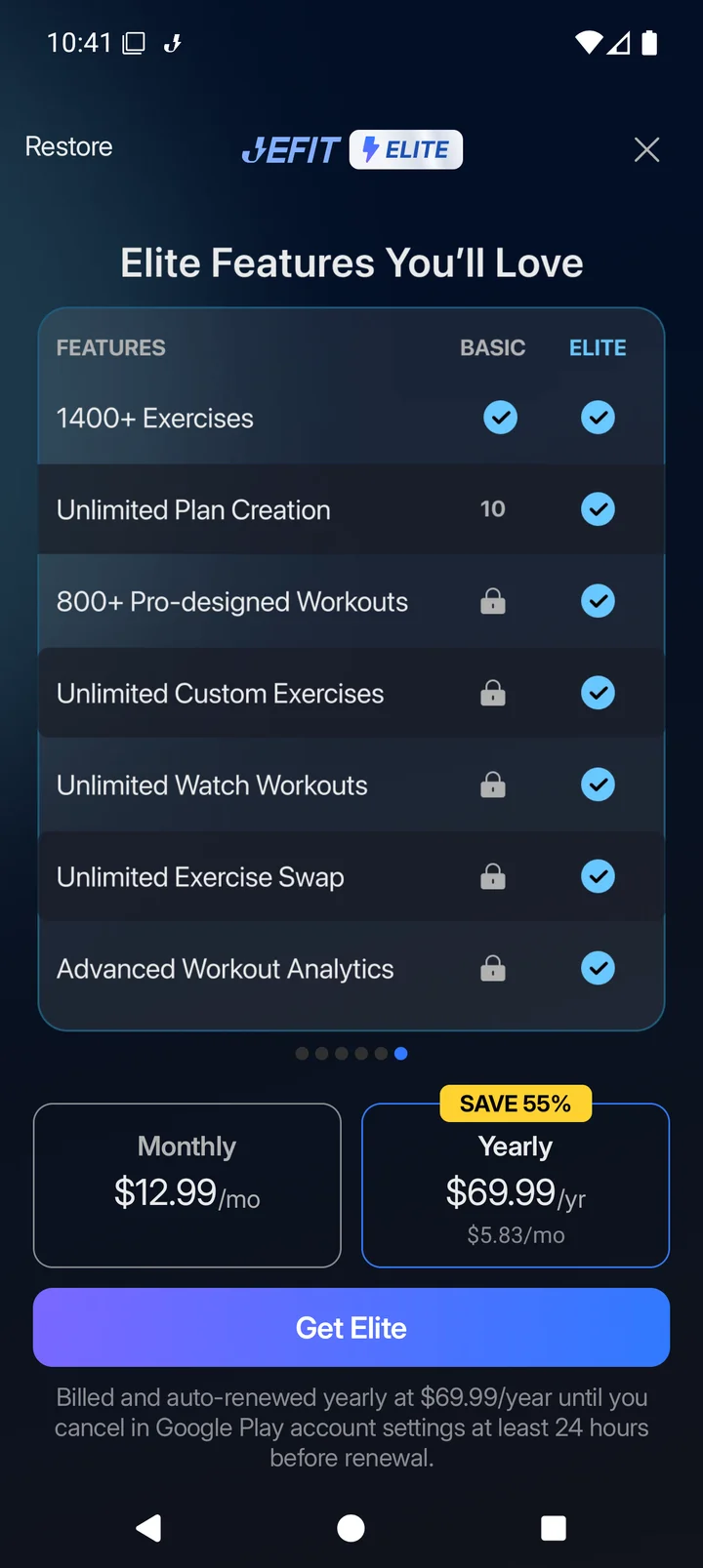\n\nYou need to answer 20 questions on separate screens and get past 3 paywalls before you even get to the first set. On the free tier you can only create 3 custom exercises. It also automatically posts your achievements to a community feed, without asking you. And there's no way to export anything from the Android app.\n\n## Liftosaur\n\n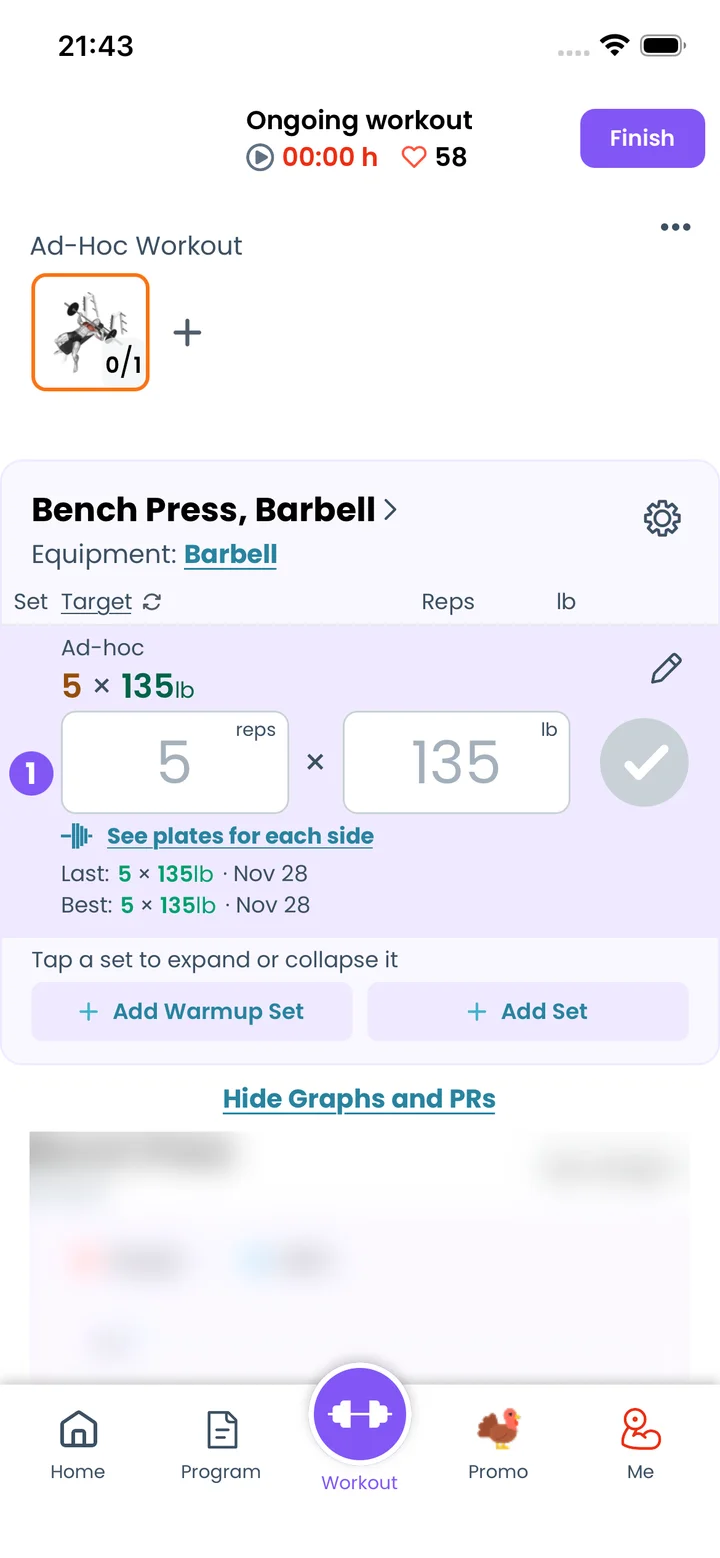\n\n- **Free is enough:** Yes - no account, no limits, no ads. Premium is graphs, rest timer notifications, the Apple Watch app and a few more\n- **Last time:** Yes - a \"Last:\" line with the date under the current set, and the set is prefilled with the same numbers\n- **Taps:** 12 to a new set in an empty workout, 8 if you repeat last time. 1 tap for a planned set\n- **Data:** CSV and JSON export, free. Import from a Hevy CSV, a generic CSV or a Liftosaur JSON\n- **Watch:** Apple Watch (Premium), which works with the phone in the locker. No Wear OS app\n- **Phones:** iPhone, Android and web\n- **Premium:** $4.99/month, $39.99/year or $99.99 lifetime\n\nTo be honest - Liftosaur is not a simple logger. It's built around programs - a program is a text in Liftoscript, and Liftosaur does all the progression for you. So if you only want to log your workouts, most of that would just get in your way.\n\n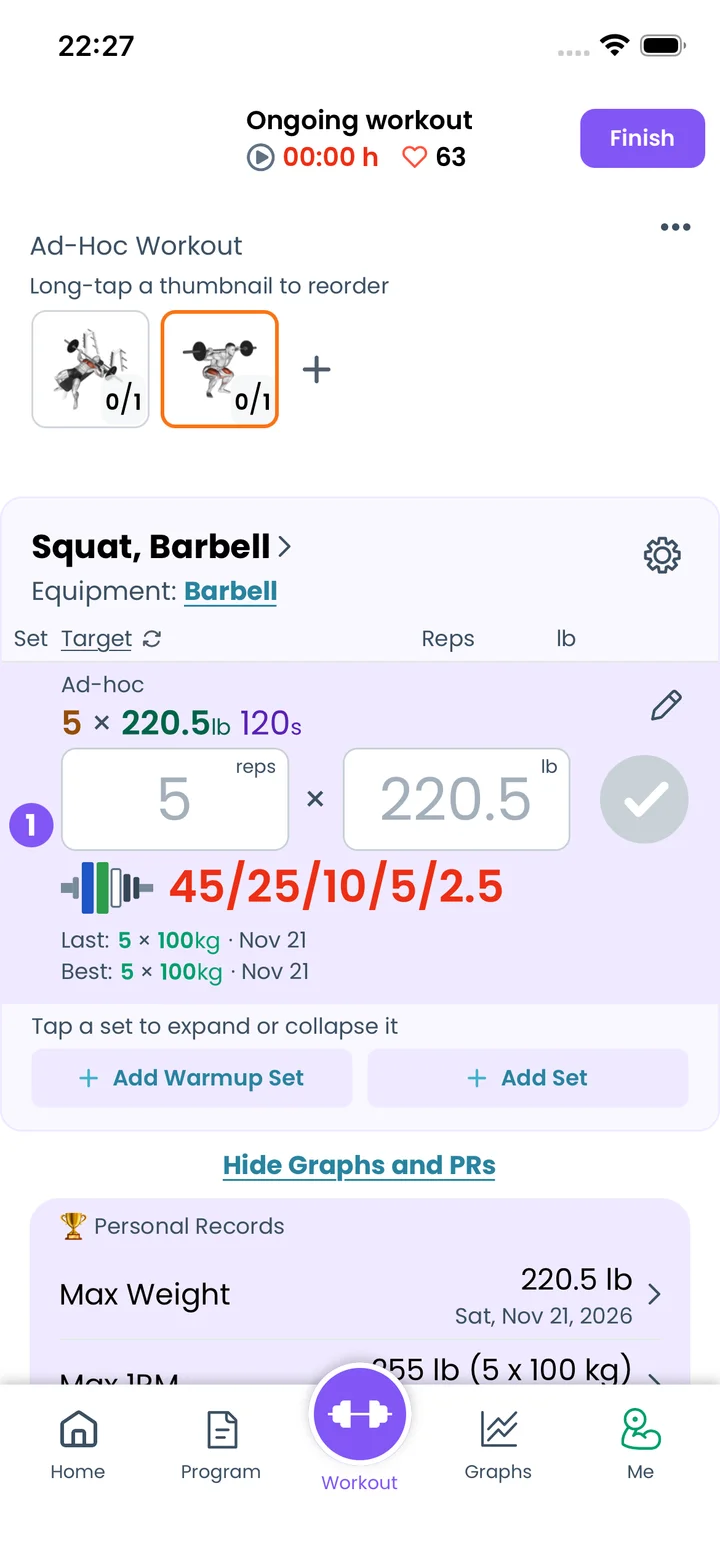\n\nBut if you just want to track workouts, you can do that as well. You don't have to register, just tap \"Ad-Hoc Workout\" and it'll start with empty workout. When you add some exercise, it'll prefill a set from the last time you did it, and there're \"Last\" and \"Best\" lines under it, so to repeat what you did last time you just need one tap. Everything is free except the extras, and you can export all your history to CSV or JSON.\n\nIf you're after a program (like GZCLP, 5/3/1, etc), not just a workout tracker, that's exactly what Liftosaur is for. Check [the best GZCLP apps](/compare/gzclp-apps) and [the best workout spreadsheet apps](/compare/workout-spreadsheet-apps) comparisons too.\n\n## Apps without a simple log\n\nWe also checked these apps - each is good in its own way, but none of those allows you to just quickly log a workout for free:\n\n- **MacroFactor Workouts** and **RP Hypertrophy** don't have a blank workout or a free tier, so you need to pay before logging anything (MacroFactor has a 7-day trial). The app builds the program itself and picks the weights.\n- **MyoAdapt** generates all the workouts from a 30-question profile. On the free tier, tapping Start Workout just opens the paywall.\n- **Fitbod** and **Gravl** let you create a workout from scratch, but they're really designed to generate the workouts themselves, and you need a subscription to keep training (Gravl has 3 free workouts).\n- **KeyLifts** is a 5/3/1 app. To do a single ad-hoc workout, you need to create a template first, and the free tier ends after 4 workouts.\n- **GZCL Workout Logger** only supports the 7 built-in GZCL programs, there's not even a blank workout.\n\n## FAQ\n\n### What is the simplest workout log app?\n\nIf you're on Android - FitNotes. It works without any account, asks you one question on the first launch, and there are no ads and no limits. For iPhone, Strong is probably the closest one - logging is fast, and it displays your previous numbers next to each set. But you have to create an account, and also the free tier only allows 3 routines.\n\n### Is there a free workout log app with no limits?\n\nFitNotes, RepCount and Liftosaur don't limit your workouts and routines if you're on a free plan. But in RepCount, graphs, exercise history, and export are paid.\n\n### Which workout apps show what I lifted last time?\n\nStrong, Hevy, Boostcamp and Lyfta have a \"previous\" column for each set. Caliber and Liftosaur have a \"Last\" line under the set, and Alpha Progression has a little table with the last workout. StrengthLog copies the last workout into the new sets. FitNotes prefills the last set, and RepCount displays the last time as grey hints. In JEFIT, the last time is in History, just a tap away. Hardy has the same History button in a routine workout, but in unplanned workouts there's no last time at all.\n\n### Which workout log apps work without an account?\n\nFitNotes, RepCount, Alpha Progression and Liftosaur. JEFIT creates an anonymous account for you in the background. Strong, Hevy, StrengthLog, Hardy, Lyfta and Caliber - you have to sign up first, and only then you could start tracking workouts.\n\n### Can I move my workout log from one app to another?\n\nKinda. Lyfta supports the most formats (Strong, Hevy, FitNotes, JEFIT, etc). Hevy can import a Strong CSV, but only once. Liftosaur imports a Hevy CSV, and also a generic CSV. Strong, FitNotes, Boostcamp, StrengthLog, Alpha Progression, Hardy, RepCount, Caliber and JEFIT - you just can't import your history from other apps there at all.","sizes":{"simple-workout-log-apps/fitnotes-track-prefilled":{"width":720,"height":1607},"simple-workout-log-apps/fitnotes-history-tab":{"width":720,"height":1607},"simple-workout-log-apps/fitnotes-backup-export":{"width":720,"height":1607},"simple-workout-log-apps/strong-previous-column":{"width":720,"height":1607},"simple-workout-log-apps/strong-charts-locked":{"width":720,"height":1607},"simple-workout-log-apps/strong-export-csv":{"width":720,"height":1607},"simple-workout-log-apps/hevy-previous-column":{"width":720,"height":1607},"simple-workout-log-apps/hevy-routine-limit":{"width":720,"height":1607},"simple-workout-log-apps/hevy-import-strong-only":{"width":720,"height":1607},"simple-workout-log-apps/boostcamp-previous-column":{"width":720,"height":1607},"simple-workout-log-apps/strengthlog-copied-sets":{"width":720,"height":1607},"simple-workout-log-apps/alpha-last-time-card":{"width":720,"height":1607},"simple-workout-log-apps/hardy-history-sheet":{"width":720,"height":1607},"simple-workout-log-apps/repcount-grey-hints":{"width":720,"height":1600},"simple-workout-log-apps/repcount-stats-export-locked":{"width":720,"height":1600},"simple-workout-log-apps/lyfta-previous-column":{"width":720,"height":1600},"simple-workout-log-apps/lyfta-paywall-table":{"width":720,"height":1600},"simple-workout-log-apps/lyfta-import-sources":{"width":720,"height":1600},"simple-workout-log-apps/caliber-last-hints":{"width":720,"height":1607},"simple-workout-log-apps/caliber-plus-paywall":{"width":720,"height":1607},"simple-workout-log-apps/caliber-export-email":{"width":720,"height":1607},"simple-workout-log-apps/jefit-history-tab":{"width":720,"height":1607},"simple-workout-log-apps/jefit-elite-table":{"width":720,"height":1607},"simple-workout-log-apps/liftosaur-adhoc-prefilled":{"width":720,"height":1558},"simple-workout-log-apps/liftosaur-adhoc-squat-plates":{"width":720,"height":1558}}}
























