Send finished workouts and body measurements to Apple Health or Health Connect, and read bodyweight, body fat, sleep, calories and protein back into the app.
What syncs
Liftosaur connects to Apple Health on iOS 15 and newer, and to Health Connect on Android 14 and newer. It needs the app from the App Store or Google Play. The web app has no health sync.
The app writes:
Finished workouts, with start time, end time and active calories.
Bodyweight and body fat that you log in the app. On iOS, waist too.
The app reads:
Bodyweight and body fat. On iOS, waist too.
Sleep, dietary calories and protein, one total per day.
Turn it on
Go to Me, scroll to the Sync group, and tap Apple Health. On Android the row is Google Health Connect. The screen has four toggles:
Sync Workouts sends each workout when you finish it.
Confirm each workout sync? asks before every send.
Sync Measurements reads bodyweight, body fat and waist from Health.
Sync Sleep & Nutrition reads sleep, calories and protein.
On Android, turning on Sync Workouts or Sync Measurements opens the Health Connect permission screen right away. On iOS, the Health permission sheet opens the first time the app reads or writes. Turning on Sync Sleep & Nutrition starts a read at once on both platforms.
Sync runs when the app opens and when it comes back to the foreground. The app reads from Health at those moments. It writes to Health when you finish a workout or save a measurement.
Send a workout
Turn on Sync Workouts. When you tap Finish on a workout, the app saves it to Health as a strength training workout. The start and end times come from the workout timer. Active calories are 6 kcal per minute of workout time. Paused time does not count.
Turn on Confirm each workout sync? and the app asks first: "Do you want to sync this workout to Apple Health?" Tap OK to send it or Cancel to skip it. With the toggle off, the workout goes to Health without a question.
If you finish the workout on the Apple Watch and the watch saves it to Health, the phone does not save it a second time.
If the save fails, the app shows "Couldn't save workout to Apple Health".
Send a past workout
Open a past workout from the Home tab. Tap the menu icon in the top right, then Share. The sheet has Sync to Apple Health, or Sync to Google Health on Android. Tap it, and the app writes that workout with its original times. It shows "Synced to Apple Health" when done.
Send measurements
Go to Me → Measurements and tap the add button. At the bottom of the form is a Sync to Apple Health toggle. On Android it is Sync to Google Health Connect. It starts in the same state as Sync Measurements in the Health settings, and you can flip it for one save.
With the toggle on, saving sends bodyweight, body fat and waist to Apple Health. Health Connect gets bodyweight and body fat. Other body sites stay in the app. See Measurements for the form itself.
Read measurements
With Sync Measurements on, the app reads bodyweight, body fat and waist from Apple Health. On Android it reads bodyweight and body fat from Health Connect. The values appear in Me → Measurements in your units, next to the ones you typed.
After the first read, the app skips the values it wrote itself, so nothing shows twice. A value you deleted in the app does not come back on the next read.
The read is one way. If you delete a value in Health, it stays in the app until you delete it there.
Read sleep and nutrition
With Sync Sleep & Nutrition on, the app reads three metrics and stores one total per day:
Sleep, the minutes asleep. Time awake in bed does not count.
Calories, the dietary calories you logged in a food app, in kcal.
Protein, in grams.
On iOS the app reads the last 90 days. On Android it reads the last 30, because Health Connect does not return older records. If a day's total changes in the source, the next read replaces it in the app.
The app never writes these metrics. Open Me → Sleep & Nutrition to see a graph and a list per metric. You can hide a day from the list and unhide it later. The data syncs to your account and is available through the REST API and the MCP server as the health category. See Measurements for the screen.
{"feature":{"id":"health-sync","title":"Apple Health and Health Connect","shortDescription":"Send finished workouts and body measurements to Apple Health or Health Connect, and read bodyweight, body fat, sleep, calories and protein back into the app.","order":40,"category":"Progress","datePublished":"2026-09-27","dateModified":"2026-09-28","screenshots":["health-sync-settings","health-sync-share"]},"content":"## What syncs\n\nLiftosaur connects to **Apple Health** on iOS 15 and newer, and to **Health Connect** on Android 14 and newer. It needs the app from the App Store or Google Play. The web app has no health sync.\n\nThe app writes:\n\n- Finished workouts, with start time, end time and active calories.\n- Bodyweight and body fat that you log in the app. On iOS, waist too.\n\nThe app reads:\n\n- Bodyweight and body fat. On iOS, waist too.\n- Sleep, dietary calories and protein, one total per day.\n\n## Turn it on\n\n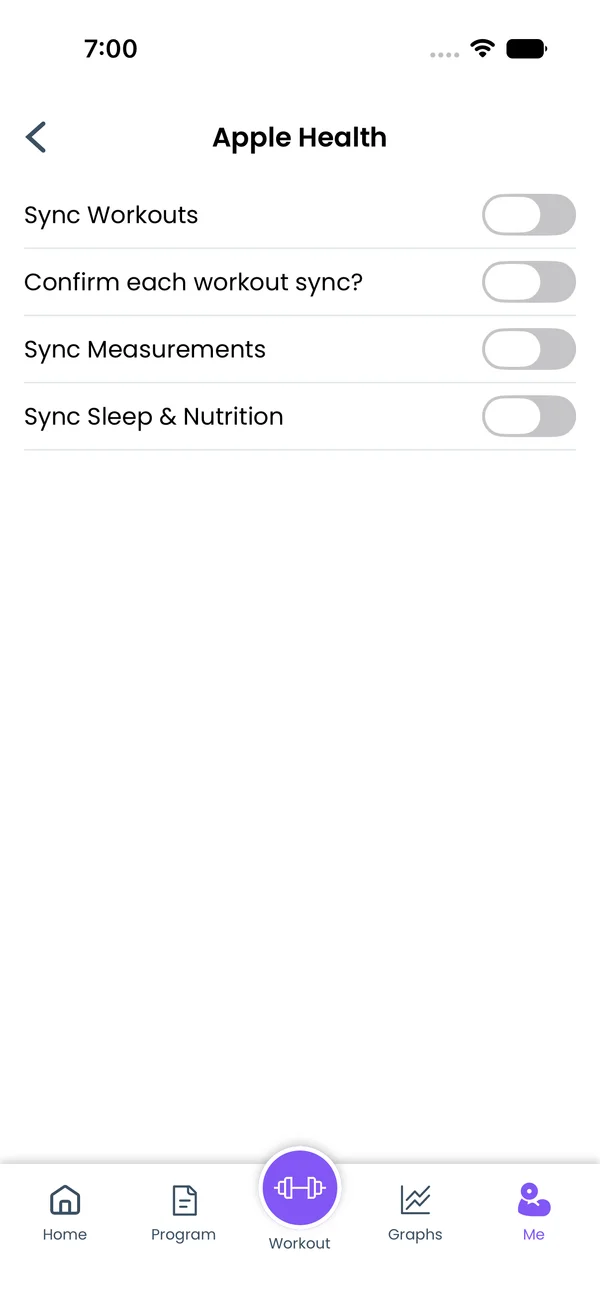 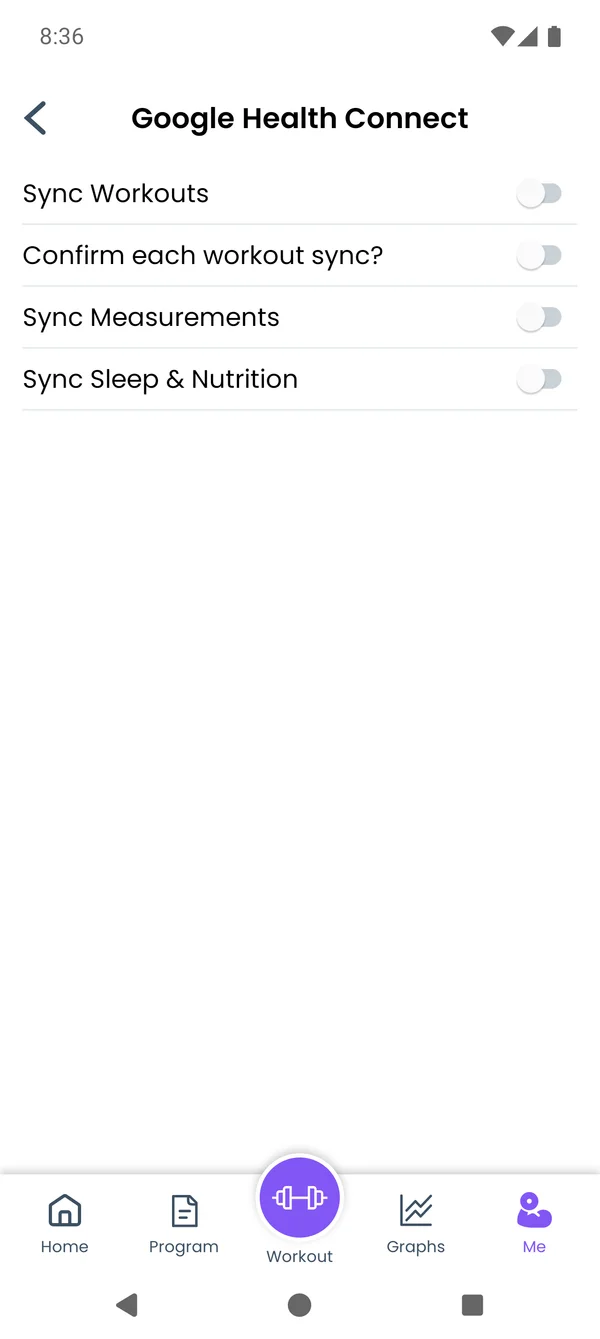\n\nGo to **Me**, scroll to the **Sync** group, and tap **Apple Health**. On Android the row is **Google Health Connect**. The screen has four toggles:\n\n- **Sync Workouts** sends each workout when you finish it.\n- **Confirm each workout sync?** asks before every send.\n- **Sync Measurements** reads bodyweight, body fat and waist from Health.\n- **Sync Sleep & Nutrition** reads sleep, calories and protein.\n\nOn Android, turning on **Sync Workouts** or **Sync Measurements** opens the Health Connect permission screen right away. On iOS, the Health permission sheet opens the first time the app reads or writes. Turning on **Sync Sleep & Nutrition** starts a read at once on both platforms.\n\nSync runs when the app opens and when it comes back to the foreground. The app reads from Health at those moments. It writes to Health when you finish a workout or save a measurement.\n\n## Send a workout\n\nTurn on **Sync Workouts**. When you tap **Finish** on a workout, the app saves it to Health as a strength training workout. The start and end times come from the workout timer. Active calories are 6 kcal per minute of workout time. Paused time does not count.\n\nTurn on **Confirm each workout sync?** and the app asks first: \"Do you want to sync this workout to Apple Health?\" Tap **OK** to send it or **Cancel** to skip it. With the toggle off, the workout goes to Health without a question.\n\nIf you finish the workout on the Apple Watch and the watch saves it to Health, the phone does not save it a second time.\n\nIf the save fails, the app shows \"Couldn't save workout to Apple Health\".\n\n## Send a past workout\n\n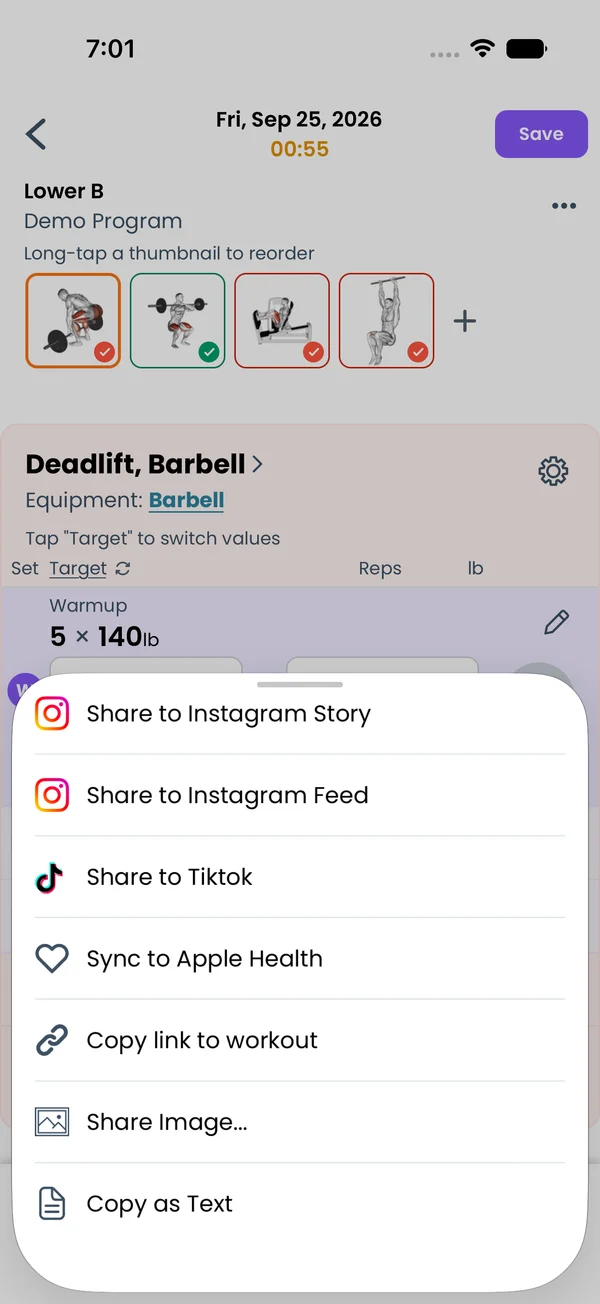\n\nOpen a past workout from the **Home** tab. Tap the menu icon in the top right, then **Share**. The sheet has **Sync to Apple Health**, or **Sync to Google Health** on Android. Tap it, and the app writes that workout with its original times. It shows \"Synced to Apple Health\" when done.\n\n## Send measurements\n\n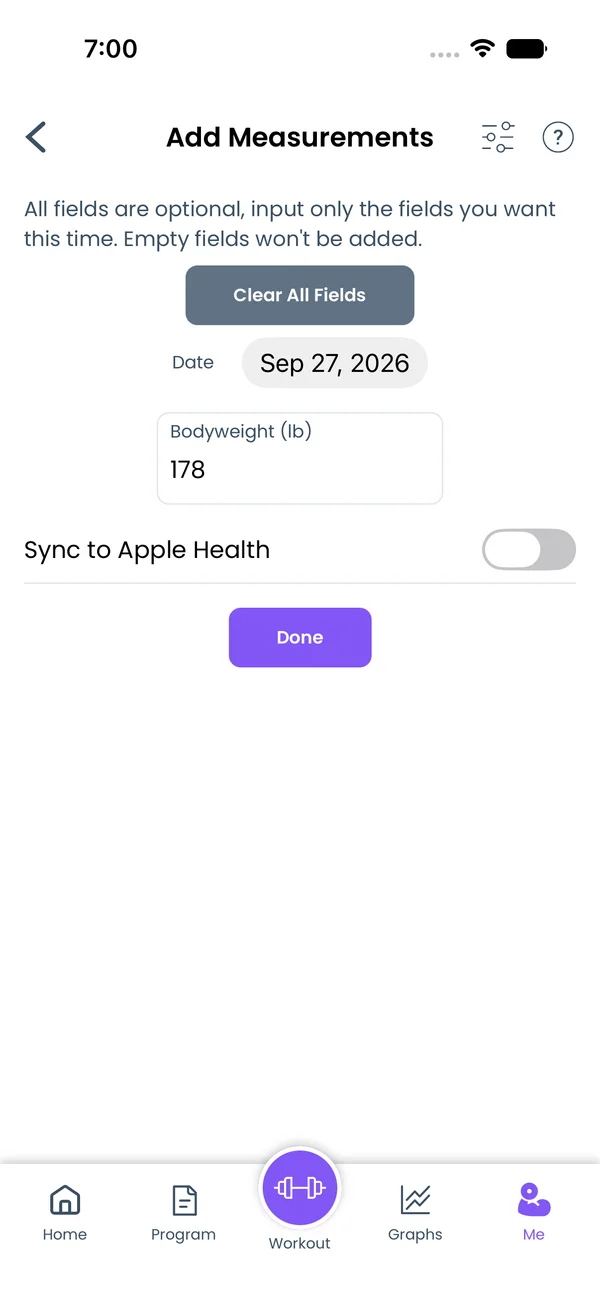\n\nGo to **Me → Measurements** and tap the add button. At the bottom of the form is a **Sync to Apple Health** toggle. On Android it is **Sync to Google Health Connect**. It starts in the same state as **Sync Measurements** in the Health settings, and you can flip it for one save.\n\nWith the toggle on, saving sends bodyweight, body fat and waist to Apple Health. Health Connect gets bodyweight and body fat. Other body sites stay in the app. See [Measurements](/features/measurements) for the form itself.\n\n## Read measurements\n\nWith **Sync Measurements** on, the app reads bodyweight, body fat and waist from Apple Health. On Android it reads bodyweight and body fat from Health Connect. The values appear in **Me → Measurements** in your units, next to the ones you typed.\n\nAfter the first read, the app skips the values it wrote itself, so nothing shows twice. A value you deleted in the app does not come back on the next read.\n\nThe read is one way. If you delete a value in Health, it stays in the app until you delete it there.\n\n## Read sleep and nutrition\n\n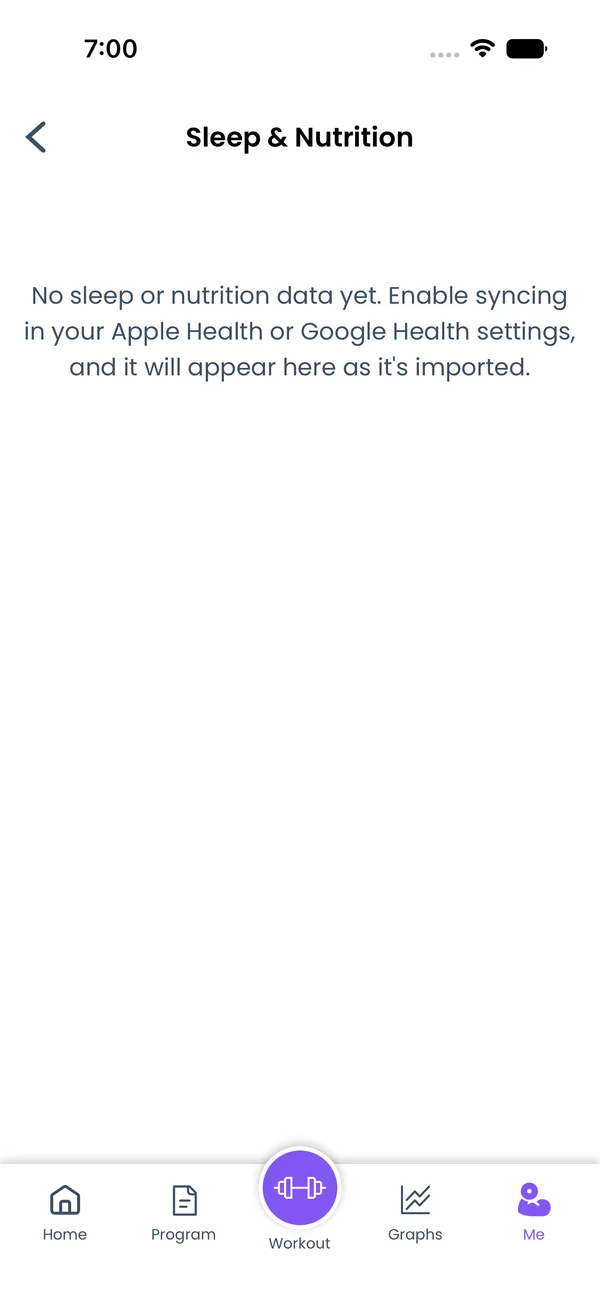\n\nWith **Sync Sleep & Nutrition** on, the app reads three metrics and stores one total per day:\n\n- **Sleep**, the minutes asleep. Time awake in bed does not count.\n- **Calories**, the dietary calories you logged in a food app, in kcal.\n- **Protein**, in grams.\n\nOn iOS the app reads the last 90 days. On Android it reads the last 30, because Health Connect does not return older records. If a day's total changes in the source, the next read replaces it in the app.\n\nThe app never writes these metrics. Open **Me → Sleep & Nutrition** to see a graph and a list per metric. You can hide a day from the list and unhide it later. The data syncs to your account and is available through the REST API and the MCP server as the `health` category. See [Measurements](/features/measurements) for the screen.","sizes":{"account/account-email-form":{"width":600,"height":1304},"account/account-forgot-password":{"width":600,"height":1304},"account/account-screen":{"width":600,"height":1304},"account/account-sign-in":{"width":600,"height":1304},"chatgpt-claude-and-ai/chatgpt-claude-and-ai-autofill":{"width":600,"height":1304},"api/api-key-created":{"width":600,"height":1304},"api/api-keys-empty":{"width":600,"height":1304},"api/api-me-row":{"width":600,"height":1304},"apple-watch/apple-watch-health-settings":{"width":600,"height":1304},"apple-watch/watch-apple-watch-amrap":{"width":416,"height":496},"apple-watch/watch-apple-watch-crown":{"width":416,"height":496},"apple-watch/watch-apple-watch-exercise":{"width":416,"height":496},"apple-watch/watch-apple-watch-get-ready":{"width":416,"height":496},"apple-watch/watch-apple-watch-home":{"width":416,"height":496},"apple-watch/watch-apple-watch-set-clock":{"width":416,"height":496},"apple-watch/watch-apple-watch-workout":{"width":416,"height":496},"built-in-programs/built-in-programs-import":{"width":600,"height":1304},"built-in-programs/built-in-programs-info":{"width":600,"height":1304},"built-in-programs/built-in-programs-library":{"width":600,"height":1304},"built-in-programs/built-in-programs-preview":{"width":600,"height":1304},"built-in-programs/built-in-programs-started":{"width":600,"height":1304},"changing-a-workout/changing-a-workout-adhoc":{"width":600,"height":1304},"changing-a-workout/changing-a-workout-adhoc-picker":{"width":600,"height":1304},"changing-a-workout/changing-a-workout-create-program-day":{"width":600,"height":1304},"changing-a-workout/changing-a-workout-edit-day":{"width":600,"height":1304},"changing-a-workout/changing-a-workout-edit-exercise":{"width":600,"height":1304},"changing-a-workout/changing-a-workout-next-workout":{"width":600,"height":1304},"changing-a-workout/changing-a-workout-pick-day":{"width":600,"height":1304},"changing-a-workout/changing-a-workout-program-day":{"width":600,"height":1304},"changing-a-workout/changing-a-workout-swap-adhoc":{"width":600,"height":1304},"changing-a-workout/changing-a-workout-swap-from-program":{"width":600,"height":1304},"changing-a-workout/changing-a-workout-swap-recent":{"width":600,"height":1304},"custom-exercises/custom-exercises-autofill":{"width":600,"height":1304},"custom-exercises/custom-exercises-clone-library":{"width":600,"height":1304},"custom-exercises/custom-exercises-cloned":{"width":600,"height":1304},"custom-exercises/custom-exercises-form":{"width":600,"height":1304},"custom-exercises/custom-exercises-hidden-group":{"width":600,"height":1304},"custom-exercises/custom-exercises-image-library":{"width":600,"height":1304},"custom-exercises/custom-exercises-image-source":{"width":600,"height":1304},"custom-exercises/custom-exercises-in-workout":{"width":600,"height":1304},"custom-exercises/custom-exercises-muscle-groups":{"width":600,"height":1304},"custom-exercises/custom-exercises-picker":{"width":600,"height":1304},"custom-exercises/custom-exercises-target-muscles":{"width":600,"height":1304},"equipment-and-gyms/equipment-and-gyms-barbell":{"width":600,"height":1304},"equipment-and-gyms/equipment-and-gyms-custom":{"width":600,"height":1304},"equipment-and-gyms/equipment-and-gyms-exercise":{"width":600,"height":1304},"equipment-and-gyms/equipment-and-gyms-fixed":{"width":600,"height":1304},"equipment-and-gyms/equipment-and-gyms-gyms":{"width":600,"height":1304},"equipment-and-gyms/equipment-and-gyms-hidden":{"width":600,"height":1304},"equipment-and-gyms/equipment-and-gyms-list":{"width":600,"height":1304},"exercise-library/exercise-library-calculator":{"width":600,"height":1304},"exercise-library/exercise-library-from-program":{"width":600,"height":1304},"exercise-library/exercise-library-list":{"width":600,"height":1304},"exercise-library/exercise-library-multi-add":{"width":600,"height":1304},"exercise-library/exercise-library-override-muscles":{"width":600,"height":1304},"exercise-library/exercise-library-picker":{"width":600,"height":1304},"exercise-library/exercise-library-prs":{"width":600,"height":1304},"exercise-library/exercise-library-search":{"width":600,"height":1304},"exercise-library/exercise-library-stats":{"width":600,"height":1304},"exercise-library/exercise-library-swap":{"width":600,"height":1304},"graphs/graphs-bodyweight":{"width":600,"height":1304},"graphs/graphs-choose":{"width":600,"height":1304},"graphs/graphs-exercise":{"width":600,"height":1304},"graphs/graphs-legend":{"width":600,"height":1304},"graphs/graphs-muscle-group":{"width":600,"height":1304},"graphs/graphs-personal-records":{"width":600,"height":1304},"graphs/graphs-settings":{"width":600,"height":1304},"health-sync/android-health-sync-measurements":{"width":600,"height":1339},"health-sync/android-health-sync-settings":{"width":600,"height":1339},"health-sync/android-health-sync-share":{"width":600,"height":1339},"health-sync/android-health-sync-sleep-nutrition":{"width":600,"height":1339},"health-sync/health-sync-measurements":{"width":600,"height":1304},"health-sync/health-sync-settings":{"width":600,"height":1304},"health-sync/health-sync-share":{"width":600,"height":1304},"health-sync/health-sync-sleep-nutrition":{"width":600,"height":1304},"import-export/import-export-export":{"width":600,"height":1304},"import-export/import-export-hevy":{"width":600,"height":1304},"import-export/import-export-import":{"width":600,"height":1304},"liftoscript/liftoscript-exercise-sheet":{"width":600,"height":1304},"liftoscript/liftoscript-full-program":{"width":600,"height":1304},"liftoscript/liftoscript-per-day":{"width":600,"height":1304},"liftoscript/liftoscript-playground":{"width":600,"height":1304},"lock-screen-and-notifications/android-lock-screen-and-notifications-live-update":{"width":600,"height":1339},"lock-screen-and-notifications/android-lock-screen-and-notifications-reminder":{"width":600,"height":1339},"lock-screen-and-notifications/android-lock-screen-and-notifications-sound":{"width":600,"height":1339},"lock-screen-and-notifications/lock-screen-and-notifications-dynamic-island":{"width":600,"height":1304},"lock-screen-and-notifications/lock-screen-and-notifications-live-activity":{"width":600,"height":1304},"lock-screen-and-notifications/lock-screen-and-notifications-reminder":{"width":600,"height":1304},"lock-screen-and-notifications/lock-screen-and-notifications-sound":{"width":600,"height":1304},"measurements/measurements-add":{"width":600,"height":1304},"measurements/measurements-bodyweight":{"width":600,"height":1304},"measurements/measurements-moving-average":{"width":600,"height":1304},"measurements/measurements-sleep-nutrition":{"width":600,"height":1304},"measurements/measurements-types":{"width":600,"height":1304},"first-run-and-settings/first-run-and-settings-appearance":{"width":600,"height":1304},"first-run-and-settings/first-run-and-settings-dark-mode":{"width":600,"height":1304},"first-run-and-settings/first-run-and-settings-equipment":{"width":600,"height":1304},"first-run-and-settings/first-run-and-settings-me":{"width":600,"height":1304},"first-run-and-settings/first-run-and-settings-units":{"width":600,"height":1304},"first-run-and-settings/first-run-and-settings-welcome":{"width":600,"height":1304},"playground/playground-completed":{"width":600,"height":1304},"playground/playground-day":{"width":600,"height":1304},"playground/playground-finished":{"width":600,"height":1304},"playground/playground-variables":{"width":600,"height":1304},"premium/premium-account":{"width":600,"height":1304},"premium/premium-feature-info":{"width":600,"height":1304},"premium/premium-plans":{"width":600,"height":1304},"program-editor/program-editor-create":{"width":600,"height":1304},"program-editor/program-editor-day-details":{"width":600,"height":1304},"program-editor/program-editor-exercise-sheet":{"width":600,"height":1304},"program-editor/program-editor-full-text":{"width":600,"height":1304},"program-editor/program-editor-grid":{"width":600,"height":1304},"program-editor/program-editor-perday-text":{"width":600,"height":1304},"program-editor/program-editor-ui-mode":{"width":600,"height":1304},"program-editor/program-editor-week-stats":{"width":600,"height":1304},"progressions/progressions-linear-settings":{"width":600,"height":1304},"progressions/progressions-preview":{"width":600,"height":1304},"progressions/progressions-state-variables":{"width":600,"height":1304},"progressions/progressions-suppressed":{"width":600,"height":1304},"rest-timer/rest-timer-collapsed":{"width":600,"height":1304},"rest-timer/rest-timer-dynamic-island":{"width":600,"height":1304},"rest-timer/rest-timer-expanded":{"width":600,"height":1304},"rest-timer/rest-timer-get-ready":{"width":600,"height":1304},"rest-timer/rest-timer-lock-screen":{"width":600,"height":1304},"rest-timer/rest-timer-settings":{"width":600,"height":1304},"rest-timer/rest-timer-sound":{"width":600,"height":1304},"rest-timer/watch-rest-timer":{"width":416,"height":496},"rest-timer/watch-rest-timer-exercise":{"width":416,"height":496},"set-types/set-types-amrap-popup":{"width":600,"height":1304},"set-types/set-types-per-side":{"width":600,"height":1304},"set-types/set-types-rpe-logged":{"width":600,"height":1304},"set-types/set-types-rpe-popup":{"width":600,"height":1304},"sharing-programs/sharing-programs-export-text":{"width":600,"height":1304},"sharing-programs/sharing-programs-image-preview":{"width":600,"height":1304},"sharing-programs/sharing-programs-image-settings":{"width":600,"height":1304},"sharing-programs/sharing-programs-import":{"width":600,"height":1304},"sharing-programs/sharing-programs-menu":{"width":600,"height":1304},"sharing-programs/sharing-programs-private-link":{"width":600,"height":1304},"sharing-programs/sharing-programs-public-link":{"width":600,"height":1304},"sharing-workouts/sharing-workouts-copied-text":{"width":600,"height":1304},"sharing-workouts/sharing-workouts-finish-screen":{"width":600,"height":1304},"sharing-workouts/sharing-workouts-profile-settings":{"width":600,"height":1304},"sharing-workouts/sharing-workouts-share-sheet":{"width":600,"height":1304},"sharing-workouts/sharing-workouts-story-preview":{"width":600,"height":1304},"supersets/supersets-liftoscript":{"width":600,"height":1304},"supersets/supersets-next-exercise":{"width":600,"height":1304},"supersets/supersets-picker":{"width":600,"height":1304},"supersets/supersets-program-editor":{"width":600,"height":1304},"supersets/supersets-timer":{"width":600,"height":1304},"supersets/supersets-workout":{"width":600,"height":1304},"sync-and-offline/sync-and-offline-account":{"width":600,"height":1304},"sync-and-offline/sync-and-offline-me-account":{"width":600,"height":1304},"sync-and-offline/sync-and-offline-sign-in":{"width":600,"height":1304},"timed-sets/timed-sets-count-up":{"width":600,"height":1304},"timed-sets/timed-sets-edit-time":{"width":600,"height":1304},"timed-sets/timed-sets-get-ready":{"width":600,"height":1304},"timed-sets/timed-sets-recorded":{"width":600,"height":1304},"timed-sets/timed-sets-running":{"width":600,"height":1304},"timed-sets/timed-sets-set-row":{"width":600,"height":1304},"timed-sets/timed-sets-timers":{"width":600,"height":1304},"week-insights/week-insights-details":{"width":600,"height":1304},"week-insights/week-insights-edit-muscle-groups":{"width":600,"height":1304},"week-insights/week-insights-exercises":{"width":600,"height":1304},"week-insights/week-insights-home":{"width":600,"height":1304},"week-insights/week-insights-muscle-groups":{"width":600,"height":1304},"week-insights/week-insights-settings":{"width":600,"height":1304},"workout-history/workout-history-change-date":{"width":600,"height":1304},"workout-history/workout-history-delete":{"width":600,"height":1304},"workout-history/workout-history-feed":{"width":600,"height":1304},"workout-history/workout-history-menu":{"width":600,"height":1304},"workout-history/workout-history-month-calendar":{"width":600,"height":1304},"workout-history/workout-history-note-on-card":{"width":600,"height":1304},"workout-history/workout-history-notes":{"width":600,"height":1304},"workout-history/workout-history-past-card":{"width":600,"height":1304},"workout-history/workout-history-past-workout":{"width":600,"height":1304},"workout-history/workout-history-week-insights":{"width":600,"height":1304},"workout-screen/workout-screen-e1rm":{"width":600,"height":1304},"workout-screen/workout-screen-edit-target":{"width":600,"height":1304},"workout-screen/workout-screen-exercise-menu":{"width":600,"height":1304},"workout-screen/workout-screen-exercise-notes":{"width":600,"height":1304},"workout-screen/workout-screen-history":{"width":600,"height":1304},"workout-screen/workout-screen-keypad":{"width":600,"height":1304},"workout-screen/workout-screen-next-set":{"width":600,"height":1304},"workout-screen/workout-screen-overview":{"width":600,"height":1304},"workout-screen/workout-screen-rounding":{"width":600,"height":1304},"workout-screen/workout-screen-summary":{"width":600,"height":1304}}}




