Add a + in your program and the app asks what you did: AMRAP reps, RPE, the weight lifted, or a progression value. Unilateral sets track reps per side.
How it works
In Liftoscript, a + after a value means "ask me when I finish the set". There are four places you can put it:
5+ is an AMRAP set. The app asks how many reps you did.
@8+ asks for your RPE after the set.
100lb+ asks for the weight, with 100lb filled in. ?+ asks for the weight with no target at all.
shouldBumpWeight+ asks for a state variable value after the last set of the exercise.
Tap the checkmark on such a set and a popup opens instead of completing the set right away. The popup shows only the fields that set needs. Tap Done to complete the set. Tap Cancel to leave the set as it was. The rest timer starts when you tap Done, see Rest Timer.
Mark a set as AMRAP
Write 5+ and the set target shows as 5+ on the workout screen. When you tap the checkmark, the popup asks for Completed reps. It starts at the target reps. Use the - and + buttons or type the number.
The number you enter is saved as the completed reps of that set. Progressions read it as completedReps. The demo program uses it like this:
Do 8 or more reps on the last set, and the next workout has 90lb. Do fewer than 5, and it drops to 80lb.
A set with a rep range, like 3x8-12+, works the same way. + goes after the top of the range.
Log your RPE
RPE, Rate of Perceived Exertion, is how hard a set felt, on a scale from 1 to 10. 10 means you could not have done one more rep. 9 means one rep was left, 8 means two, and so on down. Logging it tells the app and your progression scripts how close to failure a set was, which the reps and weight alone do not show.
@8 alone sets a target RPE and the app does not ask anything. @8+ shows the target as @8+ and asks for your Completed RPE when you tap the checkmark. The field goes from 0 to 10 in steps of 0.5, and starts at the target RPE.
After Done, the set row shows the RPE you entered next to the set. Progressions read it as completedRPE, and the target as RPE:
Add + after a weight, like 100lb+ or 70%+, and the popup asks for the Weight you used. The field starts at the target weight. The - and + buttons step through the weights your equipment can make. The calculator button opens the rep max calculator.
Write ?+ when you do not want a target weight at all, for example Bicep Curl / 3x10 @8 ?+. The target column shows ?+ @8. A set with no weight in the program, like Bench Press / 3x12, asks for the weight too, with no + needed.
When one set asks for both weight and RPE, the popup shows both fields.
The entered weight is saved as the completed weight of the set. Progressions read it as completedWeights:
increment returns the next weight your equipment can make.
Reps per side for unilateral exercises
Built-in one-side exercises, like Bulgarian Split Squat, Lunge, Step Up, Bicep Curl, Hammer Curl, Concentration Curl or Bent Over One Arm Row, track reps per side. Each set row has an L: and an R: reps field. An AMRAP set on such an exercise asks for Completed reps (left) and Completed reps (right).
Volume adds the reps of both sides. The estimated 1RM uses the average of the two sides. Progressions read the right side as completedReps and the left side as completedRepsLeft.
To change this for an exercise, tap the exercise name on the workout screen to open Exercise Stats, and switch Is Unilateral.
Ask for a state variable
Add + after a state variable name in progress: custom(...):
When you complete the last set of the exercise, the popup shows Enter new state variables values with one field per such variable. The values go into the state before the progress script runs, so the script above adds 5lb only when you entered 1 or more. Use it for progressions you decide yourself, like RPE or RIR based programs, or to type the next weight by hand.
Turn the markers on for one set during a workout
Tap a set to expand it, tap its options button, and choose Edit Target. The Edit Set Target sheet has an AMRAP? switch next to reps, an Ask? switch next to weight, and a Log? switch next to RPE. This changes only the current workout, the program text stays the same.
Scripts can also set them. amraps, logrpes and askweights work like reps or weights, 1 turns a marker on and 0 turns it off:
{"feature":{"id":"set-types","title":"AMRAP, RPE, Ask-Weight and Unilateral Sets","shortDescription":"Add a + in your program and the app asks what you did: AMRAP reps, RPE, the weight lifted, or a progression value. Unilateral sets track reps per side.","order":30,"category":"Workout","datePublished":"2026-09-27","dateModified":"2026-09-28","screenshots":["set-types-amrap-popup","set-types-per-side"]},"content":"## How it works\n\nIn Liftoscript, a `+` after a value means \"ask me when I finish the set\". There are four places you can put it:\n\n```liftoscript\nOverhead Press / 3x5+ / 85lb\nRomanian Deadlift / 3x8 @8+ / 165lb\nBench Press / 3x8 / 100lb+\nBicep Curl / 3x10 @8 ?+\nSquat / 3x5 / progress: custom(shouldBumpWeight+: 0) {~\n if (state.shouldBumpWeight > 0) { weights += 5lb }\n~}\n```\n\n- `5+` is an AMRAP set. The app asks how many reps you did.\n- `@8+` asks for your RPE after the set.\n- `100lb+` asks for the weight, with 100lb filled in. `?+` asks for the weight with no target at all.\n- `shouldBumpWeight+` asks for a state variable value after the last set of the exercise.\n\nTap the checkmark on such a set and a popup opens instead of completing the set right away. The popup shows only the fields that set needs. Tap **Done** to complete the set. Tap **Cancel** to leave the set as it was. The rest timer starts when you tap **Done**, see [Rest Timer](/features/rest-timer).\n\n## Mark a set as AMRAP\n\n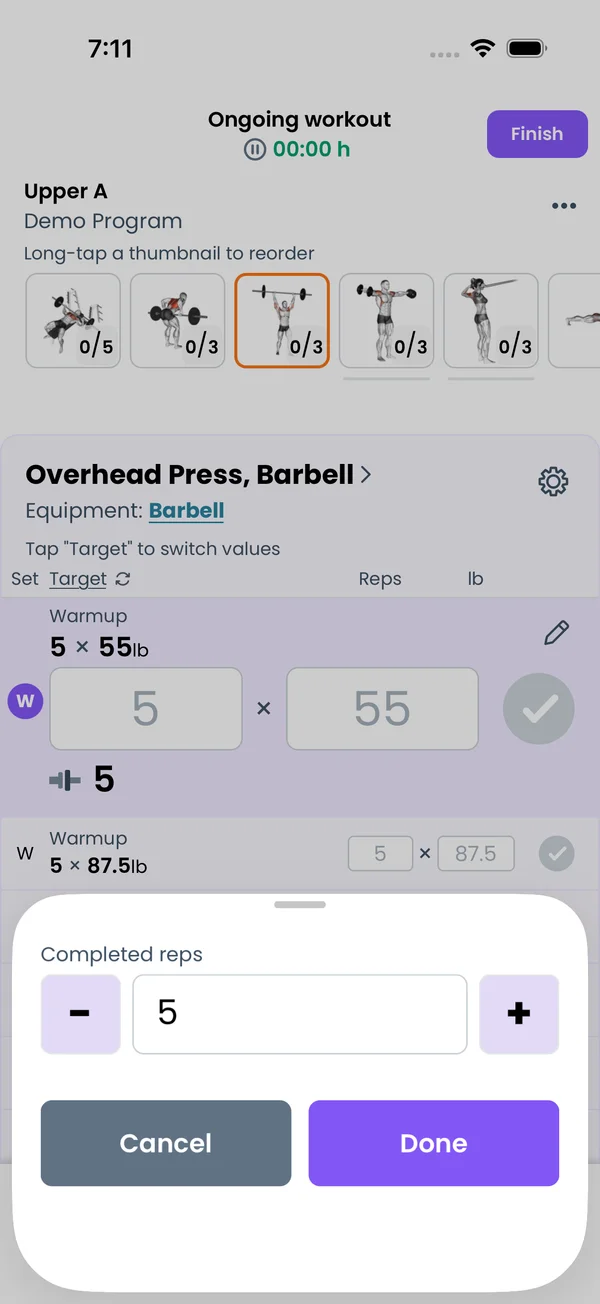\n\nWrite `5+` and the set target shows as `5+` on the workout screen. When you tap the checkmark, the popup asks for **Completed reps**. It starts at the target reps. Use the **-** and **+** buttons or type the number.\n\nThe number you enter is saved as the completed reps of that set. Progressions read it as `completedReps`. The demo program uses it like this:\n\n```liftoscript\nOverhead Press / 3x5+ / 85lb / progress: custom(increment: 5lb) {~\n if (completedReps[ns] >= 8) {\n weights += state.increment\n } else if (completedReps[ns] < 5) {\n weights -= state.increment\n }\n~}\n```\n\nDo 8 or more reps on the last set, and the next workout has 90lb. Do fewer than 5, and it drops to 80lb.\n\nA set with a rep range, like `3x8-12+`, works the same way. `+` goes after the top of the range.\n\n## Log your RPE\n\n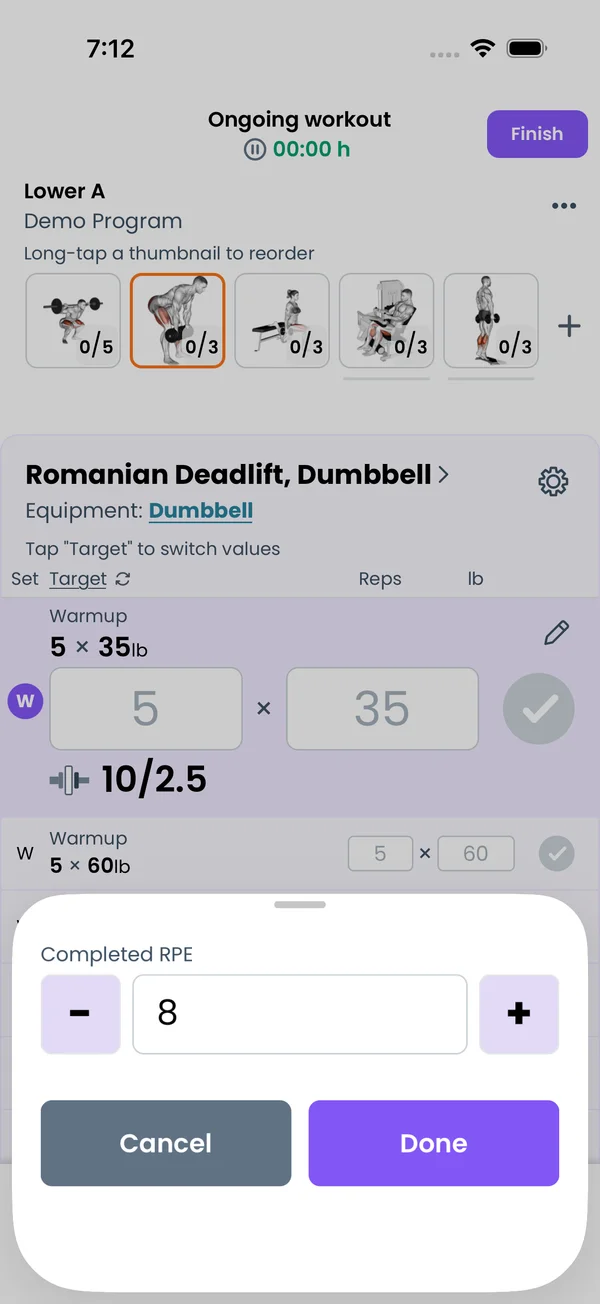 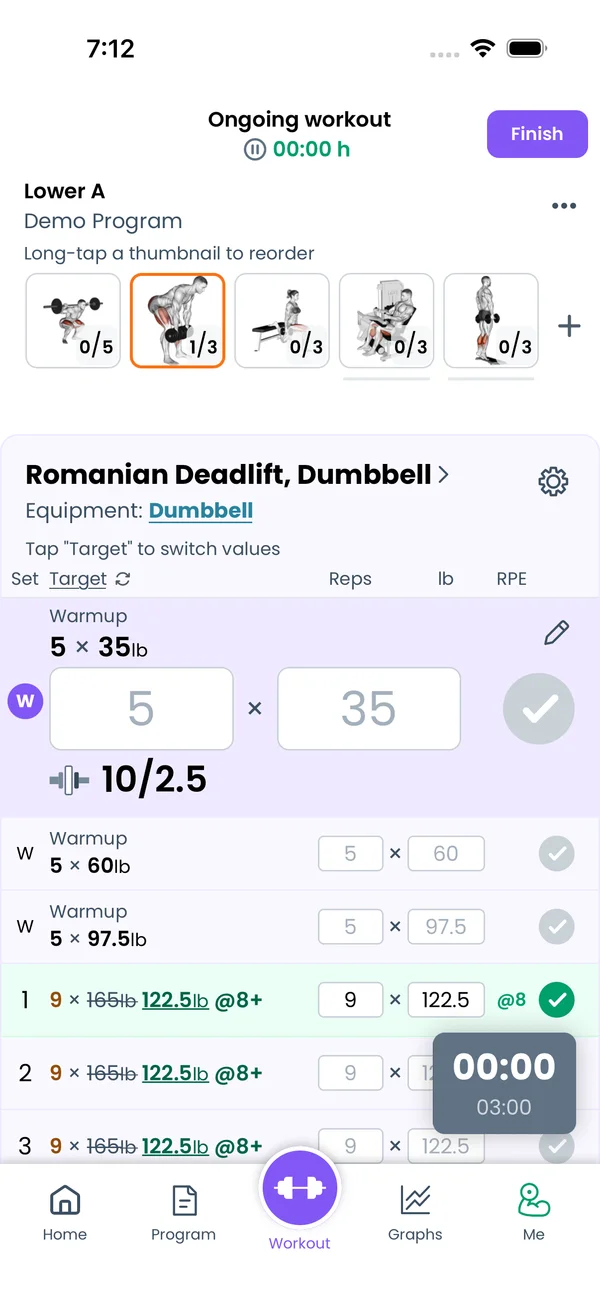\n\nRPE, Rate of Perceived Exertion, is how hard a set felt, on a scale from 1 to 10. 10 means you could not have done one more rep. 9 means one rep was left, 8 means two, and so on down. Logging it tells the app and your progression scripts how close to failure a set was, which the reps and weight alone do not show.\n\n`@8` alone sets a target RPE and the app does not ask anything. `@8+` shows the target as `@8+` and asks for your **Completed RPE** when you tap the checkmark. The field goes from 0 to 10 in steps of 0.5, and starts at the target RPE.\n\nAfter **Done**, the set row shows the RPE you entered next to the set. Progressions read it as `completedRPE`, and the target as `RPE`:\n\n```liftoscript\nRomanian Deadlift / 3x8 @8+ / 165lb / progress: custom() {~\n if (completedRPE[ns] < 8) {\n weights += 10lb\n }\n~}\n```\n\n## Enter the weight you lifted\n\nAdd `+` after a weight, like `100lb+` or `70%+`, and the popup asks for the **Weight** you used. The field starts at the target weight. The **-** and **+** buttons step through the weights your equipment can make. The calculator button opens the rep max calculator.\n\nWrite `?+` when you do not want a target weight at all, for example `Bicep Curl / 3x10 @8 ?+`. The target column shows `?+ @8`. A set with no weight in the program, like `Bench Press / 3x12`, asks for the weight too, with no `+` needed.\n\nWhen one set asks for both weight and RPE, the popup shows both fields.\n\nThe entered weight is saved as the completed weight of the set. Progressions read it as `completedWeights`:\n\n```liftoscript\nBicep Curl / 3x10 @8 ?+ / progress: custom() {~\n weights = increment(completedWeights[1])\n~}\n```\n\n`increment` returns the next weight your equipment can make.\n\n## Reps per side for unilateral exercises\n\n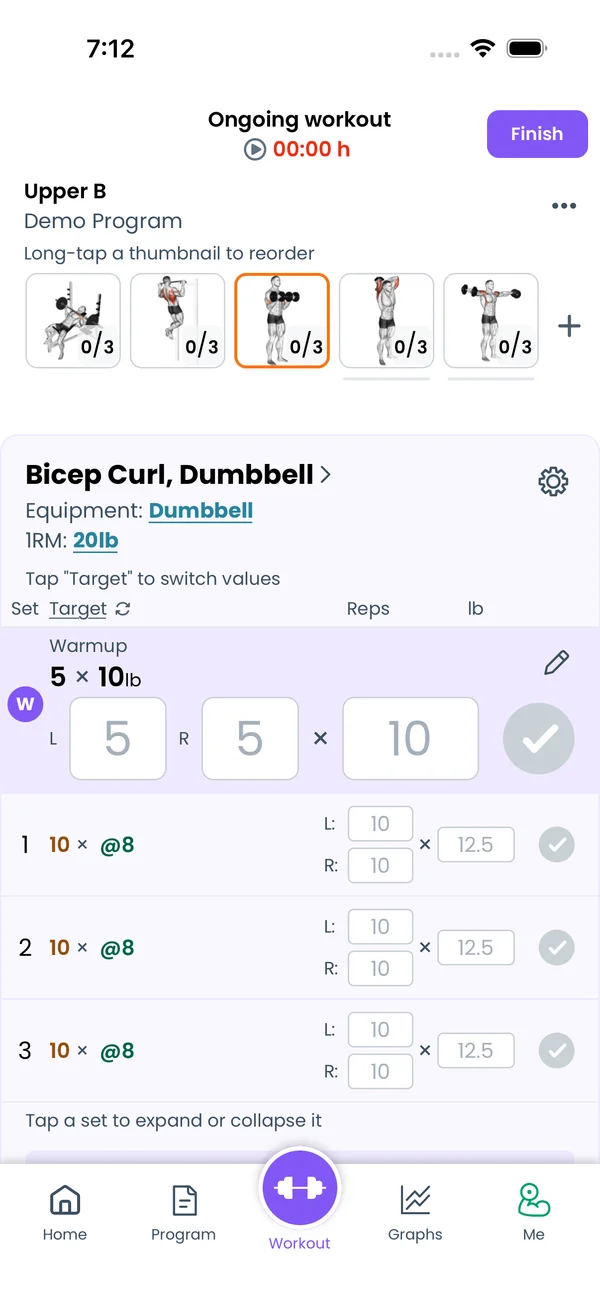\n\nBuilt-in one-side exercises, like Bulgarian Split Squat, Lunge, Step Up, Bicep Curl, Hammer Curl, Concentration Curl or Bent Over One Arm Row, track reps per side. Each set row has an **L:** and an **R:** reps field. An AMRAP set on such an exercise asks for **Completed reps (left)** and **Completed reps (right)**.\n\nVolume adds the reps of both sides. The estimated 1RM uses the average of the two sides. Progressions read the right side as `completedReps` and the left side as `completedRepsLeft`.\n\nTo change this for an exercise, tap the exercise name on the workout screen to open Exercise Stats, and switch **Is Unilateral**.\n\n## Ask for a state variable\n\nAdd `+` after a state variable name in `progress: custom(...)`:\n\n```liftoscript\nBench Press / 3x8 / progress: custom(shouldBumpWeight+: 0) {~\n if (shouldBumpWeight > 0) {\n weights += 5lb\n }\n~}\n```\n\nWhen you complete the last set of the exercise, the popup shows **Enter new state variables values** with one field per such variable. The values go into the state before the progress script runs, so the script above adds 5lb only when you entered 1 or more. Use it for progressions you decide yourself, like RPE or RIR based programs, or to type the next weight by hand.\n\n## Turn the markers on for one set during a workout\n\nTap a set to expand it, tap its options button, and choose **Edit Target**. The **Edit Set Target** sheet has an **AMRAP?** switch next to reps, an **Ask?** switch next to weight, and a **Log?** switch next to RPE. This changes only the current workout, the program text stays the same.\n\nScripts can also set them. `amraps`, `logrpes` and `askweights` work like `reps` or `weights`, `1` turns a marker on and `0` turns it off:\n\n```liftoscript\nSquat / 3x8 100lb / progress: custom() {~\n amraps = 1\n askweights[ns] = 1\n~}\n```","sizes":{"account/account-email-form":{"width":600,"height":1304},"account/account-forgot-password":{"width":600,"height":1304},"account/account-screen":{"width":600,"height":1304},"account/account-sign-in":{"width":600,"height":1304},"chatgpt-claude-and-ai/chatgpt-claude-and-ai-autofill":{"width":600,"height":1304},"api/api-key-created":{"width":600,"height":1304},"api/api-keys-empty":{"width":600,"height":1304},"api/api-me-row":{"width":600,"height":1304},"apple-watch/apple-watch-health-settings":{"width":600,"height":1304},"apple-watch/watch-apple-watch-amrap":{"width":416,"height":496},"apple-watch/watch-apple-watch-crown":{"width":416,"height":496},"apple-watch/watch-apple-watch-exercise":{"width":416,"height":496},"apple-watch/watch-apple-watch-get-ready":{"width":416,"height":496},"apple-watch/watch-apple-watch-home":{"width":416,"height":496},"apple-watch/watch-apple-watch-set-clock":{"width":416,"height":496},"apple-watch/watch-apple-watch-workout":{"width":416,"height":496},"built-in-programs/built-in-programs-import":{"width":600,"height":1304},"built-in-programs/built-in-programs-info":{"width":600,"height":1304},"built-in-programs/built-in-programs-library":{"width":600,"height":1304},"built-in-programs/built-in-programs-preview":{"width":600,"height":1304},"built-in-programs/built-in-programs-started":{"width":600,"height":1304},"changing-a-workout/changing-a-workout-adhoc":{"width":600,"height":1304},"changing-a-workout/changing-a-workout-adhoc-picker":{"width":600,"height":1304},"changing-a-workout/changing-a-workout-create-program-day":{"width":600,"height":1304},"changing-a-workout/changing-a-workout-edit-day":{"width":600,"height":1304},"changing-a-workout/changing-a-workout-edit-exercise":{"width":600,"height":1304},"changing-a-workout/changing-a-workout-next-workout":{"width":600,"height":1304},"changing-a-workout/changing-a-workout-pick-day":{"width":600,"height":1304},"changing-a-workout/changing-a-workout-program-day":{"width":600,"height":1304},"changing-a-workout/changing-a-workout-swap-adhoc":{"width":600,"height":1304},"changing-a-workout/changing-a-workout-swap-from-program":{"width":600,"height":1304},"changing-a-workout/changing-a-workout-swap-recent":{"width":600,"height":1304},"custom-exercises/custom-exercises-autofill":{"width":600,"height":1304},"custom-exercises/custom-exercises-clone-library":{"width":600,"height":1304},"custom-exercises/custom-exercises-cloned":{"width":600,"height":1304},"custom-exercises/custom-exercises-form":{"width":600,"height":1304},"custom-exercises/custom-exercises-hidden-group":{"width":600,"height":1304},"custom-exercises/custom-exercises-image-library":{"width":600,"height":1304},"custom-exercises/custom-exercises-image-source":{"width":600,"height":1304},"custom-exercises/custom-exercises-in-workout":{"width":600,"height":1304},"custom-exercises/custom-exercises-muscle-groups":{"width":600,"height":1304},"custom-exercises/custom-exercises-picker":{"width":600,"height":1304},"custom-exercises/custom-exercises-target-muscles":{"width":600,"height":1304},"equipment-and-gyms/equipment-and-gyms-barbell":{"width":600,"height":1304},"equipment-and-gyms/equipment-and-gyms-custom":{"width":600,"height":1304},"equipment-and-gyms/equipment-and-gyms-exercise":{"width":600,"height":1304},"equipment-and-gyms/equipment-and-gyms-fixed":{"width":600,"height":1304},"equipment-and-gyms/equipment-and-gyms-gyms":{"width":600,"height":1304},"equipment-and-gyms/equipment-and-gyms-hidden":{"width":600,"height":1304},"equipment-and-gyms/equipment-and-gyms-list":{"width":600,"height":1304},"exercise-library/exercise-library-calculator":{"width":600,"height":1304},"exercise-library/exercise-library-from-program":{"width":600,"height":1304},"exercise-library/exercise-library-list":{"width":600,"height":1304},"exercise-library/exercise-library-multi-add":{"width":600,"height":1304},"exercise-library/exercise-library-override-muscles":{"width":600,"height":1304},"exercise-library/exercise-library-picker":{"width":600,"height":1304},"exercise-library/exercise-library-prs":{"width":600,"height":1304},"exercise-library/exercise-library-search":{"width":600,"height":1304},"exercise-library/exercise-library-stats":{"width":600,"height":1304},"exercise-library/exercise-library-swap":{"width":600,"height":1304},"graphs/graphs-bodyweight":{"width":600,"height":1304},"graphs/graphs-choose":{"width":600,"height":1304},"graphs/graphs-exercise":{"width":600,"height":1304},"graphs/graphs-legend":{"width":600,"height":1304},"graphs/graphs-muscle-group":{"width":600,"height":1304},"graphs/graphs-personal-records":{"width":600,"height":1304},"graphs/graphs-settings":{"width":600,"height":1304},"health-sync/android-health-sync-measurements":{"width":600,"height":1339},"health-sync/android-health-sync-settings":{"width":600,"height":1339},"health-sync/android-health-sync-share":{"width":600,"height":1339},"health-sync/android-health-sync-sleep-nutrition":{"width":600,"height":1339},"health-sync/health-sync-measurements":{"width":600,"height":1304},"health-sync/health-sync-settings":{"width":600,"height":1304},"health-sync/health-sync-share":{"width":600,"height":1304},"health-sync/health-sync-sleep-nutrition":{"width":600,"height":1304},"import-export/import-export-export":{"width":600,"height":1304},"import-export/import-export-hevy":{"width":600,"height":1304},"import-export/import-export-import":{"width":600,"height":1304},"liftoscript/liftoscript-exercise-sheet":{"width":600,"height":1304},"liftoscript/liftoscript-full-program":{"width":600,"height":1304},"liftoscript/liftoscript-per-day":{"width":600,"height":1304},"liftoscript/liftoscript-playground":{"width":600,"height":1304},"lock-screen-and-notifications/android-lock-screen-and-notifications-live-update":{"width":600,"height":1339},"lock-screen-and-notifications/android-lock-screen-and-notifications-reminder":{"width":600,"height":1339},"lock-screen-and-notifications/android-lock-screen-and-notifications-sound":{"width":600,"height":1339},"lock-screen-and-notifications/lock-screen-and-notifications-dynamic-island":{"width":600,"height":1304},"lock-screen-and-notifications/lock-screen-and-notifications-live-activity":{"width":600,"height":1304},"lock-screen-and-notifications/lock-screen-and-notifications-reminder":{"width":600,"height":1304},"lock-screen-and-notifications/lock-screen-and-notifications-sound":{"width":600,"height":1304},"measurements/measurements-add":{"width":600,"height":1304},"measurements/measurements-bodyweight":{"width":600,"height":1304},"measurements/measurements-moving-average":{"width":600,"height":1304},"measurements/measurements-sleep-nutrition":{"width":600,"height":1304},"measurements/measurements-types":{"width":600,"height":1304},"first-run-and-settings/first-run-and-settings-appearance":{"width":600,"height":1304},"first-run-and-settings/first-run-and-settings-dark-mode":{"width":600,"height":1304},"first-run-and-settings/first-run-and-settings-equipment":{"width":600,"height":1304},"first-run-and-settings/first-run-and-settings-me":{"width":600,"height":1304},"first-run-and-settings/first-run-and-settings-units":{"width":600,"height":1304},"first-run-and-settings/first-run-and-settings-welcome":{"width":600,"height":1304},"playground/playground-completed":{"width":600,"height":1304},"playground/playground-day":{"width":600,"height":1304},"playground/playground-finished":{"width":600,"height":1304},"playground/playground-variables":{"width":600,"height":1304},"premium/premium-account":{"width":600,"height":1304},"premium/premium-feature-info":{"width":600,"height":1304},"premium/premium-plans":{"width":600,"height":1304},"program-editor/program-editor-create":{"width":600,"height":1304},"program-editor/program-editor-day-details":{"width":600,"height":1304},"program-editor/program-editor-exercise-sheet":{"width":600,"height":1304},"program-editor/program-editor-full-text":{"width":600,"height":1304},"program-editor/program-editor-grid":{"width":600,"height":1304},"program-editor/program-editor-perday-text":{"width":600,"height":1304},"program-editor/program-editor-ui-mode":{"width":600,"height":1304},"program-editor/program-editor-week-stats":{"width":600,"height":1304},"progressions/progressions-linear-settings":{"width":600,"height":1304},"progressions/progressions-preview":{"width":600,"height":1304},"progressions/progressions-state-variables":{"width":600,"height":1304},"progressions/progressions-suppressed":{"width":600,"height":1304},"rest-timer/rest-timer-collapsed":{"width":600,"height":1304},"rest-timer/rest-timer-dynamic-island":{"width":600,"height":1304},"rest-timer/rest-timer-expanded":{"width":600,"height":1304},"rest-timer/rest-timer-get-ready":{"width":600,"height":1304},"rest-timer/rest-timer-lock-screen":{"width":600,"height":1304},"rest-timer/rest-timer-settings":{"width":600,"height":1304},"rest-timer/rest-timer-sound":{"width":600,"height":1304},"rest-timer/watch-rest-timer":{"width":416,"height":496},"rest-timer/watch-rest-timer-exercise":{"width":416,"height":496},"set-types/set-types-amrap-popup":{"width":600,"height":1304},"set-types/set-types-per-side":{"width":600,"height":1304},"set-types/set-types-rpe-logged":{"width":600,"height":1304},"set-types/set-types-rpe-popup":{"width":600,"height":1304},"sharing-programs/sharing-programs-export-text":{"width":600,"height":1304},"sharing-programs/sharing-programs-image-preview":{"width":600,"height":1304},"sharing-programs/sharing-programs-image-settings":{"width":600,"height":1304},"sharing-programs/sharing-programs-import":{"width":600,"height":1304},"sharing-programs/sharing-programs-menu":{"width":600,"height":1304},"sharing-programs/sharing-programs-private-link":{"width":600,"height":1304},"sharing-programs/sharing-programs-public-link":{"width":600,"height":1304},"sharing-workouts/sharing-workouts-copied-text":{"width":600,"height":1304},"sharing-workouts/sharing-workouts-finish-screen":{"width":600,"height":1304},"sharing-workouts/sharing-workouts-profile-settings":{"width":600,"height":1304},"sharing-workouts/sharing-workouts-share-sheet":{"width":600,"height":1304},"sharing-workouts/sharing-workouts-story-preview":{"width":600,"height":1304},"supersets/supersets-liftoscript":{"width":600,"height":1304},"supersets/supersets-next-exercise":{"width":600,"height":1304},"supersets/supersets-picker":{"width":600,"height":1304},"supersets/supersets-program-editor":{"width":600,"height":1304},"supersets/supersets-timer":{"width":600,"height":1304},"supersets/supersets-workout":{"width":600,"height":1304},"sync-and-offline/sync-and-offline-account":{"width":600,"height":1304},"sync-and-offline/sync-and-offline-me-account":{"width":600,"height":1304},"sync-and-offline/sync-and-offline-sign-in":{"width":600,"height":1304},"timed-sets/timed-sets-count-up":{"width":600,"height":1304},"timed-sets/timed-sets-edit-time":{"width":600,"height":1304},"timed-sets/timed-sets-get-ready":{"width":600,"height":1304},"timed-sets/timed-sets-recorded":{"width":600,"height":1304},"timed-sets/timed-sets-running":{"width":600,"height":1304},"timed-sets/timed-sets-set-row":{"width":600,"height":1304},"timed-sets/timed-sets-timers":{"width":600,"height":1304},"week-insights/week-insights-details":{"width":600,"height":1304},"week-insights/week-insights-edit-muscle-groups":{"width":600,"height":1304},"week-insights/week-insights-exercises":{"width":600,"height":1304},"week-insights/week-insights-home":{"width":600,"height":1304},"week-insights/week-insights-muscle-groups":{"width":600,"height":1304},"week-insights/week-insights-settings":{"width":600,"height":1304},"workout-history/workout-history-change-date":{"width":600,"height":1304},"workout-history/workout-history-delete":{"width":600,"height":1304},"workout-history/workout-history-feed":{"width":600,"height":1304},"workout-history/workout-history-menu":{"width":600,"height":1304},"workout-history/workout-history-month-calendar":{"width":600,"height":1304},"workout-history/workout-history-note-on-card":{"width":600,"height":1304},"workout-history/workout-history-notes":{"width":600,"height":1304},"workout-history/workout-history-past-card":{"width":600,"height":1304},"workout-history/workout-history-past-workout":{"width":600,"height":1304},"workout-history/workout-history-week-insights":{"width":600,"height":1304},"workout-screen/workout-screen-e1rm":{"width":600,"height":1304},"workout-screen/workout-screen-edit-target":{"width":600,"height":1304},"workout-screen/workout-screen-exercise-menu":{"width":600,"height":1304},"workout-screen/workout-screen-exercise-notes":{"width":600,"height":1304},"workout-screen/workout-screen-history":{"width":600,"height":1304},"workout-screen/workout-screen-keypad":{"width":600,"height":1304},"workout-screen/workout-screen-next-set":{"width":600,"height":1304},"workout-screen/workout-screen-overview":{"width":600,"height":1304},"workout-screen/workout-screen-rounding":{"width":600,"height":1304},"workout-screen/workout-screen-summary":{"width":600,"height":1304}}}



