Copy a public link to any program, generate an image with a QR code, or grab a private link to edit it on your laptop. Anyone with the link can add it.
How it works
A program in Liftosaur is text, and a link is a snapshot of that text. Sharing a program means sharing the snapshot as it is right now. If you edit the program later, the link still opens the old version. To share the new version, generate a new link.
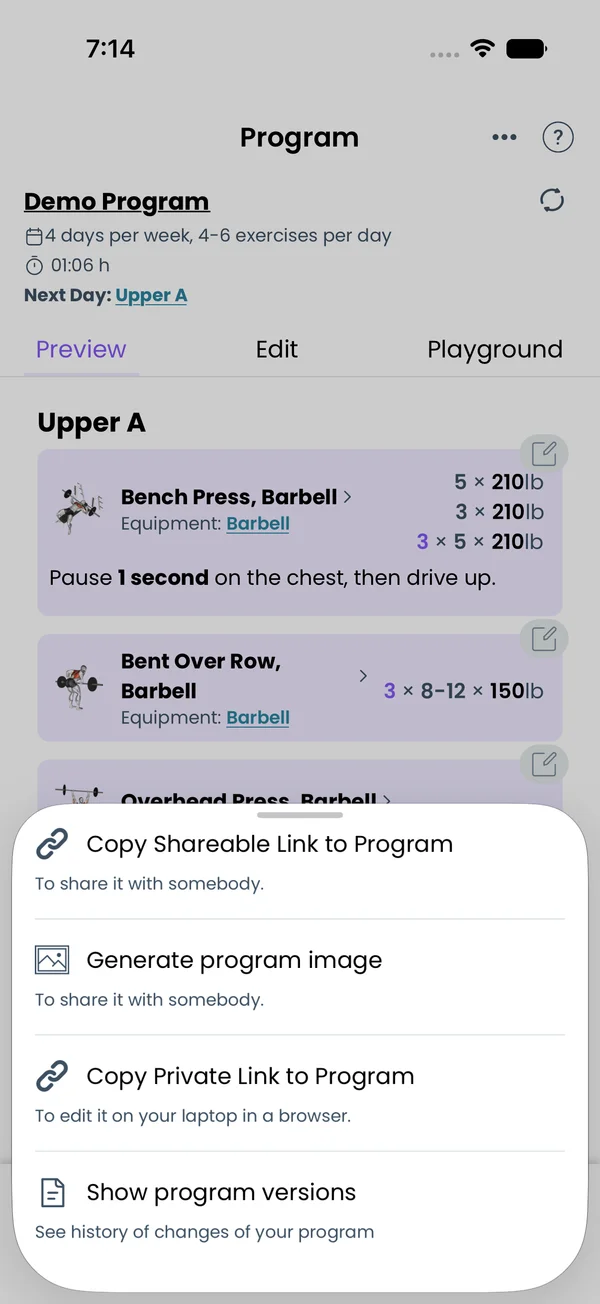
All sharing starts on the Program tab. Tap the ⋮ menu in the top right corner. The menu has:
Copy Shareable Link to Program, to send the program to somebody.
Generate program image, to post it as a picture.
Copy Private Link to Program, to edit it on your laptop in a browser. Only shown when you are signed in.
Show program versions, covered on the Program Editor page.
Share a public link
Tap Copy Shareable Link to Program. The app packs the program, its custom exercises, your units and timer settings into a short link. It looks like https://www.liftosaur.com/p/abc123. The app copies the link to the clipboard and shows it in a popup.
The link does not need your account. Anyone can open it. It never changes, so what you shared is what they get, even if you keep editing the program.
If you turned on the Affiliate Program under Me → Earn money with Liftosaur, the link carries your affiliate id. The menu item says as an affiliate link in that case.
What a public link opens
Opening /p/... in a browser shows the program in the Web Editor on liftosaur.com. Near the top, a yellow box says To use this program:
If they are signed in, they tap Add this program to your account. If the program uses the other weight unit, the site asks: "The program has weights in kg, do you want to convert them to lb?". The program is saved to their account and opens at /user/p/....
If they are not signed in, the box shows the App Store and Google Play badges. They install the app, copy the link with the link icon under the program, and import it on the Choose Program screen.
Someone who edits the program in the Web Editor sees a red bar: "Made changes to the program, but the link still goes to the original version. If you want to share updated version, generate a new link."
Import a link into the app
Go to Me → Program and tap Import in the top right corner. Paste the link into the popup and tap Add. The app asks "Do you want to import program Demo Program?". If a program with the same id is already there, it asks to overwrite it. If the weights are in the other unit, it offers to convert them.
The link can be a short /p/... link or a long link with the program encoded in it. Custom exercises come along. A custom exercise you already have, with the same name, is kept as yours.
Share the program as an image
Tap Generate program image in the ⋮ menu. The Settings tab has:
Include program details, the program name with the week and day count at the top.
Include QR Code. The QR code opens the public link, so a reader can scan the picture and import the program.
Include week descriptions and Include day descriptions.
Columns, how many days go side by side. Default 1.
Days to show, one toggle per week and per day, with Select All and Deselect All.
The Preview tab shows the picture with your options applied. Tap Generate image to render it, then the system share sheet opens to save or send the PNG. A very long program may not fit in one picture. The app then asks for more columns or fewer days.
Edit on a laptop with a private link
Tap Copy Private Link to Program. The app copies https://www.liftosaur.com/user/p/<program id> to the clipboard. Open it in a browser where you are signed in to the same account. The site asks you to sign in first if you are not.
The private link opens the live program from your account, with a Save button and a Versions list. Edits saved there sync back to the app. The link is useless to others. Another account gets "Not Found", and a signed-out browser gets the login page.
Export every program as text
Go to Me and scroll to Import / Export. Tap Export all programs to text file. The app writes one .txt file with every program in Liftoscript, each under a header like ======= Demo Program =======, and opens the share sheet to save it. The text is the same as the full text mode of the editor, so you can paste a program back into a new program later.
Backups, CSV export and JSON program files are on the Import and Export page.
{"feature":{"id":"sharing-programs","title":"Sharing Programs","shortDescription":"Copy a public link to any program, generate an image with a QR code, or grab a private link to edit it on your laptop. Anyone with the link can add it.","order":20,"category":"Sharing and data","datePublished":"2026-09-27","dateModified":"2026-09-28","screenshots":["sharing-programs-menu","sharing-programs-image-preview"]},"content":"## How it works\n\nA program in Liftosaur is text, and a link is a snapshot of that text. Sharing a program means sharing the snapshot as it is right now. If you edit the program later, the link still opens the old version. To share the new version, generate a new link.\n\nAll sharing starts on the **Program** tab. Tap the **⋮** menu in the top right corner. The menu has:\n\n- **Copy Shareable Link to Program**, to send the program to somebody.\n- **Generate program image**, to post it as a picture.\n- **Copy Private Link to Program**, to edit it on your laptop in a browser. Only shown when you are signed in.\n- **Show program versions**, covered on the [Program Editor](/features/program-editor) page.\n\n## Share a public link\n\n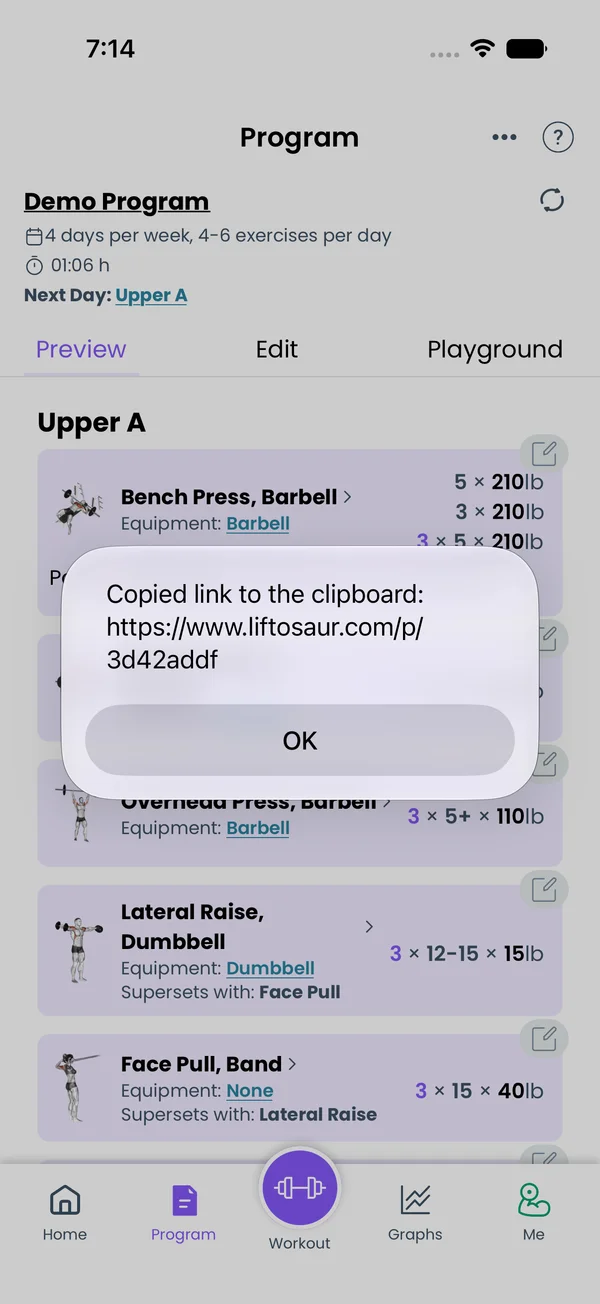\n\nTap **Copy Shareable Link to Program**. The app packs the program, its custom exercises, your units and timer settings into a short link. It looks like `https://www.liftosaur.com/p/abc123`. The app copies the link to the clipboard and shows it in a popup.\n\nThe link does not need your account. Anyone can open it. It never changes, so what you shared is what they get, even if you keep editing the program.\n\nIf you turned on the **Affiliate Program** under **Me → Earn money with Liftosaur**, the link carries your affiliate id. The menu item says **as an affiliate link** in that case.\n\n## What a public link opens\n\nOpening `/p/...` in a browser shows the program in the **Web Editor** on liftosaur.com. Near the top, a yellow box says **To use this program**:\n\n- If they are signed in, they tap **Add this program to your account**. If the program uses the other weight unit, the site asks: \"The program has weights in kg, do you want to convert them to lb?\". The program is saved to their account and opens at `/user/p/...`.\n- If they are not signed in, the box shows the App Store and Google Play badges. They install the app, copy the link with the link icon under the program, and import it on the **Choose Program** screen.\n\nSomeone who edits the program in the Web Editor sees a red bar: \"Made changes to the program, but the link still goes to the original version. If you want to share updated version, generate a new link.\"\n\n## Import a link into the app\n\n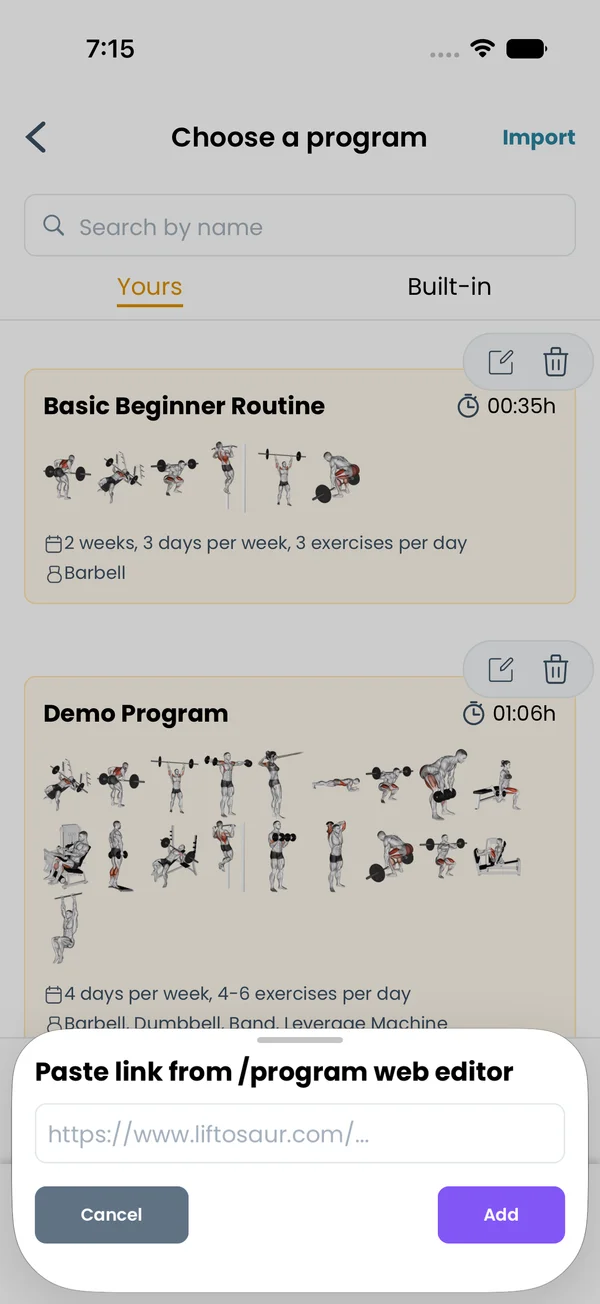\n\nGo to **Me → Program** and tap **Import** in the top right corner. Paste the link into the popup and tap **Add**. The app asks \"Do you want to import program Demo Program?\". If a program with the same id is already there, it asks to overwrite it. If the weights are in the other unit, it offers to convert them.\n\nThe link can be a short `/p/...` link or a long link with the program encoded in it. Custom exercises come along. A custom exercise you already have, with the same name, is kept as yours.\n\n## Share the program as an image\n\n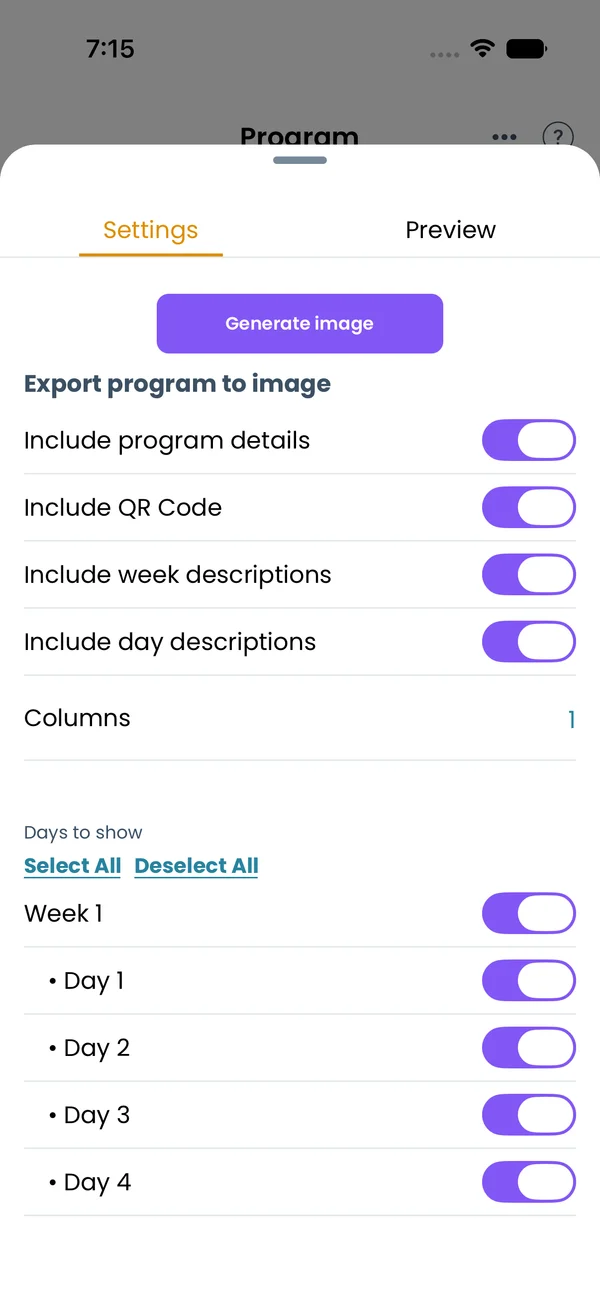 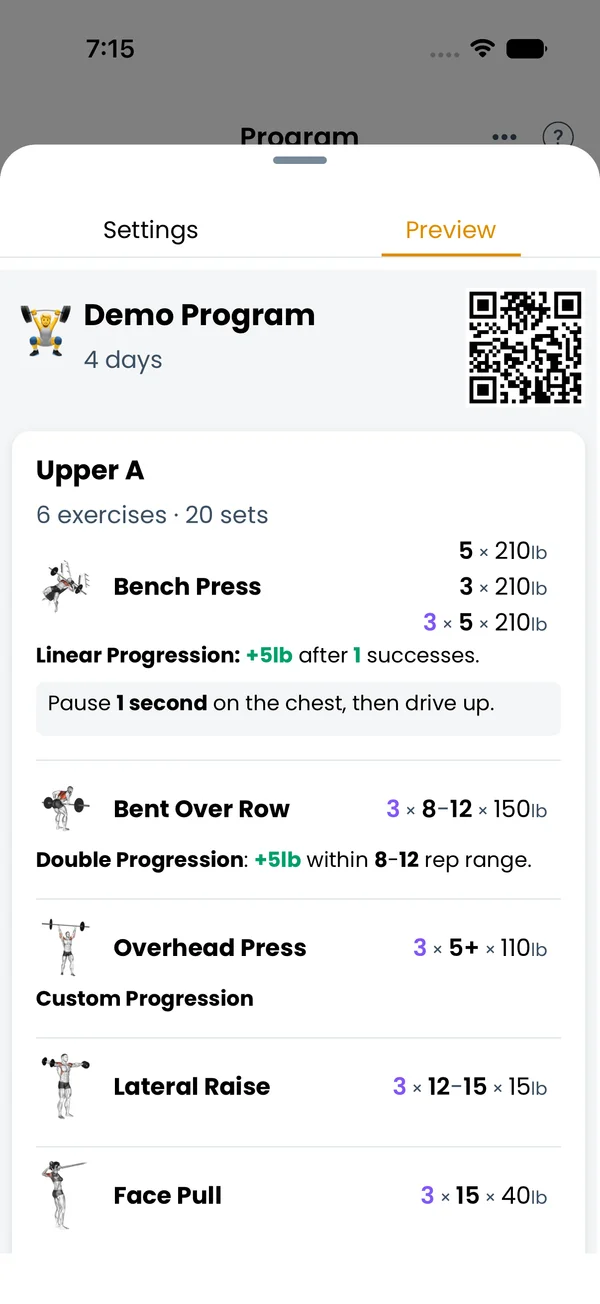\n\nTap **Generate program image** in the **⋮** menu. The **Settings** tab has:\n\n- **Include program details**, the program name with the week and day count at the top.\n- **Include QR Code**. The QR code opens the public link, so a reader can scan the picture and import the program.\n- **Include week descriptions** and **Include day descriptions**.\n- **Columns**, how many days go side by side. Default 1.\n- **Days to show**, one toggle per week and per day, with **Select All** and **Deselect All**.\n\nThe **Preview** tab shows the picture with your options applied. Tap **Generate image** to render it, then the system share sheet opens to save or send the PNG. A very long program may not fit in one picture. The app then asks for more columns or fewer days.\n\n## Edit on a laptop with a private link\n\n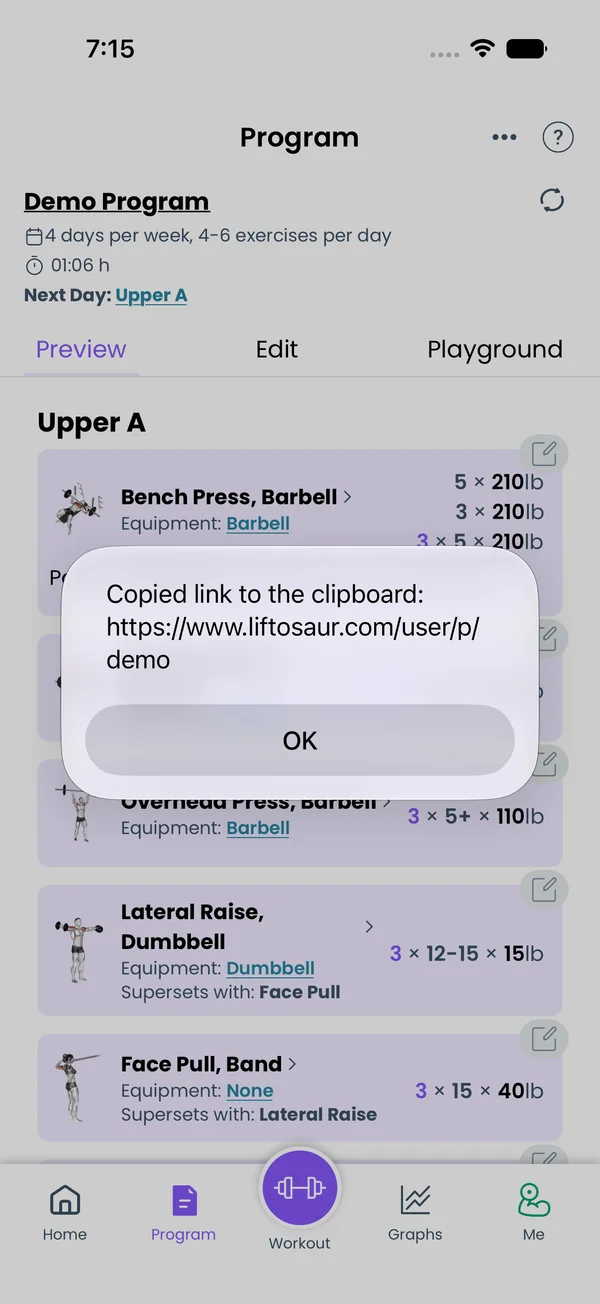\n\nTap **Copy Private Link to Program**. The app copies `https://www.liftosaur.com/user/p/<program id>` to the clipboard. Open it in a browser where you are signed in to the same account. The site asks you to sign in first if you are not.\n\nThe private link opens the live program from your account, with a **Save** button and a **Versions** list. Edits saved there sync back to the app. The link is useless to others. Another account gets \"Not Found\", and a signed-out browser gets the login page.\n\n## Export every program as text\n\n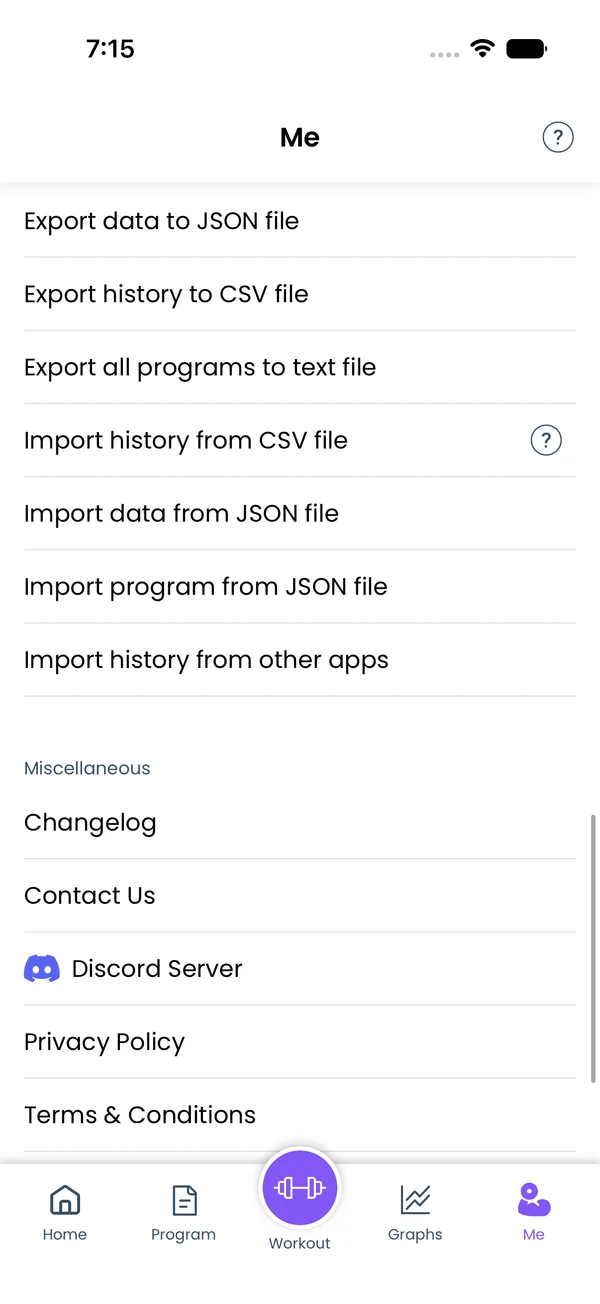\n\nGo to **Me** and scroll to **Import / Export**. Tap **Export all programs to text file**. The app writes one `.txt` file with every program in [Liftoscript](/doc/liftoscript), each under a header like `======= Demo Program =======`, and opens the share sheet to save it. The text is the same as the full text mode of the editor, so you can paste a program back into a new program later.\n\nBackups, CSV export and JSON program files are on the [Import and Export](/features/import-export) page.","sizes":{"account/account-email-form":{"width":600,"height":1304},"account/account-forgot-password":{"width":600,"height":1304},"account/account-screen":{"width":600,"height":1304},"account/account-sign-in":{"width":600,"height":1304},"chatgpt-claude-and-ai/chatgpt-claude-and-ai-autofill":{"width":600,"height":1304},"api/api-key-created":{"width":600,"height":1304},"api/api-keys-empty":{"width":600,"height":1304},"api/api-me-row":{"width":600,"height":1304},"apple-watch/apple-watch-health-settings":{"width":600,"height":1304},"apple-watch/watch-apple-watch-amrap":{"width":416,"height":496},"apple-watch/watch-apple-watch-crown":{"width":416,"height":496},"apple-watch/watch-apple-watch-exercise":{"width":416,"height":496},"apple-watch/watch-apple-watch-get-ready":{"width":416,"height":496},"apple-watch/watch-apple-watch-home":{"width":416,"height":496},"apple-watch/watch-apple-watch-set-clock":{"width":416,"height":496},"apple-watch/watch-apple-watch-workout":{"width":416,"height":496},"built-in-programs/built-in-programs-import":{"width":600,"height":1304},"built-in-programs/built-in-programs-info":{"width":600,"height":1304},"built-in-programs/built-in-programs-library":{"width":600,"height":1304},"built-in-programs/built-in-programs-preview":{"width":600,"height":1304},"built-in-programs/built-in-programs-started":{"width":600,"height":1304},"changing-a-workout/changing-a-workout-adhoc":{"width":600,"height":1304},"changing-a-workout/changing-a-workout-adhoc-picker":{"width":600,"height":1304},"changing-a-workout/changing-a-workout-create-program-day":{"width":600,"height":1304},"changing-a-workout/changing-a-workout-edit-day":{"width":600,"height":1304},"changing-a-workout/changing-a-workout-edit-exercise":{"width":600,"height":1304},"changing-a-workout/changing-a-workout-next-workout":{"width":600,"height":1304},"changing-a-workout/changing-a-workout-pick-day":{"width":600,"height":1304},"changing-a-workout/changing-a-workout-program-day":{"width":600,"height":1304},"changing-a-workout/changing-a-workout-swap-adhoc":{"width":600,"height":1304},"changing-a-workout/changing-a-workout-swap-from-program":{"width":600,"height":1304},"changing-a-workout/changing-a-workout-swap-recent":{"width":600,"height":1304},"custom-exercises/custom-exercises-autofill":{"width":600,"height":1304},"custom-exercises/custom-exercises-clone-library":{"width":600,"height":1304},"custom-exercises/custom-exercises-cloned":{"width":600,"height":1304},"custom-exercises/custom-exercises-form":{"width":600,"height":1304},"custom-exercises/custom-exercises-hidden-group":{"width":600,"height":1304},"custom-exercises/custom-exercises-image-library":{"width":600,"height":1304},"custom-exercises/custom-exercises-image-source":{"width":600,"height":1304},"custom-exercises/custom-exercises-in-workout":{"width":600,"height":1304},"custom-exercises/custom-exercises-muscle-groups":{"width":600,"height":1304},"custom-exercises/custom-exercises-picker":{"width":600,"height":1304},"custom-exercises/custom-exercises-target-muscles":{"width":600,"height":1304},"equipment-and-gyms/equipment-and-gyms-barbell":{"width":600,"height":1304},"equipment-and-gyms/equipment-and-gyms-custom":{"width":600,"height":1304},"equipment-and-gyms/equipment-and-gyms-exercise":{"width":600,"height":1304},"equipment-and-gyms/equipment-and-gyms-fixed":{"width":600,"height":1304},"equipment-and-gyms/equipment-and-gyms-gyms":{"width":600,"height":1304},"equipment-and-gyms/equipment-and-gyms-hidden":{"width":600,"height":1304},"equipment-and-gyms/equipment-and-gyms-list":{"width":600,"height":1304},"exercise-library/exercise-library-calculator":{"width":600,"height":1304},"exercise-library/exercise-library-from-program":{"width":600,"height":1304},"exercise-library/exercise-library-list":{"width":600,"height":1304},"exercise-library/exercise-library-multi-add":{"width":600,"height":1304},"exercise-library/exercise-library-override-muscles":{"width":600,"height":1304},"exercise-library/exercise-library-picker":{"width":600,"height":1304},"exercise-library/exercise-library-prs":{"width":600,"height":1304},"exercise-library/exercise-library-search":{"width":600,"height":1304},"exercise-library/exercise-library-stats":{"width":600,"height":1304},"exercise-library/exercise-library-swap":{"width":600,"height":1304},"graphs/graphs-bodyweight":{"width":600,"height":1304},"graphs/graphs-choose":{"width":600,"height":1304},"graphs/graphs-exercise":{"width":600,"height":1304},"graphs/graphs-legend":{"width":600,"height":1304},"graphs/graphs-muscle-group":{"width":600,"height":1304},"graphs/graphs-personal-records":{"width":600,"height":1304},"graphs/graphs-settings":{"width":600,"height":1304},"health-sync/android-health-sync-measurements":{"width":600,"height":1339},"health-sync/android-health-sync-settings":{"width":600,"height":1339},"health-sync/android-health-sync-share":{"width":600,"height":1339},"health-sync/android-health-sync-sleep-nutrition":{"width":600,"height":1339},"health-sync/health-sync-measurements":{"width":600,"height":1304},"health-sync/health-sync-settings":{"width":600,"height":1304},"health-sync/health-sync-share":{"width":600,"height":1304},"health-sync/health-sync-sleep-nutrition":{"width":600,"height":1304},"import-export/import-export-export":{"width":600,"height":1304},"import-export/import-export-hevy":{"width":600,"height":1304},"import-export/import-export-import":{"width":600,"height":1304},"liftoscript/liftoscript-exercise-sheet":{"width":600,"height":1304},"liftoscript/liftoscript-full-program":{"width":600,"height":1304},"liftoscript/liftoscript-per-day":{"width":600,"height":1304},"liftoscript/liftoscript-playground":{"width":600,"height":1304},"lock-screen-and-notifications/android-lock-screen-and-notifications-live-update":{"width":600,"height":1339},"lock-screen-and-notifications/android-lock-screen-and-notifications-reminder":{"width":600,"height":1339},"lock-screen-and-notifications/android-lock-screen-and-notifications-sound":{"width":600,"height":1339},"lock-screen-and-notifications/lock-screen-and-notifications-dynamic-island":{"width":600,"height":1304},"lock-screen-and-notifications/lock-screen-and-notifications-live-activity":{"width":600,"height":1304},"lock-screen-and-notifications/lock-screen-and-notifications-reminder":{"width":600,"height":1304},"lock-screen-and-notifications/lock-screen-and-notifications-sound":{"width":600,"height":1304},"measurements/measurements-add":{"width":600,"height":1304},"measurements/measurements-bodyweight":{"width":600,"height":1304},"measurements/measurements-moving-average":{"width":600,"height":1304},"measurements/measurements-sleep-nutrition":{"width":600,"height":1304},"measurements/measurements-types":{"width":600,"height":1304},"first-run-and-settings/first-run-and-settings-appearance":{"width":600,"height":1304},"first-run-and-settings/first-run-and-settings-dark-mode":{"width":600,"height":1304},"first-run-and-settings/first-run-and-settings-equipment":{"width":600,"height":1304},"first-run-and-settings/first-run-and-settings-me":{"width":600,"height":1304},"first-run-and-settings/first-run-and-settings-units":{"width":600,"height":1304},"first-run-and-settings/first-run-and-settings-welcome":{"width":600,"height":1304},"playground/playground-completed":{"width":600,"height":1304},"playground/playground-day":{"width":600,"height":1304},"playground/playground-finished":{"width":600,"height":1304},"playground/playground-variables":{"width":600,"height":1304},"premium/premium-account":{"width":600,"height":1304},"premium/premium-feature-info":{"width":600,"height":1304},"premium/premium-plans":{"width":600,"height":1304},"program-editor/program-editor-create":{"width":600,"height":1304},"program-editor/program-editor-day-details":{"width":600,"height":1304},"program-editor/program-editor-exercise-sheet":{"width":600,"height":1304},"program-editor/program-editor-full-text":{"width":600,"height":1304},"program-editor/program-editor-grid":{"width":600,"height":1304},"program-editor/program-editor-perday-text":{"width":600,"height":1304},"program-editor/program-editor-ui-mode":{"width":600,"height":1304},"program-editor/program-editor-week-stats":{"width":600,"height":1304},"progressions/progressions-linear-settings":{"width":600,"height":1304},"progressions/progressions-preview":{"width":600,"height":1304},"progressions/progressions-state-variables":{"width":600,"height":1304},"progressions/progressions-suppressed":{"width":600,"height":1304},"rest-timer/rest-timer-collapsed":{"width":600,"height":1304},"rest-timer/rest-timer-dynamic-island":{"width":600,"height":1304},"rest-timer/rest-timer-expanded":{"width":600,"height":1304},"rest-timer/rest-timer-get-ready":{"width":600,"height":1304},"rest-timer/rest-timer-lock-screen":{"width":600,"height":1304},"rest-timer/rest-timer-settings":{"width":600,"height":1304},"rest-timer/rest-timer-sound":{"width":600,"height":1304},"rest-timer/watch-rest-timer":{"width":416,"height":496},"rest-timer/watch-rest-timer-exercise":{"width":416,"height":496},"set-types/set-types-amrap-popup":{"width":600,"height":1304},"set-types/set-types-per-side":{"width":600,"height":1304},"set-types/set-types-rpe-logged":{"width":600,"height":1304},"set-types/set-types-rpe-popup":{"width":600,"height":1304},"sharing-programs/sharing-programs-export-text":{"width":600,"height":1304},"sharing-programs/sharing-programs-image-preview":{"width":600,"height":1304},"sharing-programs/sharing-programs-image-settings":{"width":600,"height":1304},"sharing-programs/sharing-programs-import":{"width":600,"height":1304},"sharing-programs/sharing-programs-menu":{"width":600,"height":1304},"sharing-programs/sharing-programs-private-link":{"width":600,"height":1304},"sharing-programs/sharing-programs-public-link":{"width":600,"height":1304},"sharing-workouts/sharing-workouts-copied-text":{"width":600,"height":1304},"sharing-workouts/sharing-workouts-finish-screen":{"width":600,"height":1304},"sharing-workouts/sharing-workouts-profile-settings":{"width":600,"height":1304},"sharing-workouts/sharing-workouts-share-sheet":{"width":600,"height":1304},"sharing-workouts/sharing-workouts-story-preview":{"width":600,"height":1304},"supersets/supersets-liftoscript":{"width":600,"height":1304},"supersets/supersets-next-exercise":{"width":600,"height":1304},"supersets/supersets-picker":{"width":600,"height":1304},"supersets/supersets-program-editor":{"width":600,"height":1304},"supersets/supersets-timer":{"width":600,"height":1304},"supersets/supersets-workout":{"width":600,"height":1304},"sync-and-offline/sync-and-offline-account":{"width":600,"height":1304},"sync-and-offline/sync-and-offline-me-account":{"width":600,"height":1304},"sync-and-offline/sync-and-offline-sign-in":{"width":600,"height":1304},"timed-sets/timed-sets-count-up":{"width":600,"height":1304},"timed-sets/timed-sets-edit-time":{"width":600,"height":1304},"timed-sets/timed-sets-get-ready":{"width":600,"height":1304},"timed-sets/timed-sets-recorded":{"width":600,"height":1304},"timed-sets/timed-sets-running":{"width":600,"height":1304},"timed-sets/timed-sets-set-row":{"width":600,"height":1304},"timed-sets/timed-sets-timers":{"width":600,"height":1304},"week-insights/week-insights-details":{"width":600,"height":1304},"week-insights/week-insights-edit-muscle-groups":{"width":600,"height":1304},"week-insights/week-insights-exercises":{"width":600,"height":1304},"week-insights/week-insights-home":{"width":600,"height":1304},"week-insights/week-insights-muscle-groups":{"width":600,"height":1304},"week-insights/week-insights-settings":{"width":600,"height":1304},"workout-history/workout-history-change-date":{"width":600,"height":1304},"workout-history/workout-history-delete":{"width":600,"height":1304},"workout-history/workout-history-feed":{"width":600,"height":1304},"workout-history/workout-history-menu":{"width":600,"height":1304},"workout-history/workout-history-month-calendar":{"width":600,"height":1304},"workout-history/workout-history-note-on-card":{"width":600,"height":1304},"workout-history/workout-history-notes":{"width":600,"height":1304},"workout-history/workout-history-past-card":{"width":600,"height":1304},"workout-history/workout-history-past-workout":{"width":600,"height":1304},"workout-history/workout-history-week-insights":{"width":600,"height":1304},"workout-screen/workout-screen-e1rm":{"width":600,"height":1304},"workout-screen/workout-screen-edit-target":{"width":600,"height":1304},"workout-screen/workout-screen-exercise-menu":{"width":600,"height":1304},"workout-screen/workout-screen-exercise-notes":{"width":600,"height":1304},"workout-screen/workout-screen-history":{"width":600,"height":1304},"workout-screen/workout-screen-keypad":{"width":600,"height":1304},"workout-screen/workout-screen-next-set":{"width":600,"height":1304},"workout-screen/workout-screen-overview":{"width":600,"height":1304},"workout-screen/workout-screen-rounding":{"width":600,"height":1304},"workout-screen/workout-screen-summary":{"width":600,"height":1304}}}