Sign in once and your workouts, programs and settings follow you across iOS, Android and web. Train offline and sync when you are back online.
Where your data lives
Everything you do in Liftosaur is saved on the device first. Workouts, programs, measurements, settings, and the workout you have open right now. You can use the app without an account and without a connection.
An account adds a copy in the cloud. Sign in on another device, and the same data appears there.
Sign in
Go to Me → Account. The row shows your email when you are signed in, and Not signed in when you are not.
The Account screen has three ways to sign in: Sign in with Google, Sign in with Apple, and or use email login for an email and password.
When you sign up on a device that already has data, that data becomes the account. Nothing is lost.
When you sign in to an account that already exists, the app loads the account's data. The data that was on the device stays as a separate local account. Scroll to Other local accounts on the Account screen to switch back to it.
Sign Out signs the device out. The data stays on the device.
Use it on every platform
Liftosaur runs as an iOS app, an Android app, and a web app at liftosaur.com/app. One account works on all of them.
In the browser, add the web app to your home screen. It then opens full screen, like an installed app.
When the app syncs
Sync runs on its own. You do not tap anything. The app syncs:
After every change. Completing a set, editing a program, adding a measurement.
When you open the app, and when you bring it back from the background.
When another device changes something. The server tells your other phones and tablets, and they pull the change right away. This works in the iOS and Android apps when you are signed in.
The web app syncs when you open it and after each change.
While a sync runs, a spinner shows in the top left corner of the screen. If a sync fails, a red Sync failed pill shows there instead. The app retries three times, one second apart. After that, it tries again on the next change, or the next time you open the app.
Continue a workout on another device
The workout you have open syncs too. Start on your phone, complete a few sets, then open the web app. The same workout is there, with the same sets done. Finish it on either device.
The cloud keeps one open workout per account. If two devices each start a different workout, the one started last is kept.
Edit on two devices
Every piece of data carries the time of its last change. When two devices change the same thing, the later change is kept and the earlier one is dropped. Changes to different things merge, so both devices end up with both.
What counts as one thing:
A finished workout is one thing. Edit the same workout on two devices, and the later edit replaces the whole workout.
A program's name, its next day, and its text are three separate things. Rename it on the phone and edit the text on the web, and both changes are kept.
In the open workout, each exercise is tracked on its own. Complete Bench Press sets on the phone and Squat sets on the web, and both are kept.
Deleting is a change too. Delete a workout on one device, and it disappears from the others.
Train without a connection
No connection is needed to train. Start a workout, complete sets, edit programs, add measurements. The app saves to the device and syncs when it is online again.
The web app keeps a copy of itself in the browser, so it opens without a connection too.
The list of built-in programs comes from the server, so it needs a connection. Programs you already have stay on the device.
For a file backup that does not depend on an account, see Import and Export.
{"feature":{"id":"sync-and-offline","title":"Sync and Offline","shortDescription":"Sign in once and your workouts, programs and settings follow you across iOS, Android and web. Train offline and sync when you are back online.","order":40,"category":"Sharing and data","datePublished":"2026-09-27","dateModified":"2026-09-28","screenshots":["sync-and-offline-me-account","sync-and-offline-account"]},"content":"## Where your data lives\n\nEverything you do in Liftosaur is saved on the device first. Workouts, programs, measurements, settings, and the workout you have open right now. You can use the app without an account and without a connection.\n\nAn account adds a copy in the cloud. Sign in on another device, and the same data appears there.\n\n## Sign in\n\n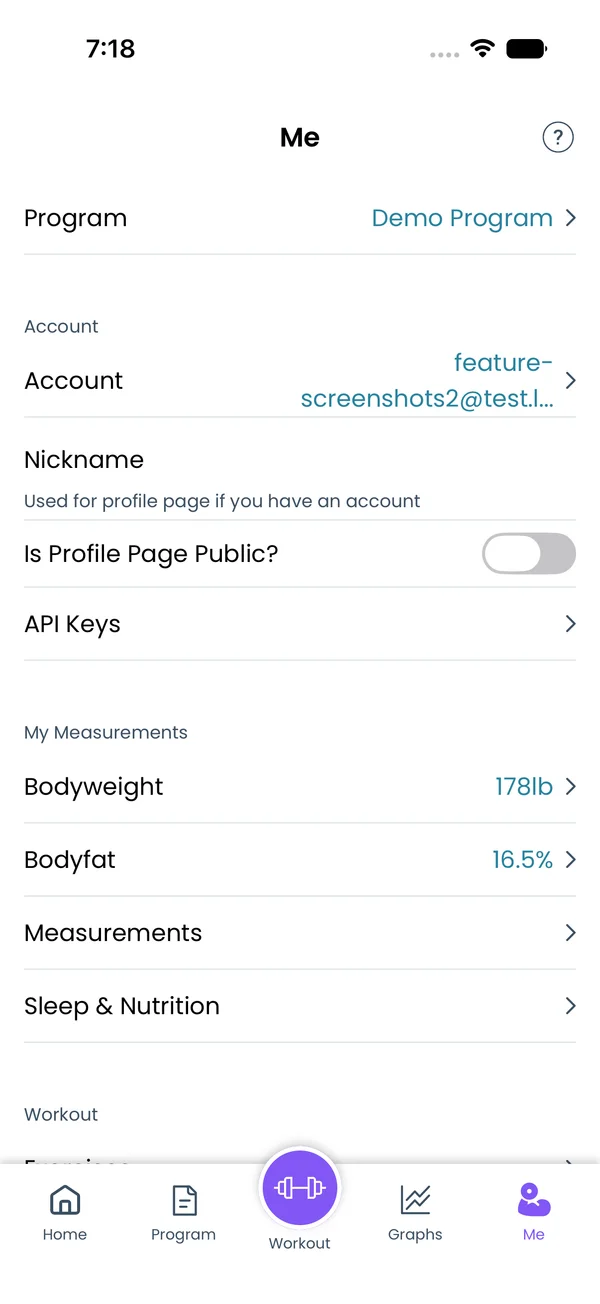 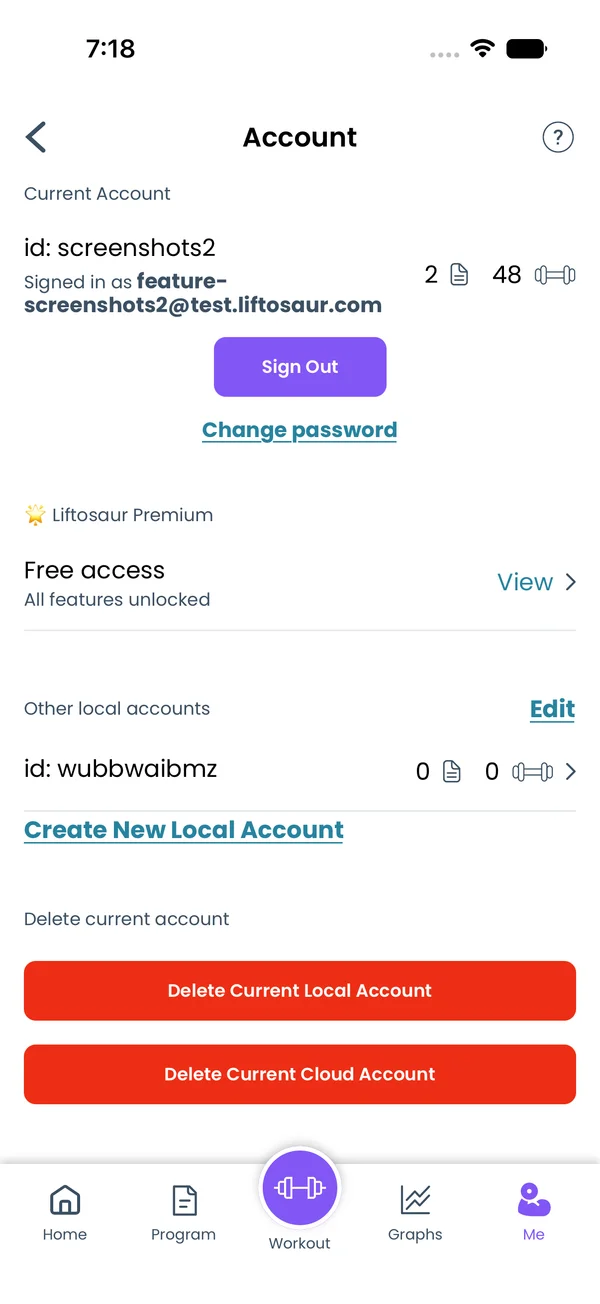\n\nGo to **Me → Account**. The row shows your email when you are signed in, and **Not signed in** when you are not.\n\nThe Account screen has three ways to sign in: **Sign in with Google**, **Sign in with Apple**, and **or use email login** for an email and password.\n\nWhen you sign up on a device that already has data, that data becomes the account. Nothing is lost.\n\nWhen you sign in to an account that already exists, the app loads the account's data. The data that was on the device stays as a separate local account. Scroll to **Other local accounts** on the Account screen to switch back to it.\n\n**Sign Out** signs the device out. The data stays on the device.\n\n## Use it on every platform\n\n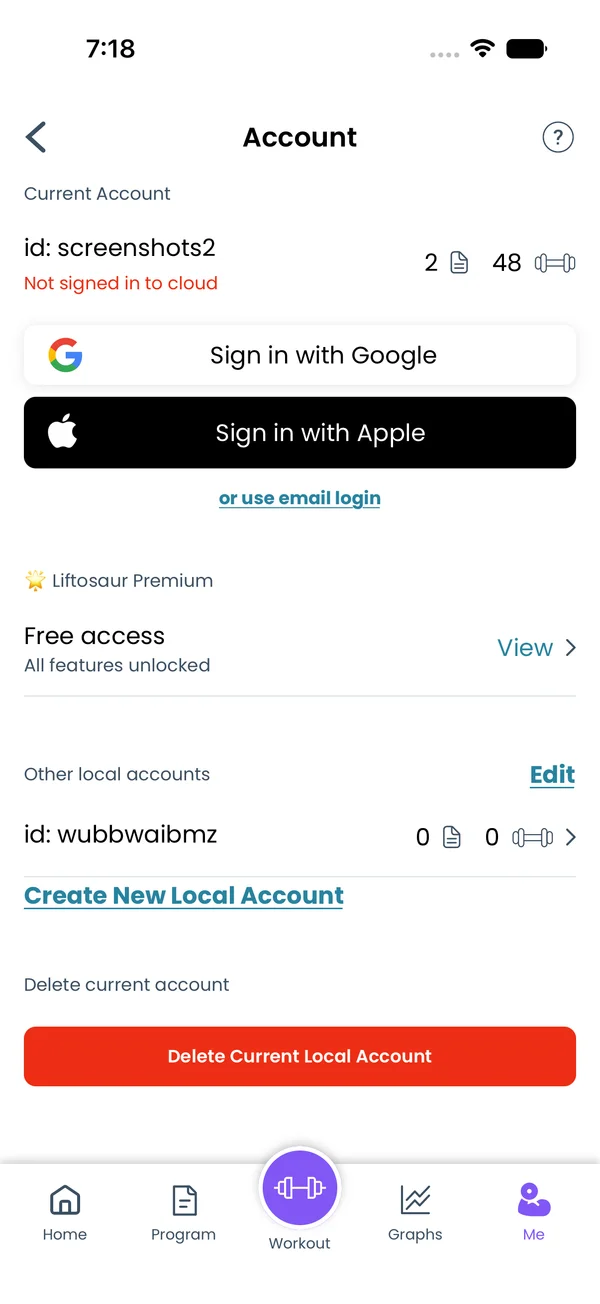\n\nLiftosaur runs as an iOS app, an Android app, and a web app at [liftosaur.com/app](/app). One account works on all of them.\n\nIn the browser, add the web app to your home screen. It then opens full screen, like an installed app.\n\n## When the app syncs\n\nSync runs on its own. You do not tap anything. The app syncs:\n\n- After every change. Completing a set, editing a program, adding a measurement.\n- When you open the app, and when you bring it back from the background.\n- When another device changes something. The server tells your other phones and tablets, and they pull the change right away. This works in the iOS and Android apps when you are signed in.\n\nThe web app syncs when you open it and after each change.\n\nWhile a sync runs, a spinner shows in the top left corner of the screen. If a sync fails, a red **Sync failed** pill shows there instead. The app retries three times, one second apart. After that, it tries again on the next change, or the next time you open the app.\n\n## Continue a workout on another device\n\nThe workout you have open syncs too. Start on your phone, complete a few sets, then open the web app. The same workout is there, with the same sets done. Finish it on either device.\n\nThe cloud keeps one open workout per account. If two devices each start a different workout, the one started last is kept.\n\n## Edit on two devices\n\nEvery piece of data carries the time of its last change. When two devices change the same thing, the later change is kept and the earlier one is dropped. Changes to different things merge, so both devices end up with both.\n\nWhat counts as one thing:\n\n- A finished workout is one thing. Edit the same workout on two devices, and the later edit replaces the whole workout.\n- A program's name, its next day, and its text are three separate things. Rename it on the phone and edit the text on the web, and both changes are kept.\n- In the open workout, each exercise is tracked on its own. Complete Bench Press sets on the phone and Squat sets on the web, and both are kept.\n- Deleting is a change too. Delete a workout on one device, and it disappears from the others.\n\n## Train without a connection\n\nNo connection is needed to train. Start a workout, complete sets, edit programs, add measurements. The app saves to the device and syncs when it is online again.\n\nThe web app keeps a copy of itself in the browser, so it opens without a connection too.\n\nThe list of built-in programs comes from the server, so it needs a connection. Programs you already have stay on the device.\n\nFor a file backup that does not depend on an account, see [Import and Export](/features/import-export).","sizes":{"account/account-email-form":{"width":600,"height":1304},"account/account-forgot-password":{"width":600,"height":1304},"account/account-screen":{"width":600,"height":1304},"account/account-sign-in":{"width":600,"height":1304},"chatgpt-claude-and-ai/chatgpt-claude-and-ai-autofill":{"width":600,"height":1304},"api/api-key-created":{"width":600,"height":1304},"api/api-keys-empty":{"width":600,"height":1304},"api/api-me-row":{"width":600,"height":1304},"apple-watch/apple-watch-health-settings":{"width":600,"height":1304},"apple-watch/watch-apple-watch-amrap":{"width":416,"height":496},"apple-watch/watch-apple-watch-crown":{"width":416,"height":496},"apple-watch/watch-apple-watch-exercise":{"width":416,"height":496},"apple-watch/watch-apple-watch-get-ready":{"width":416,"height":496},"apple-watch/watch-apple-watch-home":{"width":416,"height":496},"apple-watch/watch-apple-watch-set-clock":{"width":416,"height":496},"apple-watch/watch-apple-watch-workout":{"width":416,"height":496},"built-in-programs/built-in-programs-import":{"width":600,"height":1304},"built-in-programs/built-in-programs-info":{"width":600,"height":1304},"built-in-programs/built-in-programs-library":{"width":600,"height":1304},"built-in-programs/built-in-programs-preview":{"width":600,"height":1304},"built-in-programs/built-in-programs-started":{"width":600,"height":1304},"changing-a-workout/changing-a-workout-adhoc":{"width":600,"height":1304},"changing-a-workout/changing-a-workout-adhoc-picker":{"width":600,"height":1304},"changing-a-workout/changing-a-workout-create-program-day":{"width":600,"height":1304},"changing-a-workout/changing-a-workout-edit-day":{"width":600,"height":1304},"changing-a-workout/changing-a-workout-edit-exercise":{"width":600,"height":1304},"changing-a-workout/changing-a-workout-next-workout":{"width":600,"height":1304},"changing-a-workout/changing-a-workout-pick-day":{"width":600,"height":1304},"changing-a-workout/changing-a-workout-program-day":{"width":600,"height":1304},"changing-a-workout/changing-a-workout-swap-adhoc":{"width":600,"height":1304},"changing-a-workout/changing-a-workout-swap-from-program":{"width":600,"height":1304},"changing-a-workout/changing-a-workout-swap-recent":{"width":600,"height":1304},"custom-exercises/custom-exercises-autofill":{"width":600,"height":1304},"custom-exercises/custom-exercises-clone-library":{"width":600,"height":1304},"custom-exercises/custom-exercises-cloned":{"width":600,"height":1304},"custom-exercises/custom-exercises-form":{"width":600,"height":1304},"custom-exercises/custom-exercises-hidden-group":{"width":600,"height":1304},"custom-exercises/custom-exercises-image-library":{"width":600,"height":1304},"custom-exercises/custom-exercises-image-source":{"width":600,"height":1304},"custom-exercises/custom-exercises-in-workout":{"width":600,"height":1304},"custom-exercises/custom-exercises-muscle-groups":{"width":600,"height":1304},"custom-exercises/custom-exercises-picker":{"width":600,"height":1304},"custom-exercises/custom-exercises-target-muscles":{"width":600,"height":1304},"equipment-and-gyms/equipment-and-gyms-barbell":{"width":600,"height":1304},"equipment-and-gyms/equipment-and-gyms-custom":{"width":600,"height":1304},"equipment-and-gyms/equipment-and-gyms-exercise":{"width":600,"height":1304},"equipment-and-gyms/equipment-and-gyms-fixed":{"width":600,"height":1304},"equipment-and-gyms/equipment-and-gyms-gyms":{"width":600,"height":1304},"equipment-and-gyms/equipment-and-gyms-hidden":{"width":600,"height":1304},"equipment-and-gyms/equipment-and-gyms-list":{"width":600,"height":1304},"exercise-library/exercise-library-calculator":{"width":600,"height":1304},"exercise-library/exercise-library-from-program":{"width":600,"height":1304},"exercise-library/exercise-library-list":{"width":600,"height":1304},"exercise-library/exercise-library-multi-add":{"width":600,"height":1304},"exercise-library/exercise-library-override-muscles":{"width":600,"height":1304},"exercise-library/exercise-library-picker":{"width":600,"height":1304},"exercise-library/exercise-library-prs":{"width":600,"height":1304},"exercise-library/exercise-library-search":{"width":600,"height":1304},"exercise-library/exercise-library-stats":{"width":600,"height":1304},"exercise-library/exercise-library-swap":{"width":600,"height":1304},"graphs/graphs-bodyweight":{"width":600,"height":1304},"graphs/graphs-choose":{"width":600,"height":1304},"graphs/graphs-exercise":{"width":600,"height":1304},"graphs/graphs-legend":{"width":600,"height":1304},"graphs/graphs-muscle-group":{"width":600,"height":1304},"graphs/graphs-personal-records":{"width":600,"height":1304},"graphs/graphs-settings":{"width":600,"height":1304},"health-sync/android-health-sync-measurements":{"width":600,"height":1339},"health-sync/android-health-sync-settings":{"width":600,"height":1339},"health-sync/android-health-sync-share":{"width":600,"height":1339},"health-sync/android-health-sync-sleep-nutrition":{"width":600,"height":1339},"health-sync/health-sync-measurements":{"width":600,"height":1304},"health-sync/health-sync-settings":{"width":600,"height":1304},"health-sync/health-sync-share":{"width":600,"height":1304},"health-sync/health-sync-sleep-nutrition":{"width":600,"height":1304},"import-export/import-export-export":{"width":600,"height":1304},"import-export/import-export-hevy":{"width":600,"height":1304},"import-export/import-export-import":{"width":600,"height":1304},"liftoscript/liftoscript-exercise-sheet":{"width":600,"height":1304},"liftoscript/liftoscript-full-program":{"width":600,"height":1304},"liftoscript/liftoscript-per-day":{"width":600,"height":1304},"liftoscript/liftoscript-playground":{"width":600,"height":1304},"lock-screen-and-notifications/android-lock-screen-and-notifications-live-update":{"width":600,"height":1339},"lock-screen-and-notifications/android-lock-screen-and-notifications-reminder":{"width":600,"height":1339},"lock-screen-and-notifications/android-lock-screen-and-notifications-sound":{"width":600,"height":1339},"lock-screen-and-notifications/lock-screen-and-notifications-dynamic-island":{"width":600,"height":1304},"lock-screen-and-notifications/lock-screen-and-notifications-live-activity":{"width":600,"height":1304},"lock-screen-and-notifications/lock-screen-and-notifications-reminder":{"width":600,"height":1304},"lock-screen-and-notifications/lock-screen-and-notifications-sound":{"width":600,"height":1304},"measurements/measurements-add":{"width":600,"height":1304},"measurements/measurements-bodyweight":{"width":600,"height":1304},"measurements/measurements-moving-average":{"width":600,"height":1304},"measurements/measurements-sleep-nutrition":{"width":600,"height":1304},"measurements/measurements-types":{"width":600,"height":1304},"first-run-and-settings/first-run-and-settings-appearance":{"width":600,"height":1304},"first-run-and-settings/first-run-and-settings-dark-mode":{"width":600,"height":1304},"first-run-and-settings/first-run-and-settings-equipment":{"width":600,"height":1304},"first-run-and-settings/first-run-and-settings-me":{"width":600,"height":1304},"first-run-and-settings/first-run-and-settings-units":{"width":600,"height":1304},"first-run-and-settings/first-run-and-settings-welcome":{"width":600,"height":1304},"playground/playground-completed":{"width":600,"height":1304},"playground/playground-day":{"width":600,"height":1304},"playground/playground-finished":{"width":600,"height":1304},"playground/playground-variables":{"width":600,"height":1304},"premium/premium-account":{"width":600,"height":1304},"premium/premium-feature-info":{"width":600,"height":1304},"premium/premium-plans":{"width":600,"height":1304},"program-editor/program-editor-create":{"width":600,"height":1304},"program-editor/program-editor-day-details":{"width":600,"height":1304},"program-editor/program-editor-exercise-sheet":{"width":600,"height":1304},"program-editor/program-editor-full-text":{"width":600,"height":1304},"program-editor/program-editor-grid":{"width":600,"height":1304},"program-editor/program-editor-perday-text":{"width":600,"height":1304},"program-editor/program-editor-ui-mode":{"width":600,"height":1304},"program-editor/program-editor-week-stats":{"width":600,"height":1304},"progressions/progressions-linear-settings":{"width":600,"height":1304},"progressions/progressions-preview":{"width":600,"height":1304},"progressions/progressions-state-variables":{"width":600,"height":1304},"progressions/progressions-suppressed":{"width":600,"height":1304},"rest-timer/rest-timer-collapsed":{"width":600,"height":1304},"rest-timer/rest-timer-dynamic-island":{"width":600,"height":1304},"rest-timer/rest-timer-expanded":{"width":600,"height":1304},"rest-timer/rest-timer-get-ready":{"width":600,"height":1304},"rest-timer/rest-timer-lock-screen":{"width":600,"height":1304},"rest-timer/rest-timer-settings":{"width":600,"height":1304},"rest-timer/rest-timer-sound":{"width":600,"height":1304},"rest-timer/watch-rest-timer":{"width":416,"height":496},"rest-timer/watch-rest-timer-exercise":{"width":416,"height":496},"set-types/set-types-amrap-popup":{"width":600,"height":1304},"set-types/set-types-per-side":{"width":600,"height":1304},"set-types/set-types-rpe-logged":{"width":600,"height":1304},"set-types/set-types-rpe-popup":{"width":600,"height":1304},"sharing-programs/sharing-programs-export-text":{"width":600,"height":1304},"sharing-programs/sharing-programs-image-preview":{"width":600,"height":1304},"sharing-programs/sharing-programs-image-settings":{"width":600,"height":1304},"sharing-programs/sharing-programs-import":{"width":600,"height":1304},"sharing-programs/sharing-programs-menu":{"width":600,"height":1304},"sharing-programs/sharing-programs-private-link":{"width":600,"height":1304},"sharing-programs/sharing-programs-public-link":{"width":600,"height":1304},"sharing-workouts/sharing-workouts-copied-text":{"width":600,"height":1304},"sharing-workouts/sharing-workouts-finish-screen":{"width":600,"height":1304},"sharing-workouts/sharing-workouts-profile-settings":{"width":600,"height":1304},"sharing-workouts/sharing-workouts-share-sheet":{"width":600,"height":1304},"sharing-workouts/sharing-workouts-story-preview":{"width":600,"height":1304},"supersets/supersets-liftoscript":{"width":600,"height":1304},"supersets/supersets-next-exercise":{"width":600,"height":1304},"supersets/supersets-picker":{"width":600,"height":1304},"supersets/supersets-program-editor":{"width":600,"height":1304},"supersets/supersets-timer":{"width":600,"height":1304},"supersets/supersets-workout":{"width":600,"height":1304},"sync-and-offline/sync-and-offline-account":{"width":600,"height":1304},"sync-and-offline/sync-and-offline-me-account":{"width":600,"height":1304},"sync-and-offline/sync-and-offline-sign-in":{"width":600,"height":1304},"timed-sets/timed-sets-count-up":{"width":600,"height":1304},"timed-sets/timed-sets-edit-time":{"width":600,"height":1304},"timed-sets/timed-sets-get-ready":{"width":600,"height":1304},"timed-sets/timed-sets-recorded":{"width":600,"height":1304},"timed-sets/timed-sets-running":{"width":600,"height":1304},"timed-sets/timed-sets-set-row":{"width":600,"height":1304},"timed-sets/timed-sets-timers":{"width":600,"height":1304},"week-insights/week-insights-details":{"width":600,"height":1304},"week-insights/week-insights-edit-muscle-groups":{"width":600,"height":1304},"week-insights/week-insights-exercises":{"width":600,"height":1304},"week-insights/week-insights-home":{"width":600,"height":1304},"week-insights/week-insights-muscle-groups":{"width":600,"height":1304},"week-insights/week-insights-settings":{"width":600,"height":1304},"workout-history/workout-history-change-date":{"width":600,"height":1304},"workout-history/workout-history-delete":{"width":600,"height":1304},"workout-history/workout-history-feed":{"width":600,"height":1304},"workout-history/workout-history-menu":{"width":600,"height":1304},"workout-history/workout-history-month-calendar":{"width":600,"height":1304},"workout-history/workout-history-note-on-card":{"width":600,"height":1304},"workout-history/workout-history-notes":{"width":600,"height":1304},"workout-history/workout-history-past-card":{"width":600,"height":1304},"workout-history/workout-history-past-workout":{"width":600,"height":1304},"workout-history/workout-history-week-insights":{"width":600,"height":1304},"workout-screen/workout-screen-e1rm":{"width":600,"height":1304},"workout-screen/workout-screen-edit-target":{"width":600,"height":1304},"workout-screen/workout-screen-exercise-menu":{"width":600,"height":1304},"workout-screen/workout-screen-exercise-notes":{"width":600,"height":1304},"workout-screen/workout-screen-history":{"width":600,"height":1304},"workout-screen/workout-screen-keypad":{"width":600,"height":1304},"workout-screen/workout-screen-next-set":{"width":600,"height":1304},"workout-screen/workout-screen-overview":{"width":600,"height":1304},"workout-screen/workout-screen-rounding":{"width":600,"height":1304},"workout-screen/workout-screen-summary":{"width":600,"height":1304}}}


