Time the set itself, not only the rest. Planks, carries, EMOM and Tabata get a countdown, a set clock and a recorded time, with auto-advance between rounds.
Writing a timed set
A plain 90s after the sets is the rest timer. Put a | in it and the left side becomes the set timer, how long the set itself lasts:
Plank / 3x1 60s|30s / 0lb
That is 3 sets of plank, 60 seconds each, then 30 seconds of rest. In the workout, a timed set shows a play button instead of the check mark. Give a bodyweight exercise 0lb, or the app asks you for the weight when the set ends.
60s|? keeps your default rest from Me → Timers. See Liftoscript for the full syntax, and Rest Timer for how the rest side works.
Starting the set
Tap the play button. The app opens a Get Ready countdown, 5 seconds by default. The phone vibrates on each of the last 5 seconds if Vibration is on in Me → Settings.
Tap Start now, or tap the ring, to skip the countdown.
Tap Discard & close to close the sheet without starting.
During the set
When the countdown ends, the set clock starts. The big number is the elapsed time, and the progress bar fills toward the target.
When the clock reaches the target, the app records the target time and completes the set on its own. The rest timer starts.
Stop & record stops the clock early and records the elapsed time. The rest timer starts.
Log 0:12, keep timing records the elapsed time now but leaves the clock running to the target. The rest starts when the clock ends.
Discard & close closes the clock without recording.
For a set written as 8x1+ 20s|10s, the app asks for the reps you did when the clock ends, like any AMRAP set.
After the set
The recorded time appears in the set row under Time.
Editing the recorded time
Tap the recorded time in the set row. The Edit recorded time sheet takes minutes and seconds. Save writes the new time, Clear removes it.
Counting up past the target
Add + after the set timer and the clock does not stop at the target. You stop it yourself with Stop & record, and the elapsed time is recorded. This is the AMRAP of timers, "hold the plank as long as you can":
Plank / 2x1 30s|60s, 1x1 30s+|60s
You can also set this on one set during a workout. Tap the pencil on the set, then Edit Target. Enable Set Timer? adds a set timer, and the Count up past target? switch in the keypad adds the +.
In progress and update blocks, the target is setTime and the recorded time is completedSetTime, for example setTime[1] = completedSetTime[1] + 5.
EMOM, Tabata and circuits with auto
Add auto and the app opens the next timed set on its own when the rest ends. No tap between rounds.
// EMOM - 5 rounds, 5 reps, 1-minute window
Power Clean / 5x5 135lb 60s|0s auto

// Tabata - 8 rounds of 20s work, 10s rest, record reps
Squat, Bodyweight / 8x1+ 20s|10s auto
With 60s|0s auto there is no rest and no countdown. The next set's clock starts in the same sheet when the previous one ends.
With rest, the countdown comes out of the rest, so the round length stays the same. 45s|15s auto with a 5 second countdown rests 10 seconds, then counts down 5.
In a superset, auto moves to the next exercise in the group, so a circuit of Crunch, Hollow Hold, Crunch runs on its own.
Changing the countdown
Go to Me → Timers. Under Timed sets, Get ready is the countdown length in seconds. Default 5. Set it to 0 to start the clock on the first tap.
Unilateral exercises: two clocks
For a unilateral exercise, like Bulgarian Split Squat, Lunge, Step Up or a dumbbell Bicep Curl, one timed set runs two clocks. The sheet shows Left side first. When you stop it, a countdown starts and then the Right side clock runs. The set row records both as L and R, and the Edit recorded time sheet has a row for each side.
Whether an exercise is unilateral comes from the Is Unilateral checkbox on its Exercise Stats screen.
Lock screen and Apple Watch
With Premium, the countdown and the set clock also run in the Live Activity on the iOS lock screen and in the Dynamic Island, in the Live Update on Android, and on the Apple Watch, with buttons to stop and record the set from there.
{"feature":{"id":"timed-sets","title":"Timed Sets, Intervals and Circuits","shortDescription":"Time the set itself, not only the rest. Planks, carries, EMOM and Tabata get a countdown, a set clock and a recorded time, with auto-advance between rounds.","order":20,"category":"Workout","datePublished":"2026-09-27","dateModified":"2026-09-28","screenshots":["timed-sets-get-ready","timed-sets-running"]},"content":"## Writing a timed set\n\n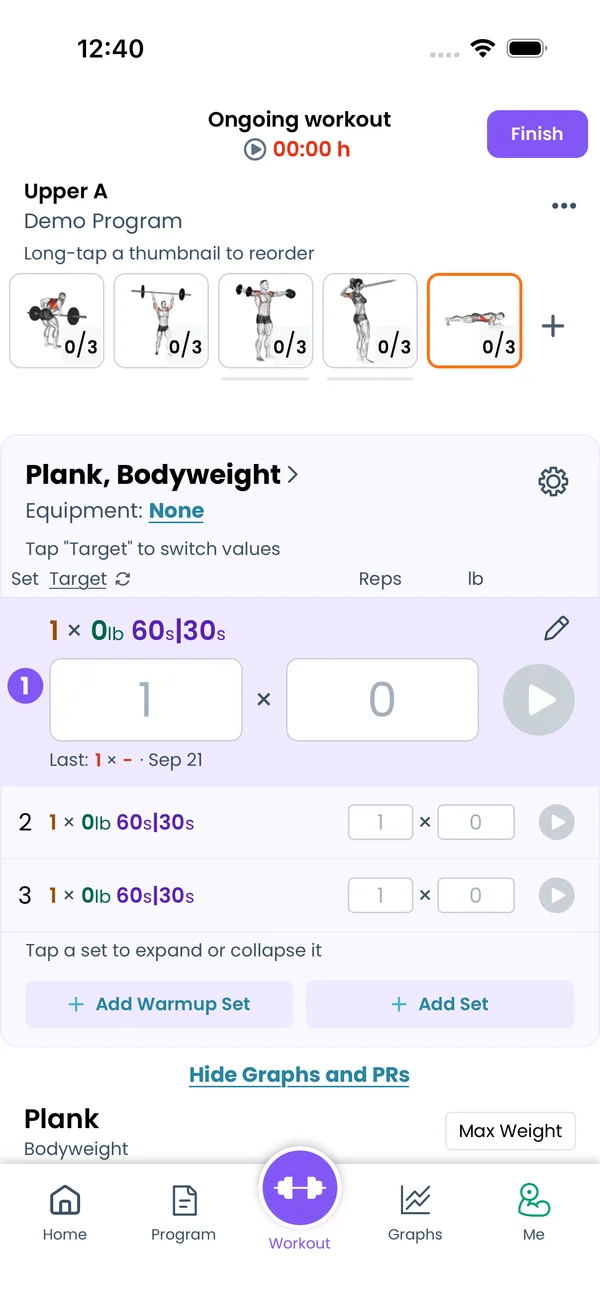\n\nA plain `90s` after the sets is the rest timer. Put a `|` in it and the left side becomes the set timer, how long the set itself lasts:\n\n```liftoscript\nPlank / 3x1 60s|30s / 0lb\n```\n\nThat is 3 sets of plank, 60 seconds each, then 30 seconds of rest. In the workout, a timed set shows a play button instead of the check mark. Give a bodyweight exercise `0lb`, or the app asks you for the weight when the set ends.\n\n`60s|?` keeps your default rest from **Me → Timers**. See [Liftoscript](/doc/liftoscript) for the full syntax, and [Rest Timer](/features/rest-timer) for how the rest side works.\n\n## Starting the set\n\n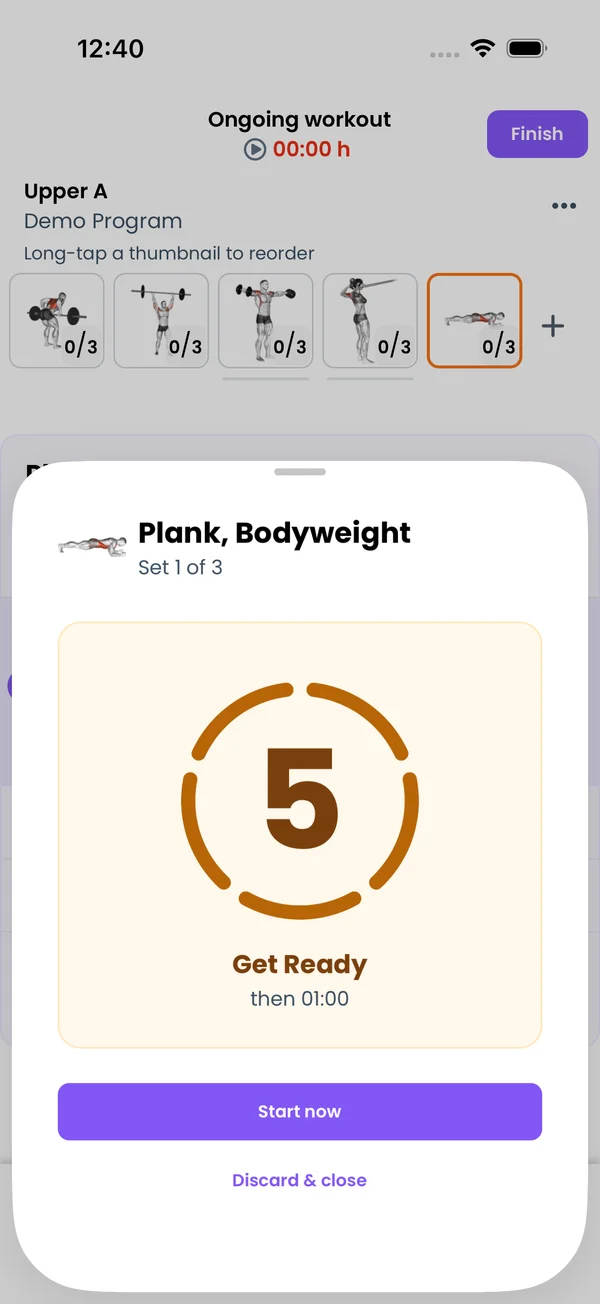\n\nTap the play button. The app opens a **Get Ready** countdown, 5 seconds by default. The phone vibrates on each of the last 5 seconds if **Vibration** is on in **Me → Settings**.\n\n- Tap **Start now**, or tap the ring, to skip the countdown.\n- Tap **Discard & close** to close the sheet without starting.\n\n## During the set\n\n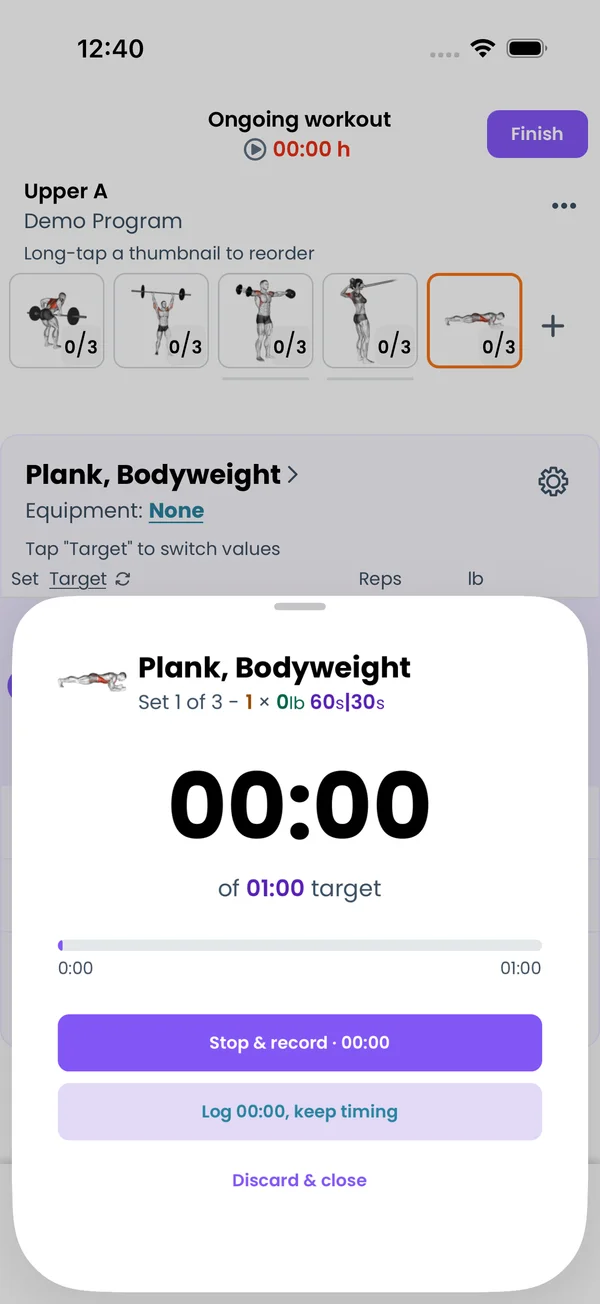\n\nWhen the countdown ends, the set clock starts. The big number is the elapsed time, and the progress bar fills toward the target.\n\n- When the clock reaches the target, the app records the target time and completes the set on its own. The rest timer starts.\n- **Stop & record** stops the clock early and records the elapsed time. The rest timer starts.\n- **Log 0:12, keep timing** records the elapsed time now but leaves the clock running to the target. The rest starts when the clock ends.\n- **Discard & close** closes the clock without recording.\n\nFor a set written as `8x1+ 20s|10s`, the app asks for the reps you did when the clock ends, like any AMRAP set.\n\n## After the set\n\n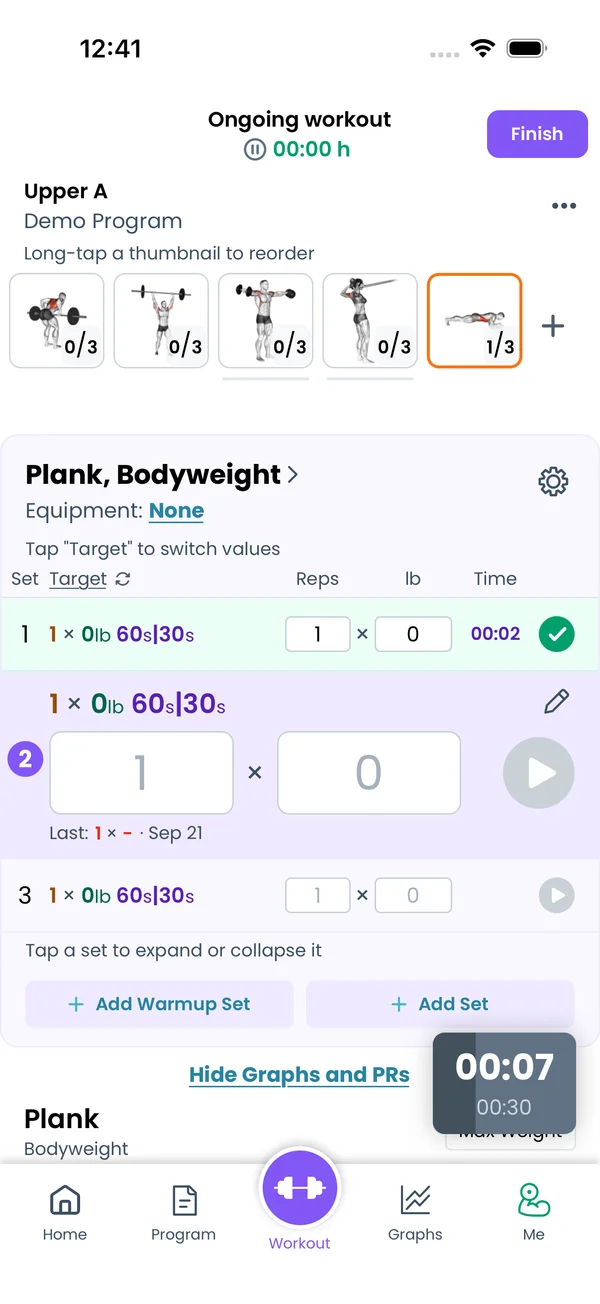\n\nThe recorded time appears in the set row under **Time**.\n\n## Editing the recorded time\n\n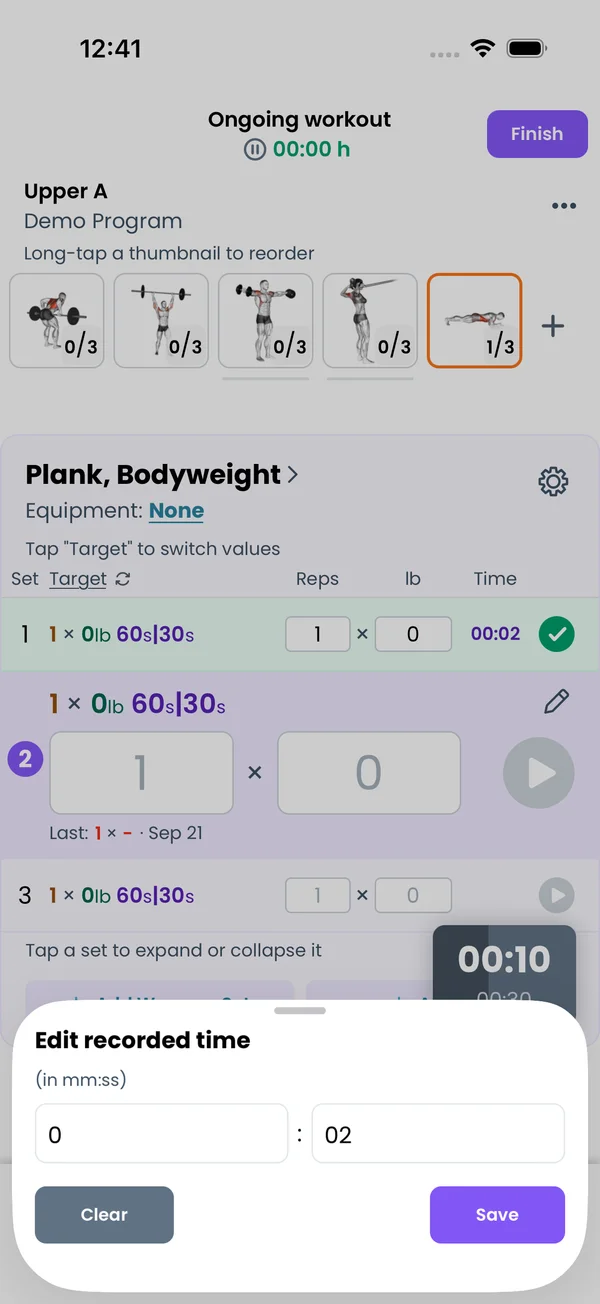\n\nTap the recorded time in the set row. The **Edit recorded time** sheet takes minutes and seconds. **Save** writes the new time, **Clear** removes it.\n\n## Counting up past the target\n\n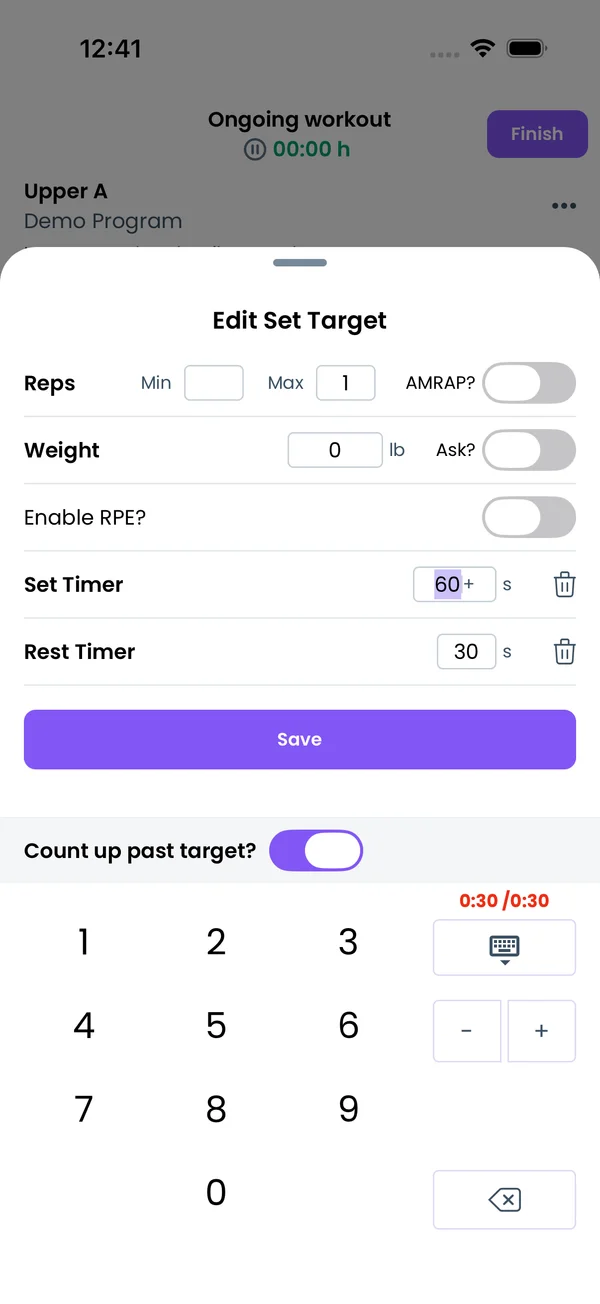\n\nAdd `+` after the set timer and the clock does not stop at the target. You stop it yourself with **Stop & record**, and the elapsed time is recorded. This is the AMRAP of timers, \"hold the plank as long as you can\":\n\n```liftoscript\nPlank / 2x1 30s|60s, 1x1 30s+|60s\n```\n\nYou can also set this on one set during a workout. Tap the pencil on the set, then **Edit Target**. **Enable Set Timer?** adds a set timer, and the **Count up past target?** switch in the keypad adds the `+`.\n\nIn `progress` and `update` blocks, the target is `setTime` and the recorded time is `completedSetTime`, for example `setTime[1] = completedSetTime[1] + 5`.\n\n## EMOM, Tabata and circuits with `auto`\n\nAdd `auto` and the app opens the next timed set on its own when the rest ends. No tap between rounds.\n\n```liftoscript\n// EMOM - 5 rounds, 5 reps, 1-minute window\nPower Clean / 5x5 135lb 60s|0s auto\n\n// Tabata - 8 rounds of 20s work, 10s rest, record reps\nSquat, Bodyweight / 8x1+ 20s|10s auto\n```\n\n- With `60s|0s auto` there is no rest and no countdown. The next set's clock starts in the same sheet when the previous one ends.\n- With rest, the countdown comes out of the rest, so the round length stays the same. `45s|15s auto` with a 5 second countdown rests 10 seconds, then counts down 5.\n- In a superset, `auto` moves to the next exercise in the group, so a circuit of Crunch, Hollow Hold, Crunch runs on its own.\n\n## Changing the countdown\n\n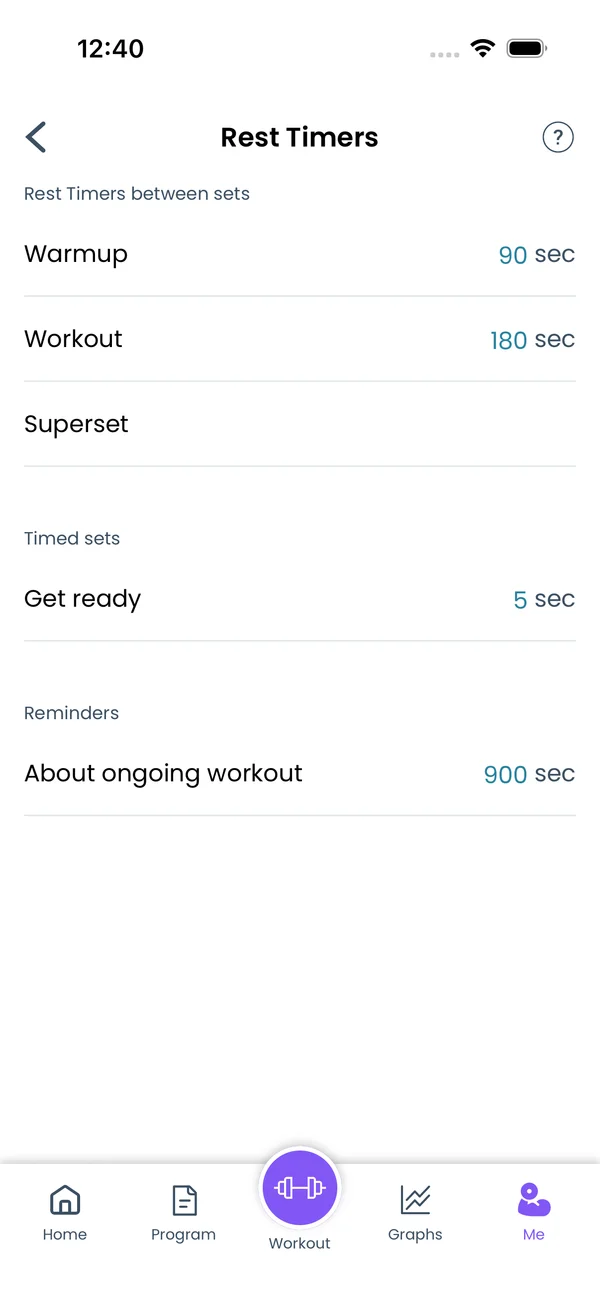\n\nGo to **Me → Timers**. Under **Timed sets**, **Get ready** is the countdown length in seconds. Default 5. Set it to 0 to start the clock on the first tap.\n\n## Unilateral exercises: two clocks\n\nFor a unilateral exercise, like Bulgarian Split Squat, Lunge, Step Up or a dumbbell Bicep Curl, one timed set runs two clocks. The sheet shows **Left side** first. When you stop it, a countdown starts and then the **Right side** clock runs. The set row records both as **L** and **R**, and the **Edit recorded time** sheet has a row for each side.\n\nWhether an exercise is unilateral comes from the **Is Unilateral** checkbox on its Exercise Stats screen.\n\n## Lock screen and Apple Watch\n\nWith Premium, the countdown and the set clock also run in the **Live Activity** on the iOS lock screen and in the Dynamic Island, in the **Live Update** on Android, and on the Apple Watch, with buttons to stop and record the set from there.","sizes":{"account/account-email-form":{"width":600,"height":1304},"account/account-forgot-password":{"width":600,"height":1304},"account/account-screen":{"width":600,"height":1304},"account/account-sign-in":{"width":600,"height":1304},"chatgpt-claude-and-ai/chatgpt-claude-and-ai-autofill":{"width":600,"height":1304},"api/api-key-created":{"width":600,"height":1304},"api/api-keys-empty":{"width":600,"height":1304},"api/api-me-row":{"width":600,"height":1304},"apple-watch/apple-watch-health-settings":{"width":600,"height":1304},"apple-watch/watch-apple-watch-amrap":{"width":416,"height":496},"apple-watch/watch-apple-watch-crown":{"width":416,"height":496},"apple-watch/watch-apple-watch-exercise":{"width":416,"height":496},"apple-watch/watch-apple-watch-get-ready":{"width":416,"height":496},"apple-watch/watch-apple-watch-home":{"width":416,"height":496},"apple-watch/watch-apple-watch-set-clock":{"width":416,"height":496},"apple-watch/watch-apple-watch-workout":{"width":416,"height":496},"built-in-programs/built-in-programs-import":{"width":600,"height":1304},"built-in-programs/built-in-programs-info":{"width":600,"height":1304},"built-in-programs/built-in-programs-library":{"width":600,"height":1304},"built-in-programs/built-in-programs-preview":{"width":600,"height":1304},"built-in-programs/built-in-programs-started":{"width":600,"height":1304},"changing-a-workout/changing-a-workout-adhoc":{"width":600,"height":1304},"changing-a-workout/changing-a-workout-adhoc-picker":{"width":600,"height":1304},"changing-a-workout/changing-a-workout-create-program-day":{"width":600,"height":1304},"changing-a-workout/changing-a-workout-edit-day":{"width":600,"height":1304},"changing-a-workout/changing-a-workout-edit-exercise":{"width":600,"height":1304},"changing-a-workout/changing-a-workout-next-workout":{"width":600,"height":1304},"changing-a-workout/changing-a-workout-pick-day":{"width":600,"height":1304},"changing-a-workout/changing-a-workout-program-day":{"width":600,"height":1304},"changing-a-workout/changing-a-workout-swap-adhoc":{"width":600,"height":1304},"changing-a-workout/changing-a-workout-swap-from-program":{"width":600,"height":1304},"changing-a-workout/changing-a-workout-swap-recent":{"width":600,"height":1304},"custom-exercises/custom-exercises-autofill":{"width":600,"height":1304},"custom-exercises/custom-exercises-clone-library":{"width":600,"height":1304},"custom-exercises/custom-exercises-cloned":{"width":600,"height":1304},"custom-exercises/custom-exercises-form":{"width":600,"height":1304},"custom-exercises/custom-exercises-hidden-group":{"width":600,"height":1304},"custom-exercises/custom-exercises-image-library":{"width":600,"height":1304},"custom-exercises/custom-exercises-image-source":{"width":600,"height":1304},"custom-exercises/custom-exercises-in-workout":{"width":600,"height":1304},"custom-exercises/custom-exercises-muscle-groups":{"width":600,"height":1304},"custom-exercises/custom-exercises-picker":{"width":600,"height":1304},"custom-exercises/custom-exercises-target-muscles":{"width":600,"height":1304},"equipment-and-gyms/equipment-and-gyms-barbell":{"width":600,"height":1304},"equipment-and-gyms/equipment-and-gyms-custom":{"width":600,"height":1304},"equipment-and-gyms/equipment-and-gyms-exercise":{"width":600,"height":1304},"equipment-and-gyms/equipment-and-gyms-fixed":{"width":600,"height":1304},"equipment-and-gyms/equipment-and-gyms-gyms":{"width":600,"height":1304},"equipment-and-gyms/equipment-and-gyms-hidden":{"width":600,"height":1304},"equipment-and-gyms/equipment-and-gyms-list":{"width":600,"height":1304},"exercise-library/exercise-library-calculator":{"width":600,"height":1304},"exercise-library/exercise-library-from-program":{"width":600,"height":1304},"exercise-library/exercise-library-list":{"width":600,"height":1304},"exercise-library/exercise-library-multi-add":{"width":600,"height":1304},"exercise-library/exercise-library-override-muscles":{"width":600,"height":1304},"exercise-library/exercise-library-picker":{"width":600,"height":1304},"exercise-library/exercise-library-prs":{"width":600,"height":1304},"exercise-library/exercise-library-search":{"width":600,"height":1304},"exercise-library/exercise-library-stats":{"width":600,"height":1304},"exercise-library/exercise-library-swap":{"width":600,"height":1304},"graphs/graphs-bodyweight":{"width":600,"height":1304},"graphs/graphs-choose":{"width":600,"height":1304},"graphs/graphs-exercise":{"width":600,"height":1304},"graphs/graphs-legend":{"width":600,"height":1304},"graphs/graphs-muscle-group":{"width":600,"height":1304},"graphs/graphs-personal-records":{"width":600,"height":1304},"graphs/graphs-settings":{"width":600,"height":1304},"health-sync/android-health-sync-measurements":{"width":600,"height":1339},"health-sync/android-health-sync-settings":{"width":600,"height":1339},"health-sync/android-health-sync-share":{"width":600,"height":1339},"health-sync/android-health-sync-sleep-nutrition":{"width":600,"height":1339},"health-sync/health-sync-measurements":{"width":600,"height":1304},"health-sync/health-sync-settings":{"width":600,"height":1304},"health-sync/health-sync-share":{"width":600,"height":1304},"health-sync/health-sync-sleep-nutrition":{"width":600,"height":1304},"import-export/import-export-export":{"width":600,"height":1304},"import-export/import-export-hevy":{"width":600,"height":1304},"import-export/import-export-import":{"width":600,"height":1304},"liftoscript/liftoscript-exercise-sheet":{"width":600,"height":1304},"liftoscript/liftoscript-full-program":{"width":600,"height":1304},"liftoscript/liftoscript-per-day":{"width":600,"height":1304},"liftoscript/liftoscript-playground":{"width":600,"height":1304},"lock-screen-and-notifications/android-lock-screen-and-notifications-live-update":{"width":600,"height":1339},"lock-screen-and-notifications/android-lock-screen-and-notifications-reminder":{"width":600,"height":1339},"lock-screen-and-notifications/android-lock-screen-and-notifications-sound":{"width":600,"height":1339},"lock-screen-and-notifications/lock-screen-and-notifications-dynamic-island":{"width":600,"height":1304},"lock-screen-and-notifications/lock-screen-and-notifications-live-activity":{"width":600,"height":1304},"lock-screen-and-notifications/lock-screen-and-notifications-reminder":{"width":600,"height":1304},"lock-screen-and-notifications/lock-screen-and-notifications-sound":{"width":600,"height":1304},"measurements/measurements-add":{"width":600,"height":1304},"measurements/measurements-bodyweight":{"width":600,"height":1304},"measurements/measurements-moving-average":{"width":600,"height":1304},"measurements/measurements-sleep-nutrition":{"width":600,"height":1304},"measurements/measurements-types":{"width":600,"height":1304},"first-run-and-settings/first-run-and-settings-appearance":{"width":600,"height":1304},"first-run-and-settings/first-run-and-settings-dark-mode":{"width":600,"height":1304},"first-run-and-settings/first-run-and-settings-equipment":{"width":600,"height":1304},"first-run-and-settings/first-run-and-settings-me":{"width":600,"height":1304},"first-run-and-settings/first-run-and-settings-units":{"width":600,"height":1304},"first-run-and-settings/first-run-and-settings-welcome":{"width":600,"height":1304},"playground/playground-completed":{"width":600,"height":1304},"playground/playground-day":{"width":600,"height":1304},"playground/playground-finished":{"width":600,"height":1304},"playground/playground-variables":{"width":600,"height":1304},"premium/premium-account":{"width":600,"height":1304},"premium/premium-feature-info":{"width":600,"height":1304},"premium/premium-plans":{"width":600,"height":1304},"program-editor/program-editor-create":{"width":600,"height":1304},"program-editor/program-editor-day-details":{"width":600,"height":1304},"program-editor/program-editor-exercise-sheet":{"width":600,"height":1304},"program-editor/program-editor-full-text":{"width":600,"height":1304},"program-editor/program-editor-grid":{"width":600,"height":1304},"program-editor/program-editor-perday-text":{"width":600,"height":1304},"program-editor/program-editor-ui-mode":{"width":600,"height":1304},"program-editor/program-editor-week-stats":{"width":600,"height":1304},"progressions/progressions-linear-settings":{"width":600,"height":1304},"progressions/progressions-preview":{"width":600,"height":1304},"progressions/progressions-state-variables":{"width":600,"height":1304},"progressions/progressions-suppressed":{"width":600,"height":1304},"rest-timer/rest-timer-collapsed":{"width":600,"height":1304},"rest-timer/rest-timer-dynamic-island":{"width":600,"height":1304},"rest-timer/rest-timer-expanded":{"width":600,"height":1304},"rest-timer/rest-timer-get-ready":{"width":600,"height":1304},"rest-timer/rest-timer-lock-screen":{"width":600,"height":1304},"rest-timer/rest-timer-settings":{"width":600,"height":1304},"rest-timer/rest-timer-sound":{"width":600,"height":1304},"rest-timer/watch-rest-timer":{"width":416,"height":496},"rest-timer/watch-rest-timer-exercise":{"width":416,"height":496},"set-types/set-types-amrap-popup":{"width":600,"height":1304},"set-types/set-types-per-side":{"width":600,"height":1304},"set-types/set-types-rpe-logged":{"width":600,"height":1304},"set-types/set-types-rpe-popup":{"width":600,"height":1304},"sharing-programs/sharing-programs-export-text":{"width":600,"height":1304},"sharing-programs/sharing-programs-image-preview":{"width":600,"height":1304},"sharing-programs/sharing-programs-image-settings":{"width":600,"height":1304},"sharing-programs/sharing-programs-import":{"width":600,"height":1304},"sharing-programs/sharing-programs-menu":{"width":600,"height":1304},"sharing-programs/sharing-programs-private-link":{"width":600,"height":1304},"sharing-programs/sharing-programs-public-link":{"width":600,"height":1304},"sharing-workouts/sharing-workouts-copied-text":{"width":600,"height":1304},"sharing-workouts/sharing-workouts-finish-screen":{"width":600,"height":1304},"sharing-workouts/sharing-workouts-profile-settings":{"width":600,"height":1304},"sharing-workouts/sharing-workouts-share-sheet":{"width":600,"height":1304},"sharing-workouts/sharing-workouts-story-preview":{"width":600,"height":1304},"supersets/supersets-liftoscript":{"width":600,"height":1304},"supersets/supersets-next-exercise":{"width":600,"height":1304},"supersets/supersets-picker":{"width":600,"height":1304},"supersets/supersets-program-editor":{"width":600,"height":1304},"supersets/supersets-timer":{"width":600,"height":1304},"supersets/supersets-workout":{"width":600,"height":1304},"sync-and-offline/sync-and-offline-account":{"width":600,"height":1304},"sync-and-offline/sync-and-offline-me-account":{"width":600,"height":1304},"sync-and-offline/sync-and-offline-sign-in":{"width":600,"height":1304},"timed-sets/timed-sets-count-up":{"width":600,"height":1304},"timed-sets/timed-sets-edit-time":{"width":600,"height":1304},"timed-sets/timed-sets-get-ready":{"width":600,"height":1304},"timed-sets/timed-sets-recorded":{"width":600,"height":1304},"timed-sets/timed-sets-running":{"width":600,"height":1304},"timed-sets/timed-sets-set-row":{"width":600,"height":1304},"timed-sets/timed-sets-timers":{"width":600,"height":1304},"week-insights/week-insights-details":{"width":600,"height":1304},"week-insights/week-insights-edit-muscle-groups":{"width":600,"height":1304},"week-insights/week-insights-exercises":{"width":600,"height":1304},"week-insights/week-insights-home":{"width":600,"height":1304},"week-insights/week-insights-muscle-groups":{"width":600,"height":1304},"week-insights/week-insights-settings":{"width":600,"height":1304},"workout-history/workout-history-change-date":{"width":600,"height":1304},"workout-history/workout-history-delete":{"width":600,"height":1304},"workout-history/workout-history-feed":{"width":600,"height":1304},"workout-history/workout-history-menu":{"width":600,"height":1304},"workout-history/workout-history-month-calendar":{"width":600,"height":1304},"workout-history/workout-history-note-on-card":{"width":600,"height":1304},"workout-history/workout-history-notes":{"width":600,"height":1304},"workout-history/workout-history-past-card":{"width":600,"height":1304},"workout-history/workout-history-past-workout":{"width":600,"height":1304},"workout-history/workout-history-week-insights":{"width":600,"height":1304},"workout-screen/workout-screen-e1rm":{"width":600,"height":1304},"workout-screen/workout-screen-edit-target":{"width":600,"height":1304},"workout-screen/workout-screen-exercise-menu":{"width":600,"height":1304},"workout-screen/workout-screen-exercise-notes":{"width":600,"height":1304},"workout-screen/workout-screen-history":{"width":600,"height":1304},"workout-screen/workout-screen-keypad":{"width":600,"height":1304},"workout-screen/workout-screen-next-set":{"width":600,"height":1304},"workout-screen/workout-screen-overview":{"width":600,"height":1304},"workout-screen/workout-screen-rounding":{"width":600,"height":1304},"workout-screen/workout-screen-summary":{"width":600,"height":1304}}}






