Sign in with Apple, Google or email to sync workouts, share links and keep Premium on every device. Keep several local accounts on one phone.
What signing in gives you
You can use Liftosaur without an account. Everything stays on the phone. Signing in adds:
Cloud sync. The app uploads your data and keeps it in sync. Lose your phone, sign in on the new one, and your history is back.
Links.Copy Private Link to Program, Copy link to workout and the public profile page need you signed in. See Sharing programs and Sharing workouts.
Premium on every device. Subscribe in the iOS or Android app, then sign in with the same method on the web or another phone.
Apple Watch. When the phone is signed in, the watch talks to the Liftosaur server directly, even with the phone out of reach.
API keys. The keys for the REST API and the MCP server belong to the account.
Sign in
Go to Me → Account. The row under Account on the Me screen says "Not signed in" until you do. On a fresh install, I have an account on the first screen opens the same choices.
You get three options:
Sign in with Google
Sign in with Apple, on iOS and on Android
or use email login
Sign in to an existing account, and the app loads that account's data from the cloud. What was on the phone before stays as a separate local account, listed under Other local accounts.
Create a new account, and the app keeps what is on the phone and uploads it.
Email and password
Tap or use email login. The Sign in with Email sheet has an Email field, a Password field and a Sign In button.
Tap Create account to switch the sheet to sign-up mode. The button becomes Create Account. A password is 8 to 256 characters. The app sends a "Liftosaur - verify your email" message with a link that works for 7 days. Verifying makes sure you can reset the password later.
If the email already signs in with Google or Apple, the app does not create a second account. It emails a link to set a password for the existing one, and says "This email already has a Liftosaur account".
After too many wrong passwords, the app shows "Too many attempts, try again in 15 minutes".
Reset a forgotten password
Tap Forgot password? on the email sheet. Enter your email and tap Send Reset Link. The app says "We've sent an email with instructions to" and your address.
The email is "Liftosaur - reset your password". Its link opens a web page where you choose a new password. The link expires in 1 hour. The web page does not sign you in. Go back to the app and sign in with the new password.
If the email signs in with Google or Apple and has no password, the app says "This email signs in with Google or Apple".
When you are signed in, Change password sits under Sign Out on the Account screen. Leave the current password blank if you sign in with Google or Apple and never set one.
Several accounts on one phone
The Account screen shows Current Account first: your nickname or id, the number of programs, the number of workouts, and "Signed in as" with your email, or "Not signed in to cloud".
Every account on the phone keeps its own copy of programs, history and settings. Under Other local accounts:
Tap an account to switch to it. The app asks "Want to switch to this account? You WILL NOT lose your current account, you'll be able to switch back to it later."
Create New Local Account signs you out and starts an empty account. The current one stays in the list.
Edit shows a trash icon next to each account. Tap it and type delete to remove that copy from the phone.
Sign out and delete
Sign Out signs the phone out of the cloud. Your data stays on the phone, and sync stops. The watch is signed out too.
Delete Current Local Account asks you to type delete. It signs out, removes this account's data from the phone, and starts a new empty local account. The cloud copy is not touched.
Delete Current Cloud Account appears only when you are signed in. Type delete to confirm. The server removes your programs, workout history, measurements, settings, uploaded images, API keys, push subscriptions and logs. Payment records stay, tax law requires it. The app then signs out and says "Account deleted from cloud." If it fails, it asks you to email info@liftosaur.com.
{"feature":{"id":"account","title":"Account and Sign-in","shortDescription":"Sign in with Apple, Google or email to sync workouts, share links and keep Premium on every device. Keep several local accounts on one phone.","order":50,"category":"Sharing and data","datePublished":"2026-09-27","dateModified":"2026-09-28","screenshots":["account-screen","account-sign-in"]},"content":"## What signing in gives you\n\nYou can use Liftosaur without an account. Everything stays on the phone. Signing in adds:\n\n- **Cloud sync.** The app uploads your data and keeps it in sync. Lose your phone, sign in on the new one, and your history is back.\n- **Links.** **Copy Private Link to Program**, **Copy link to workout** and the public profile page need you signed in. See [Sharing programs](/features/sharing-programs) and [Sharing workouts](/features/sharing-workouts).\n- **Premium on every device.** Subscribe in the iOS or Android app, then sign in with the same method on the web or another phone.\n- **Apple Watch.** When the phone is signed in, the watch talks to the Liftosaur server directly, even with the phone out of reach.\n- **API keys.** The keys for the REST API and the MCP server belong to the account.\n\n## Sign in\n\n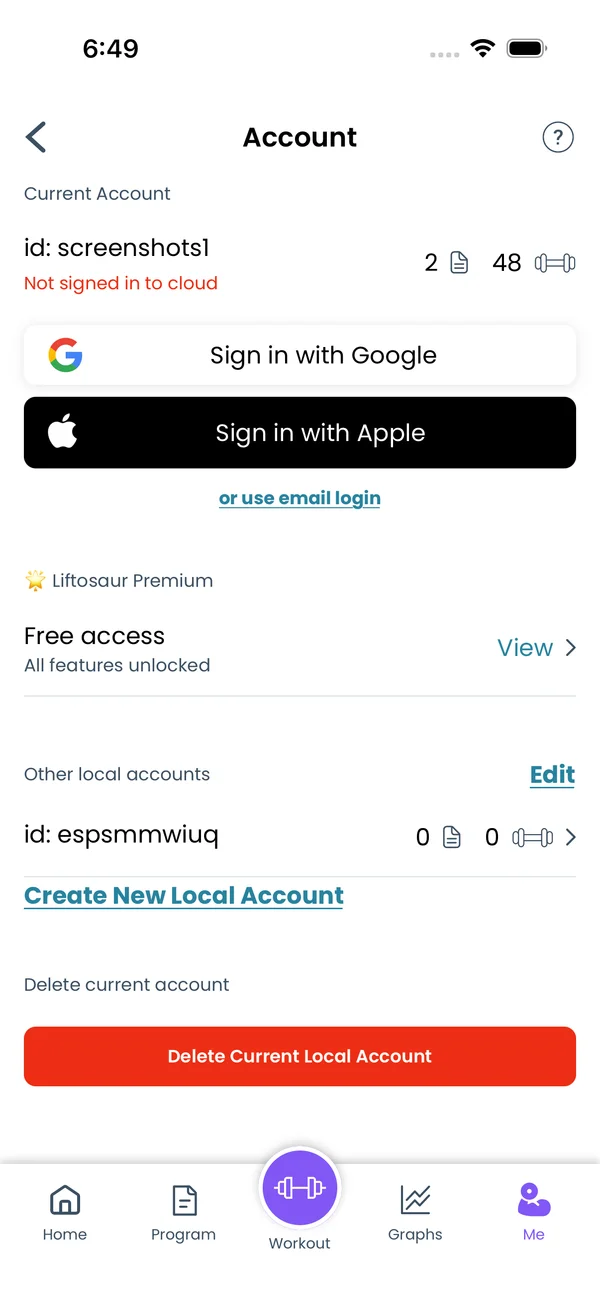\n\nGo to **Me → Account**. The row under **Account** on the Me screen says \"Not signed in\" until you do. On a fresh install, **I have an account** on the first screen opens the same choices.\n\nYou get three options:\n\n- **Sign in with Google**\n- **Sign in with Apple**, on iOS and on Android\n- **or use email login**\n\nSign in to an existing account, and the app loads that account's data from the cloud. What was on the phone before stays as a separate local account, listed under **Other local accounts**.\n\nCreate a new account, and the app keeps what is on the phone and uploads it.\n\n## Email and password\n\n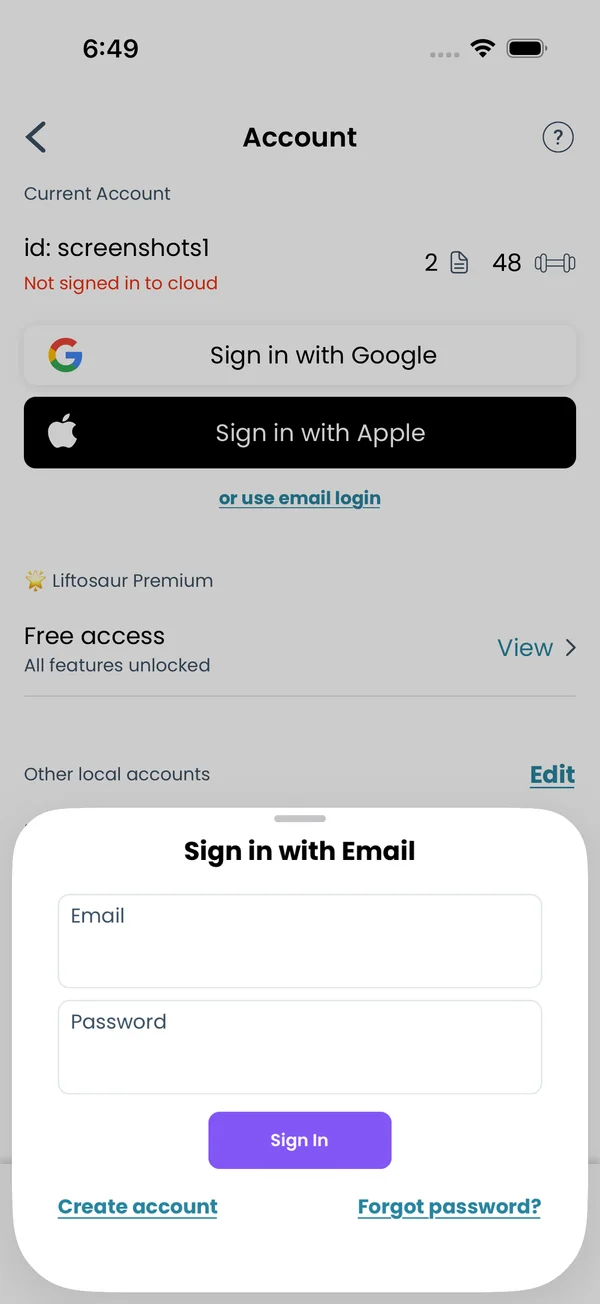\n\nTap **or use email login**. The **Sign in with Email** sheet has an **Email** field, a **Password** field and a **Sign In** button.\n\nTap **Create account** to switch the sheet to sign-up mode. The button becomes **Create Account**. A password is 8 to 256 characters. The app sends a \"Liftosaur - verify your email\" message with a link that works for 7 days. Verifying makes sure you can reset the password later.\n\nIf the email already signs in with Google or Apple, the app does not create a second account. It emails a link to set a password for the existing one, and says \"This email already has a Liftosaur account\".\n\nAfter too many wrong passwords, the app shows \"Too many attempts, try again in 15 minutes\".\n\n## Reset a forgotten password\n\n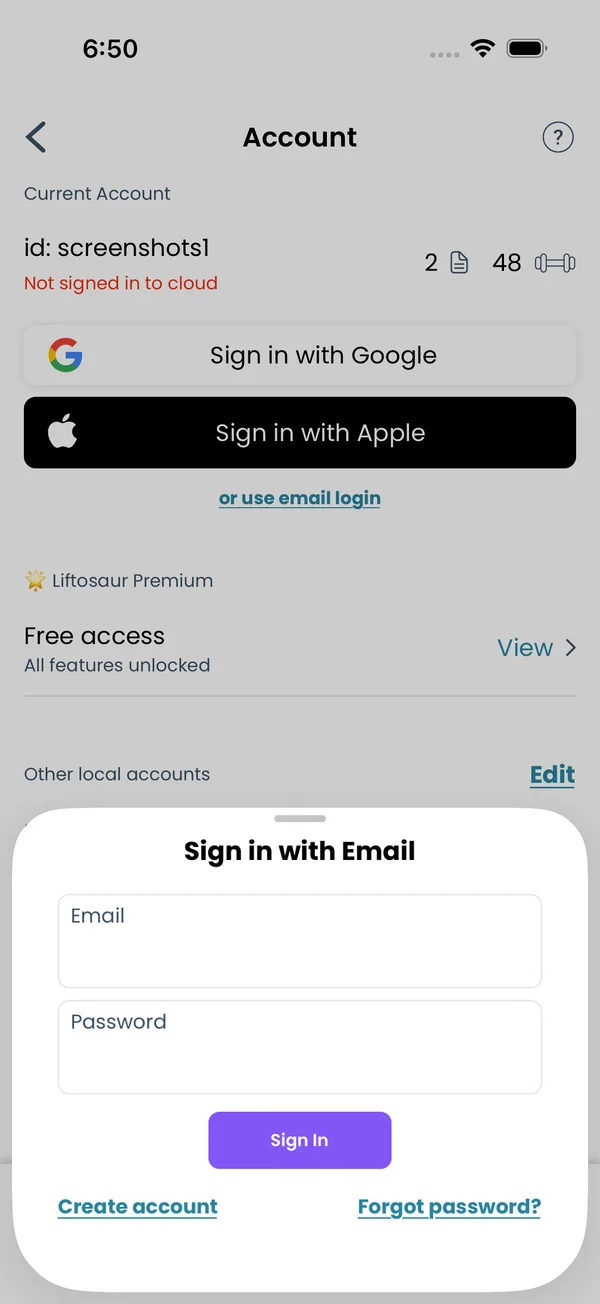\n\nTap **Forgot password?** on the email sheet. Enter your email and tap **Send Reset Link**. The app says \"We've sent an email with instructions to\" and your address.\n\nThe email is \"Liftosaur - reset your password\". Its link opens a web page where you choose a new password. The link expires in 1 hour. The web page does not sign you in. Go back to the app and sign in with the new password.\n\nIf the email signs in with Google or Apple and has no password, the app says \"This email signs in with Google or Apple\".\n\nWhen you are signed in, **Change password** sits under **Sign Out** on the Account screen. Leave the current password blank if you sign in with Google or Apple and never set one.\n\n## Several accounts on one phone\n\n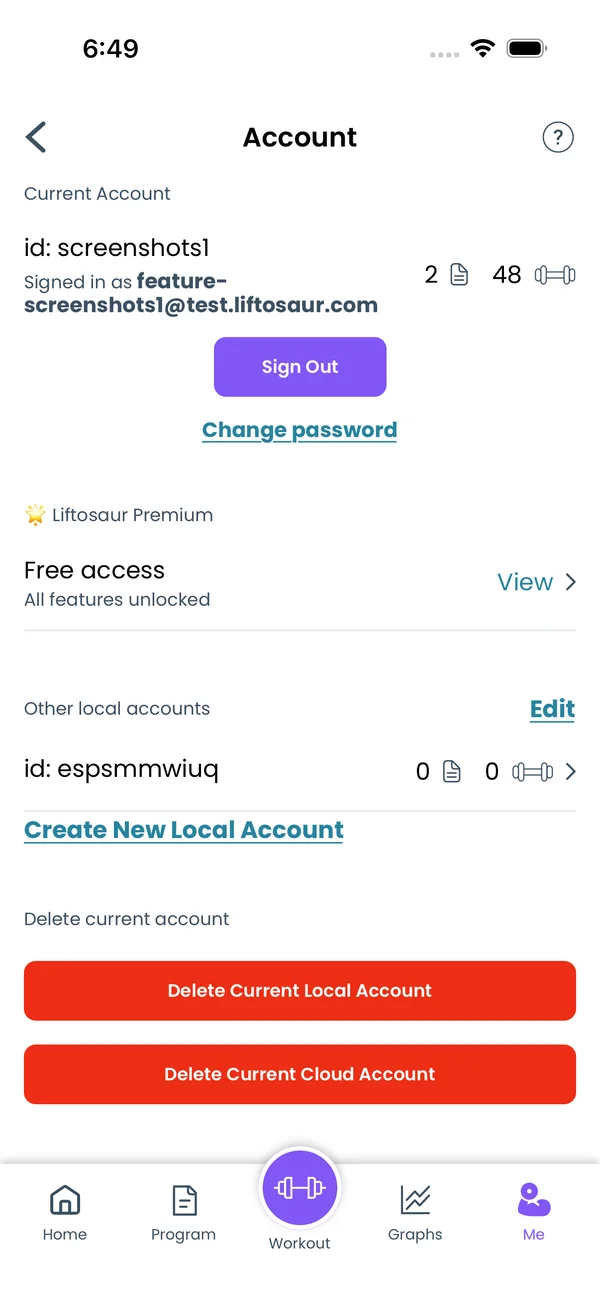\n\nThe Account screen shows **Current Account** first: your nickname or id, the number of programs, the number of workouts, and \"Signed in as\" with your email, or \"Not signed in to cloud\".\n\nEvery account on the phone keeps its own copy of programs, history and settings. Under **Other local accounts**:\n\n- Tap an account to switch to it. The app asks \"Want to switch to this account? You WILL NOT lose your current account, you'll be able to switch back to it later.\"\n- **Create New Local Account** signs you out and starts an empty account. The current one stays in the list.\n- **Edit** shows a trash icon next to each account. Tap it and type `delete` to remove that copy from the phone.\n\n## Sign out and delete\n\n**Sign Out** signs the phone out of the cloud. Your data stays on the phone, and sync stops. The watch is signed out too.\n\n**Delete Current Local Account** asks you to type `delete`. It signs out, removes this account's data from the phone, and starts a new empty local account. The cloud copy is not touched.\n\n**Delete Current Cloud Account** appears only when you are signed in. Type `delete` to confirm. The server removes your programs, workout history, measurements, settings, uploaded images, API keys, push subscriptions and logs. Payment records stay, tax law requires it. The app then signs out and says \"Account deleted from cloud.\" If it fails, it asks you to email info@liftosaur.com.","sizes":{"account/account-email-form":{"width":600,"height":1304},"account/account-forgot-password":{"width":600,"height":1304},"account/account-screen":{"width":600,"height":1304},"account/account-sign-in":{"width":600,"height":1304},"chatgpt-claude-and-ai/chatgpt-claude-and-ai-autofill":{"width":600,"height":1304},"api/api-key-created":{"width":600,"height":1304},"api/api-keys-empty":{"width":600,"height":1304},"api/api-me-row":{"width":600,"height":1304},"apple-watch/apple-watch-health-settings":{"width":600,"height":1304},"apple-watch/watch-apple-watch-amrap":{"width":416,"height":496},"apple-watch/watch-apple-watch-crown":{"width":416,"height":496},"apple-watch/watch-apple-watch-exercise":{"width":416,"height":496},"apple-watch/watch-apple-watch-get-ready":{"width":416,"height":496},"apple-watch/watch-apple-watch-home":{"width":416,"height":496},"apple-watch/watch-apple-watch-set-clock":{"width":416,"height":496},"apple-watch/watch-apple-watch-workout":{"width":416,"height":496},"built-in-programs/built-in-programs-import":{"width":600,"height":1304},"built-in-programs/built-in-programs-info":{"width":600,"height":1304},"built-in-programs/built-in-programs-library":{"width":600,"height":1304},"built-in-programs/built-in-programs-preview":{"width":600,"height":1304},"built-in-programs/built-in-programs-started":{"width":600,"height":1304},"changing-a-workout/changing-a-workout-adhoc":{"width":600,"height":1304},"changing-a-workout/changing-a-workout-adhoc-picker":{"width":600,"height":1304},"changing-a-workout/changing-a-workout-create-program-day":{"width":600,"height":1304},"changing-a-workout/changing-a-workout-edit-day":{"width":600,"height":1304},"changing-a-workout/changing-a-workout-edit-exercise":{"width":600,"height":1304},"changing-a-workout/changing-a-workout-next-workout":{"width":600,"height":1304},"changing-a-workout/changing-a-workout-pick-day":{"width":600,"height":1304},"changing-a-workout/changing-a-workout-program-day":{"width":600,"height":1304},"changing-a-workout/changing-a-workout-swap-adhoc":{"width":600,"height":1304},"changing-a-workout/changing-a-workout-swap-from-program":{"width":600,"height":1304},"changing-a-workout/changing-a-workout-swap-recent":{"width":600,"height":1304},"custom-exercises/custom-exercises-autofill":{"width":600,"height":1304},"custom-exercises/custom-exercises-clone-library":{"width":600,"height":1304},"custom-exercises/custom-exercises-cloned":{"width":600,"height":1304},"custom-exercises/custom-exercises-form":{"width":600,"height":1304},"custom-exercises/custom-exercises-hidden-group":{"width":600,"height":1304},"custom-exercises/custom-exercises-image-library":{"width":600,"height":1304},"custom-exercises/custom-exercises-image-source":{"width":600,"height":1304},"custom-exercises/custom-exercises-in-workout":{"width":600,"height":1304},"custom-exercises/custom-exercises-muscle-groups":{"width":600,"height":1304},"custom-exercises/custom-exercises-picker":{"width":600,"height":1304},"custom-exercises/custom-exercises-target-muscles":{"width":600,"height":1304},"equipment-and-gyms/equipment-and-gyms-barbell":{"width":600,"height":1304},"equipment-and-gyms/equipment-and-gyms-custom":{"width":600,"height":1304},"equipment-and-gyms/equipment-and-gyms-exercise":{"width":600,"height":1304},"equipment-and-gyms/equipment-and-gyms-fixed":{"width":600,"height":1304},"equipment-and-gyms/equipment-and-gyms-gyms":{"width":600,"height":1304},"equipment-and-gyms/equipment-and-gyms-hidden":{"width":600,"height":1304},"equipment-and-gyms/equipment-and-gyms-list":{"width":600,"height":1304},"exercise-library/exercise-library-calculator":{"width":600,"height":1304},"exercise-library/exercise-library-from-program":{"width":600,"height":1304},"exercise-library/exercise-library-list":{"width":600,"height":1304},"exercise-library/exercise-library-multi-add":{"width":600,"height":1304},"exercise-library/exercise-library-override-muscles":{"width":600,"height":1304},"exercise-library/exercise-library-picker":{"width":600,"height":1304},"exercise-library/exercise-library-prs":{"width":600,"height":1304},"exercise-library/exercise-library-search":{"width":600,"height":1304},"exercise-library/exercise-library-stats":{"width":600,"height":1304},"exercise-library/exercise-library-swap":{"width":600,"height":1304},"graphs/graphs-bodyweight":{"width":600,"height":1304},"graphs/graphs-choose":{"width":600,"height":1304},"graphs/graphs-exercise":{"width":600,"height":1304},"graphs/graphs-legend":{"width":600,"height":1304},"graphs/graphs-muscle-group":{"width":600,"height":1304},"graphs/graphs-personal-records":{"width":600,"height":1304},"graphs/graphs-settings":{"width":600,"height":1304},"health-sync/android-health-sync-measurements":{"width":600,"height":1339},"health-sync/android-health-sync-settings":{"width":600,"height":1339},"health-sync/android-health-sync-share":{"width":600,"height":1339},"health-sync/android-health-sync-sleep-nutrition":{"width":600,"height":1339},"health-sync/health-sync-measurements":{"width":600,"height":1304},"health-sync/health-sync-settings":{"width":600,"height":1304},"health-sync/health-sync-share":{"width":600,"height":1304},"health-sync/health-sync-sleep-nutrition":{"width":600,"height":1304},"import-export/import-export-export":{"width":600,"height":1304},"import-export/import-export-hevy":{"width":600,"height":1304},"import-export/import-export-import":{"width":600,"height":1304},"liftoscript/liftoscript-exercise-sheet":{"width":600,"height":1304},"liftoscript/liftoscript-full-program":{"width":600,"height":1304},"liftoscript/liftoscript-per-day":{"width":600,"height":1304},"liftoscript/liftoscript-playground":{"width":600,"height":1304},"lock-screen-and-notifications/android-lock-screen-and-notifications-live-update":{"width":600,"height":1339},"lock-screen-and-notifications/android-lock-screen-and-notifications-reminder":{"width":600,"height":1339},"lock-screen-and-notifications/android-lock-screen-and-notifications-sound":{"width":600,"height":1339},"lock-screen-and-notifications/lock-screen-and-notifications-dynamic-island":{"width":600,"height":1304},"lock-screen-and-notifications/lock-screen-and-notifications-live-activity":{"width":600,"height":1304},"lock-screen-and-notifications/lock-screen-and-notifications-reminder":{"width":600,"height":1304},"lock-screen-and-notifications/lock-screen-and-notifications-sound":{"width":600,"height":1304},"measurements/measurements-add":{"width":600,"height":1304},"measurements/measurements-bodyweight":{"width":600,"height":1304},"measurements/measurements-moving-average":{"width":600,"height":1304},"measurements/measurements-sleep-nutrition":{"width":600,"height":1304},"measurements/measurements-types":{"width":600,"height":1304},"first-run-and-settings/first-run-and-settings-appearance":{"width":600,"height":1304},"first-run-and-settings/first-run-and-settings-dark-mode":{"width":600,"height":1304},"first-run-and-settings/first-run-and-settings-equipment":{"width":600,"height":1304},"first-run-and-settings/first-run-and-settings-me":{"width":600,"height":1304},"first-run-and-settings/first-run-and-settings-units":{"width":600,"height":1304},"first-run-and-settings/first-run-and-settings-welcome":{"width":600,"height":1304},"playground/playground-completed":{"width":600,"height":1304},"playground/playground-day":{"width":600,"height":1304},"playground/playground-finished":{"width":600,"height":1304},"playground/playground-variables":{"width":600,"height":1304},"premium/premium-account":{"width":600,"height":1304},"premium/premium-feature-info":{"width":600,"height":1304},"premium/premium-plans":{"width":600,"height":1304},"program-editor/program-editor-create":{"width":600,"height":1304},"program-editor/program-editor-day-details":{"width":600,"height":1304},"program-editor/program-editor-exercise-sheet":{"width":600,"height":1304},"program-editor/program-editor-full-text":{"width":600,"height":1304},"program-editor/program-editor-grid":{"width":600,"height":1304},"program-editor/program-editor-perday-text":{"width":600,"height":1304},"program-editor/program-editor-ui-mode":{"width":600,"height":1304},"program-editor/program-editor-week-stats":{"width":600,"height":1304},"progressions/progressions-linear-settings":{"width":600,"height":1304},"progressions/progressions-preview":{"width":600,"height":1304},"progressions/progressions-state-variables":{"width":600,"height":1304},"progressions/progressions-suppressed":{"width":600,"height":1304},"rest-timer/rest-timer-collapsed":{"width":600,"height":1304},"rest-timer/rest-timer-dynamic-island":{"width":600,"height":1304},"rest-timer/rest-timer-expanded":{"width":600,"height":1304},"rest-timer/rest-timer-get-ready":{"width":600,"height":1304},"rest-timer/rest-timer-lock-screen":{"width":600,"height":1304},"rest-timer/rest-timer-settings":{"width":600,"height":1304},"rest-timer/rest-timer-sound":{"width":600,"height":1304},"rest-timer/watch-rest-timer":{"width":416,"height":496},"rest-timer/watch-rest-timer-exercise":{"width":416,"height":496},"set-types/set-types-amrap-popup":{"width":600,"height":1304},"set-types/set-types-per-side":{"width":600,"height":1304},"set-types/set-types-rpe-logged":{"width":600,"height":1304},"set-types/set-types-rpe-popup":{"width":600,"height":1304},"sharing-programs/sharing-programs-export-text":{"width":600,"height":1304},"sharing-programs/sharing-programs-image-preview":{"width":600,"height":1304},"sharing-programs/sharing-programs-image-settings":{"width":600,"height":1304},"sharing-programs/sharing-programs-import":{"width":600,"height":1304},"sharing-programs/sharing-programs-menu":{"width":600,"height":1304},"sharing-programs/sharing-programs-private-link":{"width":600,"height":1304},"sharing-programs/sharing-programs-public-link":{"width":600,"height":1304},"sharing-workouts/sharing-workouts-copied-text":{"width":600,"height":1304},"sharing-workouts/sharing-workouts-finish-screen":{"width":600,"height":1304},"sharing-workouts/sharing-workouts-profile-settings":{"width":600,"height":1304},"sharing-workouts/sharing-workouts-share-sheet":{"width":600,"height":1304},"sharing-workouts/sharing-workouts-story-preview":{"width":600,"height":1304},"supersets/supersets-liftoscript":{"width":600,"height":1304},"supersets/supersets-next-exercise":{"width":600,"height":1304},"supersets/supersets-picker":{"width":600,"height":1304},"supersets/supersets-program-editor":{"width":600,"height":1304},"supersets/supersets-timer":{"width":600,"height":1304},"supersets/supersets-workout":{"width":600,"height":1304},"sync-and-offline/sync-and-offline-account":{"width":600,"height":1304},"sync-and-offline/sync-and-offline-me-account":{"width":600,"height":1304},"sync-and-offline/sync-and-offline-sign-in":{"width":600,"height":1304},"timed-sets/timed-sets-count-up":{"width":600,"height":1304},"timed-sets/timed-sets-edit-time":{"width":600,"height":1304},"timed-sets/timed-sets-get-ready":{"width":600,"height":1304},"timed-sets/timed-sets-recorded":{"width":600,"height":1304},"timed-sets/timed-sets-running":{"width":600,"height":1304},"timed-sets/timed-sets-set-row":{"width":600,"height":1304},"timed-sets/timed-sets-timers":{"width":600,"height":1304},"week-insights/week-insights-details":{"width":600,"height":1304},"week-insights/week-insights-edit-muscle-groups":{"width":600,"height":1304},"week-insights/week-insights-exercises":{"width":600,"height":1304},"week-insights/week-insights-home":{"width":600,"height":1304},"week-insights/week-insights-muscle-groups":{"width":600,"height":1304},"week-insights/week-insights-settings":{"width":600,"height":1304},"workout-history/workout-history-change-date":{"width":600,"height":1304},"workout-history/workout-history-delete":{"width":600,"height":1304},"workout-history/workout-history-feed":{"width":600,"height":1304},"workout-history/workout-history-menu":{"width":600,"height":1304},"workout-history/workout-history-month-calendar":{"width":600,"height":1304},"workout-history/workout-history-note-on-card":{"width":600,"height":1304},"workout-history/workout-history-notes":{"width":600,"height":1304},"workout-history/workout-history-past-card":{"width":600,"height":1304},"workout-history/workout-history-past-workout":{"width":600,"height":1304},"workout-history/workout-history-week-insights":{"width":600,"height":1304},"workout-screen/workout-screen-e1rm":{"width":600,"height":1304},"workout-screen/workout-screen-edit-target":{"width":600,"height":1304},"workout-screen/workout-screen-exercise-menu":{"width":600,"height":1304},"workout-screen/workout-screen-exercise-notes":{"width":600,"height":1304},"workout-screen/workout-screen-history":{"width":600,"height":1304},"workout-screen/workout-screen-keypad":{"width":600,"height":1304},"workout-screen/workout-screen-next-set":{"width":600,"height":1304},"workout-screen/workout-screen-overview":{"width":600,"height":1304},"workout-screen/workout-screen-rounding":{"width":600,"height":1304},"workout-screen/workout-screen-summary":{"width":600,"height":1304}}}



