Tell the app how to add weight or reps over time. Pick a built-in linear, double or sum-of-reps progression, or write your own script with state variables.
How progressions work
A progression is a rule on one exercise in your program. It runs when you finish the workout and rewrites the program text. Write it with progress: after the sets:
Bench Press / 3x5 / 155lb / progress: lp(5lb)
Complete all three sets of five, and after you finish the workout the line reads 160lb. Miss a rep, and it stays at 155lb.
You write it once per exercise. The app applies it on every day and week where that exercise appears. Write progress: none on a deload day to skip it there.
Complete all working sets of an exercise, and the app shows what the rule will do under the sets. Exercise Changes lists the new weights or reps. State Variables changes lists the values the script remembers.
Adding weight after a good session
Linear progression (lp) adds a fixed weight after you complete every set and rep:
The second number is how many good sessions you need. The fourth and fifth are the weight to drop and how many failed sessions it takes. The app adds the increment to the weight you lifted, so a weight you changed during the workout carries over.
To edit it in the app, tap the cog on the exercise during a workout and pick Edit Program Exercise. The exercise line opens in the Liftoscript editor sheet. Change the progress: part of the line and tap Save, and the program is updated.
Adding reps first, then weight
Double progression (dp) grows the reps inside a range, then adds weight and resets the reps:
Bent Over Row / 3x8-12 / 115lb / progress: dp(5lb, 8, 12)
With 3x8-12 the range narrows from below until you hit 12 on every set, then the weight goes up. With plain 3x8 the reps climb from 8 to 12 one session at a time. In the app the section shows Increase weight by and Reps range.
Sum of reps (sum) adds weight when the reps of all sets add up to a number:
Bench Press / 3x10+ / progress: sum(30, 5lb)
Writing your own rule
progress: custom() runs a script between {~ and ~}. It reads what you did and writes new values into the program:
completedReps[ns] is the reps of the last set. weights += 5lb changes every set, weights[2] += 5lb only set two. You can also assign reps, minReps, RPE, timers, numberOfSets, and rm1.
In the app, pick Custom in the Progress picker and tap Edit Script. The Progress Script editor checks the script as you type and disables Save on an error. Reuse another exercise's script with progress: custom(increment: 10lb) { ...Bench Press }.
Remembering values between workouts
State variables live in the parentheses of custom(). The script reads and writes them as state.name, and the app saves them in the program text:
A + after the name, as in custom(shouldBumpWeight+: 0), makes the app ask you for the value after the last set.
In the exercise editor, tap State vars… on a custom(...) line to open the list of variables with their current values. Change a value there, and the app writes it back into the program text.
Changing sets during the workout
update: custom() runs before the first set and after every set you complete. It changes the sets of the current workout only. setIndex is the set you just tapped, 0 on the first run:
Completed sets never change. Turn the section on from the 3-dot menu of Edit Program Exercise with Enable Update.
Skipping the progression once
Tap Suppress under the preview to keep the program as it is after this workout. The listed changes get a line through them. Tap Enable to turn the rule back on.
Rounded weights in the workout
A progression writes exact weights into the program. When the increment is not a weight your plates can make, like 2.5lb with only 5 lb plates, the program soon holds a weight like 162.5lb that you cannot load. Percentages of your 1RM do the same: 70% of a 235 lb max is 164.5 lb. In the workout, the app rounds such a weight to what you can load and underlines it. Tap the set to expand it, then tap the underlined weight. The Why is the weight adjusted? sheet shows the program's weight, the 1RM math for a percentage, and the bar and plates it used. See Logging a Workout for the sheet.
More tools for scripts
bodyweight is your latest bodyweight from measurements. weights = bodyweight in an update script tracks pull-ups. Equipment, Plates and Gyms shows the full setup for weighted and assisted pull-ups.
Tags let one exercise change another's state. Write Squat / 3x8 / id: tags(1), then state[1].rating = 10 from another script.
Progression ladders: Split Squat | ! Bulgarian Split Squat | Pistol Squat / 3x8 0lb. exerciseVariationIndex += 1 moves to the next movement.
Built-in functions: floor, ceil, round, sum, min, max, increment, decrement, roundWeight, rpeMultiplier, calculate1RM, zeroOrGte, and print to show values in the preview.
{"feature":{"id":"progressions","title":"Progressions and State","shortDescription":"Tell the app how to add weight or reps over time. Pick a built-in linear, double or sum-of-reps progression, or write your own script with state variables.","order":40,"category":"Programs","datePublished":"2026-09-27","dateModified":"2026-09-29","screenshots":["progressions-preview","progressions-linear-settings"]},"content":"## How progressions work\n\n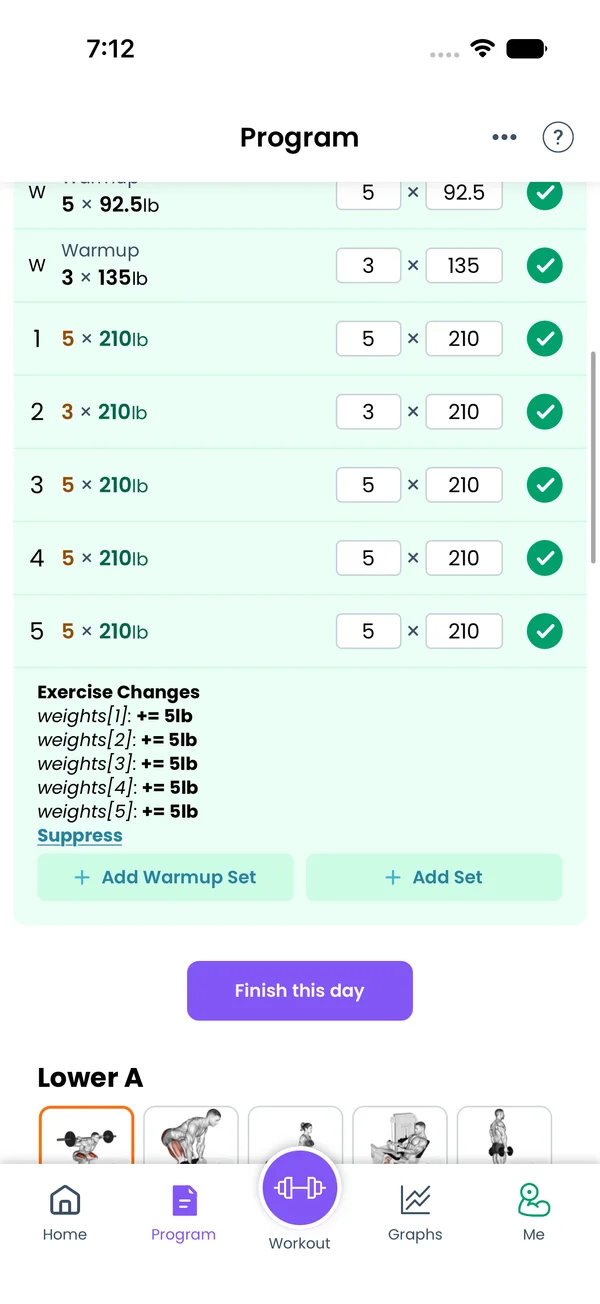\n\nA progression is a rule on one exercise in your program. It runs when you finish the workout and rewrites the program text. Write it with `progress:` after the sets:\n\n```liftoscript\nBench Press / 3x5 / 155lb / progress: lp(5lb)\n```\n\nComplete all three sets of five, and after you finish the workout the line reads `160lb`. Miss a rep, and it stays at `155lb`.\n\nYou write it once per exercise. The app applies it on every day and week where that exercise appears. Write `progress: none` on a deload day to skip it there.\n\nComplete all working sets of an exercise, and the app shows what the rule will do under the sets. **Exercise Changes** lists the new weights or reps. **State Variables changes** lists the values the script remembers.\n\n## Adding weight after a good session\n\n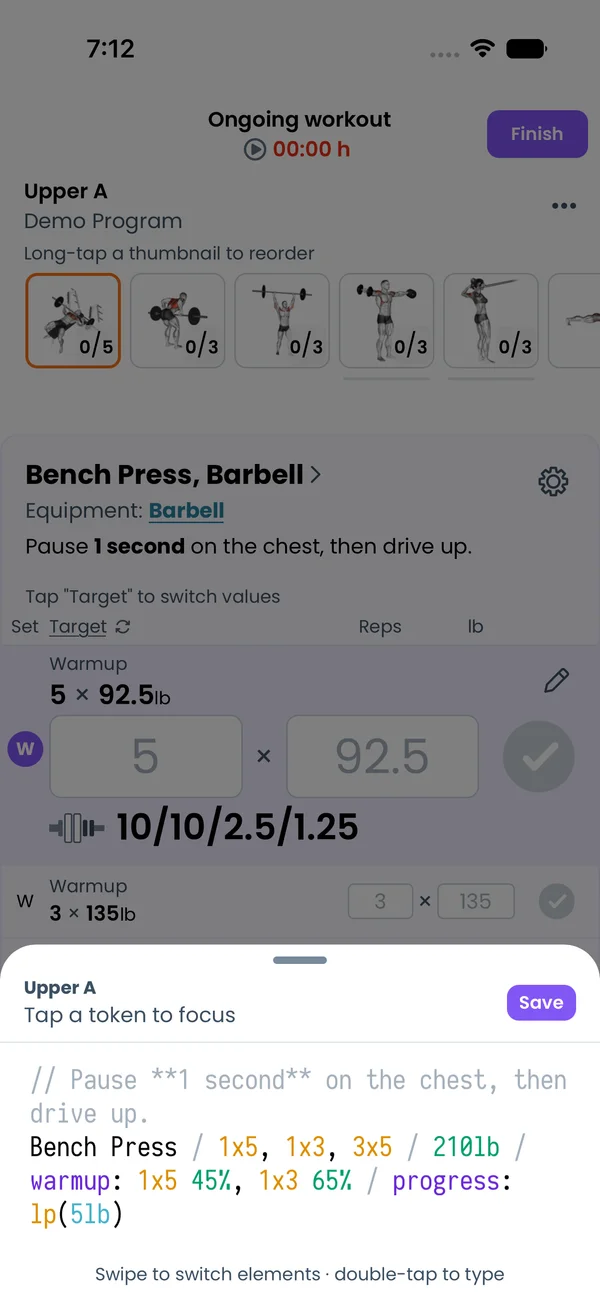\n\nLinear progression (`lp`) adds a fixed weight after you complete every set and rep:\n\n```liftoscript\nSquat / 3x8 / progress: lp(5lb, 2)\nSquat / 3x8 / progress: lp(5lb, 2, 0, 10lb, 3)\n```\n\nThe second number is how many good sessions you need. The fourth and fifth are the weight to drop and how many failed sessions it takes. The app adds the increment to the weight you lifted, so a weight you changed during the workout carries over.\n\nTo edit it in the app, tap the cog on the exercise during a workout and pick **Edit Program Exercise**. The exercise line opens in the Liftoscript editor sheet. Change the `progress:` part of the line and tap **Save**, and the program is updated.\n\n## Adding reps first, then weight\n\nDouble progression (`dp`) grows the reps inside a range, then adds weight and resets the reps:\n\n```liftoscript\nBent Over Row / 3x8-12 / 115lb / progress: dp(5lb, 8, 12)\n```\n\nWith `3x8-12` the range narrows from below until you hit 12 on every set, then the weight goes up. With plain `3x8` the reps climb from 8 to 12 one session at a time. In the app the section shows **Increase weight by** and **Reps range**.\n\nSum of reps (`sum`) adds weight when the reps of all sets add up to a number:\n\n```liftoscript\nBench Press / 3x10+ / progress: sum(30, 5lb)\n```\n\n## Writing your own rule\n\n`progress: custom()` runs a script between `{~` and `~}`. It reads what you did and writes new values into the program:\n\n```liftoscript\nOverhead Press / 3x5+ / 85lb / progress: custom(increment: 5lb) {~\n if (completedReps[ns] >= 8) {\n weights += state.increment\n } else if (completedReps[ns] < 5) {\n weights -= state.increment\n }\n~}\n```\n\n`completedReps[ns]` is the reps of the last set. `weights += 5lb` changes every set, `weights[2] += 5lb` only set two. You can also assign `reps`, `minReps`, `RPE`, `timers`, `numberOfSets`, and `rm1`.\n\nIn the app, pick **Custom** in the **Progress** picker and tap **Edit Script**. The **Progress Script** editor checks the script as you type and disables **Save** on an error. Reuse another exercise's script with `progress: custom(increment: 10lb) { ...Bench Press }`.\n\n## Remembering values between workouts\n\n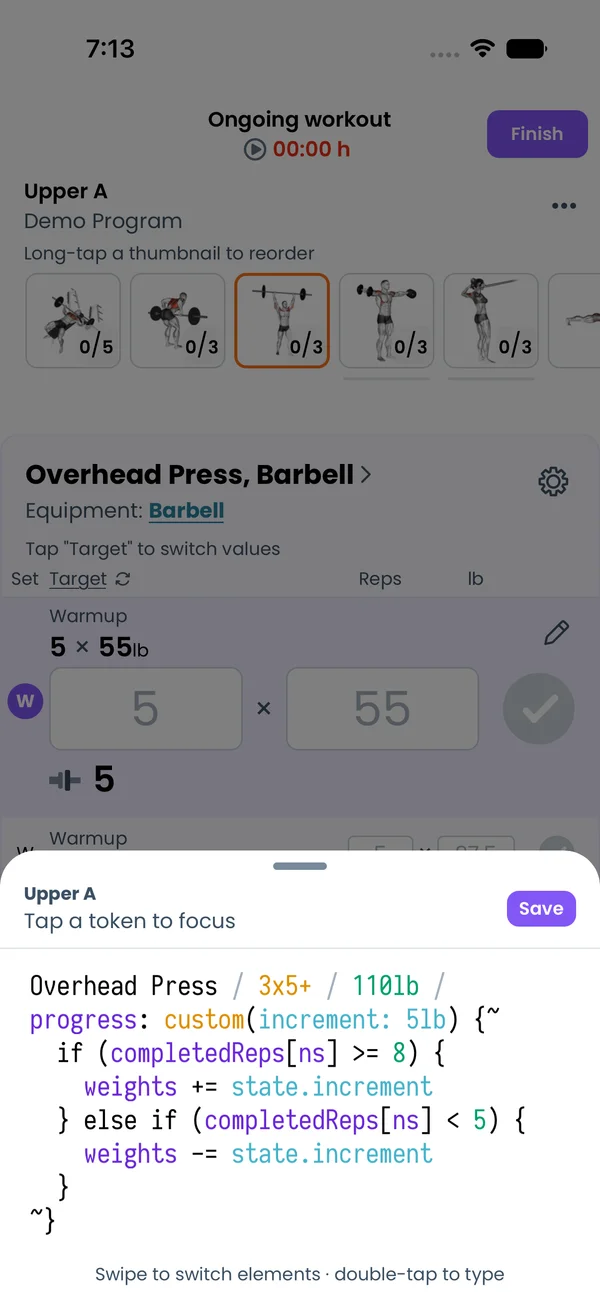\n\nState variables live in the parentheses of `custom()`. The script reads and writes them as `state.name`, and the app saves them in the program text:\n\n```liftoscript\nBench Press / 3x8 / progress: custom(attempt: 0) {~\n if (completedReps >= reps) {\n state.attempt += 1\n if (state.attempt > 3) {\n weights += 5lb\n state.attempt = 0\n }\n }\n~}\n```\n\nA `+` after the name, as in `custom(shouldBumpWeight+: 0)`, makes the app ask you for the value after the last set.\n\nIn the exercise editor, tap **State vars…** on a `custom(...)` line to open the list of variables with their current values. Change a value there, and the app writes it back into the program text.\n\n## Changing sets during the workout\n\n`update: custom()` runs before the first set and after every set you complete. It changes the sets of the current workout only. `setIndex` is the set you just tapped, 0 on the first run:\n\n```liftoscript\nBench Press / 3x8 / update: custom() {~\n if (setIndex == 1 && completedReps[1] >= reps[1]) {\n numberOfSets = 4\n }\n~}\n```\n\nCompleted sets never change. Turn the section on from the 3-dot menu of **Edit Program Exercise** with **Enable Update**.\n\n## Skipping the progression once\n\n 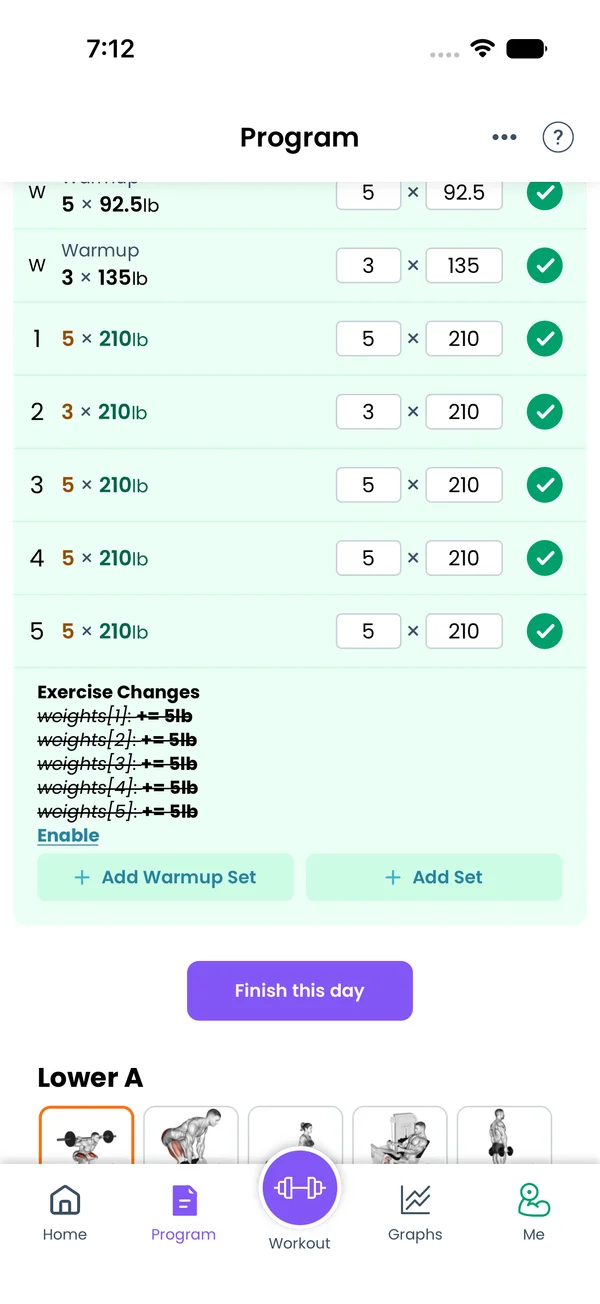\n\nTap **Suppress** under the preview to keep the program as it is after this workout. The listed changes get a line through them. Tap **Enable** to turn the rule back on.\n\n## Rounded weights in the workout\n\nA progression writes exact weights into the program. When the increment is not a weight your plates can make, like `2.5lb` with only 5 lb plates, the program soon holds a weight like `162.5lb` that you cannot load. Percentages of your 1RM do the same: `70%` of a 235 lb max is 164.5 lb. In the workout, the app rounds such a weight to what you can load and underlines it. Tap the set to expand it, then tap the underlined weight. The **Why is the weight adjusted?** sheet shows the program's weight, the 1RM math for a percentage, and the bar and plates it used. See [Logging a Workout](/features/workout-screen) for the sheet.\n\n## More tools for scripts\n\n- `bodyweight` is your latest bodyweight from measurements. `weights = bodyweight` in an update script tracks pull-ups. [Equipment, Plates and Gyms](/features/equipment-and-gyms) shows the full setup for weighted and assisted pull-ups.\n- Tags let one exercise change another's state. Write `Squat / 3x8 / id: tags(1)`, then `state[1].rating = 10` from another script.\n- Progression ladders: `Split Squat | ! Bulgarian Split Squat | Pistol Squat / 3x8 0lb`. `exerciseVariationIndex += 1` moves to the next movement.\n- Built-in functions: `floor`, `ceil`, `round`, `sum`, `min`, `max`, `increment`, `decrement`, `roundWeight`, `rpeMultiplier`, `calculate1RM`, `zeroOrGte`, and `print` to show values in the preview.\n\nSee [Liftoscript](/doc/liftoscript) for every variable and function.","sizes":{"account/account-email-form":{"width":600,"height":1304},"account/account-forgot-password":{"width":600,"height":1304},"account/account-screen":{"width":600,"height":1304},"account/account-sign-in":{"width":600,"height":1304},"chatgpt-claude-and-ai/chatgpt-claude-and-ai-autofill":{"width":600,"height":1304},"api/api-key-created":{"width":600,"height":1304},"api/api-keys-empty":{"width":600,"height":1304},"api/api-me-row":{"width":600,"height":1304},"apple-watch/apple-watch-health-settings":{"width":600,"height":1304},"apple-watch/watch-apple-watch-amrap":{"width":416,"height":496},"apple-watch/watch-apple-watch-crown":{"width":416,"height":496},"apple-watch/watch-apple-watch-exercise":{"width":416,"height":496},"apple-watch/watch-apple-watch-get-ready":{"width":416,"height":496},"apple-watch/watch-apple-watch-home":{"width":416,"height":496},"apple-watch/watch-apple-watch-set-clock":{"width":416,"height":496},"apple-watch/watch-apple-watch-workout":{"width":416,"height":496},"built-in-programs/built-in-programs-import":{"width":600,"height":1304},"built-in-programs/built-in-programs-info":{"width":600,"height":1304},"built-in-programs/built-in-programs-library":{"width":600,"height":1304},"built-in-programs/built-in-programs-preview":{"width":600,"height":1304},"built-in-programs/built-in-programs-started":{"width":600,"height":1304},"changing-a-workout/changing-a-workout-adhoc":{"width":600,"height":1304},"changing-a-workout/changing-a-workout-adhoc-picker":{"width":600,"height":1304},"changing-a-workout/changing-a-workout-create-program-day":{"width":600,"height":1304},"changing-a-workout/changing-a-workout-edit-day":{"width":600,"height":1304},"changing-a-workout/changing-a-workout-edit-exercise":{"width":600,"height":1304},"changing-a-workout/changing-a-workout-next-workout":{"width":600,"height":1304},"changing-a-workout/changing-a-workout-pick-day":{"width":600,"height":1304},"changing-a-workout/changing-a-workout-program-day":{"width":600,"height":1304},"changing-a-workout/changing-a-workout-swap-adhoc":{"width":600,"height":1304},"changing-a-workout/changing-a-workout-swap-from-program":{"width":600,"height":1304},"changing-a-workout/changing-a-workout-swap-recent":{"width":600,"height":1304},"custom-exercises/custom-exercises-autofill":{"width":600,"height":1304},"custom-exercises/custom-exercises-clone-library":{"width":600,"height":1304},"custom-exercises/custom-exercises-cloned":{"width":600,"height":1304},"custom-exercises/custom-exercises-form":{"width":600,"height":1304},"custom-exercises/custom-exercises-hidden-group":{"width":600,"height":1304},"custom-exercises/custom-exercises-image-library":{"width":600,"height":1304},"custom-exercises/custom-exercises-image-source":{"width":600,"height":1304},"custom-exercises/custom-exercises-in-workout":{"width":600,"height":1304},"custom-exercises/custom-exercises-muscle-groups":{"width":600,"height":1304},"custom-exercises/custom-exercises-picker":{"width":600,"height":1304},"custom-exercises/custom-exercises-target-muscles":{"width":600,"height":1304},"equipment-and-gyms/equipment-and-gyms-barbell":{"width":600,"height":1304},"equipment-and-gyms/equipment-and-gyms-custom":{"width":600,"height":1304},"equipment-and-gyms/equipment-and-gyms-exercise":{"width":600,"height":1304},"equipment-and-gyms/equipment-and-gyms-fixed":{"width":600,"height":1304},"equipment-and-gyms/equipment-and-gyms-gyms":{"width":600,"height":1304},"equipment-and-gyms/equipment-and-gyms-hidden":{"width":600,"height":1304},"equipment-and-gyms/equipment-and-gyms-list":{"width":600,"height":1304},"exercise-library/exercise-library-calculator":{"width":600,"height":1304},"exercise-library/exercise-library-from-program":{"width":600,"height":1304},"exercise-library/exercise-library-list":{"width":600,"height":1304},"exercise-library/exercise-library-multi-add":{"width":600,"height":1304},"exercise-library/exercise-library-override-muscles":{"width":600,"height":1304},"exercise-library/exercise-library-picker":{"width":600,"height":1304},"exercise-library/exercise-library-prs":{"width":600,"height":1304},"exercise-library/exercise-library-search":{"width":600,"height":1304},"exercise-library/exercise-library-stats":{"width":600,"height":1304},"exercise-library/exercise-library-swap":{"width":600,"height":1304},"graphs/graphs-bodyweight":{"width":600,"height":1304},"graphs/graphs-choose":{"width":600,"height":1304},"graphs/graphs-exercise":{"width":600,"height":1304},"graphs/graphs-legend":{"width":600,"height":1304},"graphs/graphs-muscle-group":{"width":600,"height":1304},"graphs/graphs-personal-records":{"width":600,"height":1304},"graphs/graphs-settings":{"width":600,"height":1304},"health-sync/android-health-sync-measurements":{"width":600,"height":1339},"health-sync/android-health-sync-settings":{"width":600,"height":1339},"health-sync/android-health-sync-share":{"width":600,"height":1339},"health-sync/android-health-sync-sleep-nutrition":{"width":600,"height":1339},"health-sync/health-sync-measurements":{"width":600,"height":1304},"health-sync/health-sync-settings":{"width":600,"height":1304},"health-sync/health-sync-share":{"width":600,"height":1304},"health-sync/health-sync-sleep-nutrition":{"width":600,"height":1304},"import-export/import-export-export":{"width":600,"height":1304},"import-export/import-export-hevy":{"width":600,"height":1304},"import-export/import-export-import":{"width":600,"height":1304},"liftoscript/liftoscript-exercise-sheet":{"width":600,"height":1304},"liftoscript/liftoscript-full-program":{"width":600,"height":1304},"liftoscript/liftoscript-per-day":{"width":600,"height":1304},"liftoscript/liftoscript-playground":{"width":600,"height":1304},"lock-screen-and-notifications/android-lock-screen-and-notifications-live-update":{"width":600,"height":1339},"lock-screen-and-notifications/android-lock-screen-and-notifications-reminder":{"width":600,"height":1339},"lock-screen-and-notifications/android-lock-screen-and-notifications-sound":{"width":600,"height":1339},"lock-screen-and-notifications/lock-screen-and-notifications-dynamic-island":{"width":600,"height":1304},"lock-screen-and-notifications/lock-screen-and-notifications-live-activity":{"width":600,"height":1304},"lock-screen-and-notifications/lock-screen-and-notifications-reminder":{"width":600,"height":1304},"lock-screen-and-notifications/lock-screen-and-notifications-sound":{"width":600,"height":1304},"measurements/measurements-add":{"width":600,"height":1304},"measurements/measurements-bodyweight":{"width":600,"height":1304},"measurements/measurements-moving-average":{"width":600,"height":1304},"measurements/measurements-sleep-nutrition":{"width":600,"height":1304},"measurements/measurements-types":{"width":600,"height":1304},"first-run-and-settings/first-run-and-settings-appearance":{"width":600,"height":1304},"first-run-and-settings/first-run-and-settings-dark-mode":{"width":600,"height":1304},"first-run-and-settings/first-run-and-settings-equipment":{"width":600,"height":1304},"first-run-and-settings/first-run-and-settings-me":{"width":600,"height":1304},"first-run-and-settings/first-run-and-settings-units":{"width":600,"height":1304},"first-run-and-settings/first-run-and-settings-welcome":{"width":600,"height":1304},"playground/playground-completed":{"width":600,"height":1304},"playground/playground-day":{"width":600,"height":1304},"playground/playground-finished":{"width":600,"height":1304},"playground/playground-variables":{"width":600,"height":1304},"premium/premium-account":{"width":600,"height":1304},"premium/premium-feature-info":{"width":600,"height":1304},"premium/premium-plans":{"width":600,"height":1304},"program-editor/program-editor-create":{"width":600,"height":1304},"program-editor/program-editor-day-details":{"width":600,"height":1304},"program-editor/program-editor-exercise-sheet":{"width":600,"height":1304},"program-editor/program-editor-full-text":{"width":600,"height":1304},"program-editor/program-editor-grid":{"width":600,"height":1304},"program-editor/program-editor-perday-text":{"width":600,"height":1304},"program-editor/program-editor-ui-mode":{"width":600,"height":1304},"program-editor/program-editor-week-stats":{"width":600,"height":1304},"progressions/progressions-linear-settings":{"width":600,"height":1304},"progressions/progressions-preview":{"width":600,"height":1304},"progressions/progressions-state-variables":{"width":600,"height":1304},"progressions/progressions-suppressed":{"width":600,"height":1304},"rest-timer/rest-timer-collapsed":{"width":600,"height":1304},"rest-timer/rest-timer-dynamic-island":{"width":600,"height":1304},"rest-timer/rest-timer-expanded":{"width":600,"height":1304},"rest-timer/rest-timer-get-ready":{"width":600,"height":1304},"rest-timer/rest-timer-lock-screen":{"width":600,"height":1304},"rest-timer/rest-timer-settings":{"width":600,"height":1304},"rest-timer/rest-timer-sound":{"width":600,"height":1304},"rest-timer/watch-rest-timer":{"width":416,"height":496},"rest-timer/watch-rest-timer-exercise":{"width":416,"height":496},"set-types/set-types-amrap-popup":{"width":600,"height":1304},"set-types/set-types-per-side":{"width":600,"height":1304},"set-types/set-types-rpe-logged":{"width":600,"height":1304},"set-types/set-types-rpe-popup":{"width":600,"height":1304},"sharing-programs/sharing-programs-export-text":{"width":600,"height":1304},"sharing-programs/sharing-programs-image-preview":{"width":600,"height":1304},"sharing-programs/sharing-programs-image-settings":{"width":600,"height":1304},"sharing-programs/sharing-programs-import":{"width":600,"height":1304},"sharing-programs/sharing-programs-menu":{"width":600,"height":1304},"sharing-programs/sharing-programs-private-link":{"width":600,"height":1304},"sharing-programs/sharing-programs-public-link":{"width":600,"height":1304},"sharing-workouts/sharing-workouts-copied-text":{"width":600,"height":1304},"sharing-workouts/sharing-workouts-finish-screen":{"width":600,"height":1304},"sharing-workouts/sharing-workouts-profile-settings":{"width":600,"height":1304},"sharing-workouts/sharing-workouts-share-sheet":{"width":600,"height":1304},"sharing-workouts/sharing-workouts-story-preview":{"width":600,"height":1304},"supersets/supersets-liftoscript":{"width":600,"height":1304},"supersets/supersets-next-exercise":{"width":600,"height":1304},"supersets/supersets-picker":{"width":600,"height":1304},"supersets/supersets-program-editor":{"width":600,"height":1304},"supersets/supersets-timer":{"width":600,"height":1304},"supersets/supersets-workout":{"width":600,"height":1304},"sync-and-offline/sync-and-offline-account":{"width":600,"height":1304},"sync-and-offline/sync-and-offline-me-account":{"width":600,"height":1304},"sync-and-offline/sync-and-offline-sign-in":{"width":600,"height":1304},"timed-sets/timed-sets-count-up":{"width":600,"height":1304},"timed-sets/timed-sets-edit-time":{"width":600,"height":1304},"timed-sets/timed-sets-get-ready":{"width":600,"height":1304},"timed-sets/timed-sets-recorded":{"width":600,"height":1304},"timed-sets/timed-sets-running":{"width":600,"height":1304},"timed-sets/timed-sets-set-row":{"width":600,"height":1304},"timed-sets/timed-sets-timers":{"width":600,"height":1304},"week-insights/week-insights-details":{"width":600,"height":1304},"week-insights/week-insights-edit-muscle-groups":{"width":600,"height":1304},"week-insights/week-insights-exercises":{"width":600,"height":1304},"week-insights/week-insights-home":{"width":600,"height":1304},"week-insights/week-insights-muscle-groups":{"width":600,"height":1304},"week-insights/week-insights-settings":{"width":600,"height":1304},"workout-history/workout-history-change-date":{"width":600,"height":1304},"workout-history/workout-history-delete":{"width":600,"height":1304},"workout-history/workout-history-feed":{"width":600,"height":1304},"workout-history/workout-history-menu":{"width":600,"height":1304},"workout-history/workout-history-month-calendar":{"width":600,"height":1304},"workout-history/workout-history-note-on-card":{"width":600,"height":1304},"workout-history/workout-history-notes":{"width":600,"height":1304},"workout-history/workout-history-past-card":{"width":600,"height":1304},"workout-history/workout-history-past-workout":{"width":600,"height":1304},"workout-history/workout-history-week-insights":{"width":600,"height":1304},"workout-screen/workout-screen-e1rm":{"width":600,"height":1304},"workout-screen/workout-screen-edit-target":{"width":600,"height":1304},"workout-screen/workout-screen-exercise-menu":{"width":600,"height":1304},"workout-screen/workout-screen-exercise-notes":{"width":600,"height":1304},"workout-screen/workout-screen-history":{"width":600,"height":1304},"workout-screen/workout-screen-keypad":{"width":600,"height":1304},"workout-screen/workout-screen-next-set":{"width":600,"height":1304},"workout-screen/workout-screen-overview":{"width":600,"height":1304},"workout-screen/workout-screen-rounding":{"width":600,"height":1304},"workout-screen/workout-screen-summary":{"width":600,"height":1304}}}



