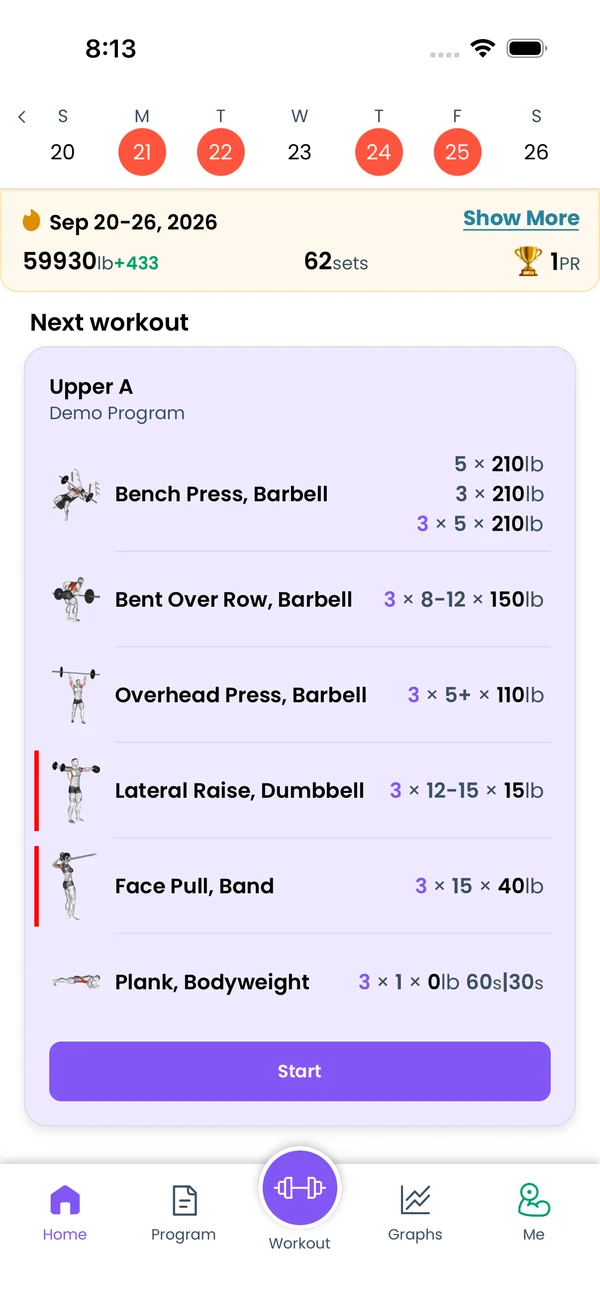
Every finished workout is a card on the Home tab, under a week strip and a month calendar. Open a past one to fix sets, move it, add a note or delete it.
Read a finished workout
Go to Home. The first card is your next workout, with a Start button. If a workout is running, the card says Ongoing workout and the button says Continue. Under it, every finished workout is a card, newest first.
Each card shows the date, the program day and the program name. Then one row per exercise: the image, the name, and the sets as weight and reps. A trophy next to the name means you set a personal record in that workout. Notes you wrote for an exercise appear under its name.
The bottom row of the card has four numbers: workout time, total weight lifted, sets and reps. A workout note appears under them as Note:.
Move through weeks
The strip at the top of the feed shows one week. Days with a workout are filled circles. Today has a border. Swipe the strip left or right, or tap the arrows on its sides, to see another week.
While you scroll the feed, the strip and the week card follow the workout at the top of the screen.
The week starts on Sunday. To start it on Monday, go to Me → Settings and set Week starts from: to Monday.
See the week's totals
The card under the strip sums up the selected week: the date range, the volume, the number of sets, and the number of personal records. For a past week, the volume and sets show the difference from the week before, in green or red.
Tap Show More. The details list the week's personal records, the total sets, and the Strength and Hypertrophy split with percentages. Then the sets per Upper, Lower, Core, Push, Pull, Legs, and per muscle group, with a body drawing.
A muscle group line reads like Chest: 8↑ (3s, 5h), 2d: 8 sets in total, of which 3 counted as strength (s, under 8 reps) and 5 as hypertrophy (h, 8 reps or more), on 2 days (d). The total is colored against your weekly set range for that group, 10 to 12 sets by default. The arrow says which way to go: ↑ below the minimum, ↓ above the maximum, none inside the range. Change Set Range Settings at the bottom changes the ranges and the day targets. Week Insights explains every number and color.
Week Insights needs Premium. Without it, the card says See Week Insights and opens the subscription screen.
Find a workout in the month calendar
Tap the week strip. A sheet opens with one block per month, back to your first workout. Each month has a header with the number of workouts and personal records, like 12 workouts · 🏆 3 PRs. Days with a workout are filled circles. The selected week has a shaded background. Days in the future are grey.
Tap a day with a workout. The sheet closes and the feed scrolls to that workout. This week at the top of the sheet scrolls the calendar back to the selected week.
Open and edit a past workout
Tap a card. The workout screen opens with the date as the title and the workout length under it. The button in the top right says Save instead of Finish.
Edit it the same way as a live workout: tap a set to change reps and weight, complete or uncomplete sets, add sets, swap or remove exercises. See Logging a Workout for the controls.
Tap Save. The app asks "Are you sure you want to SAVE this PAST workout?". Tap OK. Saving replaces that one record. It does not run your program's progressions again, so your next workout stays as planned. To leave without saving, go back.
Change the date or the length
Open the past workout and tap the date in the title. A sheet opens with Please enter new date and a date picker, then Please enter workout length in hh:mm. Pick the day and tap Save on the sheet. The workout keeps its time of day, only the calendar day changes. Then tap Save in the top right to store it.
The card moves to its new place in the feed, and the week strip and month calendar mark the new day.
Add a note
Open the workout, tap the kebab in the top right, and pick Show Workout Notes. A field with "Add workout notes here..." appears under the program name. Type the note and tap Save. The card shows it as Note:.
The field stays on for every workout, live or past, until you pick Hide Workout Notes from the same menu.
For a note on one exercise, tap the cog on the exercise card and pick Show Exercise Notes. The exercise notes show under the exercise name in the feed. On the exercise stats screen you can hide the workouts that have no notes.
Share a workout
Tap the kebab on a past workout and pick Share. You can Copy link to workout, Copy as Text for a message or a notes app, or share a picture to Instagram or TikTok.
The same menu has Edit Program Day, Day Muscles, Show Tour and Delete Workout. A workout from a program you no longer have also gets Create Program Day, which adds it as a day to a program.
Delete a workout
Tap the kebab and pick Delete Workout. The app asks "Are you sure you want to delete this PAST workout?". Tap OK. The workout leaves the feed, the week strip and the calendar, and the app returns to Home. The same item on a running workout asks about the ONGOING workout and discards it.
{"feature":{"id":"workout-history","title":"History and Calendar","shortDescription":"Every finished workout is a card on the Home tab, under a week strip and a month calendar. Open a past one to fix sets, move it, add a note or delete it.","order":60,"category":"Workout","datePublished":"2026-09-27","dateModified":"2026-09-29","screenshots":["workout-history-feed","workout-history-month-calendar"]},"content":"## Read a finished workout\n\n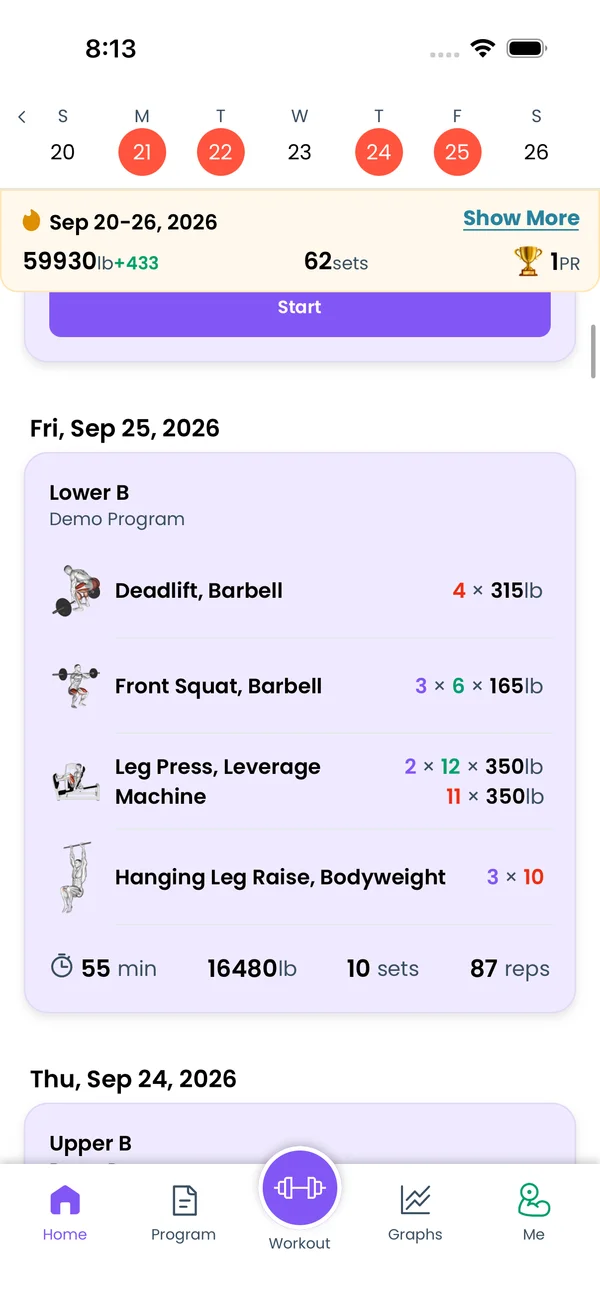\n\nGo to **Home**. The first card is your next workout, with a **Start** button. If a workout is running, the card says **Ongoing workout** and the button says **Continue**. Under it, every finished workout is a card, newest first.\n\nEach card shows the date, the program day and the program name. Then one row per exercise: the image, the name, and the sets as weight and reps. A trophy next to the name means you set a personal record in that workout. Notes you wrote for an exercise appear under its name.\n\nThe bottom row of the card has four numbers: workout time, total weight lifted, sets and reps. A workout note appears under them as **Note:**.\n\n## Move through weeks\n\nThe strip at the top of the feed shows one week. Days with a workout are filled circles. Today has a border. Swipe the strip left or right, or tap the arrows on its sides, to see another week.\n\nWhile you scroll the feed, the strip and the week card follow the workout at the top of the screen.\n\nThe week starts on Sunday. To start it on Monday, go to **Me → Settings** and set **Week starts from:** to **Monday**.\n\n## See the week's totals\n\n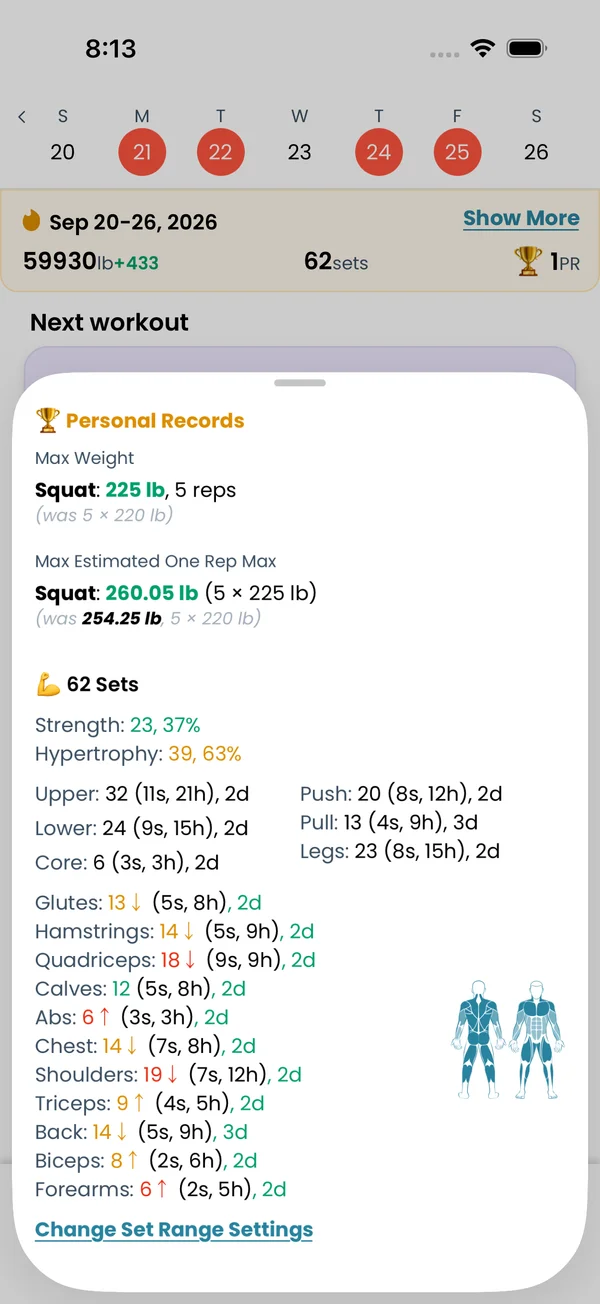\n\nThe card under the strip sums up the selected week: the date range, the volume, the number of sets, and the number of personal records. For a past week, the volume and sets show the difference from the week before, in green or red.\n\nTap **Show More**. The details list the week's personal records, the total sets, and the **Strength** and **Hypertrophy** split with percentages. Then the sets per **Upper**, **Lower**, **Core**, **Push**, **Pull**, **Legs**, and per muscle group, with a body drawing.\n\nA muscle group line reads like `Chest: 8↑ (3s, 5h), 2d`: 8 sets in total, of which 3 counted as strength (`s`, under 8 reps) and 5 as hypertrophy (`h`, 8 reps or more), on 2 days (`d`). The total is colored against your weekly set range for that group, 10 to 12 sets by default. The arrow says which way to go: **↑** below the minimum, **↓** above the maximum, none inside the range. **Change Set Range Settings** at the bottom changes the ranges and the day targets. [Week Insights](/features/week-insights) explains every number and color.\n\nWeek Insights needs Premium. Without it, the card says **See Week Insights** and opens the subscription screen.\n\n## Find a workout in the month calendar\n\n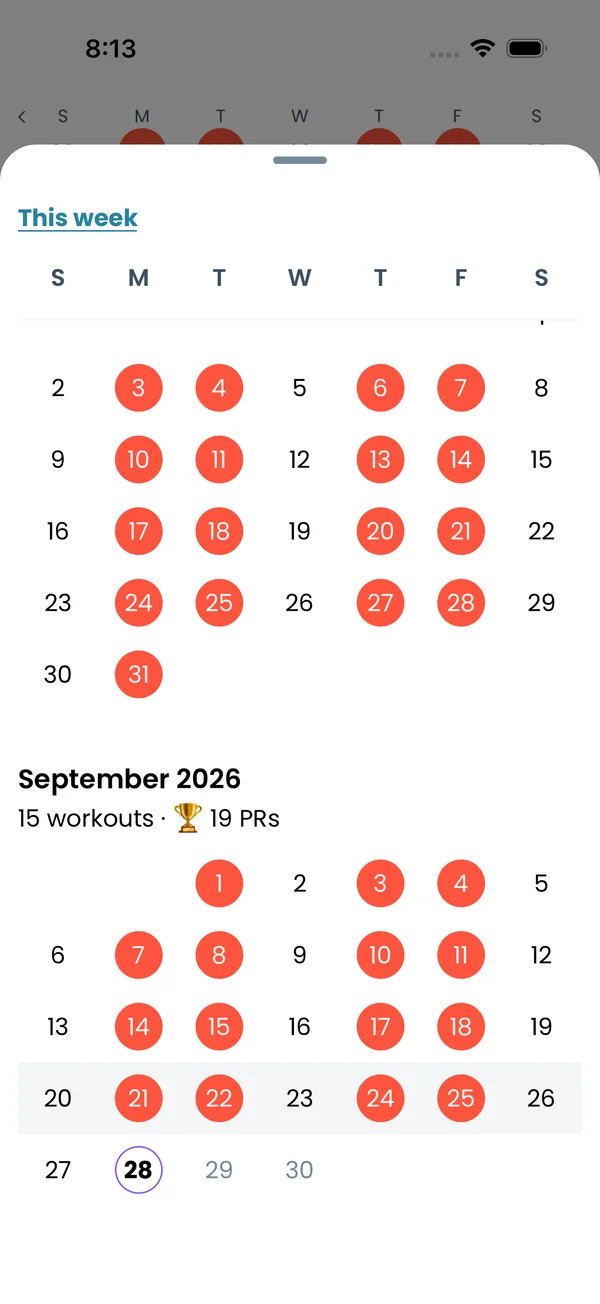\n\nTap the week strip. A sheet opens with one block per month, back to your first workout. Each month has a header with the number of workouts and personal records, like **12 workouts · 🏆 3 PRs**. Days with a workout are filled circles. The selected week has a shaded background. Days in the future are grey.\n\nTap a day with a workout. The sheet closes and the feed scrolls to that workout. **This week** at the top of the sheet scrolls the calendar back to the selected week.\n\n## Open and edit a past workout\n\n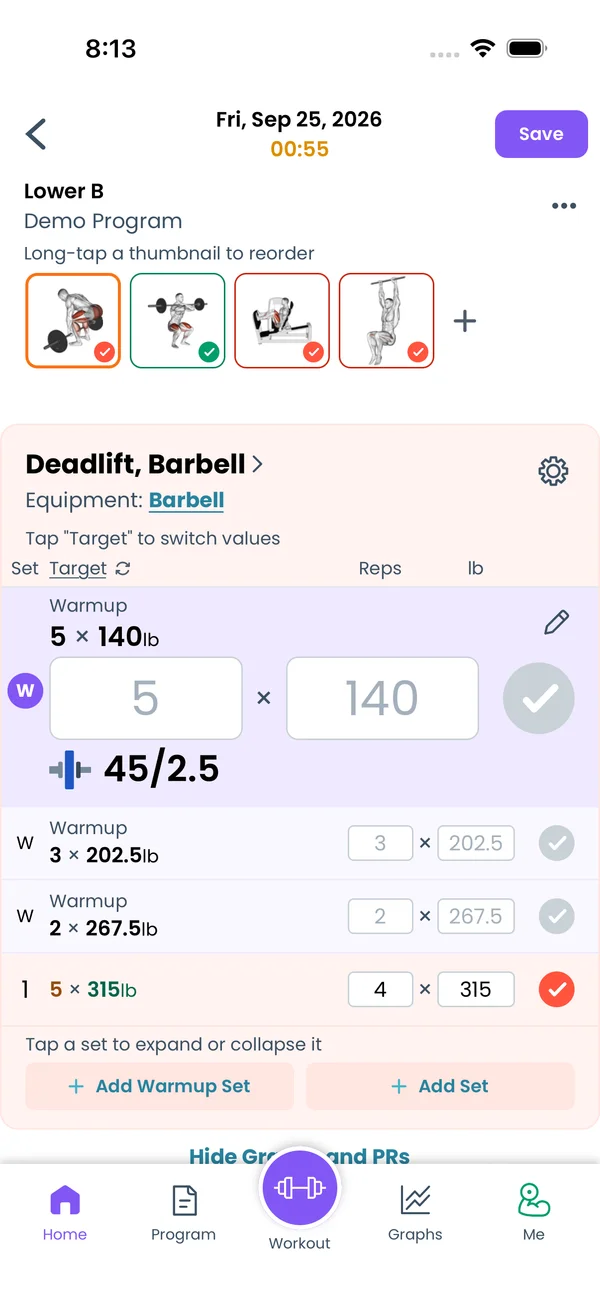\n\nTap a card. The workout screen opens with the date as the title and the workout length under it. The button in the top right says **Save** instead of **Finish**.\n\nEdit it the same way as a live workout: tap a set to change reps and weight, complete or uncomplete sets, add sets, swap or remove exercises. See [Logging a Workout](/features/workout-screen) for the controls.\n\nTap **Save**. The app asks \"Are you sure you want to SAVE this PAST workout?\". Tap **OK**. Saving replaces that one record. It does not run your program's progressions again, so your next workout stays as planned. To leave without saving, go back.\n\n## Change the date or the length\n\n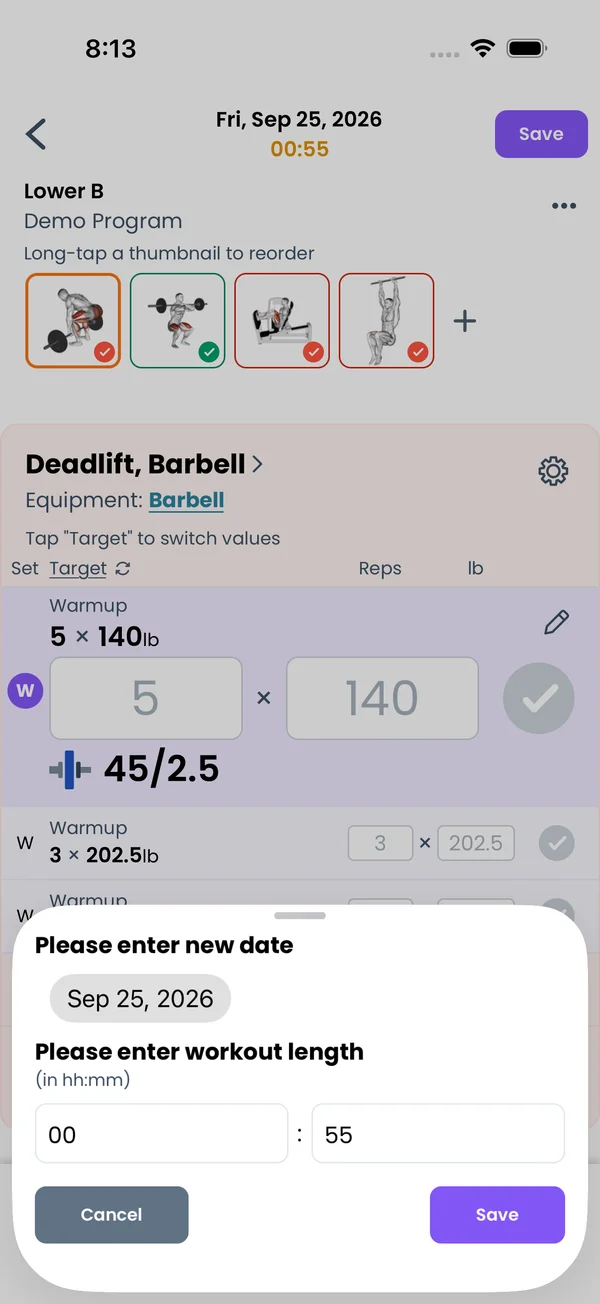\n\nOpen the past workout and tap the date in the title. A sheet opens with **Please enter new date** and a date picker, then **Please enter workout length** in hh:mm. Pick the day and tap **Save** on the sheet. The workout keeps its time of day, only the calendar day changes. Then tap **Save** in the top right to store it.\n\nThe card moves to its new place in the feed, and the week strip and month calendar mark the new day.\n\n## Add a note\n\n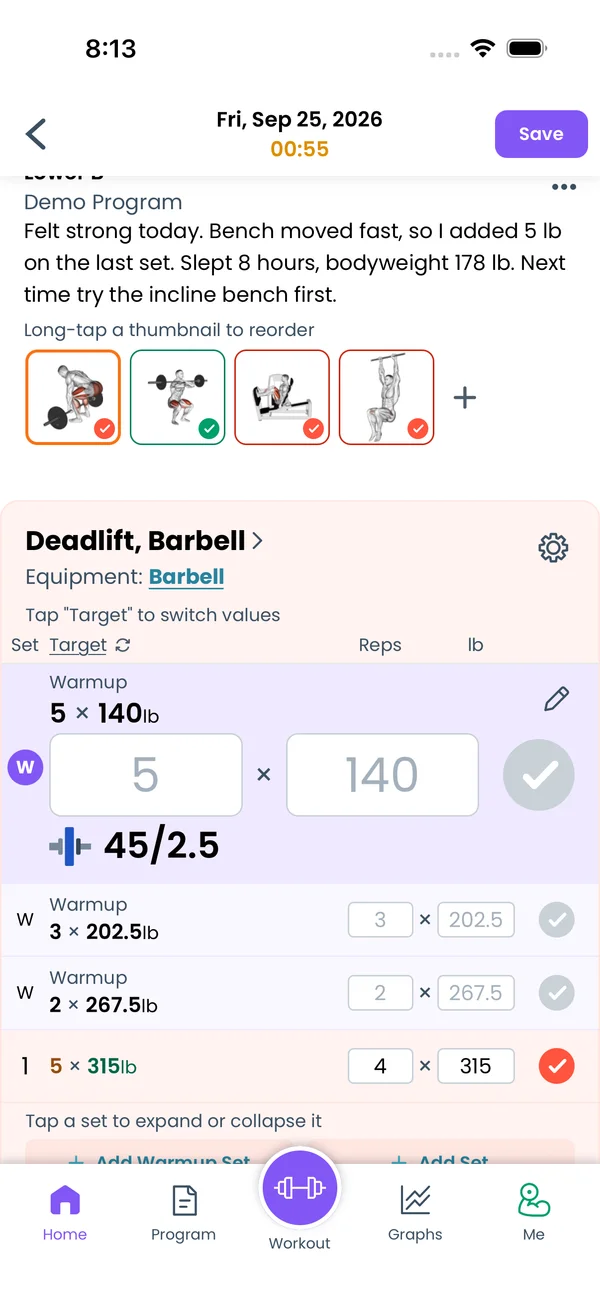 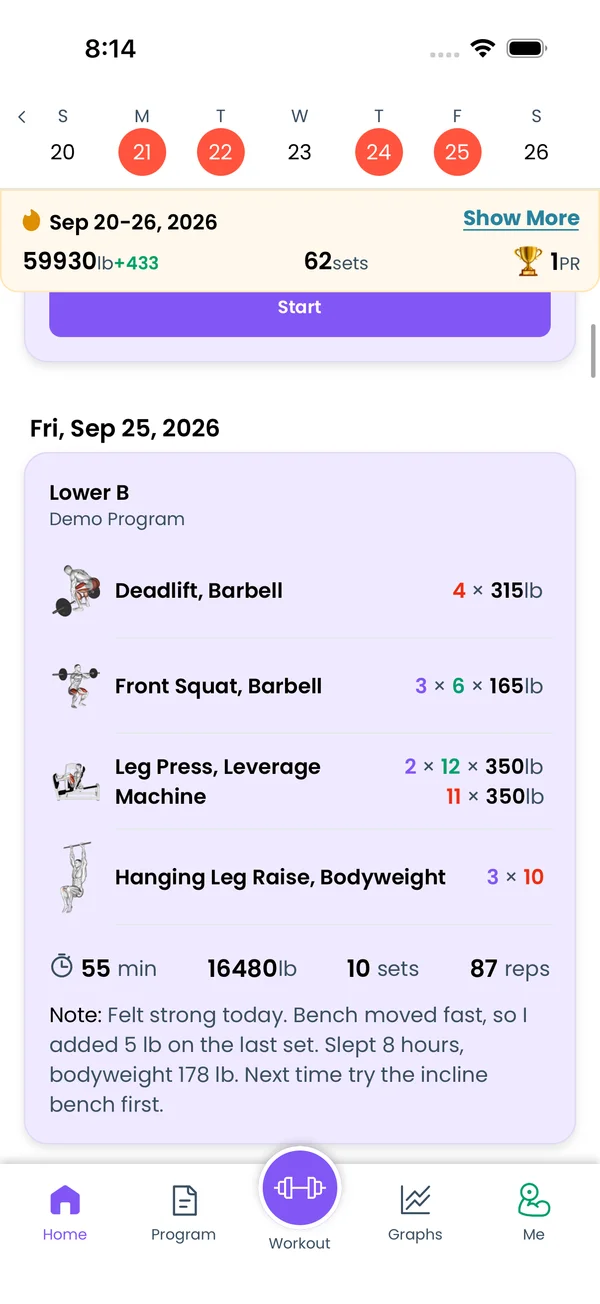\n\nOpen the workout, tap the kebab in the top right, and pick **Show Workout Notes**. A field with \"Add workout notes here...\" appears under the program name. Type the note and tap **Save**. The card shows it as **Note:**.\n\nThe field stays on for every workout, live or past, until you pick **Hide Workout Notes** from the same menu.\n\nFor a note on one exercise, tap the cog on the exercise card and pick **Show Exercise Notes**. The exercise notes show under the exercise name in the feed. On the exercise stats screen you can hide the workouts that have no notes.\n\n## Share a workout\n\n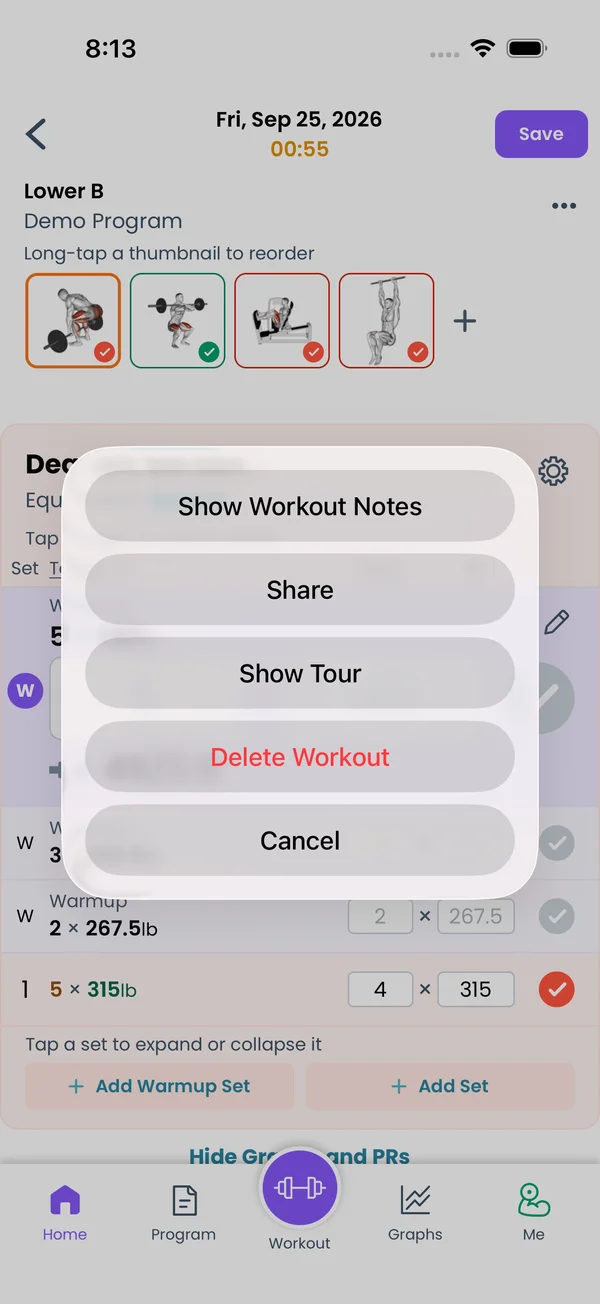\n\nTap the kebab on a past workout and pick **Share**. You can **Copy link to workout**, **Copy as Text** for a message or a notes app, or share a picture to Instagram or TikTok.\n\nThe same menu has **Edit Program Day**, **Day Muscles**, **Show Tour** and **Delete Workout**. A workout from a program you no longer have also gets **Create Program Day**, which adds it as a day to a program.\n\n## Delete a workout\n\n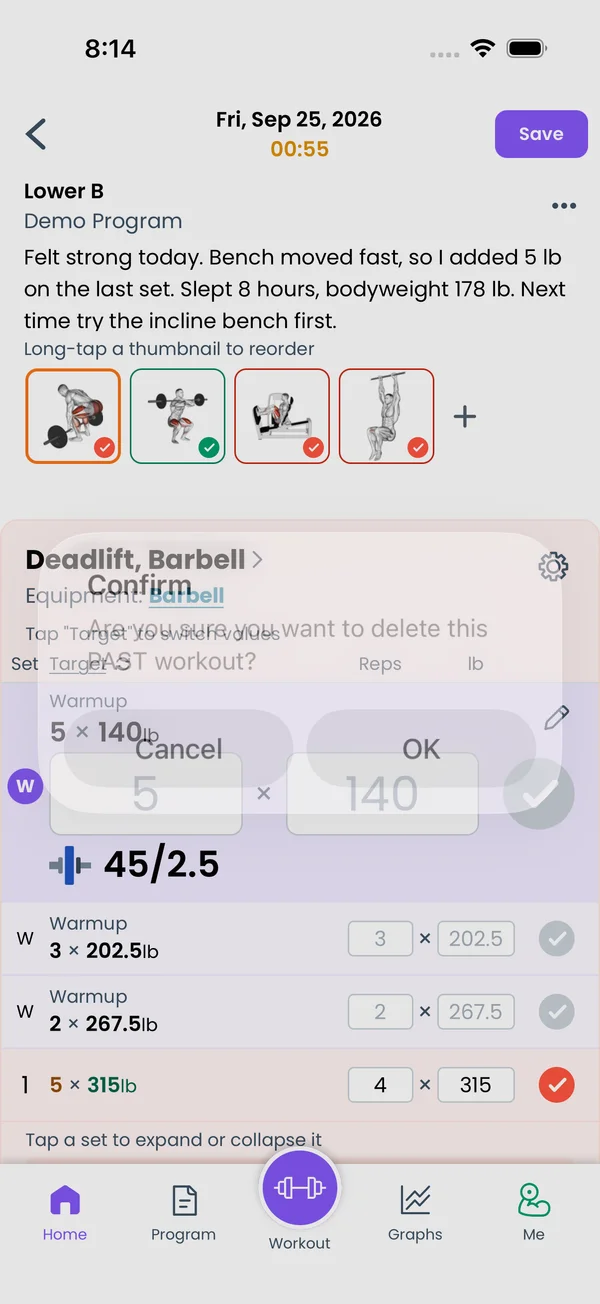\n\nTap the kebab and pick **Delete Workout**. The app asks \"Are you sure you want to delete this PAST workout?\". Tap **OK**. The workout leaves the feed, the week strip and the calendar, and the app returns to **Home**. The same item on a running workout asks about the ONGOING workout and discards it.","sizes":{"account/account-email-form":{"width":600,"height":1304},"account/account-forgot-password":{"width":600,"height":1304},"account/account-screen":{"width":600,"height":1304},"account/account-sign-in":{"width":600,"height":1304},"chatgpt-claude-and-ai/chatgpt-claude-and-ai-autofill":{"width":600,"height":1304},"api/api-key-created":{"width":600,"height":1304},"api/api-keys-empty":{"width":600,"height":1304},"api/api-me-row":{"width":600,"height":1304},"apple-watch/apple-watch-health-settings":{"width":600,"height":1304},"apple-watch/watch-apple-watch-amrap":{"width":416,"height":496},"apple-watch/watch-apple-watch-crown":{"width":416,"height":496},"apple-watch/watch-apple-watch-exercise":{"width":416,"height":496},"apple-watch/watch-apple-watch-get-ready":{"width":416,"height":496},"apple-watch/watch-apple-watch-home":{"width":416,"height":496},"apple-watch/watch-apple-watch-set-clock":{"width":416,"height":496},"apple-watch/watch-apple-watch-workout":{"width":416,"height":496},"built-in-programs/built-in-programs-import":{"width":600,"height":1304},"built-in-programs/built-in-programs-info":{"width":600,"height":1304},"built-in-programs/built-in-programs-library":{"width":600,"height":1304},"built-in-programs/built-in-programs-preview":{"width":600,"height":1304},"built-in-programs/built-in-programs-started":{"width":600,"height":1304},"changing-a-workout/changing-a-workout-adhoc":{"width":600,"height":1304},"changing-a-workout/changing-a-workout-adhoc-picker":{"width":600,"height":1304},"changing-a-workout/changing-a-workout-create-program-day":{"width":600,"height":1304},"changing-a-workout/changing-a-workout-edit-day":{"width":600,"height":1304},"changing-a-workout/changing-a-workout-edit-exercise":{"width":600,"height":1304},"changing-a-workout/changing-a-workout-next-workout":{"width":600,"height":1304},"changing-a-workout/changing-a-workout-pick-day":{"width":600,"height":1304},"changing-a-workout/changing-a-workout-program-day":{"width":600,"height":1304},"changing-a-workout/changing-a-workout-swap-adhoc":{"width":600,"height":1304},"changing-a-workout/changing-a-workout-swap-from-program":{"width":600,"height":1304},"changing-a-workout/changing-a-workout-swap-recent":{"width":600,"height":1304},"custom-exercises/custom-exercises-autofill":{"width":600,"height":1304},"custom-exercises/custom-exercises-clone-library":{"width":600,"height":1304},"custom-exercises/custom-exercises-cloned":{"width":600,"height":1304},"custom-exercises/custom-exercises-form":{"width":600,"height":1304},"custom-exercises/custom-exercises-hidden-group":{"width":600,"height":1304},"custom-exercises/custom-exercises-image-library":{"width":600,"height":1304},"custom-exercises/custom-exercises-image-source":{"width":600,"height":1304},"custom-exercises/custom-exercises-in-workout":{"width":600,"height":1304},"custom-exercises/custom-exercises-muscle-groups":{"width":600,"height":1304},"custom-exercises/custom-exercises-picker":{"width":600,"height":1304},"custom-exercises/custom-exercises-target-muscles":{"width":600,"height":1304},"equipment-and-gyms/equipment-and-gyms-barbell":{"width":600,"height":1304},"equipment-and-gyms/equipment-and-gyms-custom":{"width":600,"height":1304},"equipment-and-gyms/equipment-and-gyms-exercise":{"width":600,"height":1304},"equipment-and-gyms/equipment-and-gyms-fixed":{"width":600,"height":1304},"equipment-and-gyms/equipment-and-gyms-gyms":{"width":600,"height":1304},"equipment-and-gyms/equipment-and-gyms-hidden":{"width":600,"height":1304},"equipment-and-gyms/equipment-and-gyms-list":{"width":600,"height":1304},"exercise-library/exercise-library-calculator":{"width":600,"height":1304},"exercise-library/exercise-library-from-program":{"width":600,"height":1304},"exercise-library/exercise-library-list":{"width":600,"height":1304},"exercise-library/exercise-library-multi-add":{"width":600,"height":1304},"exercise-library/exercise-library-override-muscles":{"width":600,"height":1304},"exercise-library/exercise-library-picker":{"width":600,"height":1304},"exercise-library/exercise-library-prs":{"width":600,"height":1304},"exercise-library/exercise-library-search":{"width":600,"height":1304},"exercise-library/exercise-library-stats":{"width":600,"height":1304},"exercise-library/exercise-library-swap":{"width":600,"height":1304},"graphs/graphs-bodyweight":{"width":600,"height":1304},"graphs/graphs-choose":{"width":600,"height":1304},"graphs/graphs-exercise":{"width":600,"height":1304},"graphs/graphs-legend":{"width":600,"height":1304},"graphs/graphs-muscle-group":{"width":600,"height":1304},"graphs/graphs-personal-records":{"width":600,"height":1304},"graphs/graphs-settings":{"width":600,"height":1304},"health-sync/android-health-sync-measurements":{"width":600,"height":1339},"health-sync/android-health-sync-settings":{"width":600,"height":1339},"health-sync/android-health-sync-share":{"width":600,"height":1339},"health-sync/android-health-sync-sleep-nutrition":{"width":600,"height":1339},"health-sync/health-sync-measurements":{"width":600,"height":1304},"health-sync/health-sync-settings":{"width":600,"height":1304},"health-sync/health-sync-share":{"width":600,"height":1304},"health-sync/health-sync-sleep-nutrition":{"width":600,"height":1304},"import-export/import-export-export":{"width":600,"height":1304},"import-export/import-export-hevy":{"width":600,"height":1304},"import-export/import-export-import":{"width":600,"height":1304},"liftoscript/liftoscript-exercise-sheet":{"width":600,"height":1304},"liftoscript/liftoscript-full-program":{"width":600,"height":1304},"liftoscript/liftoscript-per-day":{"width":600,"height":1304},"liftoscript/liftoscript-playground":{"width":600,"height":1304},"lock-screen-and-notifications/android-lock-screen-and-notifications-live-update":{"width":600,"height":1339},"lock-screen-and-notifications/android-lock-screen-and-notifications-reminder":{"width":600,"height":1339},"lock-screen-and-notifications/android-lock-screen-and-notifications-sound":{"width":600,"height":1339},"lock-screen-and-notifications/lock-screen-and-notifications-dynamic-island":{"width":600,"height":1304},"lock-screen-and-notifications/lock-screen-and-notifications-live-activity":{"width":600,"height":1304},"lock-screen-and-notifications/lock-screen-and-notifications-reminder":{"width":600,"height":1304},"lock-screen-and-notifications/lock-screen-and-notifications-sound":{"width":600,"height":1304},"measurements/measurements-add":{"width":600,"height":1304},"measurements/measurements-bodyweight":{"width":600,"height":1304},"measurements/measurements-moving-average":{"width":600,"height":1304},"measurements/measurements-sleep-nutrition":{"width":600,"height":1304},"measurements/measurements-types":{"width":600,"height":1304},"first-run-and-settings/first-run-and-settings-appearance":{"width":600,"height":1304},"first-run-and-settings/first-run-and-settings-dark-mode":{"width":600,"height":1304},"first-run-and-settings/first-run-and-settings-equipment":{"width":600,"height":1304},"first-run-and-settings/first-run-and-settings-me":{"width":600,"height":1304},"first-run-and-settings/first-run-and-settings-units":{"width":600,"height":1304},"first-run-and-settings/first-run-and-settings-welcome":{"width":600,"height":1304},"playground/playground-completed":{"width":600,"height":1304},"playground/playground-day":{"width":600,"height":1304},"playground/playground-finished":{"width":600,"height":1304},"playground/playground-variables":{"width":600,"height":1304},"premium/premium-account":{"width":600,"height":1304},"premium/premium-feature-info":{"width":600,"height":1304},"premium/premium-plans":{"width":600,"height":1304},"program-editor/program-editor-create":{"width":600,"height":1304},"program-editor/program-editor-day-details":{"width":600,"height":1304},"program-editor/program-editor-exercise-sheet":{"width":600,"height":1304},"program-editor/program-editor-full-text":{"width":600,"height":1304},"program-editor/program-editor-grid":{"width":600,"height":1304},"program-editor/program-editor-perday-text":{"width":600,"height":1304},"program-editor/program-editor-ui-mode":{"width":600,"height":1304},"program-editor/program-editor-week-stats":{"width":600,"height":1304},"progressions/progressions-linear-settings":{"width":600,"height":1304},"progressions/progressions-preview":{"width":600,"height":1304},"progressions/progressions-state-variables":{"width":600,"height":1304},"progressions/progressions-suppressed":{"width":600,"height":1304},"rest-timer/rest-timer-collapsed":{"width":600,"height":1304},"rest-timer/rest-timer-dynamic-island":{"width":600,"height":1304},"rest-timer/rest-timer-expanded":{"width":600,"height":1304},"rest-timer/rest-timer-get-ready":{"width":600,"height":1304},"rest-timer/rest-timer-lock-screen":{"width":600,"height":1304},"rest-timer/rest-timer-settings":{"width":600,"height":1304},"rest-timer/rest-timer-sound":{"width":600,"height":1304},"rest-timer/watch-rest-timer":{"width":416,"height":496},"rest-timer/watch-rest-timer-exercise":{"width":416,"height":496},"set-types/set-types-amrap-popup":{"width":600,"height":1304},"set-types/set-types-per-side":{"width":600,"height":1304},"set-types/set-types-rpe-logged":{"width":600,"height":1304},"set-types/set-types-rpe-popup":{"width":600,"height":1304},"sharing-programs/sharing-programs-export-text":{"width":600,"height":1304},"sharing-programs/sharing-programs-image-preview":{"width":600,"height":1304},"sharing-programs/sharing-programs-image-settings":{"width":600,"height":1304},"sharing-programs/sharing-programs-import":{"width":600,"height":1304},"sharing-programs/sharing-programs-menu":{"width":600,"height":1304},"sharing-programs/sharing-programs-private-link":{"width":600,"height":1304},"sharing-programs/sharing-programs-public-link":{"width":600,"height":1304},"sharing-workouts/sharing-workouts-copied-text":{"width":600,"height":1304},"sharing-workouts/sharing-workouts-finish-screen":{"width":600,"height":1304},"sharing-workouts/sharing-workouts-profile-settings":{"width":600,"height":1304},"sharing-workouts/sharing-workouts-share-sheet":{"width":600,"height":1304},"sharing-workouts/sharing-workouts-story-preview":{"width":600,"height":1304},"supersets/supersets-liftoscript":{"width":600,"height":1304},"supersets/supersets-next-exercise":{"width":600,"height":1304},"supersets/supersets-picker":{"width":600,"height":1304},"supersets/supersets-program-editor":{"width":600,"height":1304},"supersets/supersets-timer":{"width":600,"height":1304},"supersets/supersets-workout":{"width":600,"height":1304},"sync-and-offline/sync-and-offline-account":{"width":600,"height":1304},"sync-and-offline/sync-and-offline-me-account":{"width":600,"height":1304},"sync-and-offline/sync-and-offline-sign-in":{"width":600,"height":1304},"timed-sets/timed-sets-count-up":{"width":600,"height":1304},"timed-sets/timed-sets-edit-time":{"width":600,"height":1304},"timed-sets/timed-sets-get-ready":{"width":600,"height":1304},"timed-sets/timed-sets-recorded":{"width":600,"height":1304},"timed-sets/timed-sets-running":{"width":600,"height":1304},"timed-sets/timed-sets-set-row":{"width":600,"height":1304},"timed-sets/timed-sets-timers":{"width":600,"height":1304},"week-insights/week-insights-details":{"width":600,"height":1304},"week-insights/week-insights-edit-muscle-groups":{"width":600,"height":1304},"week-insights/week-insights-exercises":{"width":600,"height":1304},"week-insights/week-insights-home":{"width":600,"height":1304},"week-insights/week-insights-muscle-groups":{"width":600,"height":1304},"week-insights/week-insights-settings":{"width":600,"height":1304},"workout-history/workout-history-change-date":{"width":600,"height":1304},"workout-history/workout-history-delete":{"width":600,"height":1304},"workout-history/workout-history-feed":{"width":600,"height":1304},"workout-history/workout-history-menu":{"width":600,"height":1304},"workout-history/workout-history-month-calendar":{"width":600,"height":1304},"workout-history/workout-history-note-on-card":{"width":600,"height":1304},"workout-history/workout-history-notes":{"width":600,"height":1304},"workout-history/workout-history-past-card":{"width":600,"height":1304},"workout-history/workout-history-past-workout":{"width":600,"height":1304},"workout-history/workout-history-week-insights":{"width":600,"height":1304},"workout-screen/workout-screen-e1rm":{"width":600,"height":1304},"workout-screen/workout-screen-edit-target":{"width":600,"height":1304},"workout-screen/workout-screen-exercise-menu":{"width":600,"height":1304},"workout-screen/workout-screen-exercise-notes":{"width":600,"height":1304},"workout-screen/workout-screen-history":{"width":600,"height":1304},"workout-screen/workout-screen-keypad":{"width":600,"height":1304},"workout-screen/workout-screen-next-set":{"width":600,"height":1304},"workout-screen/workout-screen-overview":{"width":600,"height":1304},"workout-screen/workout-screen-rounding":{"width":600,"height":1304},"workout-screen/workout-screen-summary":{"width":600,"height":1304}}}