Add Liftosaur to ChatGPT, or connect Claude and Gemini through the MCP server, and ask the assistant to write programs, log workouts and analyze your history.
Add Liftosaur to ChatGPT
Liftosaur is in the ChatGPT plugin directory. There is nothing to configure and no URL to paste.
Sign in with your Liftosaur account and approve access.
In a chat, write @Liftosaur before your request, or select + → More and pick Liftosaur.
From then on you talk to it like this:
"@Liftosaur create a 4-day upper/lower program with linear progression."
"@Liftosaur I did 3x5 squats at 225 lb today, log it."
"@Liftosaur how has my bench press progressed over the last month?"
"@Liftosaur my program does not have enough back work, fix it."
The change lands in the app right away. There is no need to close and reopen it.
Plugin availability depends on your ChatGPT plan, region and workspace settings. If Connect is greyed out in a workspace, ask the administrator to enable Liftosaur for your role.
What the assistant can do
Behind the plugin is the Liftosaur MCP server. MCP (Model Context Protocol) is an open standard that lets an AI assistant call tools in another app. The assistant gets these tools:
Programs: list your programs, read a program's Liftoscript source, create a program, update it, or delete it.
Workout history: list your workouts with date filters, read one workout, log a new workout, edit one, or delete one.
Custom exercises: list, read, create, update and delete your custom exercises.
Gyms and equipment: list your gyms, add one, rename one or make it current, and edit bars, plates and fixed weights.
Exercise settings: read and set your 1RM, weight rounding, equipment and notes per exercise.
Measurements: read your bodyweight, body part and body fat history, add a value, edit one, or delete one.
Testing and analysis: run_playground simulates a workout to check that a progression works. get_program_stats reports duration per day, weekly volume per muscle group, and the strength vs hypertrophy split.
Reference: the Liftoscript language reference, complete program examples, the program design guide, the workout record format, the built-in exercise list, and the source of every built-in program.
Everything that touches your account needs Premium. The reference tools work without an account.
Write a program with an assistant
Ask for the program you want. The assistant reads the Liftoscript reference, writes the program, tests it with run_playground, and saves it to your account with create_program. If it skips the reference and the syntax comes out wrong, tell it to call get_liftoscript_reference first.
To change a program, describe the change. The assistant reads your current program with get_program, edits the Liftoscript, and saves it with update_program.
To check balance, ask for get_program_stats. It returns volume per muscle group and session length.
Connect Claude, Gemini and other clients
Any MCP client can use the same server. The URL is https://www.liftosaur.com/mcp.
Claude.ai and Claude Desktop: go to Settings → Connectors, click Add custom connector, and paste the URL. A browser window opens to sign in with your Liftosaur account.
Claude Code: run claude mcp add liftosaur --transport http https://www.liftosaur.com/mcp.
Gemini CLI: add the server to ~/.gemini/settings.json with "httpUrl": "https://www.liftosaur.com/mcp", then run /mcp auth liftosaur.
Sign-in uses OAuth 2.1. The client opens a browser window once, and then refreshes the token on its own. Command-line clients and config-file setups can skip the browser and send an API key as Authorization: Bearer lftsk_your_key_here instead. Every client's exact steps are in the MCP server docs.
Without Premium
The reference tools are open to everyone. An assistant can read the Liftoscript reference, the examples, the design guide and the built-in programs, and write valid Liftoscript for you. Paste the result into the Web Editor, or into the program editor in the app. See Liftoscript for the syntax.
Autofill muscles for a custom exercise
When you create a custom exercise, the form has an Autofill Muscles and Types button. Type the exercise name and tap the button. The app asks an AI model to fill the target muscles, synergist muscles and exercise types from the name. Check the result and adjust anything that looks wrong. If the name is unknown, the app says "Couldn't autofill the muscles for this exercise. Try a different name!". See Custom Exercises for the rest of the form.
The old prompt generator
The page at liftosaur.com/ai/prompt used to build a large prompt with the docs and examples. You copied it into ChatGPT, Claude or Gemini, and pasted the answer back into the web editor. That page is retired. The ChatGPT plugin and the MCP server replace the round trip, and the free reference tools cover the same ground without an account.
{"feature":{"id":"chatgpt-claude-and-ai","title":"Using AI with Liftosaur","shortDescription":"Add Liftosaur to ChatGPT, or connect Claude and Gemini through the MCP server, and ask the assistant to write programs, log workouts and analyze your history.","order":20,"category":"Start here","datePublished":"2026-09-27","dateModified":"2026-09-29","screenshots":["chatgpt-claude-and-ai-autofill"],"headerScreenshots":false},"content":"## Add Liftosaur to ChatGPT\n\nLiftosaur is in the ChatGPT plugin directory. There is nothing to configure and no URL to paste.\n\n1. Open [Liftosaur in the ChatGPT plugin directory](https://chatgpt.com/plugins/plugin_asdk_app_6a5bb283d24481918813e6efbc3d66ad), or open **Plugins** in ChatGPT and search for **Liftosaur**.\n2. Select **Connect**.\n3. Sign in with your Liftosaur account and approve access.\n4. In a chat, write **@Liftosaur** before your request, or select **+** → **More** and pick Liftosaur.\n\nFrom then on you talk to it like this:\n\n- \"@Liftosaur create a 4-day upper/lower program with linear progression.\"\n- \"@Liftosaur I did 3x5 squats at 225 lb today, log it.\"\n- \"@Liftosaur how has my bench press progressed over the last month?\"\n- \"@Liftosaur my program does not have enough back work, fix it.\"\n\nThe change lands in the app right away. There is no need to close and reopen it.\n\nPlugin availability depends on your ChatGPT plan, region and workspace settings. If **Connect** is greyed out in a workspace, ask the administrator to enable Liftosaur for your role.\n\n## What the assistant can do\n\nBehind the plugin is the Liftosaur MCP server. MCP (Model Context Protocol) is an open standard that lets an AI assistant call tools in another app. The assistant gets these tools:\n\n- **Programs**: list your programs, read a program's Liftoscript source, create a program, update it, or delete it.\n- **Workout history**: list your workouts with date filters, read one workout, log a new workout, edit one, or delete one.\n- **Custom exercises**: list, read, create, update and delete your custom exercises.\n- **Gyms and equipment**: list your gyms, add one, rename one or make it current, and edit bars, plates and fixed weights.\n- **Exercise settings**: read and set your 1RM, weight rounding, equipment and notes per exercise.\n- **Measurements**: read your bodyweight, body part and body fat history, add a value, edit one, or delete one.\n- **Testing and analysis**: `run_playground` simulates a workout to check that a progression works. `get_program_stats` reports duration per day, weekly volume per muscle group, and the strength vs hypertrophy split.\n- **Reference**: the Liftoscript language reference, complete program examples, the program design guide, the workout record format, the built-in exercise list, and the source of every built-in program.\n\nEverything that touches your account needs [Premium](/features/premium). The reference tools work without an account.\n\n## Write a program with an assistant\n\nAsk for the program you want. The assistant reads the Liftoscript reference, writes the program, tests it with `run_playground`, and saves it to your account with `create_program`. If it skips the reference and the syntax comes out wrong, tell it to call `get_liftoscript_reference` first.\n\nTo change a program, describe the change. The assistant reads your current program with `get_program`, edits the Liftoscript, and saves it with `update_program`.\n\nTo check balance, ask for `get_program_stats`. It returns volume per muscle group and session length.\n\n## Connect Claude, Gemini and other clients\n\nAny MCP client can use the same server. The URL is `https://www.liftosaur.com/mcp`.\n\n- **Claude.ai and Claude Desktop**: go to **Settings → Connectors**, click **Add custom connector**, and paste the URL. A browser window opens to sign in with your Liftosaur account.\n- **Claude Code**: run `claude mcp add liftosaur --transport http https://www.liftosaur.com/mcp`.\n- **Gemini CLI**: add the server to `~/.gemini/settings.json` with `\"httpUrl\": \"https://www.liftosaur.com/mcp\"`, then run `/mcp auth liftosaur`.\n\nSign-in uses OAuth 2.1. The client opens a browser window once, and then refreshes the token on its own. Command-line clients and config-file setups can skip the browser and send an [API key](/features/api) as `Authorization: Bearer lftsk_your_key_here` instead. Every client's exact steps are in the [MCP server docs](/doc/mcp).\n\n## Without Premium\n\nThe reference tools are open to everyone. An assistant can read the Liftoscript reference, the examples, the design guide and the built-in programs, and write valid Liftoscript for you. Paste the result into the [Web Editor](/planner), or into the program editor in the app. See [Liftoscript](/doc/liftoscript) for the syntax.\n\n## Autofill muscles for a custom exercise\n\n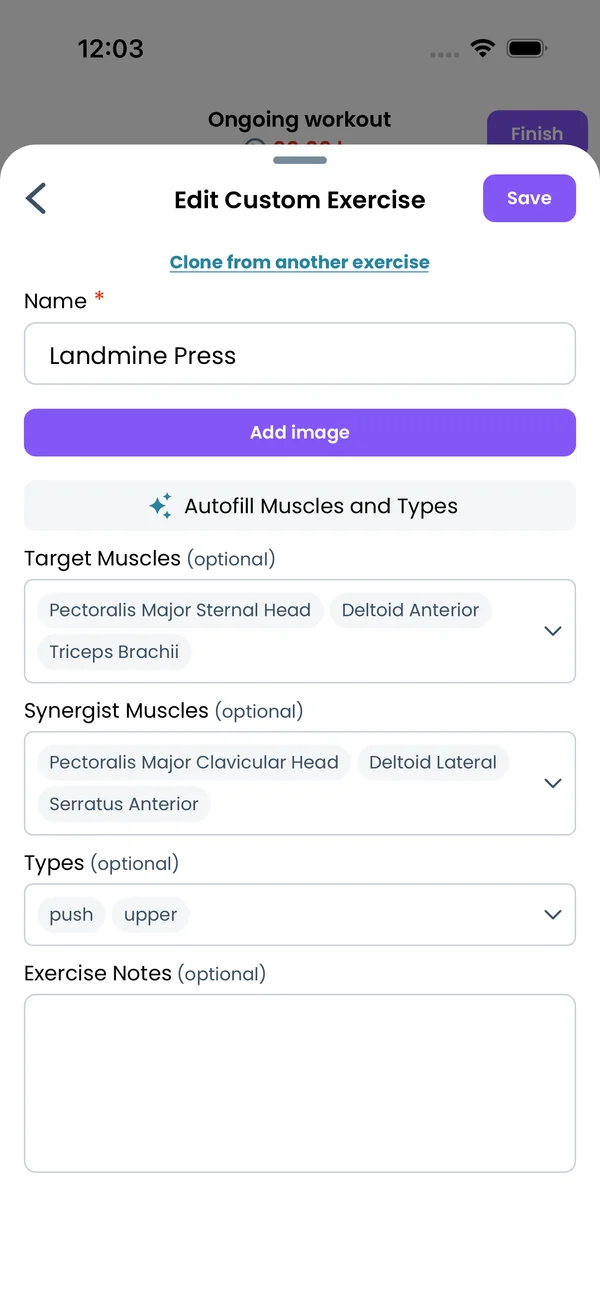\n\nWhen you create a custom exercise, the form has an **Autofill Muscles and Types** button. Type the exercise name and tap the button. The app asks an AI model to fill the target muscles, synergist muscles and exercise types from the name. Check the result and adjust anything that looks wrong. If the name is unknown, the app says \"Couldn't autofill the muscles for this exercise. Try a different name!\". See [Custom Exercises](/features/custom-exercises) for the rest of the form.\n\n## The old prompt generator\n\nThe page at `liftosaur.com/ai/prompt` used to build a large prompt with the docs and examples. You copied it into ChatGPT, Claude or Gemini, and pasted the answer back into the web editor. That page is retired. The ChatGPT plugin and the MCP server replace the round trip, and the free reference tools cover the same ground without an account.","sizes":{"account/account-email-form":{"width":600,"height":1304},"account/account-forgot-password":{"width":600,"height":1304},"account/account-screen":{"width":600,"height":1304},"account/account-sign-in":{"width":600,"height":1304},"chatgpt-claude-and-ai/chatgpt-claude-and-ai-autofill":{"width":600,"height":1304},"api/api-key-created":{"width":600,"height":1304},"api/api-keys-empty":{"width":600,"height":1304},"api/api-me-row":{"width":600,"height":1304},"apple-watch/apple-watch-health-settings":{"width":600,"height":1304},"apple-watch/watch-apple-watch-amrap":{"width":416,"height":496},"apple-watch/watch-apple-watch-crown":{"width":416,"height":496},"apple-watch/watch-apple-watch-exercise":{"width":416,"height":496},"apple-watch/watch-apple-watch-get-ready":{"width":416,"height":496},"apple-watch/watch-apple-watch-home":{"width":416,"height":496},"apple-watch/watch-apple-watch-set-clock":{"width":416,"height":496},"apple-watch/watch-apple-watch-workout":{"width":416,"height":496},"built-in-programs/built-in-programs-import":{"width":600,"height":1304},"built-in-programs/built-in-programs-info":{"width":600,"height":1304},"built-in-programs/built-in-programs-library":{"width":600,"height":1304},"built-in-programs/built-in-programs-preview":{"width":600,"height":1304},"built-in-programs/built-in-programs-started":{"width":600,"height":1304},"changing-a-workout/changing-a-workout-adhoc":{"width":600,"height":1304},"changing-a-workout/changing-a-workout-adhoc-picker":{"width":600,"height":1304},"changing-a-workout/changing-a-workout-create-program-day":{"width":600,"height":1304},"changing-a-workout/changing-a-workout-edit-day":{"width":600,"height":1304},"changing-a-workout/changing-a-workout-edit-exercise":{"width":600,"height":1304},"changing-a-workout/changing-a-workout-next-workout":{"width":600,"height":1304},"changing-a-workout/changing-a-workout-pick-day":{"width":600,"height":1304},"changing-a-workout/changing-a-workout-program-day":{"width":600,"height":1304},"changing-a-workout/changing-a-workout-swap-adhoc":{"width":600,"height":1304},"changing-a-workout/changing-a-workout-swap-from-program":{"width":600,"height":1304},"changing-a-workout/changing-a-workout-swap-recent":{"width":600,"height":1304},"custom-exercises/custom-exercises-autofill":{"width":600,"height":1304},"custom-exercises/custom-exercises-clone-library":{"width":600,"height":1304},"custom-exercises/custom-exercises-cloned":{"width":600,"height":1304},"custom-exercises/custom-exercises-form":{"width":600,"height":1304},"custom-exercises/custom-exercises-hidden-group":{"width":600,"height":1304},"custom-exercises/custom-exercises-image-library":{"width":600,"height":1304},"custom-exercises/custom-exercises-image-source":{"width":600,"height":1304},"custom-exercises/custom-exercises-in-workout":{"width":600,"height":1304},"custom-exercises/custom-exercises-muscle-groups":{"width":600,"height":1304},"custom-exercises/custom-exercises-picker":{"width":600,"height":1304},"custom-exercises/custom-exercises-target-muscles":{"width":600,"height":1304},"equipment-and-gyms/equipment-and-gyms-barbell":{"width":600,"height":1304},"equipment-and-gyms/equipment-and-gyms-custom":{"width":600,"height":1304},"equipment-and-gyms/equipment-and-gyms-exercise":{"width":600,"height":1304},"equipment-and-gyms/equipment-and-gyms-fixed":{"width":600,"height":1304},"equipment-and-gyms/equipment-and-gyms-gyms":{"width":600,"height":1304},"equipment-and-gyms/equipment-and-gyms-hidden":{"width":600,"height":1304},"equipment-and-gyms/equipment-and-gyms-list":{"width":600,"height":1304},"exercise-library/exercise-library-calculator":{"width":600,"height":1304},"exercise-library/exercise-library-from-program":{"width":600,"height":1304},"exercise-library/exercise-library-list":{"width":600,"height":1304},"exercise-library/exercise-library-multi-add":{"width":600,"height":1304},"exercise-library/exercise-library-override-muscles":{"width":600,"height":1304},"exercise-library/exercise-library-picker":{"width":600,"height":1304},"exercise-library/exercise-library-prs":{"width":600,"height":1304},"exercise-library/exercise-library-search":{"width":600,"height":1304},"exercise-library/exercise-library-stats":{"width":600,"height":1304},"exercise-library/exercise-library-swap":{"width":600,"height":1304},"graphs/graphs-bodyweight":{"width":600,"height":1304},"graphs/graphs-choose":{"width":600,"height":1304},"graphs/graphs-exercise":{"width":600,"height":1304},"graphs/graphs-legend":{"width":600,"height":1304},"graphs/graphs-muscle-group":{"width":600,"height":1304},"graphs/graphs-personal-records":{"width":600,"height":1304},"graphs/graphs-settings":{"width":600,"height":1304},"health-sync/android-health-sync-measurements":{"width":600,"height":1339},"health-sync/android-health-sync-settings":{"width":600,"height":1339},"health-sync/android-health-sync-share":{"width":600,"height":1339},"health-sync/android-health-sync-sleep-nutrition":{"width":600,"height":1339},"health-sync/health-sync-measurements":{"width":600,"height":1304},"health-sync/health-sync-settings":{"width":600,"height":1304},"health-sync/health-sync-share":{"width":600,"height":1304},"health-sync/health-sync-sleep-nutrition":{"width":600,"height":1304},"import-export/import-export-export":{"width":600,"height":1304},"import-export/import-export-hevy":{"width":600,"height":1304},"import-export/import-export-import":{"width":600,"height":1304},"liftoscript/liftoscript-exercise-sheet":{"width":600,"height":1304},"liftoscript/liftoscript-full-program":{"width":600,"height":1304},"liftoscript/liftoscript-per-day":{"width":600,"height":1304},"liftoscript/liftoscript-playground":{"width":600,"height":1304},"lock-screen-and-notifications/android-lock-screen-and-notifications-live-update":{"width":600,"height":1339},"lock-screen-and-notifications/android-lock-screen-and-notifications-reminder":{"width":600,"height":1339},"lock-screen-and-notifications/android-lock-screen-and-notifications-sound":{"width":600,"height":1339},"lock-screen-and-notifications/lock-screen-and-notifications-dynamic-island":{"width":600,"height":1304},"lock-screen-and-notifications/lock-screen-and-notifications-live-activity":{"width":600,"height":1304},"lock-screen-and-notifications/lock-screen-and-notifications-reminder":{"width":600,"height":1304},"lock-screen-and-notifications/lock-screen-and-notifications-sound":{"width":600,"height":1304},"measurements/measurements-add":{"width":600,"height":1304},"measurements/measurements-bodyweight":{"width":600,"height":1304},"measurements/measurements-moving-average":{"width":600,"height":1304},"measurements/measurements-sleep-nutrition":{"width":600,"height":1304},"measurements/measurements-types":{"width":600,"height":1304},"first-run-and-settings/first-run-and-settings-appearance":{"width":600,"height":1304},"first-run-and-settings/first-run-and-settings-dark-mode":{"width":600,"height":1304},"first-run-and-settings/first-run-and-settings-equipment":{"width":600,"height":1304},"first-run-and-settings/first-run-and-settings-me":{"width":600,"height":1304},"first-run-and-settings/first-run-and-settings-units":{"width":600,"height":1304},"first-run-and-settings/first-run-and-settings-welcome":{"width":600,"height":1304},"playground/playground-completed":{"width":600,"height":1304},"playground/playground-day":{"width":600,"height":1304},"playground/playground-finished":{"width":600,"height":1304},"playground/playground-variables":{"width":600,"height":1304},"premium/premium-account":{"width":600,"height":1304},"premium/premium-feature-info":{"width":600,"height":1304},"premium/premium-plans":{"width":600,"height":1304},"program-editor/program-editor-create":{"width":600,"height":1304},"program-editor/program-editor-day-details":{"width":600,"height":1304},"program-editor/program-editor-exercise-sheet":{"width":600,"height":1304},"program-editor/program-editor-full-text":{"width":600,"height":1304},"program-editor/program-editor-grid":{"width":600,"height":1304},"program-editor/program-editor-perday-text":{"width":600,"height":1304},"program-editor/program-editor-ui-mode":{"width":600,"height":1304},"program-editor/program-editor-week-stats":{"width":600,"height":1304},"progressions/progressions-linear-settings":{"width":600,"height":1304},"progressions/progressions-preview":{"width":600,"height":1304},"progressions/progressions-state-variables":{"width":600,"height":1304},"progressions/progressions-suppressed":{"width":600,"height":1304},"rest-timer/rest-timer-collapsed":{"width":600,"height":1304},"rest-timer/rest-timer-dynamic-island":{"width":600,"height":1304},"rest-timer/rest-timer-expanded":{"width":600,"height":1304},"rest-timer/rest-timer-get-ready":{"width":600,"height":1304},"rest-timer/rest-timer-lock-screen":{"width":600,"height":1304},"rest-timer/rest-timer-settings":{"width":600,"height":1304},"rest-timer/rest-timer-sound":{"width":600,"height":1304},"rest-timer/watch-rest-timer":{"width":416,"height":496},"rest-timer/watch-rest-timer-exercise":{"width":416,"height":496},"set-types/set-types-amrap-popup":{"width":600,"height":1304},"set-types/set-types-per-side":{"width":600,"height":1304},"set-types/set-types-rpe-logged":{"width":600,"height":1304},"set-types/set-types-rpe-popup":{"width":600,"height":1304},"sharing-programs/sharing-programs-export-text":{"width":600,"height":1304},"sharing-programs/sharing-programs-image-preview":{"width":600,"height":1304},"sharing-programs/sharing-programs-image-settings":{"width":600,"height":1304},"sharing-programs/sharing-programs-import":{"width":600,"height":1304},"sharing-programs/sharing-programs-menu":{"width":600,"height":1304},"sharing-programs/sharing-programs-private-link":{"width":600,"height":1304},"sharing-programs/sharing-programs-public-link":{"width":600,"height":1304},"sharing-workouts/sharing-workouts-copied-text":{"width":600,"height":1304},"sharing-workouts/sharing-workouts-finish-screen":{"width":600,"height":1304},"sharing-workouts/sharing-workouts-profile-settings":{"width":600,"height":1304},"sharing-workouts/sharing-workouts-share-sheet":{"width":600,"height":1304},"sharing-workouts/sharing-workouts-story-preview":{"width":600,"height":1304},"supersets/supersets-liftoscript":{"width":600,"height":1304},"supersets/supersets-next-exercise":{"width":600,"height":1304},"supersets/supersets-picker":{"width":600,"height":1304},"supersets/supersets-program-editor":{"width":600,"height":1304},"supersets/supersets-timer":{"width":600,"height":1304},"supersets/supersets-workout":{"width":600,"height":1304},"sync-and-offline/sync-and-offline-account":{"width":600,"height":1304},"sync-and-offline/sync-and-offline-me-account":{"width":600,"height":1304},"sync-and-offline/sync-and-offline-sign-in":{"width":600,"height":1304},"timed-sets/timed-sets-count-up":{"width":600,"height":1304},"timed-sets/timed-sets-edit-time":{"width":600,"height":1304},"timed-sets/timed-sets-get-ready":{"width":600,"height":1304},"timed-sets/timed-sets-recorded":{"width":600,"height":1304},"timed-sets/timed-sets-running":{"width":600,"height":1304},"timed-sets/timed-sets-set-row":{"width":600,"height":1304},"timed-sets/timed-sets-timers":{"width":600,"height":1304},"week-insights/week-insights-details":{"width":600,"height":1304},"week-insights/week-insights-edit-muscle-groups":{"width":600,"height":1304},"week-insights/week-insights-exercises":{"width":600,"height":1304},"week-insights/week-insights-home":{"width":600,"height":1304},"week-insights/week-insights-muscle-groups":{"width":600,"height":1304},"week-insights/week-insights-settings":{"width":600,"height":1304},"workout-history/workout-history-change-date":{"width":600,"height":1304},"workout-history/workout-history-delete":{"width":600,"height":1304},"workout-history/workout-history-feed":{"width":600,"height":1304},"workout-history/workout-history-menu":{"width":600,"height":1304},"workout-history/workout-history-month-calendar":{"width":600,"height":1304},"workout-history/workout-history-note-on-card":{"width":600,"height":1304},"workout-history/workout-history-notes":{"width":600,"height":1304},"workout-history/workout-history-past-card":{"width":600,"height":1304},"workout-history/workout-history-past-workout":{"width":600,"height":1304},"workout-history/workout-history-week-insights":{"width":600,"height":1304},"workout-screen/workout-screen-e1rm":{"width":600,"height":1304},"workout-screen/workout-screen-edit-target":{"width":600,"height":1304},"workout-screen/workout-screen-exercise-menu":{"width":600,"height":1304},"workout-screen/workout-screen-exercise-notes":{"width":600,"height":1304},"workout-screen/workout-screen-history":{"width":600,"height":1304},"workout-screen/workout-screen-keypad":{"width":600,"height":1304},"workout-screen/workout-screen-next-set":{"width":600,"height":1304},"workout-screen/workout-screen-overview":{"width":600,"height":1304},"workout-screen/workout-screen-rounding":{"width":600,"height":1304},"workout-screen/workout-screen-summary":{"width":600,"height":1304}}}
