One subscription unlocks plates per side, graphs, muscle views, Week Insights, the Apple Watch app and the API. Monthly, yearly or lifetime.
What Premium unlocks
Premium turns on these features:
Plates Calculator. The plates to load on each side of the bar, next to the set, under the weight keyboard, and as the Plates column on the workout screen. Without Premium, the set shows a See plates for each side link instead. See Logging a Workout.
Graphs. The Graphs tab, the graph under an exercise on the workout screen, the exercise stats screen, and the bodyweight, measurements and sleep graphs. Without Premium, the tab opens the Premium screen. The other graphs are blurred, with an Unlock button. The Moving Average Window Size setting on the measurements graph is Premium too. See Graphs.
Muscles. The muscle group views for a program and for a day. Without Premium they are blurred.
Rest Timer Notifications. A push notification when the rest ends, the Live Activity and Dynamic Island on iOS, and the Live Update chip on Android. On Android, the Ignore Do Not Disturb toggle under Sound on the Me tab appears with Premium. See Rest Timer.
Week Insights. The week card on the Home tab. Without Premium it shows See Week Insights, which opens the Premium screen. See Week Insights.
Apple Watch App. Without Premium, the watch shows Premium Required. See Apple Watch.
API & MCP. API keys in Me → API Keys. Without Premium the screen shows Subscribe to unlock. See API.
Everything else is free: programs and the editor, Liftoscript, logging workouts, history, measurements entry, equipment, sharing, import and export.
See a feature before you buy
Tap a feature name on the Premium screen. A sheet opens with a short description and a screenshot of that feature.
Choose a plan
The Premium screen shows three cards:
Start with Yearly, the highlighted card, with a Save 33% badge.
Start with Monthly.
Lifetime, a One-time payment. It never renews.
Monthly and Yearly come with a Free 14-day trial. The store charges you after the trial, then every month or every year. When a discount offer is running, the cards show the old price crossed out and the note Discount applies for the first year. The trial note is hidden then.
The store sets the price, adjusted per country, and shows it in your currency.
You can cancel any time from your App Store or Google Play subscription settings. Premium stays on until the end of the period you already paid for, or until the end of the trial if you cancel during it, so cancelling on day one of the trial still gives you the full 14 days. You cannot buy Lifetime while a subscription is active. The card says Cancel your subscription first, or Available after the end date of a cancelled one.
Where to buy and where it works
You buy Premium in the iOS app or the Android app. The web app cannot sell it. Tapping a plan on the web tells you to install Liftosaur from Google Play or the App Store, subscribe there, then log in with the same method on the web.
Premium is tied to your account. The receipt syncs with your data, so the features unlock on iOS, Android and the web at once. If you bought on the other platform, the Premium screen says You bought this subscription on the App Store. Manage or cancel it from an Apple device., or the same for Google Play and an Android device. The features stay unlocked.
See your plan and manage it
Go to Me → Account. Under 🌟 Liftosaur Premium one row shows your plan:
Free plan with Get Premium. Tap it to open the Premium screen.
Premium — Yearly or Premium — Monthly, with Renews on the next date, and Manage. A Cancel subscription link opens the store's subscription manager.
Ends on the date, won't renew, after you cancel. Manage opens the Premium screen, where Resubscribe takes you back to the store.
Lifetime Premium, All features unlocked forever.
Free access, All features unlocked, when Liftosaur granted you a free key.
On the web, Premium with Manage on the mobile app.
A subscriber also sees Switch to Monthly or Switch to Yearly on the Premium screen. A switch to Yearly starts at your next renewal. A switch to Monthly credits the time left on the yearly plan.
Restore a purchase
If Premium is off after a reinstall or on a new phone, open the Premium screen and tap Restore Subscription at the bottom. The app asks the store for your purchases and unlocks the features. If the store has nothing, the app says No active purchases to restore.
Redeem coupon on the same screen opens the App Store code sheet on iOS, or a code field on Android.
{"feature":{"id":"premium","title":"Premium","shortDescription":"One subscription unlocks plates per side, graphs, muscle views, Week Insights, the Apple Watch app and the API. Monthly, yearly or lifetime.","order":30,"category":"Start here","datePublished":"2026-09-27","dateModified":"2026-09-29","screenshots":["premium-plans","premium-account"]},"content":"## What Premium unlocks\n\n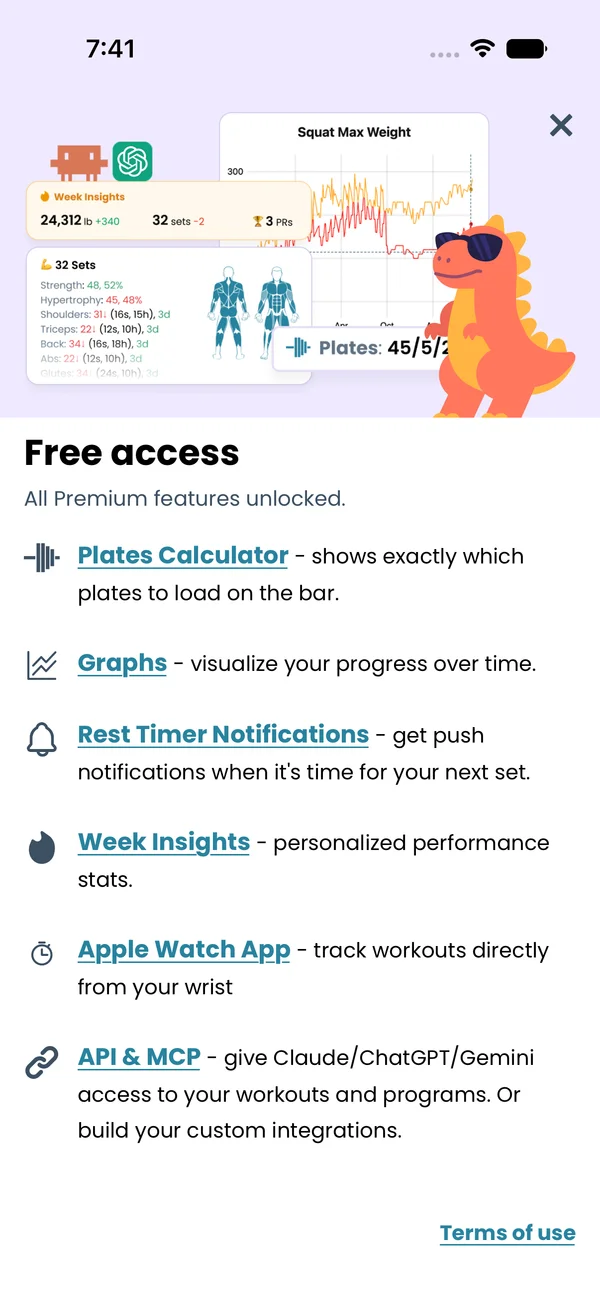\n\nPremium turns on these features:\n\n- **Plates Calculator**. The plates to load on each side of the bar, next to the set, under the weight keyboard, and as the **Plates** column on the workout screen. Without Premium, the set shows a **See plates for each side** link instead. See [Logging a Workout](/features/workout-screen).\n- **Graphs**. The **Graphs** tab, the graph under an exercise on the workout screen, the exercise stats screen, and the bodyweight, measurements and sleep graphs. Without Premium, the tab opens the Premium screen. The other graphs are blurred, with an **Unlock** button. The **Moving Average Window Size** setting on the measurements graph is Premium too. See [Graphs](/features/graphs).\n- **Muscles**. The muscle group views for a program and for a day. Without Premium they are blurred.\n- **Rest Timer Notifications**. A push notification when the rest ends, the Live Activity and Dynamic Island on iOS, and the Live Update chip on Android. On Android, the **Ignore Do Not Disturb** toggle under **Sound** on the **Me** tab appears with Premium. See [Rest Timer](/features/rest-timer).\n- **Week Insights**. The week card on the Home tab. Without Premium it shows **See Week Insights**, which opens the Premium screen. See [Week Insights](/features/week-insights).\n- **Apple Watch App**. Without Premium, the watch shows **Premium Required**. See [Apple Watch](/features/apple-watch).\n- **API & MCP**. API keys in **Me → API Keys**. Without Premium the screen shows **Subscribe to unlock**. See [API](/features/api).\n\nEverything else is free: programs and the editor, Liftoscript, logging workouts, history, measurements entry, equipment, sharing, import and export.\n\n## See a feature before you buy\n\n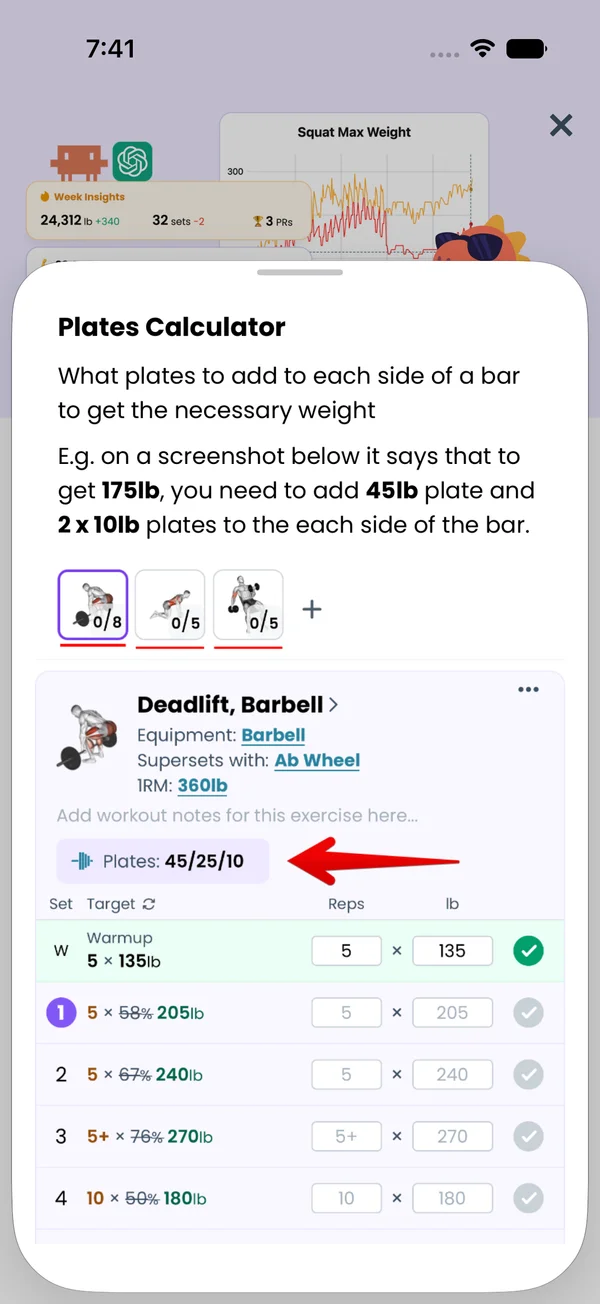\n\nTap a feature name on the Premium screen. A sheet opens with a short description and a screenshot of that feature.\n\n## Choose a plan\n\nThe Premium screen shows three cards:\n\n- **Start with Yearly**, the highlighted card, with a **Save 33%** badge.\n- **Start with Monthly**.\n- **Lifetime**, a **One-time payment**. It never renews.\n\nMonthly and Yearly come with a **Free 14-day trial**. The store charges you after the trial, then every month or every year. When a discount offer is running, the cards show the old price crossed out and the note **Discount applies for the first year**. The trial note is hidden then.\n\nThe store sets the price, adjusted per country, and shows it in your currency.\n\nYou can cancel any time from your App Store or Google Play subscription settings. Premium stays on until the end of the period you already paid for, or until the end of the trial if you cancel during it, so cancelling on day one of the trial still gives you the full 14 days. You cannot buy Lifetime while a subscription is active. The card says **Cancel your subscription first**, or **Available after** the end date of a cancelled one.\n\n## Where to buy and where it works\n\nYou buy Premium in the iOS app or the Android app. The web app cannot sell it. Tapping a plan on the web tells you to install Liftosaur from Google Play or the App Store, subscribe there, then log in with the same method on the web.\n\nPremium is tied to your account. The receipt syncs with your data, so the features unlock on iOS, Android and the web at once. If you bought on the other platform, the Premium screen says **You bought this subscription on the App Store. Manage or cancel it from an Apple device.**, or the same for Google Play and an Android device. The features stay unlocked.\n\n## See your plan and manage it\n\n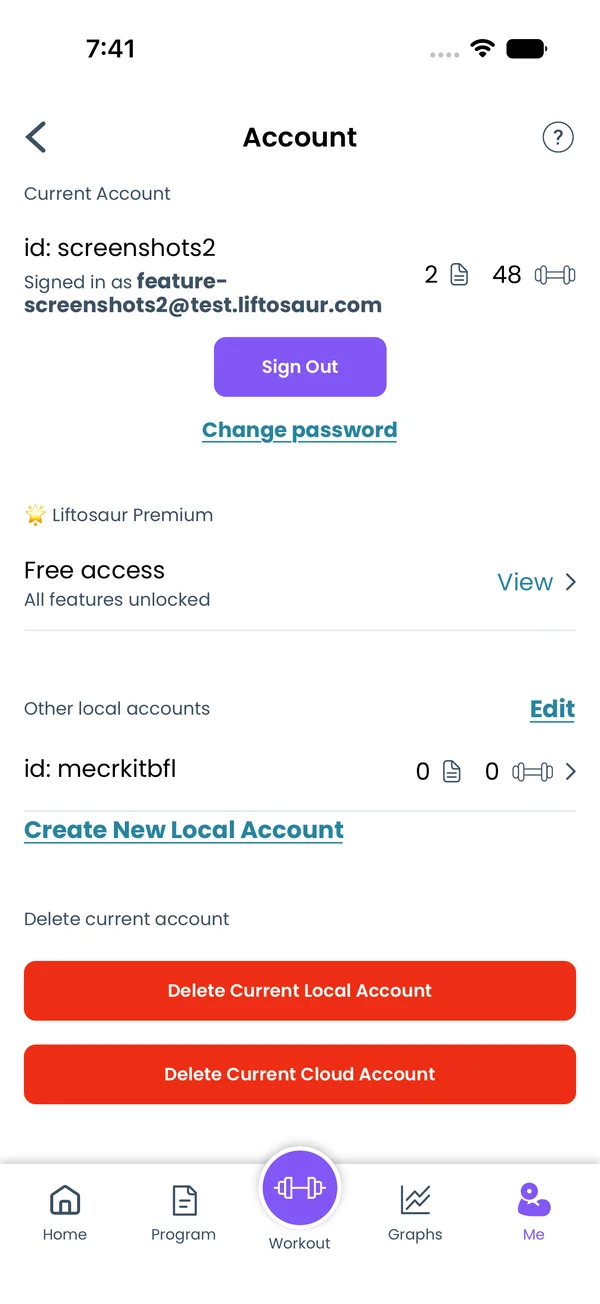\n\nGo to **Me → Account**. Under **🌟 Liftosaur Premium** one row shows your plan:\n\n- **Free plan** with **Get Premium**. Tap it to open the Premium screen.\n- **Premium — Yearly** or **Premium — Monthly**, with **Renews on** the next date, and **Manage**. A **Cancel subscription** link opens the store's subscription manager.\n- **Ends on** the date, **won't renew**, after you cancel. **Manage** opens the Premium screen, where **Resubscribe** takes you back to the store.\n- **Lifetime Premium**, **All features unlocked forever**.\n- **Free access**, **All features unlocked**, when Liftosaur granted you a free key.\n- On the web, **Premium** with **Manage on the mobile app**.\n\nA subscriber also sees **Switch to Monthly** or **Switch to Yearly** on the Premium screen. A switch to Yearly starts at your next renewal. A switch to Monthly credits the time left on the yearly plan.\n\n## Restore a purchase\n\nIf Premium is off after a reinstall or on a new phone, open the Premium screen and tap **Restore Subscription** at the bottom. The app asks the store for your purchases and unlocks the features. If the store has nothing, the app says **No active purchases to restore.**\n\n**Redeem coupon** on the same screen opens the App Store code sheet on iOS, or a code field on Android.","sizes":{"account/account-email-form":{"width":600,"height":1304},"account/account-forgot-password":{"width":600,"height":1304},"account/account-screen":{"width":600,"height":1304},"account/account-sign-in":{"width":600,"height":1304},"chatgpt-claude-and-ai/chatgpt-claude-and-ai-autofill":{"width":600,"height":1304},"api/api-key-created":{"width":600,"height":1304},"api/api-keys-empty":{"width":600,"height":1304},"api/api-me-row":{"width":600,"height":1304},"apple-watch/apple-watch-health-settings":{"width":600,"height":1304},"apple-watch/watch-apple-watch-amrap":{"width":416,"height":496},"apple-watch/watch-apple-watch-crown":{"width":416,"height":496},"apple-watch/watch-apple-watch-exercise":{"width":416,"height":496},"apple-watch/watch-apple-watch-get-ready":{"width":416,"height":496},"apple-watch/watch-apple-watch-home":{"width":416,"height":496},"apple-watch/watch-apple-watch-set-clock":{"width":416,"height":496},"apple-watch/watch-apple-watch-workout":{"width":416,"height":496},"built-in-programs/built-in-programs-import":{"width":600,"height":1304},"built-in-programs/built-in-programs-info":{"width":600,"height":1304},"built-in-programs/built-in-programs-library":{"width":600,"height":1304},"built-in-programs/built-in-programs-preview":{"width":600,"height":1304},"built-in-programs/built-in-programs-started":{"width":600,"height":1304},"changing-a-workout/changing-a-workout-adhoc":{"width":600,"height":1304},"changing-a-workout/changing-a-workout-adhoc-picker":{"width":600,"height":1304},"changing-a-workout/changing-a-workout-create-program-day":{"width":600,"height":1304},"changing-a-workout/changing-a-workout-edit-day":{"width":600,"height":1304},"changing-a-workout/changing-a-workout-edit-exercise":{"width":600,"height":1304},"changing-a-workout/changing-a-workout-next-workout":{"width":600,"height":1304},"changing-a-workout/changing-a-workout-pick-day":{"width":600,"height":1304},"changing-a-workout/changing-a-workout-program-day":{"width":600,"height":1304},"changing-a-workout/changing-a-workout-swap-adhoc":{"width":600,"height":1304},"changing-a-workout/changing-a-workout-swap-from-program":{"width":600,"height":1304},"changing-a-workout/changing-a-workout-swap-recent":{"width":600,"height":1304},"custom-exercises/custom-exercises-autofill":{"width":600,"height":1304},"custom-exercises/custom-exercises-clone-library":{"width":600,"height":1304},"custom-exercises/custom-exercises-cloned":{"width":600,"height":1304},"custom-exercises/custom-exercises-form":{"width":600,"height":1304},"custom-exercises/custom-exercises-hidden-group":{"width":600,"height":1304},"custom-exercises/custom-exercises-image-library":{"width":600,"height":1304},"custom-exercises/custom-exercises-image-source":{"width":600,"height":1304},"custom-exercises/custom-exercises-in-workout":{"width":600,"height":1304},"custom-exercises/custom-exercises-muscle-groups":{"width":600,"height":1304},"custom-exercises/custom-exercises-picker":{"width":600,"height":1304},"custom-exercises/custom-exercises-target-muscles":{"width":600,"height":1304},"equipment-and-gyms/equipment-and-gyms-barbell":{"width":600,"height":1304},"equipment-and-gyms/equipment-and-gyms-custom":{"width":600,"height":1304},"equipment-and-gyms/equipment-and-gyms-exercise":{"width":600,"height":1304},"equipment-and-gyms/equipment-and-gyms-fixed":{"width":600,"height":1304},"equipment-and-gyms/equipment-and-gyms-gyms":{"width":600,"height":1304},"equipment-and-gyms/equipment-and-gyms-hidden":{"width":600,"height":1304},"equipment-and-gyms/equipment-and-gyms-list":{"width":600,"height":1304},"exercise-library/exercise-library-calculator":{"width":600,"height":1304},"exercise-library/exercise-library-from-program":{"width":600,"height":1304},"exercise-library/exercise-library-list":{"width":600,"height":1304},"exercise-library/exercise-library-multi-add":{"width":600,"height":1304},"exercise-library/exercise-library-override-muscles":{"width":600,"height":1304},"exercise-library/exercise-library-picker":{"width":600,"height":1304},"exercise-library/exercise-library-prs":{"width":600,"height":1304},"exercise-library/exercise-library-search":{"width":600,"height":1304},"exercise-library/exercise-library-stats":{"width":600,"height":1304},"exercise-library/exercise-library-swap":{"width":600,"height":1304},"graphs/graphs-bodyweight":{"width":600,"height":1304},"graphs/graphs-choose":{"width":600,"height":1304},"graphs/graphs-exercise":{"width":600,"height":1304},"graphs/graphs-legend":{"width":600,"height":1304},"graphs/graphs-muscle-group":{"width":600,"height":1304},"graphs/graphs-personal-records":{"width":600,"height":1304},"graphs/graphs-settings":{"width":600,"height":1304},"health-sync/android-health-sync-measurements":{"width":600,"height":1339},"health-sync/android-health-sync-settings":{"width":600,"height":1339},"health-sync/android-health-sync-share":{"width":600,"height":1339},"health-sync/android-health-sync-sleep-nutrition":{"width":600,"height":1339},"health-sync/health-sync-measurements":{"width":600,"height":1304},"health-sync/health-sync-settings":{"width":600,"height":1304},"health-sync/health-sync-share":{"width":600,"height":1304},"health-sync/health-sync-sleep-nutrition":{"width":600,"height":1304},"import-export/import-export-export":{"width":600,"height":1304},"import-export/import-export-hevy":{"width":600,"height":1304},"import-export/import-export-import":{"width":600,"height":1304},"liftoscript/liftoscript-exercise-sheet":{"width":600,"height":1304},"liftoscript/liftoscript-full-program":{"width":600,"height":1304},"liftoscript/liftoscript-per-day":{"width":600,"height":1304},"liftoscript/liftoscript-playground":{"width":600,"height":1304},"lock-screen-and-notifications/android-lock-screen-and-notifications-live-update":{"width":600,"height":1339},"lock-screen-and-notifications/android-lock-screen-and-notifications-reminder":{"width":600,"height":1339},"lock-screen-and-notifications/android-lock-screen-and-notifications-sound":{"width":600,"height":1339},"lock-screen-and-notifications/lock-screen-and-notifications-dynamic-island":{"width":600,"height":1304},"lock-screen-and-notifications/lock-screen-and-notifications-live-activity":{"width":600,"height":1304},"lock-screen-and-notifications/lock-screen-and-notifications-reminder":{"width":600,"height":1304},"lock-screen-and-notifications/lock-screen-and-notifications-sound":{"width":600,"height":1304},"measurements/measurements-add":{"width":600,"height":1304},"measurements/measurements-bodyweight":{"width":600,"height":1304},"measurements/measurements-moving-average":{"width":600,"height":1304},"measurements/measurements-sleep-nutrition":{"width":600,"height":1304},"measurements/measurements-types":{"width":600,"height":1304},"first-run-and-settings/first-run-and-settings-appearance":{"width":600,"height":1304},"first-run-and-settings/first-run-and-settings-dark-mode":{"width":600,"height":1304},"first-run-and-settings/first-run-and-settings-equipment":{"width":600,"height":1304},"first-run-and-settings/first-run-and-settings-me":{"width":600,"height":1304},"first-run-and-settings/first-run-and-settings-units":{"width":600,"height":1304},"first-run-and-settings/first-run-and-settings-welcome":{"width":600,"height":1304},"playground/playground-completed":{"width":600,"height":1304},"playground/playground-day":{"width":600,"height":1304},"playground/playground-finished":{"width":600,"height":1304},"playground/playground-variables":{"width":600,"height":1304},"premium/premium-account":{"width":600,"height":1304},"premium/premium-feature-info":{"width":600,"height":1304},"premium/premium-plans":{"width":600,"height":1304},"program-editor/program-editor-create":{"width":600,"height":1304},"program-editor/program-editor-day-details":{"width":600,"height":1304},"program-editor/program-editor-exercise-sheet":{"width":600,"height":1304},"program-editor/program-editor-full-text":{"width":600,"height":1304},"program-editor/program-editor-grid":{"width":600,"height":1304},"program-editor/program-editor-perday-text":{"width":600,"height":1304},"program-editor/program-editor-ui-mode":{"width":600,"height":1304},"program-editor/program-editor-week-stats":{"width":600,"height":1304},"progressions/progressions-linear-settings":{"width":600,"height":1304},"progressions/progressions-preview":{"width":600,"height":1304},"progressions/progressions-state-variables":{"width":600,"height":1304},"progressions/progressions-suppressed":{"width":600,"height":1304},"rest-timer/rest-timer-collapsed":{"width":600,"height":1304},"rest-timer/rest-timer-dynamic-island":{"width":600,"height":1304},"rest-timer/rest-timer-expanded":{"width":600,"height":1304},"rest-timer/rest-timer-get-ready":{"width":600,"height":1304},"rest-timer/rest-timer-lock-screen":{"width":600,"height":1304},"rest-timer/rest-timer-settings":{"width":600,"height":1304},"rest-timer/rest-timer-sound":{"width":600,"height":1304},"rest-timer/watch-rest-timer":{"width":416,"height":496},"rest-timer/watch-rest-timer-exercise":{"width":416,"height":496},"set-types/set-types-amrap-popup":{"width":600,"height":1304},"set-types/set-types-per-side":{"width":600,"height":1304},"set-types/set-types-rpe-logged":{"width":600,"height":1304},"set-types/set-types-rpe-popup":{"width":600,"height":1304},"sharing-programs/sharing-programs-export-text":{"width":600,"height":1304},"sharing-programs/sharing-programs-image-preview":{"width":600,"height":1304},"sharing-programs/sharing-programs-image-settings":{"width":600,"height":1304},"sharing-programs/sharing-programs-import":{"width":600,"height":1304},"sharing-programs/sharing-programs-menu":{"width":600,"height":1304},"sharing-programs/sharing-programs-private-link":{"width":600,"height":1304},"sharing-programs/sharing-programs-public-link":{"width":600,"height":1304},"sharing-workouts/sharing-workouts-copied-text":{"width":600,"height":1304},"sharing-workouts/sharing-workouts-finish-screen":{"width":600,"height":1304},"sharing-workouts/sharing-workouts-profile-settings":{"width":600,"height":1304},"sharing-workouts/sharing-workouts-share-sheet":{"width":600,"height":1304},"sharing-workouts/sharing-workouts-story-preview":{"width":600,"height":1304},"supersets/supersets-liftoscript":{"width":600,"height":1304},"supersets/supersets-next-exercise":{"width":600,"height":1304},"supersets/supersets-picker":{"width":600,"height":1304},"supersets/supersets-program-editor":{"width":600,"height":1304},"supersets/supersets-timer":{"width":600,"height":1304},"supersets/supersets-workout":{"width":600,"height":1304},"sync-and-offline/sync-and-offline-account":{"width":600,"height":1304},"sync-and-offline/sync-and-offline-me-account":{"width":600,"height":1304},"sync-and-offline/sync-and-offline-sign-in":{"width":600,"height":1304},"timed-sets/timed-sets-count-up":{"width":600,"height":1304},"timed-sets/timed-sets-edit-time":{"width":600,"height":1304},"timed-sets/timed-sets-get-ready":{"width":600,"height":1304},"timed-sets/timed-sets-recorded":{"width":600,"height":1304},"timed-sets/timed-sets-running":{"width":600,"height":1304},"timed-sets/timed-sets-set-row":{"width":600,"height":1304},"timed-sets/timed-sets-timers":{"width":600,"height":1304},"week-insights/week-insights-details":{"width":600,"height":1304},"week-insights/week-insights-edit-muscle-groups":{"width":600,"height":1304},"week-insights/week-insights-exercises":{"width":600,"height":1304},"week-insights/week-insights-home":{"width":600,"height":1304},"week-insights/week-insights-muscle-groups":{"width":600,"height":1304},"week-insights/week-insights-settings":{"width":600,"height":1304},"workout-history/workout-history-change-date":{"width":600,"height":1304},"workout-history/workout-history-delete":{"width":600,"height":1304},"workout-history/workout-history-feed":{"width":600,"height":1304},"workout-history/workout-history-menu":{"width":600,"height":1304},"workout-history/workout-history-month-calendar":{"width":600,"height":1304},"workout-history/workout-history-note-on-card":{"width":600,"height":1304},"workout-history/workout-history-notes":{"width":600,"height":1304},"workout-history/workout-history-past-card":{"width":600,"height":1304},"workout-history/workout-history-past-workout":{"width":600,"height":1304},"workout-history/workout-history-week-insights":{"width":600,"height":1304},"workout-screen/workout-screen-e1rm":{"width":600,"height":1304},"workout-screen/workout-screen-edit-target":{"width":600,"height":1304},"workout-screen/workout-screen-exercise-menu":{"width":600,"height":1304},"workout-screen/workout-screen-exercise-notes":{"width":600,"height":1304},"workout-screen/workout-screen-history":{"width":600,"height":1304},"workout-screen/workout-screen-keypad":{"width":600,"height":1304},"workout-screen/workout-screen-next-set":{"width":600,"height":1304},"workout-screen/workout-screen-overview":{"width":600,"height":1304},"workout-screen/workout-screen-rounding":{"width":600,"height":1304},"workout-screen/workout-screen-summary":{"width":600,"height":1304}}}


